It’s great to see that SB development is going strong. I’m very excited to check out v2!
Since this topic has popped up once again, I thought I’d add some thoughts I’ve been compiling over the past few months. I believe SB is a wonderful and promising project, and this is NOT meant as criticism, but is my attempt to better describe the gap being discussed in this thread. I’ve looked through the conversation here and in the new Github issue @zef has opened.
Important: Datalog Intro
Logseq uses Datalog as its graph query language.
It’s worth noting that there is a lot of confusion on Logseq forums around their complex query syntax, but after taking a few minutes to understand the syntax it is extremely powerful and flexible.
Before continuing… I strongly recommend you watch this 40 min presentation which explains how data is modeled and queried in Datalog.
TLDR;
There is a fundamental difference in the way SB vs Logseq approach how they:
- Parse markdown files into structured data
- Build their database/index
- Make that data available via a query language
Logseq made a structural decision up front that every line in a Logseq-generated markdown file is saved as part of a bulleted list. This mean when we parse those files it provides a simple hierarchical content structure out-of-the-box where:
- Every “block” entity (bullet item) is just another node in the graph.
- A block does not map 1-to-1 to a markdown file. Rather, a block is one piece of content from a markdown file.
- A “page” entity is also just another node in the graph with some additional properties.
- However, a page does map 1-to-1 to a markdown file.
- All blocks parsed from the same markdown file are related to the page node as their parent.
- The user can add additional page properties, such as a class (Book, Movie, Meeting, Client, Project, etc.) which can also be used in queries.
- In this way a page is only related to its content through the graph relationship.
- This provides greater flexibility in writing queries
- Also provides a quick and easy way to associate a chunk of content (just nest any related content under a block with the foreign page link
[[My Page]]) without leaving the page you are on. Now that nested chunk of content will show up in the other page’s “Linked Mentions” query.
In contrast, SilverBullet seems to take a more deliberate approach to defining its native structures which map to Markdown structures (paragraph, heading, list, etc). This makes for cleaner “traditional pages”, at the cost of flexibility. SB can only query for page level data AFAIK? As a result there’s no easy way to build similar hierarchical relations. Admittedly, I don’t know enough about SB to speak authoritatively here so keep me honest.
I believe the change that is being proposed will address a part of the ask, and is totally worth it! 
However, the approach doesn’t solve for nesting non-bullet content types. This is the main gap as I see it. I don’t believe SB can offer the same flexibility without altering its approach to data modeling and its markdown format. Quick tangent; I believe this change would also enable a satisfying alternative to the current SB “Transclusions” approach.
That said, such a change would be a big breaking change, and maybe it’s just not the right approach for SB due to some other tradeoffs I haven’t considered. This is very high level and I’ve made a lot of assumptions.
Examples
Example 1: Related by Hierarchy
Here’s a basic example Logseq page
- Item 1 #my-project
	- Nested Lvl1 Item 1
		- Nested Lvl2 Item 1
	- Nested Lvl1 Item2
- Item 2
These block entities are related in their hierarchy. Each block nested under “Item 1” is related to #my-project. You could query “Item 1” and it would include all nested items in the result as part of that entity.
Having every page as one big list may sound ugly, but Logseq’s UI managed to pull this off with rich content in a way that’s not clunky, and comes with several advantages:
- It makes sense when you think of your data as a graph. So instead of each node in the graph as a page (as in SB), each node in the graph is a block. This can be a bit of text, a link to a page, a TODO item, an image, etc.
- Nested content is related to the parent content
- This organizes things very similar to page headings, but instead of headings it can be a link to another node in the graph like a page or tag, tying that block of content to the other page or tag
- Folding a block of nested content is really easy with a clear hierarchy. It’s also useful to manage transclusion of blocks because Logseq will default the render depth to 2 levels. Anything beyond 2 would be folded to save space.
- Tags are inherited by nested items, meaning those nested items are also related to the tag even if the tag does not live explicitly on that line.
The closest equivalent I’ve seen in SB is transclusion. Since SB doesn’t have the luxury of everything built as a list with innate hierarchy, it uses the headers of a more traditional page outline. Transclusion can target a page heading which will include all content below that heading to the next heading of the same level. This is much more limiting in what can be accomplished and feels like a less organic way to create+relate content as compared to my experiences with Logseq.
Example 2: Consistent Authoring Workflow
In Logseq, I never add new content directly to pages. All new content is entered into the current day’s Journal page. In SB, I’d have to open a page, find the location where I wanted to add that content, then start typing. When the subject changes, it’s incredibly disruptive and expensive mental cost. Meanwhile, you will miss notes as the discussion continues.
Here’s a more practical example page in today’s journal in Logseq, which would live in journals/2025_05_04.md. Let’s say I had 1 meeting that day with @zef where we talked about the V2 project and some other random topics.
- [[P/Zef]]
	- [[W/SBv2]]
		- Lua is cool
		- TODO [#A] dig into v2 changes
		  SCHEDULED: <2025-05-06 Tue>
	- TODO [#A] look into recommended approach before next call
	  SCHEDULED: <2025-05-07 Wed>
With a very simple setup, we can streamline all new data entry in the journals:
- Creating new content for pages Person/Zef, and Workstream/SBv2
- This content is also related back to the date 2025-05-04 via the journal page
- Creating new TODOs assigned to the topic by hierarchy
- The ability to context switch very quickly between workstreams, meetings, people, without leaving the page.
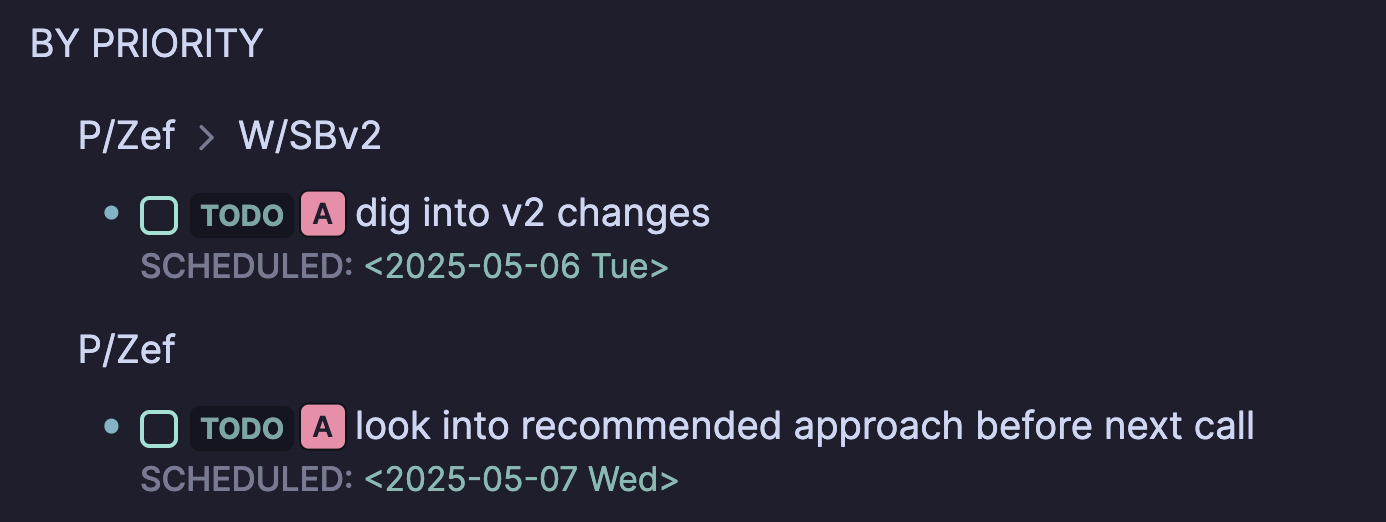
Now if I go to the page for Zef, I can query for all the TODOs related to that person which looks like this:
If you’ve made it this far, thank you for reading!!!
 The way I am seeing it:
 ) so perhaps the specialized snippet behavior for items is something for me to try first.