# Formatting Toolbar for selections

**URL:** https://community.silverbullet.md/t/formatting-toolbar-for-selections/4010
**Category:** Plugs and Libraries
**Created:** [April 5, 2026, 1:42pm UTC](https://community.silverbullet.md/t/formatting-toolbar-for-selections/4010 "2026-04-05T13:42:36Z")
**Posts on this page:** 9
**Page:** 2

<div class="post-metadata">

### Author: ![aisbergde](https://community.silverbullet.md/user_avatar/community.silverbullet.md/aisbergde/32/3439_2.png) [@aisbergde](https://community.silverbullet.md/u/aisbergde)
#### Post date: [April 18, 2026, 5:47pm UTC](https://community.silverbullet.md/t/formatting-toolbar-for-selections/4010/22 "2026-04-18T17:47:55Z")

</div>

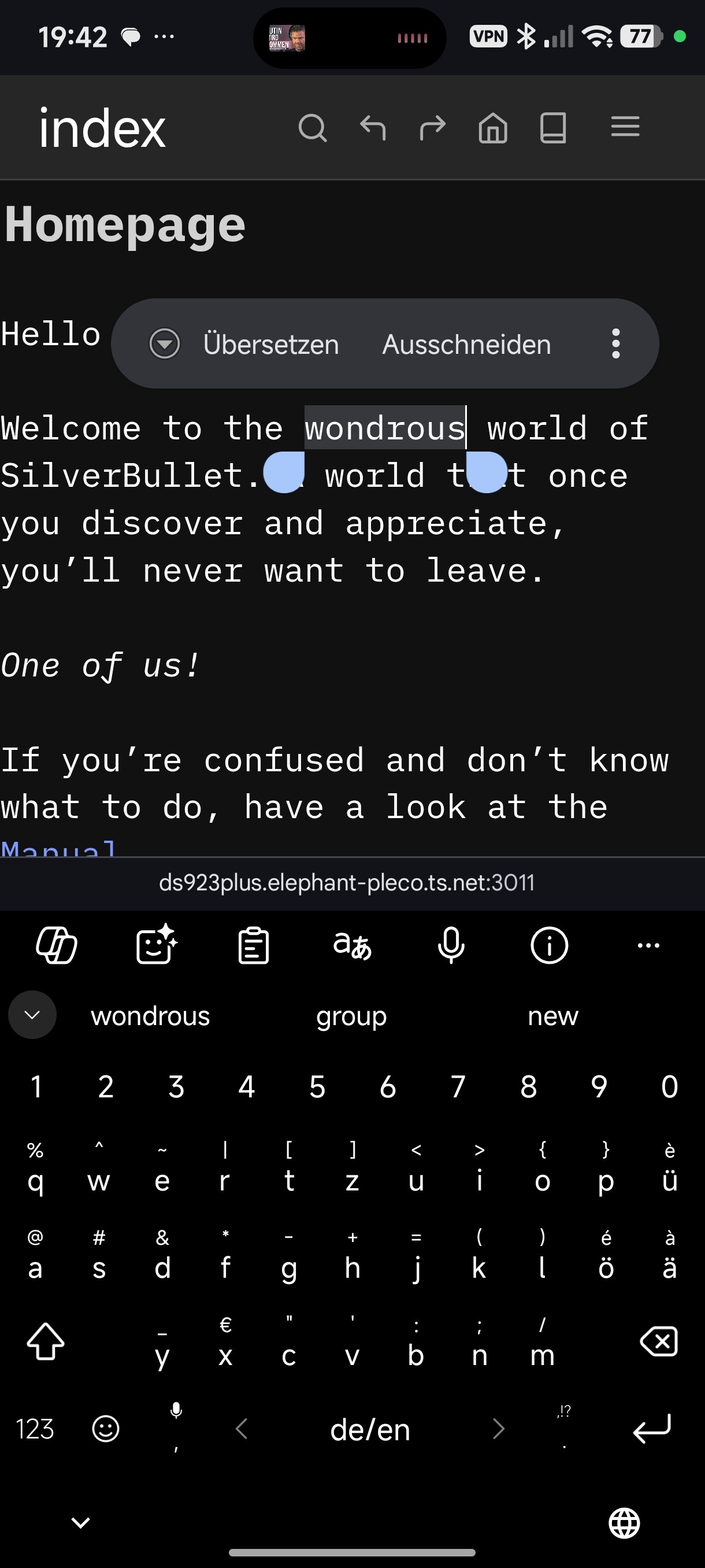
I run the command

 ![Screenshot2026-04-18-19-43-06-428com.android.chrome](https://community.silverbullet.md/uploads/default/original/2X/c/c8dcce95bbe0f705ab7af06883c3324716d2e33a.jpeg)  
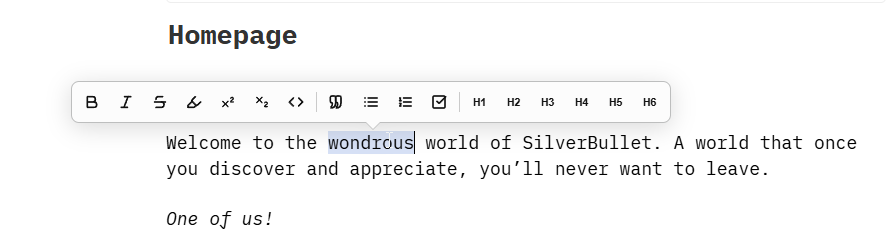
I mark a word, but nothing happens  
 ![Screenshot2026-04-18-19-42-43-259com.android.chrome](https://community.silverbullet.md/uploads/default/original/2X/6/64f86975e504931487b0fde75e74a80460177799.jpeg)

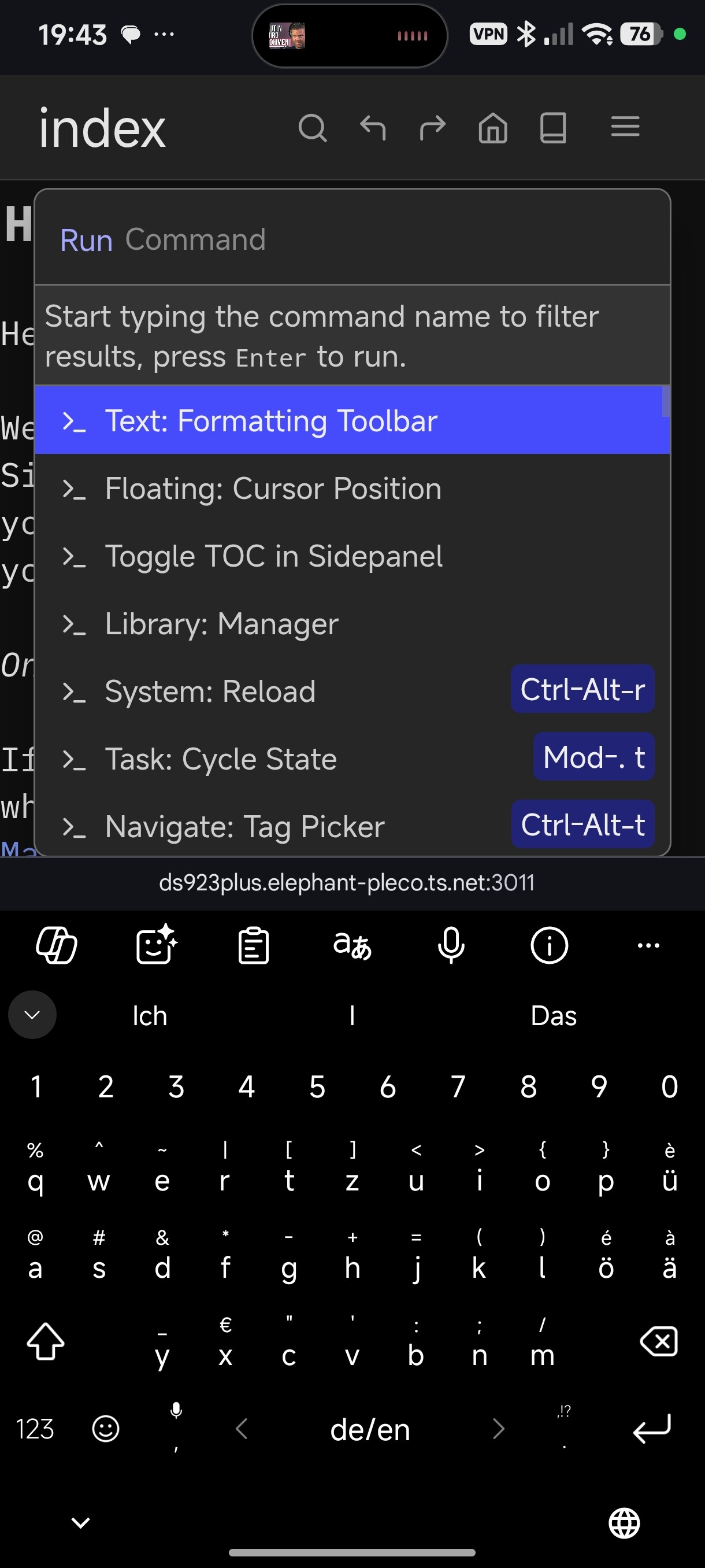
But on the desktop it works

 ![image](https://community.silverbullet.md/uploads/default/original/2X/a/a25b71c3c899994e0404d90b392d8c509b023715.png)

---

<div class="post-metadata">

### Author: ![Mr.Red](https://community.silverbullet.md/user_avatar/community.silverbullet.md/mr.red/32/821_2.png) [@Mr.Red](https://community.silverbullet.md/u/Mr.Red)
#### Post date: [April 18, 2026, 6:02pm UTC](https://community.silverbullet.md/t/formatting-toolbar-for-selections/4010/23 "2026-04-18T18:02:16Z")

</div>

Is it possible that is covered by the keyboard?  
Have you tried other browsers on the same device? I don’t own  
an Android device, so I can’t test it, but people said it also works on Android too, and the toolbar works an all my devices, so I have no clue what’s going on. Are you sure you didn’t toggled it off by mistake instead of toggling it on? By default it’s turned on, so by toggling it you might have turned it off.

---

<div class="post-metadata">

### Author: ![aisbergde](https://community.silverbullet.md/user_avatar/community.silverbullet.md/aisbergde/32/3439_2.png) [@aisbergde](https://community.silverbullet.md/u/aisbergde)
#### Post date: [April 18, 2026, 6:15pm UTC](https://community.silverbullet.md/t/formatting-toolbar-for-selections/4010/24 "2026-04-18T18:15:51Z")

</div>

I've tried different keyboards: SwiftKey, GBoard. I also called up the command, tested it, called it up again, and tested it again.  
This might be a Xiaomi issue, since pop-ups in editors might be blocked somehow on those devices. At least there seem to be other apps where a pop-up is supposed to appear but doesn't. But I have only Xiaomi Smartphones, and I cant't test on other android devices.

---

<div class="post-metadata">

### Author: ![aisbergde](https://community.silverbullet.md/user_avatar/community.silverbullet.md/aisbergde/32/3439_2.png) [@aisbergde](https://community.silverbullet.md/u/aisbergde)
#### Post date: [April 18, 2026, 6:49pm UTC](https://community.silverbullet.md/t/formatting-toolbar-for-selections/4010/25 "2026-04-18T18:49:49Z")

</div>

**Issue:** `FormattingToolbar` extension blocked on HyperOS (Poco X7 Pro).

**Root Cause:** System-level features (AI Visual Recognition and Secure Keyboard) hijack long-press events. This prevents the CodeMirror 6 engine in SilverBullet from capturing the selection events necessary to trigger the toolbar.

**Verified Workaround:** Using **Firefox for Android** (Gecko engine) instead of Chrome/WebView. It bypasses Xiaomi’s system-level selection overrides and allows the extension to function correctly.

**Optimization Potential for Developers:**

- **CSS Suppression:** Implement `-webkit-touch-callout: none;` and `-webkit-user-select: text;` on the editor container to suppress the native Android menu in favor of the custom toolbar.
- **Event Priority:** Using `touch-action: manipulation;` in the toolbar’s CSS may reduce interference from HyperOS-specific system gestures.
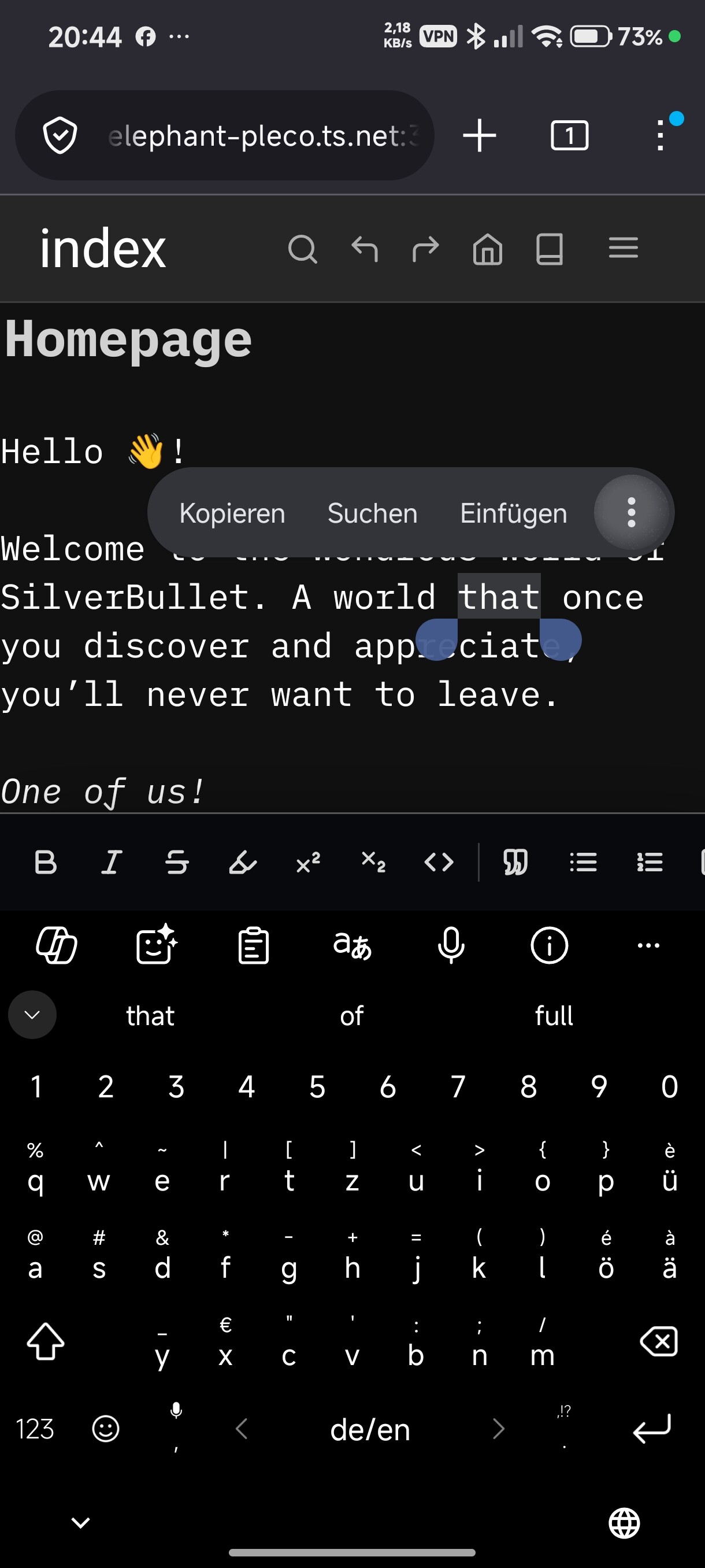
 ![Screenshot2026-04-18-20-44-12-670org.mozilla.firefox](https://community.silverbullet.md/uploads/default/original/2X/d/d2ed1882bd13aefb09eb98001229ceedd65f6ce0.jpeg)

---

<div class="post-metadata">

### Author: ![aisbergde](https://community.silverbullet.md/user_avatar/community.silverbullet.md/aisbergde/32/3439_2.png) [@aisbergde](https://community.silverbullet.md/u/aisbergde)
#### Post date: [April 18, 2026, 7:09pm UTC](https://community.silverbullet.md/t/formatting-toolbar-for-selections/4010/26 "2026-04-18T19:09:42Z")

</div>

**Lösung für Xiaomi HyperOS 3.0.5.0, deutsch:**  
Einstellungen \> Startbildschirm \> Systemnavigation  
Verknüpfungen  
Vollbildschirm-Anzeige drücken und halten  
Nichts  
wenn dort steht "Circle to Search", dann funktioniert es nicht.

---

<div class="post-metadata">

### Author: ![Mr.Red](https://community.silverbullet.md/user_avatar/community.silverbullet.md/mr.red/32/821_2.png) [@Mr.Red](https://community.silverbullet.md/u/Mr.Red)
#### Post date: [April 19, 2026, 8:50am UTC](https://community.silverbullet.md/t/formatting-toolbar-for-selections/4010/27 "2026-04-19T08:50:51Z")

</div>

> [@aisbergde](#):
>
> **Optimization Potential for Developers:**
> 
> - **CSS Suppression:** Implement `-webkit-touch-callout: none;` and `-webkit-user-select: text;` on the editor container to suppress the native Android menu in favor of the custom toolbar.
> - **Event Priority:** Using `touch-action: manipulation;` in the toolbar’s CSS may reduce interference from HyperOS-specific system gestures.

# Done ✅

- added these two CSS optimization tweaks, hope it works for you now better with these tweaks (if you have issues, bitte sag Bescheid so I can look into it.)

PS by Claude: `These won't fully fix the issue if HyperOS is intercepting at kernel/input level before the browser even sees the event (which is why Firefox's Gecko engine, bypassing the system WebView entirely, remains the fully reliable workaround), but they handle everything that's reachable from CSS.`

---

<div class="post-metadata">

### Author: ![thepaperpilot](https://community.silverbullet.md/user_avatar/community.silverbullet.md/thepaperpilot/32/1557_2.png) [@thepaperpilot](https://community.silverbullet.md/u/thepaperpilot)
#### Post date: [April 27, 2026, 3:36pm UTC](https://community.silverbullet.md/t/formatting-toolbar-for-selections/4010/28 "2026-04-27T15:36:11Z")

</div>

I've just setup readonly virtual pages using [this script](https://community.silverbullet.md/t/readonly-dashboard-view/4082) and it's made me realize that this toolbar appears on readonly pages. Could that be disabled?

---

<div class="post-metadata">

### Author: ![Mr.Red](https://community.silverbullet.md/user_avatar/community.silverbullet.md/mr.red/32/821_2.png) [@Mr.Red](https://community.silverbullet.md/u/Mr.Red)
#### Post date: [April 27, 2026, 7:49pm UTC](https://community.silverbullet.md/t/formatting-toolbar-for-selections/4010/29 "2026-04-27T19:49:31Z")

</div>

> [@thepaperpilot](#):
>
> I've just setup readonly virtual pages using [this script](https://community.silverbullet.md/t/readonly-dashboard-view/4082) and it's made me realize that this toolbar appears on readonly pages. Could that be disabled?

# Update: Done ✅

---

<div class="post-metadata">

### Author: ![Mr.Red](https://community.silverbullet.md/user_avatar/community.silverbullet.md/mr.red/32/821_2.png) [@Mr.Red](https://community.silverbullet.md/u/Mr.Red)
#### Post date: [August 28, 2026, 8:34am UTC](https://community.silverbullet.md/t/formatting-toolbar-for-selections/4010/30 "2026-08-28T08:34:08Z")

</div>

# Update

- ✅ Added support for custom buttons and marker/delimiters for third party libraries, for example for [Copyable](https://community.silverbullet.md/t/make-text-copy-on-click/4267) by @thepaperpilot

```lua
config.set("FormattingToolbar", {
    enabled = true,

 -- ... the rest of the config

 -- the example to add a formatting button for copyable library
    customButtons = {
        {
            name = "Text: Copy Block", -- unique, becomes the command name
            key = "Copy", -- tooltip text (optional, defaults to name)
            start = "[copy]", -- starting marker delimiter
            stop = "[/copy]", -- "end" is a Lua reserved word, hence "stop"
            icon = [[<svg xmlns="http://www.w3.org/2000/svg" width="16" height="16" viewBox="0 0 24 24" fill="none" stroke="currentColor" stroke-width="2.5" stroke-linecap="round" stroke-linejoin="round"><rect x="9" y="9" width="13" height="13" rx="2"/><path d="M5 15H4a2 2 0 0 1-2-2V4a2 2 0 0 1 2-2h9a2 2 0 0 1 2 2v1"/></svg>]],
            show = true -- optional, defaults to true
        },
    }
})

```

[Previous page](https://community.silverbullet.md/t/formatting-toolbar-for-selections/4010.md?page=1)