# How I manage tasks
**URL:** https://community.silverbullet.md/t/how-i-manage-tasks/641
**Category:** Tricks & Techniques
**Created:** [July 13, 2024, 8:56am UTC](https://community.silverbullet.md/t/how-i-manage-tasks/641 "2024-07-13T08:56:06Z")
**Posts on this page:** 9
**Page:** 1
### Author:  [@zef](https://community.silverbullet.md/u/zef)
#### Post date: [July 13, 2024, 8:56am UTC](https://community.silverbullet.md/t/how-i-manage-tasks/641/1 "2024-07-13T08:56:06Z")
I’m sure this will evolve, but this is what I use now. It’s very simple, but it works for me, and uses some nice SilverBullet features.
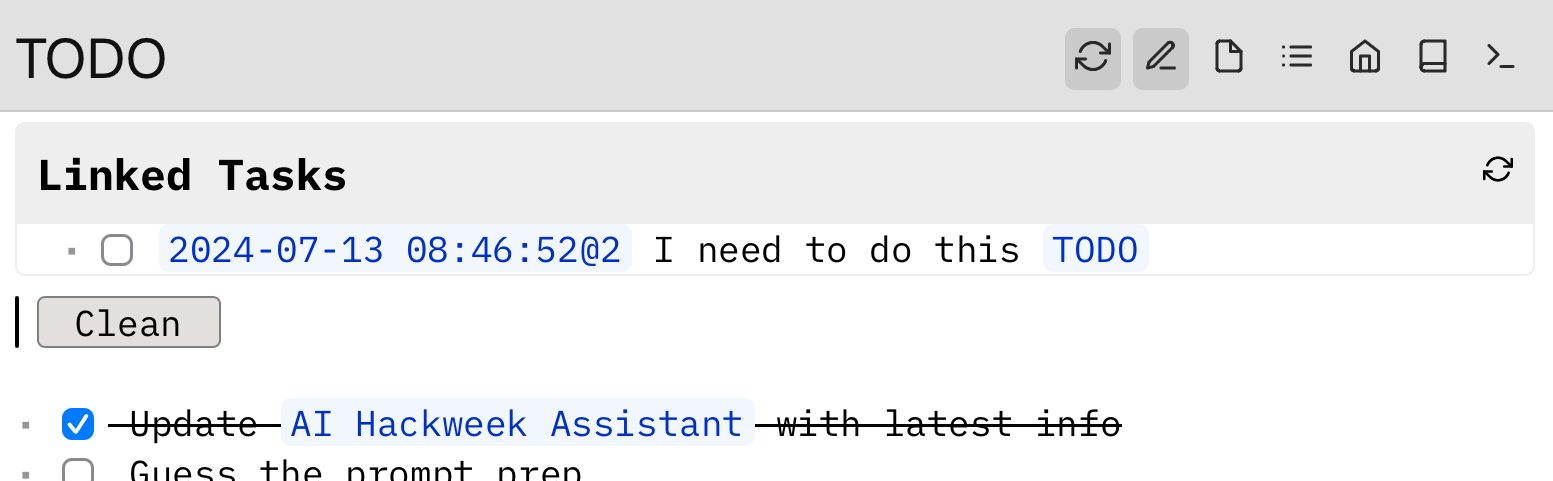
I have a TODO page that looks like this:
```auto
{[Task: Remove Completed|Clean]}
* [] Task 1
* [] Task 2
```
In addition, I have an actionButton for this configured in SETTINGS:
```auto
actionButtons:
- icon: list
description: "TODO"
command: '{[Navigate: To Page]("TODO")}'
```
Now depending on what I’m doing, I may have my TODO page open when a new task comes up. If so, I just put it directly on the page.
Occassionally, I hit the “Clean” button to clean up the list.
Often, however, I do not have my TODO page open, but am in the context of some other page. In that context, I’d then like to create a task for myself. The way that I do this is by _mentioning_ TODO:
```auto
* [] I need to do this [[TODO]]
```
Then, when I visit my TODO page again later, this task will appear along the top using [Linked Tasks](https://silverbullet.md/Linked%20Tasks)
---
### Author:  [@meain](https://community.silverbullet.md/u/meain)
#### Post date: [July 13, 2024, 1:32pm UTC](https://community.silverbullet.md/t/how-i-manage-tasks/641/2 "2024-07-13T13:32:15Z")
I personally maintain separate pages for each “category”, for example one for work TODOs, one for personal etc.
I make use of due dates heavily to surface things in my home/index page. I have 2 main queries in my index page, one to show me TODOs that I marked for today, one for ones that I missed(due before today).
I also have other queries like, tasks coming up for the weekend, or tasks I completed yesterday(mostly for work standup meetings) and task completed in last week. You can find out about the queries I have in my index page [here](https://community.silverbullet.md/t/what-does-your-index-page-look-like/117/9).
As for clearing completed TODOs from the page, I like to retain a history of the things I have done and so I have an external script that I use to move the items into a separate file. It refiles the completed items into separate files under year/month folders. You can find the script [here](https://github.com/meain/dotfiles/blob/master/scripts/.local/bin/random/,sb-refile).
---
### Author:  [@justyns](https://community.silverbullet.md/u/justyns)
#### Post date: [July 22, 2024, 5:24am UTC](https://community.silverbullet.md/t/how-i-manage-tasks/641/3 "2024-07-22T05:24:26Z")
My organization method is maybe a little more chaotic but I am working on it.
I have a `TODOs` page with a few categories on it like `## Personal`, `## Work`, and `## Bills`. Under each heading is just a list of tasks.
Tasks on the TODOs page also get archived to a separate file (TODOs\_archived) so I can keep the main file clean.
There’s also a `Tasks` page which lists _all_ incomplete task items from all pages. My index page has a similar query, but sorts tasks by due date and limits to 10 or so.
I also have a folder of notes prefixed with `InProgress/`. These are sort of like mini-projects, or tasks that I want to keep more notes around. E.g. one note in there now is `InProgress/2024-07-07 - truenas raid degraded` where I have notes about my nas having a bad drive, confirmations for ordering a new drive, serial numbers etc, and tasks to make sure I remember to actually replace the drive and resilver the array later. Once it’s done, it gets moved out of `InProgress/`. Notes in this folder are sort of todo items on their own and I have a query on my index page to show them:
````markdown
# Files in Progress
\```query
page where name =~ /^InProgress\// render [[Library/Core/Query/Page]]
\```
````
Daily notes are something I’ve never really been able to stick with, but I do make heavy use of Quick Notes and often put tasks inside of quick notes. These usually just get filed into Journal/ or some other prefix and I let the tasks show up on the Tasks or index page so I don’t forget about them. Sometimes these quick notes get moved to InProgress/ first though until I complete whatever task is in it.
---
### Author:  [@thick.cliff](https://community.silverbullet.md/u/thick.cliff)
#### Post date: [October 19, 2025, 7:39pm UTC](https://community.silverbullet.md/t/how-i-manage-tasks/641/4 "2025-10-19T19:39:38Z")
> [@zef](#):
>
> `'{[Navigate: To Page]("TODO")}'`
Do you still see a need to add a [[TODO]] link to tasks?
I think you could skip this and still get a page with all tasks by placing this query on the TODO page.
```auto
${template.each(query[[
from index.tag "task"
order by _.date desc
]],
templates.taskItem
)}
```
---
### Author:  [@dlb14615](https://community.silverbullet.md/u/dlb14615)
#### Post date: [July 28, 2026, 11:52pm UTC](https://community.silverbullet.md/t/how-i-manage-tasks/641/5 "2026-07-28T23:52:33Z")
I have this code on my index page and it doesn't seem to out them in anything but ref id order:
```lua
${template.each(
query[[
from t = index.tag "task"
where not t.done
order by t.date desc
]],
templates.taskItem
)}
```
I am trying to figure out how to sort my tasks by something other than the Ref ID. Any insight would be super helpful
---
### Author:  [@jeff](https://community.silverbullet.md/u/jeff)
#### Post date: [July 29, 2026, 7:47pm UTC](https://community.silverbullet.md/t/how-i-manage-tasks/641/6 "2026-07-29T19:47:59Z")
I use the following clause in some of my task queries, and it works fine. Are you setting a date value with your tasks?
`order by t.pageLastModified desc`
---
### Author:  [@dlb14615](https://community.silverbullet.md/u/dlb14615)
#### Post date: [August 4, 2026, 8:18pm UTC](https://community.silverbullet.md/t/how-i-manage-tasks/641/7 "2026-08-04T20:18:41Z")
I am not setting a date value, how do you do that?!
---
### Author:  [@jeff](https://community.silverbullet.md/u/jeff)
#### Post date: [August 6, 2026, 3:53pm UTC](https://community.silverbullet.md/t/how-i-manage-tasks/641/8 "2026-08-06T15:53:06Z")
If you just enter your task like:
- This is a task [due: 2026-08-08]
Then modify your task query:
```auto
${template.each(
query[[
from t = index.tag "task"
where not t.done
order by t.due desc
]],
templates.taskItem
)}
```
I think that will work.
---
### Author:  [@dlb14615](https://community.silverbullet.md/u/dlb14615)
#### Post date: [August 12, 2026, 12:04am UTC](https://community.silverbullet.md/t/how-i-manage-tasks/641/9 "2026-08-12T00:04:56Z")
That's awesome. I will try it out and let you know how it works. Thanks for the suggestion!