# How to install Plugs?
**URL:** https://community.silverbullet.md/t/how-to-install-plugs/2274
**Category:** v1: Troubleshooting (legacy)
**Created:** [April 28, 2025, 3:16pm UTC](https://community.silverbullet.md/t/how-to-install-plugs/2274 "2025-04-28T15:16:46Z")
**Posts on this page:** 8
**Page:** 1
### Author:  [@stpnwf](https://community.silverbullet.md/u/stpnwf)
#### Post date: [April 28, 2025, 3:16pm UTC](https://community.silverbullet.md/t/how-to-install-plugs/2274/1 "2025-04-28T15:16:47Z")
I recently installed SilverBullet (`V 0.10.4`) on my homeserver and I would like to install the [TreeView Plug](https://github.com/joekrill/silverbullet-treeview) in it, but I am running into issues:
Unlike for Styles, I haven’t seen any tutorials here. So I have tried following the instructions in the git repo above, but am running into issues. There is no `Plugs: add` command available to me, only a `Plugs: update` one. I have tried creating a PLUGS page and adding this to it:
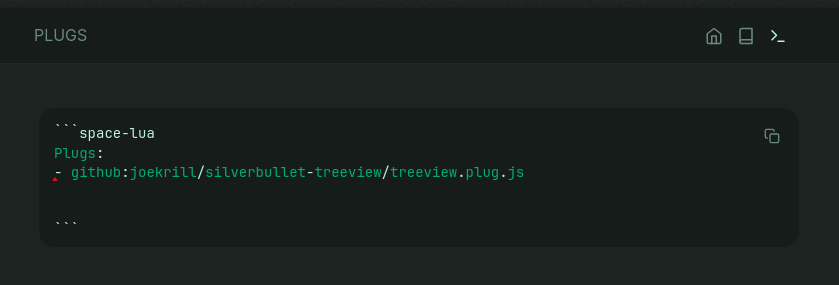
I also added the code from the git repo to a SETTINGS page, inside a code block. Including the top bar toggle icon code.
I then ran the `Plugs: update` command but nothing happened.
Am I missing something? How to install Plugs in SilverBullet?
---
### Author:  [@stpnwf](https://community.silverbullet.md/u/stpnwf)
#### Post date: [April 28, 2025, 3:27pm UTC](https://community.silverbullet.md/t/how-to-install-plugs/2274/2 "2025-04-28T15:27:48Z")
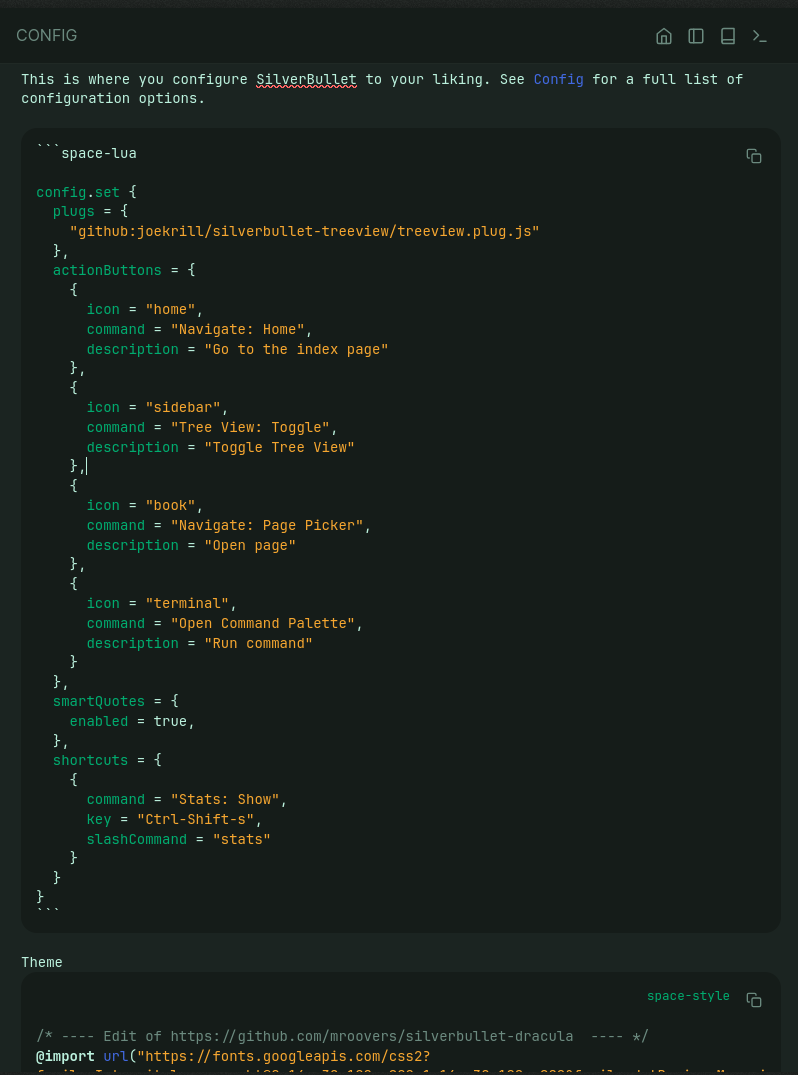
Found [this](https://community.silverbullet.md/t/plugs-add-command-missing/2223) and followed its instructions. Still no sidebar shows up. Am I still missing something?
---
### Author:  [@rlw1138](https://community.silverbullet.md/u/rlw1138)
#### Post date: [April 28, 2025, 4:15pm UTC](https://community.silverbullet.md/t/how-to-install-plugs/2274/3 "2025-04-28T16:15:23Z")
My (working) ‘treeview’ is installed like this:
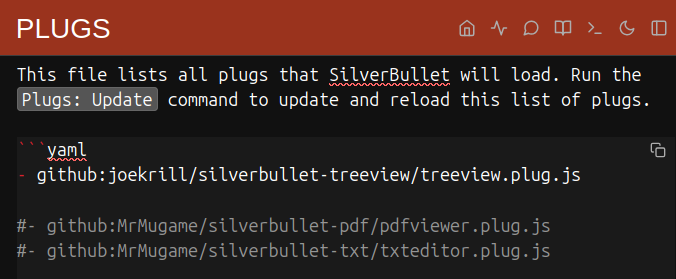
note “yaml” instead of ‘space-lua’ – i don’t know why yours doesn’t work, i only know mine does
---
### Author:  [@zef](https://community.silverbullet.md/u/zef)
#### Post date: [April 28, 2025, 4:45pm UTC](https://community.silverbullet.md/t/how-to-install-plugs/2274/4 "2025-04-28T16:45:05Z")
Are you sure you’re on 0.10? What does the `Help: Version` command say? On that release there should still be a `Plugs: Add` command. If it turns out you’re on #v2: Troubleshooting things have changed a bit. This gives a specific example on how to install the treeview plug there: [CONFIG](https://silverbullet.md/CONFIG) (after which you run `Plugs: Update`) but these are instructions that only run in v2, not 0.10.x
---
### Author:  [@stpnwf](https://community.silverbullet.md/u/stpnwf)
#### Post date: [April 28, 2025, 4:47pm UTC](https://community.silverbullet.md/t/how-to-install-plugs/2274/5 "2025-04-28T16:47:07Z")
Ok, that is weird. I added yaml to it and it worked. Which is strange bc AFAIK the thing at the top only works to render the code highlight colors (or whatever that is called), maybe I’m wrong or it works differently in SilverBullet. Anyway, that did it.
BTW, how did you get the dark mode toggle in the top right to show up?
One issue I have is that when I open SilverBullet the bright light theme loads for a second before my style does.
---
### Author:  [@stpnwf](https://community.silverbullet.md/u/stpnwf)
#### Post date: [April 28, 2025, 4:52pm UTC](https://community.silverbullet.md/t/how-to-install-plugs/2274/6 "2025-04-28T16:52:09Z")
`You are currently running SilverBullet 2.0-beta`
You are right I am running v2.
I created a compose file based on the [docker instructions](https://silverbullet.md/Install/Docker). I scrapped the WatchTower part, but kept the rest. What do you recomend I do now? Can I just pull another image with a different tag other than :v2? Perhaps :latest? Or would that break things?
---
### Author:  [@zef](https://community.silverbullet.md/u/zef)
#### Post date: [April 28, 2025, 4:55pm UTC](https://community.silverbullet.md/t/how-to-install-plugs/2274/7 "2025-04-28T16:55:28Z")
You can use the `:latest` tag to get the latest 0.x release indeed. I’d relaunch it on a clean or copy of your space files just in case and perhaps then copy files over. It will likely create a new `SETTINGS` file instead of a `CONFIG` one.
---
### Author:  [@stpnwf](https://community.silverbullet.md/u/stpnwf)
#### Post date: [April 28, 2025, 5:57pm UTC](https://community.silverbullet.md/t/how-to-install-plugs/2274/8 "2025-04-28T17:57:21Z")
That worked. Thanks!