# How to list completed todos sorted by completion time?
**URL:** https://community.silverbullet.md/t/how-to-list-completed-todos-sorted-by-completion-time/3669
**Category:** General
**Created:** [December 25, 2025, 7:05pm UTC](https://community.silverbullet.md/t/how-to-list-completed-todos-sorted-by-completion-time/3669 "2025-12-25T19:05:39Z")
**Posts on this page:** 5
**Page:** 1
### Author:  [@tommsawyer](https://community.silverbullet.md/u/tommsawyer)
#### Post date: [December 25, 2025, 7:05pm UTC](https://community.silverbullet.md/t/how-to-list-completed-todos-sorted-by-completion-time/3669/1 "2025-12-25T19:05:39Z")
Hi everyone!
I’d like to create a page that shows my completed todos, sorted by the time they were completed. From what I can see, todos themselves don’t have timestamps (no creation time or modification time), while full pages do have them.
Is there any workaround or recommended approach to achieve this? How would you organize such functionality in SilverBullet?
Thanks in advance for any ideas or suggestions!
---
### Author:  [@Mr.Red](https://community.silverbullet.md/u/Mr.Red)
#### Post date: [December 25, 2025, 7:51pm UTC](https://community.silverbullet.md/t/how-to-list-completed-todos-sorted-by-completion-time/3669/2 "2025-12-25T19:51:03Z")
Silverbullet doesn’t assign a timestamp to the completed tasks by default.
But we can tell it to do this, with this workaround. use this `space-lua` script:
```auto
event.listen {
name = "task:stateChange",
run = function(e)
if e.data.newState == "x" and not e.data.text:find("%[completed:") then
local text = e.data.text
local completedAt = os.date("%Y-%m-%dT%H:%M:%S")
local newText = text:gsub("^%[%s*%]", "[x]") .. " [completed: " .. completedAt .. "]"
editor.dispatch({ changes = { from = e.data.from, to = e.data.to, insert = newText } })
end
end
}
```
What this does:
- Only trigger if the you just checked the box (‘x’) AND if there isn’t already a timestamp (prevents loops)
-
1. Replace the empty checkbox with
-
1. Append the timestamp to the end of the line
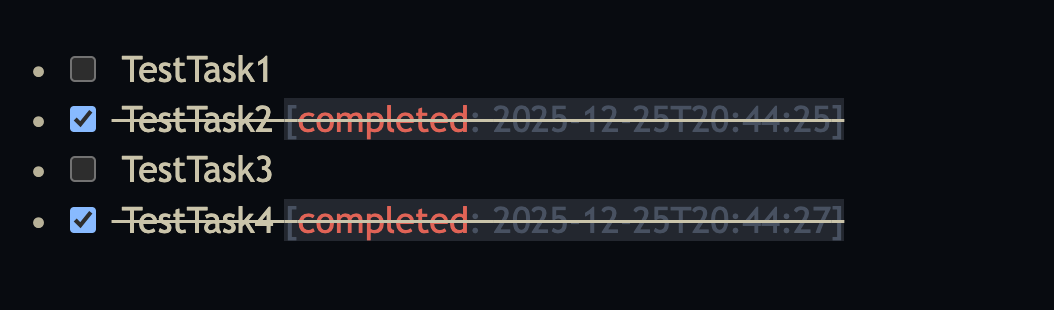
and with this in place you can sort a query based on the `completed` attribute.
This simple script can be even extended to also remove the `completed` attribute, if you uncheck the task.
that would look something like this:
```lua
event.listen {
name = "task:stateChange",
run = function(e)
local data = e.data
local text = data.text
-- Safety check: ensure text exists to avoid 'nil value' errors
if not text then return end
-- CASE 1: Task marked as complete ('x')
if data.newState == "x" then
-- Check if timestamp already exists to prevent infinite loops/double-clicks
if not string.find(text, "%[completed:") then
-- Some sandboxes restrict os.date; we use a simple format
local completedAt = os.date("%Y-%m-%dT%H:%M:%S")
-- Append the timestamp at the end
local newText = string.gsub(text, "%[%s*%]", "[x]") .. " [completed: " .. completedAt .. "]"
editor.dispatch({
changes = {
from = data.from,
to = data.to,
insert = newText
}
})
end
-- CASE 2: Task marked as incomplete (' ')
elseif data.newState == " " then
-- Check if there is actually a timestamp to remove
if string.find(text, "%[completed:") then
-- Remove the [completed: ...] tag and any leading space
local cleanText = string.gsub(text, "%[[xX]%]", "[]")
local newText = string.gsub(cleanText, "%s*%[completed: [^%]]+]", "")
editor.dispatch({
changes = {
from = data.from,
to = data.to,
insert = newText
}
})
end
end
end
}
```
---
### Author:  [@tommsawyer](https://community.silverbullet.md/u/tommsawyer)
#### Post date: [December 26, 2025, 2:49pm UTC](https://community.silverbullet.md/t/how-to-list-completed-todos-sorted-by-completion-time/3669/3 "2025-12-26T14:49:00Z")
Thanks, your solution works! However, if I complete the task not in the place where it was originally created, but from the index page (I’m collecting all active tasks via query), the task:stateChange event doesn’t get triggered and the completed attribute isn’t added. Is there a way to fix this?
---
### Author:  [@zef](https://community.silverbullet.md/u/zef)
#### Post date: [December 26, 2025, 2:57pm UTC](https://community.silverbullet.md/t/how-to-list-completed-todos-sorted-by-completion-time/3669/4 "2025-12-26T14:57:05Z")
This is a known issue:
>
>
> On a page make some tasks:
>
> \`\`\`
> \- \[\] task 1 #shopping
> \- \[\] task 2 #shoppin…g
> \- \[\] task 3 #shopping
> \`\`\`
>
> On a different page, fetch those tasks:
>
> \`\`\`
> External tasks below:
>
> \`\` \`template
> {{#each {task where tags = "shopping"}}}
> \- \[{{state}}\] \[\[{{ref}}\]\] {{name}}
> {{/each}}
> \`\` \`
> \`\`\`
>
> When completing the task on the different page, a related "task:stateChange" event is not fired.
---
### Author:  [@Mr.Red](https://community.silverbullet.md/u/Mr.Red)
#### Post date: [January 14, 2026, 9:11am UTC](https://community.silverbullet.md/t/how-to-list-completed-todos-sorted-by-completion-time/3669/5 "2026-01-14T09:11:19Z")
> the task:stateChange event doesn’t get triggered and the completed attribute isn’t added. Is there a way to fix this?
This will solve this issue - it’s a little surgical approach…BUT IT WORKS!
> [@ToDo - /Task Manager & Global Interactive Table Sorter & Filtering](https://community.silverbullet.md/t/todo-task-manager-global-interactive-table-sorter-filtering/3767):
>
> Inspired by @bau’s Task Explorer and after exchanging some ideas with him yesterday. I pulled an all-nighter to make a small streamlined, interactive Task Manager. The breakthrough here is a custom JavaScript engine that enables AlphaNumeric Sorting and Filtering for EVERY table in SilverBullet, not just this dashboard, I’m confident this will be a game-changer for those of you managing ToDo Task & datasets or sprawling project lists. Description Unified Task Dashboard: Aggregates every tas…