Can a nix flake and/or zipped binaries be made available so that it can be packaged for various distributions?
Also, and this might be of my own making from extracting the appimage and re-packaging it for my nixos setup, there's a /usr/share/applications/SilverBullet.desktop which I package, but running the app also appears to create a ~/.local/share/applications/silverbullet-app.desktop.
Something else to consider is that some options might not always be applicable, particularly in an immutable distribution, like Check for updates and install\uninstall sb CLI, maybe they could hidden/disabled under certain criteria.
Just a question, and it might well be something that not quite fully implemented as yet.
Under Dashboard -> Advanced there's an option to make it the Default .md handler which I was hoping would allow me to switch from both Obsidian and Typora, and use SilverBullet to view and edit arbitrary .md file as well as spaces. But it doesn't appear to be working and always opens up the last space.
Is this dependent on the global meta space and a Pro licence? I can understand a global meta space would provide some context and configuration for an unspaced .md file.
I assume the silverbullet-app command line should accept a file/dir/url argument, but the .desktop files Exec= line doesn't include any %F or %U. Also the app created ~/.local/share/applications/silverbullet-app.desktop doesn't include MimeType=text/markdown, but the appimages /usr/share/applications/SilverBullet.desktop does.
I've moved to silverbullet+ on my mac, however the linux client is far less performant despite having a substantively more powerful computer; an overclocked 12600k with 32gb ram and dedicated graphics. I am running silverbullet 2.8.1 with flatpak 1:1.16.6-1. I'm running Arch with an up to date system linux-7.0.10.arch1-1. I have hardware GPU acceleration enabled for the flatpak. I'm running wayland 1.25.0-1 and gnome 50.1. I have also tried the appimage which produces similar results.
The problems are as follows:
Scrolling isn't smooth, and the UI is in general less responsive. There is a noticeable delay between typing a character on the keyboard and it rendering on screen, and there's a similar input lag issue with pressing 'backspace' on the keyboard where it sometimes doesn't delete a character, and at other times it deletes more characters than intended. I am also having a similar issue to to Azzam S.A above where keyboard shortcuts are not always functional.
I'm assuming that this is a fault on my system configuration but I don't have the knowledge to diagnose it. Please let me know if there's settings I need to set, or logs or similar I can generate for you.
It is not just your system, it also happens with me as well. I have not been able to pinpoint exactly why the slowness is happening. If I run a local docker container and use silverbullet through the browser, it is very fast. So it must be something with the wrapper around it that allows it be used as a desktop application on Linux.
Fwiw, I installed the Windows application on a Windows machine I have and it is very quick and performant just like the docker container so it is just Linux in my experience so far.
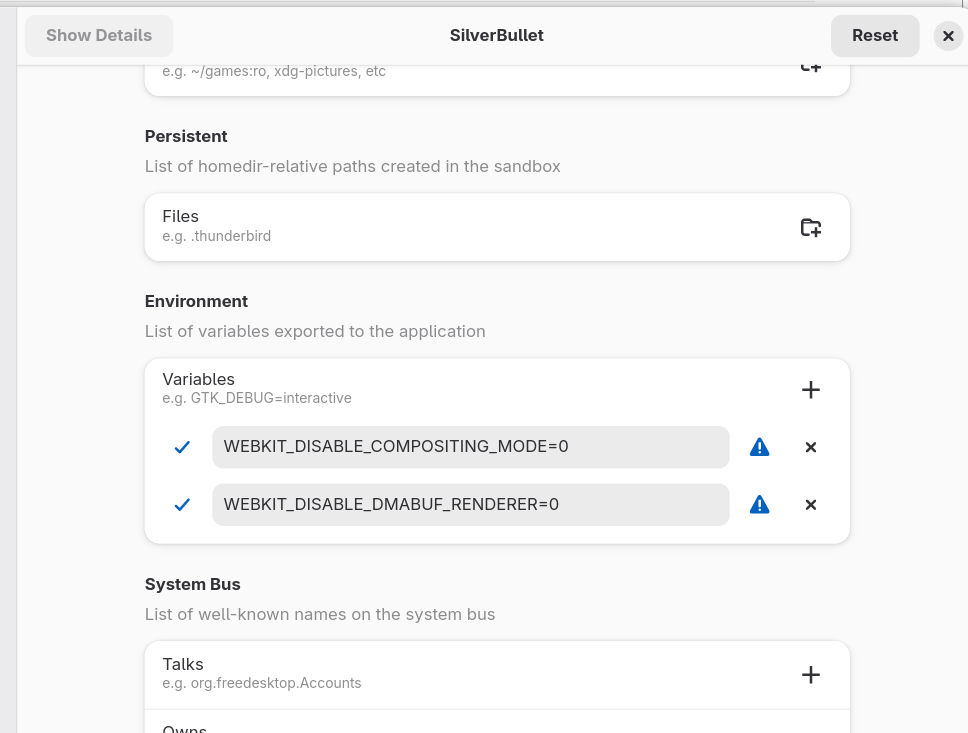
Ok, my suspicion is that this has to do with some of the Webkit graphics related things I switched off because people had trouble (WEBKIT_DISABLE_DMABUF_RENDERER, WEBKIT_DISABLE_COMPOSITING_MODE), but in the end I'm not 100% if any of them really fixed anything or just slowed things down at the cost of performance. Let me prepare an edge build a little later today for you to test without these overrides and see what happens.
Problem was that I could not reproduce any of these problems myself.
These now allow disabling the bundled WebKitGTK rendering workarounds (WEBKIT_DISABLE_DMABUF_RENDERER, WEBKIT_DISABLE_COMPOSITING_MODE). Setting either to 0 should re-enable the corresponding GPU path. So if you can try setting both (or various combinations) to 0 as environment variables and letting me know if this makes a difference, that'd be great.
Tried the edge build (flatpak) with those environmental variables set to 0. I tested each individually and then both together.
With each individually there was realistically no noticeable difference, although the meme 'safari seems snappier' may apply to DMABUF_RENDERER.
However testing with both environmental variables set to 0, there was a substantial difference. Everything is much smoother, both scrolling and text entry/deletion. Pages are also faster in loading and I've not noticed any issue with keybinds being missed. Input is correct and there's no issue with backspace.
Great, so what you did is set: WEBKIT_DISABLE_DMABUF_RENDERER=0 WEBKIT_DISABLE_COMPOSITING_MODE=0 correct? Or anything else? And is this app image or flatpak?
It's interesting that enabling both variables improved performance significantly, while using either one alone had little effect. Since SilverBullet+ relies heavily on the underlying Linux graphics stack and WebKit rendering, the interaction between rendering and compositing settings can have a noticeable impact on responsiveness. For anyone trying to understand the Linux environment behind these optimizations, this overview of Linux provides useful background. It may also be worth reviewing and the WebKitGTK documentation, as both can influence application performance depending on how rendering features are configured. The fact that the Flatpak version performs better than the AppImage in your setup suggests there may be differences in runtime libraries or graphics integration worth investigating further.
Just started using the SB+ Flatpak version on Alpine Linux and it's great so far! I'm normally using Firefox instead of Chromium and it doesn't really support PWAs, so having a more native version is really nice.
I used the following command to restrict the directory permissions, as I didn't want to expose my whole home directory:
Where $HOME/.local/state/silverbullet is the space storage directory.
Note that this breaks the sb CLI installer (you could add $HOME/.local/bin to the sandbox to avoid that), but I would prefer to install that manually anyways.
One issue I've noticed is that swiping left/right with the trackpad doesn't go forwards or backwards in history, although this is something which can work in both Firefox and Chromium. I suspect this is a Tauri-specific problem, but if it's easily solvable, it would be a nice improvement