# SilverBullet+ Windows: Report issues, requests
**URL:** https://community.silverbullet.md/t/silverbullet-windows-report-issues-requests/4064
**Category:** SilverBullet+
**Created:** [April 18, 2026, 5:21pm UTC](https://community.silverbullet.md/t/silverbullet-windows-report-issues-requests/4064 "2026-04-18T17:21:22Z")
**Posts on this page:** 15
**Page:** 2
### Author:  [@zef](https://community.silverbullet.md/u/zef)
#### Post date: [April 24, 2026, 12:39pm UTC](https://community.silverbullet.md/t/silverbullet-windows-report-issues-requests/4064/21 "2026-04-24T12:39:54Z")
Will be fixed in next release (this is a surprisingly hard part to get right everywhere...)
---
### Author:  [@i\_am\_dangry](https://community.silverbullet.md/u/i_am_dangry)
#### Post date: [May 11, 2026, 7:50am UTC](https://community.silverbullet.md/t/silverbullet-windows-report-issues-requests/4064/23 "2026-05-11T07:50:25Z")
v0.4.5
Word replacement via spell check broken.
Right clicking on a misspelled word to correct it results in no change reflected in the editor. No errors logged to console.
Unable to test on Debian as it doesn't appear to detect spelling errors (??).
---
### Author:  [@zef](https://community.silverbullet.md/u/zef)
#### Post date: [May 11, 2026, 12:38pm UTC](https://community.silverbullet.md/t/silverbullet-windows-report-issues-requests/4064/24 "2026-05-11T12:38:46Z")
Does this work for you on regular SB in Chrome? I got inconsistent behaviors here and wonder if it’s not a CodeMirror issue. It regressed before.
---
### Author:  [@Marketh](https://community.silverbullet.md/u/Marketh)
#### Post date: [May 11, 2026, 7:08pm UTC](https://community.silverbullet.md/t/silverbullet-windows-report-issues-requests/4064/25 "2026-05-11T19:08:09Z")
Could you provide a portable exe that can run from a windows flash drive? For reference, I install gimp, inkscape, etc from [https://portableapps.com/](https://portableapps.com/)
It is not a hardship without it since I can use silverbullet.exe as I do now. If I did have it I could provide sb+ feedback for this use case.
I use sb for strictly private content and I would not use it at all if it couldn't run entirely without a network. However, I do have a use case where the content can go to a server or even be leaked to the cloud at large.
My local library has a lot of maker equipment that by nature is connected to the cloud (e.g. cricut does not work without it.) The library has windows laptops that can be used for projects and they include some windows software that is required for equipment operation (e.g. Garment Creator 2 for an Epson direct-to-garment printer.) For a couple of years now my only stable home computer has been linux/pi. I do not have a windows laptop handy.
So what I do is sanitize/anonymize/depersonalize my projects (no names, addresses, sexes, ages, etc.) and I have silverbullet.exe and a space folder on my flash drive, along with artwork etc. that I attach to the library laptop.
The library does not permit software installation on the laptop. The laptop does have internet access and library policy is to wipe clean the laptop each night.
Regards,
Mark
---
### Author:  [@i\_am\_dangry](https://community.silverbullet.md/u/i_am_dangry)
#### Post date: [May 11, 2026, 10:01pm UTC](https://community.silverbullet.md/t/silverbullet-windows-report-issues-requests/4064/26 "2026-05-11T22:01:56Z")
Yes, sorry, I forgot to add that, SB in browser (mobile & desktop) is fine.
---
### Author:  [@zef](https://community.silverbullet.md/u/zef)
#### Post date: [May 12, 2026, 1:10pm UTC](https://community.silverbullet.md/t/silverbullet-windows-report-issues-requests/4064/27 "2026-05-12T13:10:44Z")
I cannot reproduce this on Windows 11 — it works fine for me, can you give me any specifics of your system?
---
### Author:  [@i\_am\_dangry](https://community.silverbullet.md/u/i_am_dangry)
#### Post date: [May 13, 2026, 1:25am UTC](https://community.silverbullet.md/t/silverbullet-windows-report-issues-requests/4064/28 "2026-05-13T01:25:51Z")
Oh this hurt so much to find. I have recreated the issue on a fresh install, fresh W11 VM, fresh space.
Expected:
1. Create a new note
2. Spell something wrong
3. Attempt to correct it - it should be fine.
Recreate:
1. Create new note
2. Add **any** frontmatter (example uses tags, but confirmed it with displayName too)
3. Spell something wrong
4. Attempt to correct it - correction won't work
5. Remove the frontmatter
6. Attempt to correct - works as expected
Example video below:
---
### Author:  [@zef](https://community.silverbullet.md/u/zef)
#### Post date: [May 14, 2026, 11:35am UTC](https://community.silverbullet.md/t/silverbullet-windows-report-issues-requests/4064/29 "2026-05-14T11:35:01Z")
Thanks for all that effort! I'll put it on a list of things to see if I can fix...
---
### Author:  [@Vkthor](https://community.silverbullet.md/u/Vkthor)
#### Post date: [September 15, 2026, 8:45pm UTC](https://community.silverbullet.md/t/silverbullet-windows-report-issues-requests/4064/30 "2026-09-15T20:45:28Z")
Hi.
Please forgive me if this isn't the right place to explain my issue.
I'm trying to use SilverBullet+ on my PC with Windows 11 Pro.
When I try to run it after installation, a flashing black and white window appears and SilverBullet freezes.
This was my second attempt. The first time, I installed it in the default suggested folder.
Since that error occurred, [Error: undefined] (a red box in the upper-right corner) I uninstalled it, downloaded the installer again, and tried installing it again in a different, more generic location. The problem persists. Can you please help me fix it?
Thank you.
---
### Author:  [@Vkthor](https://community.silverbullet.md/u/Vkthor)
#### Post date: [September 21, 2026, 5:47pm UTC](https://community.silverbullet.md/t/silverbullet-windows-report-issues-requests/4064/31 "2026-09-21T17:47:14Z")
I've updated from SilverBullet\_2.10.0\_x64-setup.exe to SilverBullet\_2.11.0\_x64-setup.
Just to be clear, I completely uninstalled the previous version before reinstalling this new one.
The same issue persists. 🙁
---
### Author:  [@zef](https://community.silverbullet.md/u/zef)
#### Post date: [September 21, 2026, 6:48pm UTC](https://community.silverbullet.md/t/silverbullet-windows-report-issues-requests/4064/32 "2026-09-21T18:48:46Z")
I’m testing out an electron build, you try it and see if it happens to solve your issue? [Electron desktop version: Some testing help](https://community.silverbullet.md/t/electron-desktop-version-some-testing-help/4388)
---
### Author:  [@Vkthor](https://community.silverbullet.md/u/Vkthor)
#### Post date: [September 22, 2026, 7:03pm UTC](https://community.silverbullet.md/t/silverbullet-windows-report-issues-requests/4064/33 "2026-09-22T19:03:33Z")
Hi!
Thanks for looking at this.
I've installed the SilverBullet-2.11.0-edge.20260922T1043-x64-Setup version on my PC with Windows 11 Pro, but first I had to manually clear out all the folders and files that mentioned SilverBullet's name completely because of this error that I could not stop.
Clicking [OK], the background turned itself white, and the same error appeared. Clicking [OK] again, it returned to black and keeped doing this cicle.
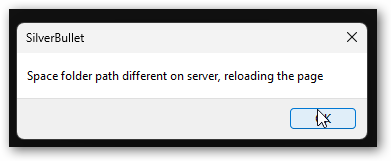
Now I could create a new space with a folder with a few .md files.
When I tried to do the same here:
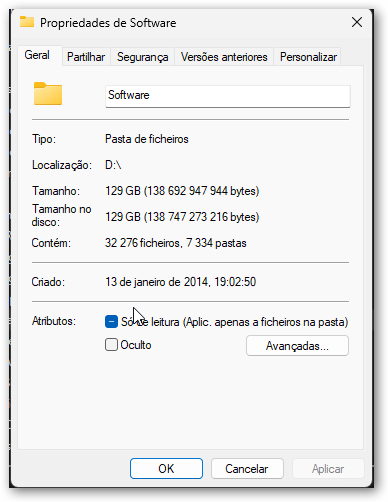
a folder with 129GB, 32276 files, and 7334 folders (no, no... just a few .md files in it: 511files, (most of which were inherited from Logseq) SilverBullet hanged with a timeout error. 30000?) Can not remember. It searched only 16% of the folder.
According to AppControl, there was a spike in processing by a Windows module. Perhaps it was Defender. I received a notification from it almost immediately afterward.
---
### Author:  [@Vkthor](https://community.silverbullet.md/u/Vkthor)
#### Post date: [September 22, 2026, 7:18pm UTC](https://community.silverbullet.md/t/silverbullet-windows-report-issues-requests/4064/34 "2026-09-22T19:18:22Z")
> [@Vkthor](#):
>
> Clicking [OK], the background turned itself white, and the same error appeared. Clicking [OK] again, it returned to black and keeped doing this cicle.
Hi again.
I think I've found it. 😊
I tried to add another small folder with just a few .md files. and the issue returned.
The folder I was trying to create a space from, was beginning with a dot and a space.
- or -
it was on my personal OneDrive folder
I need more time to check it.
---
### Author:  [@zef](https://community.silverbullet.md/u/zef)
#### Post date: [September 22, 2026, 8:09pm UTC](https://community.silverbullet.md/t/silverbullet-windows-report-issues-requests/4064/35 "2026-09-22T20:09:46Z")
SB is not set up to handle huge folders like that, even with just a few markdown files. I also have no idea how onedrive works to be honest. This may also cause problems.
---
### Author:  [@Vkthor](https://community.silverbullet.md/u/Vkthor)
#### Post date: [September 22, 2026, 8:10pm UTC](https://community.silverbullet.md/t/silverbullet-windows-report-issues-requests/4064/36 "2026-09-22T20:10:46Z")
> [@Vkthor](#):
>
> The folder I was trying to create a space from, was beginning with a dot and a space
Beginning with a dot works fine. As in I:.pessoal
Beginning with a dot and a space also works fine. As in I:. projectos
Found!
**SilverBullet can't handle OneDrive files.** As in D:~Vkthor\OneDrive.personal
It was my first approach because my .md files are mainly in OneDrive.
It caused my first post
My mistake. Sorry for that.
Besides that, SilverBullet is working fine.
😊
**Thank you!**
[Previous page](https://community.silverbullet.md/t/silverbullet-windows-report-issues-requests/4064.md?page=1)