# \[Space-Script\] Add URL to Page (Web Bookmark List)
**URL:** https://community.silverbullet.md/t/space-script-add-url-to-page-web-bookmark-list/1666
**Category:** Tricks & Techniques
**Created:** [January 19, 2025, 10:59am UTC](https://community.silverbullet.md/t/space-script-add-url-to-page-web-bookmark-list/1666 "2025-01-19T10:59:26Z")
**Posts on this page:** 11
**Page:** 1
### Author:  [@CaffeineFueled](https://community.silverbullet.md/u/CaffeineFueled)
#### Post date: [January 19, 2025, 10:59am UTC](https://community.silverbullet.md/t/space-script-add-url-to-page-web-bookmark-list/1666/1 "2025-01-19T10:59:26Z")
# Goal
Being able to add a web bookmark to a list of links wherever I am in my space.
* * *
# The Script
- creates a **new command** called `Add Web Bookmark`
- it will **open 2 prompts** : first, to get the URL, then the page to add it to
- the page prompt is optional and the script will use a default value if empty - change `pageName = "read";` to change the default page
- the **URL will be added to the very bottom of the selected page**
- I’ve tried to keep it simple to make it easier to modify. The script can be used for any kind of content you want to add to a page
- the default format can be changed here: `${pageContent}\n${url}`
- e.g. to make it a list item and add a default tag `#read` just change it to `${pageContent}\n- ${url} #read`
## Adding the script
1. add the following script anywhere in your space in a code block in the `space-script` format \> [more information](https://silverbullet.md/Space%20Script)
2. Run command `System: Reload`
3. Command should be accessible
```js
silverbullet.registerCommand(
{ name: "Add Web Bookmark" },
async () => {
const url = await editor.prompt("Enter the URL:");
if (!url) {
await editor.flashNotification("No URL provided.", "error");
return;
}
let pageName = await editor.prompt("Enter the page name to insert the URL into:");
if (!pageName || pageName.trim() === "") {
pageName = "read"; // Use a default page name if none is provided
}
try {
// Read the page content, or initialize it if the page does not exist
let pageContent;
try {
pageContent = await space.readPage(pageName);
} catch (e) {
// Assume the page does not exist, initialize with empty content
pageContent = "";
}
// Append the URL as a markdown link
const updatedContent = `${pageContent}\n${url}`;
// Write the updated content back to the page
await space.writePage(pageName, updatedContent);
await editor.flashNotification(`URL successfully inserted into ${pageName}.`);
} catch (error) {
console.error("Error while inserting URL:", error);
await editor.flashNotification("An error occurred while inserting the URL.", "error");
}
}
);
```
* * *
Feedback is welcome - not a coder and happy to learn more.
_As a disclaimer: script was created with the help of AI._
Cheers,
CF
---
### Author:  [@docfips](https://community.silverbullet.md/u/docfips)
#### Post date: [January 21, 2025, 3:25am UTC](https://community.silverbullet.md/t/space-script-add-url-to-page-web-bookmark-list/1666/2 "2025-01-21T03:25:33Z")
I really like this, a lot actually…
I modified for myself to use the same page instead of creating a new one, but your script gave me the idea and I wanted to say I appreciate it 😄
```javascript
silverbullet.registerCommand(
{ name: "Add Web Bookmark" },
async () => {
const url = await editor.prompt("Enter the URL:");
if (!url) {
await editor.flashNotification("No URL provided.", "error");
return;
}
const pageName = "General_Pages/Bookmarks";
try {
// Read the page content, or initialize it if the page does not exist
let pageContent;
try {
pageContent = await space.readPage(pageName);
} catch (e) {
// Assume the page does not exist, initialize with empty content
pageContent = "";
}
// Append the URL as a markdown link
const updatedContent = `${pageContent}\n${url}`;
// Write the updated content back to the page
await space.writePage(pageName, updatedContent);
await editor.flashNotification("URL successfully added to bookmarks.");
} catch (error) {
console.error("Error while inserting URL:", error);
await editor.flashNotification("An error occurred while adding the bookmark.", "error");
}
}
);
```
---
### Author:  [@mjf](https://community.silverbullet.md/u/mjf)
#### Post date: [January 21, 2025, 6:28am UTC](https://community.silverbullet.md/t/space-script-add-url-to-page-web-bookmark-list/1666/3 "2025-01-21T06:28:28Z")
@CaffeineFueled Nice script. How to access current page name from the script? I’d like to append to the current page if no particular name is given.
---
### Author:  [@CaffeineFueled](https://community.silverbullet.md/u/CaffeineFueled)
#### Post date: [January 21, 2025, 12:23pm UTC](https://community.silverbullet.md/t/space-script-add-url-to-page-web-bookmark-list/1666/4 "2025-01-21T12:23:38Z")
This should do the trick
```js
silverbullet.registerCommand(
{ name: "Add Web Bookmark" },
async () => {
// Prompt the user for the URL
const url = await editor.prompt("Enter the URL:");
if (!url) {
await editor.flashNotification("No URL provided.", "error");
return;
}
// Retrieve the current page name
const currentPageName = await editor.getCurrentPage();
// Prompt the user for the page name, with the current page name as the default value
const pageName = await editor.prompt(
"Enter the page name to insert the URL into:",
"" // Suggest the current page name as the default value
) || currentPageName; // Fallback to the current page if input is empty
try {
// Read the page content, or initialize it if the page does not exist
let pageContent;
try {
pageContent = await space.readPage(pageName);
} catch (e) {
// Assume the page does not exist, initialize with empty content
pageContent = "";
}
// Append the URL as plain text
const updatedContent = `${pageContent}\n${url}`;
// Write the updated content back to the page
await space.writePage(pageName, updatedContent);
await editor.flashNotification(`URL successfully inserted into ${pageName}.`);
} catch (error) {
console.error("Error while inserting URL:", error);
await editor.flashNotification("An error occurred while inserting the URL.", "error");
}
}
);
```
---
### Author:  [@mjf](https://community.silverbullet.md/u/mjf)
#### Post date: [January 21, 2025, 1:02pm UTC](https://community.silverbullet.md/t/space-script-add-url-to-page-web-bookmark-list/1666/5 "2025-01-21T13:02:22Z")
@CaffeineFueled Ah, thanks. 😃 I always forgot about the system calls. 😉
---
### Author:  [@miketronic](https://community.silverbullet.md/u/miketronic)
#### Post date: [February 12, 2026, 2:42pm UTC](https://community.silverbullet.md/t/space-script-add-url-to-page-web-bookmark-list/1666/6 "2026-02-12T14:42:30Z")
Hi all!
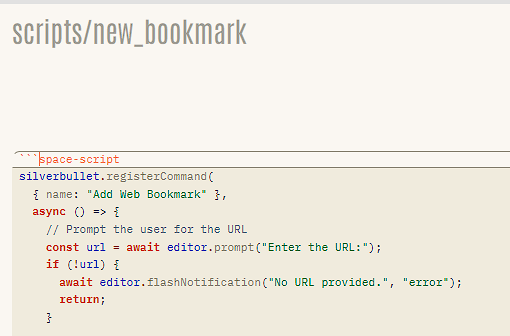
So I'm trying to use this as a way of bookmarking websites but for some reason I can't get it to run. I created a new page on my space and then pasted the code, setting the formatting as 'space-script', then reloading, but I'm not finding the command. Is space-script disabled due to the security concerns? I would fun the Chrome extension but I don't think it will work as I'm running self-hosted behind a Cloudflare tunnel secured by MFA.
Thanks!
Mike
---
### Author:  [@zef](https://community.silverbullet.md/u/zef)
#### Post date: [February 12, 2026, 2:44pm UTC](https://community.silverbullet.md/t/space-script-add-url-to-page-web-bookmark-list/1666/7 "2026-02-12T14:44:33Z")
Unless you’re explicitly still using an old v1 build of SilverBullet, space script no longer exists and has been replaced with space lua.
Your code snippet doesn’t show much so I can’t help you rewrite it without more info.
---
### Author:  [@miketronic](https://community.silverbullet.md/u/miketronic)
#### Post date: [February 12, 2026, 2:48pm UTC](https://community.silverbullet.md/t/space-script-add-url-to-page-web-bookmark-list/1666/8 "2026-02-12T14:48:06Z")
Ohh ok. Yeah I'm on v2 so I'll need to see how to make this work for lua. Sorry, yeah I was just highlighting that I called out 'space-script' and truncated the image to that. It's all the same code from [[Space-Script] Add URL to Page (Web Bookmark List) - #4 by CaffeineFueled](https://community.silverbullet.md/t/space-script-add-url-to-page-web-bookmark-list/1666/4)
---
### Author:  [@zeus-web](https://community.silverbullet.md/u/zeus-web)
#### Post date: [February 12, 2026, 3:20pm UTC](https://community.silverbullet.md/t/space-script-add-url-to-page-web-bookmark-list/1666/9 "2026-02-12T15:20:40Z")
Not exactly a replacement, but might be useful for your usecase, too: @daveb made a nice Browser Plugin "Web Clipper" for Silverbullet:
> [@SilverBullet Web Clipper for Chrome and Opera (BETA)](https://community.silverbullet.md/t/silverbullet-web-clipper-for-chrome-and-opera-beta/446):
>
> I’ve created a simple web clipper for SilverBullet. SilverBullet Clipper is a browser extension that allows you to save either a URL or selected content from a page as markdown to SilverBullet. The capture is added as a Quick Note in the default SilverBullet inbox. Please keep in mind that it is not guaranteed to work on all websites. The beta version of the web clipper is on the chrome web store for anyone who wants to try it out. [[image]](https://chromewebstore.google.com/detail/silverbullet-clipper/nkapoagmecfkneiaejccgkhffdmfmhki) The code is available in github. [[GitHub release (…](https://github.com/davecburke/silverbullet-clipper/releases/latest)
---
### Author:  [@Mr.Red](https://community.silverbullet.md/u/Mr.Red)
#### Post date: [February 12, 2026, 6:05pm UTC](https://community.silverbullet.md/t/space-script-add-url-to-page-web-bookmark-list/1666/10 "2026-02-12T18:05:19Z")
> [@miketronic](#):
>
> Ohh ok. Yeah I'm on v2 so I'll need to see how to make this work for lua.
If you ask [deepwiki](https://deepwiki.com/search/could-you-please-rewrite-this_76bc3725-fdd1-4c76-b657-6802efa48700?mode=deep) nicely, it could rewrite/convert simple space-scripts into space-lua. or if it fails you could always try to use some smarter LLM's like claude or gemini or even chatGPT.
something like this:
> Could you please rewrite this space-script into space-lua:
> ...paste code here...
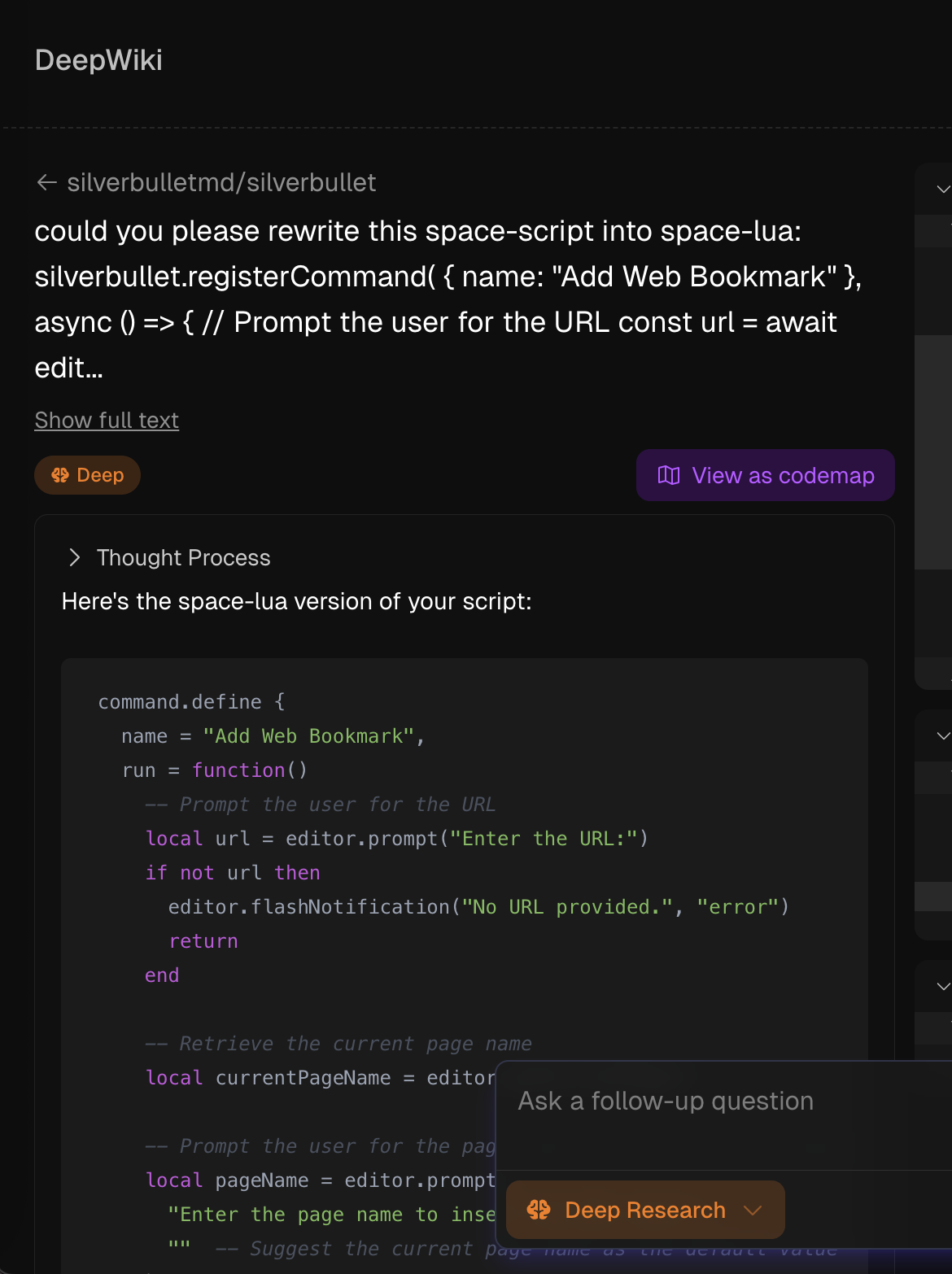
and voila, here the generated code:
```lua
command.define {
name = "Add Web Bookmark",
run = function()
-- Prompt the user for the URL
local url = editor.prompt("Enter the URL:")
if not url then
editor.flashNotification("No URL provided.", "error")
return
end
-- Retrieve the current page name
local currentPageName = editor.getCurrentPage()
-- Prompt the user for the page name, with the current page name as the default value
local pageName = editor.prompt(
"Enter the page name to insert the URL into:",
"" -- Suggest the current page name as the default value
) or currentPageName -- Fallback to the current page if input is empty
-- Read the page content, or initialize it if the page does not exist
local success, pageContent = pcall(function()
return space.readPage(pageName)
end)
if not success then
-- Assume the page does not exist, initialize with empty content
pageContent = ""
end
-- Append the URL as plain text
local updatedContent = pageContent .. "\n" .. url
-- Write the updated content back to the page
local success2, err = pcall(function()
space.writePage(pageName, updatedContent)
editor.flashNotification("URL successfully inserted into " .. pageName .. ".")
end)
if not success2 then
print("Error while inserting URL: " .. tostring(err))
editor.flashNotification("An error occurred while inserting the URL.", "error")
end
end
}
```
sometimes you need to adjust some things, commands but 70-80% of the job is done.
---
### Author:  [@miketronic](https://community.silverbullet.md/u/miketronic)
#### Post date: [February 13, 2026, 8:43pm UTC](https://community.silverbullet.md/t/space-script-add-url-to-page-web-bookmark-list/1666/11 "2026-02-13T20:43:07Z")
Thanks, this was very helpful! I added some tagging and timestamps to it also.
```auto
command.define {
name = "New Web Bookmark",
run = function()
-- Prompt for URL
local url = editor.prompt("Enter the URL:")
if not url or url == "" then
editor.flashNotification("No URL provided.", "error")
return
end
-- Prompt for TITLE
local title = editor.prompt("Enter a title for this bookmark:")
if not title or title == "" then
title = url
end
-- Prompt for TAGS
local tags = editor.prompt("Enter tags (e.g. #bookmarks #reading #security):")
if not tags or tags == "" then
tags = "#bookmarks"
end
-- Default bookmark PAGE
local pageName = "Bookmarks"
-- Read the page content, or initialize it if the page does not exist
local success, pageContent = pcall(function()
return space.readPage(pageName)
end)
if not success or not pageContent then
pageContent = ""
end
-- Prevent duplicate URLs
if string.find(pageContent, url, 1, true) then
editor.flashNotification("This URL already exists on the page.", "error")
return
end
-- Ensure Bookmarks heading exists
local heading = "## Bookmarks"
if not string.find(pageContent, heading, 1, true) then
pageContent = pageContent .. "\n\n" .. heading .. "\n"
end
-- Create timestamp
-- local timestamp = os.date("%Y-%m-%d %H:%M")
-- use the line above for a more traditional date/time stamp
local timestamp = os.date("%d%b%Y")
local uppercasetimestamp = string.upper(timestamp)
-- Build Markdown bookmark line
local bookmarkLine = "- [" .. title .. "](" .. url .. ") — " .. uppercasetimestamp .. " " .. tags
-- Insert after Bookmarks heading
local updatedContent = pageContent:gsub(
heading .. "\n",
heading .. "\n" .. bookmarkLine .. "\n",
1
)
-- Write back to the page
local success2, err = pcall(function()
space.writePage(pageName, updatedContent)
editor.flashNotification("Bookmark successfully inserted into " .. pageName .. ".")
end)
if not success2 then
print("Error while inserting URL: " .. tostring(err))
editor.flashNotification("An error occurred while inserting the URL.", "error")
end
end
}
```