Are there any built-in themes in silverbullet?
I’m personally looking for more color to make headers pop more.
Are there any built-in themes in silverbullet?
I’m personally looking for more color to make headers pop more.
There are no built in themes apart from the ones offered, but you can use space-style blocks to modify elements with CSS.
So if you’d wanna change the color of headings you can do something like this:
h1, h2, h3, h4, h5, h6 {
   color: red;
}
Guides: Space Style
the simple h1-h6 css-selector won’t work for the .cm-editor headings
For page headings you should/could use:
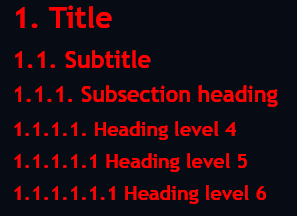
for all red:
#sb-main .cm-editor {
  .sb-line-h1,
  .sb-line-h2,
  .sb-line-h3,
  .sb-line-h4,
  .sb-line-h5,
  .sb-line-h6 { color: red;
  }
}
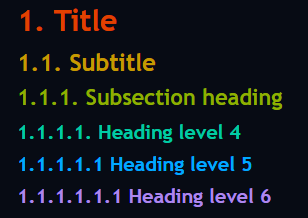
for different color headings you can use:
#sb-main .cm-editor .sb-line-h1 { color: oklch(60% 0.25 60);}
#sb-main .cm-editor .sb-line-h2 { color: oklch(70% 0.25 100);}
#sb-main .cm-editor .sb-line-h3 { color: oklch(70% 0.25 120);}
#sb-main .cm-editor .sb-line-h4 { color: oklch(70% 0.25 180);}
#sb-main .cm-editor .sb-line-h5 { color: oklch(70% 0.20 240);}
#sb-main .cm-editor .sb-line-h6 { color: oklch(70% 0.15 300);}
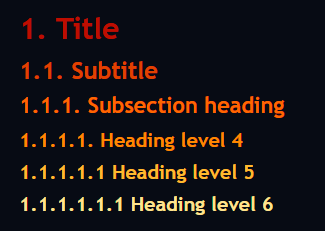
or for a color gradient you can use:
#sb-main .cm-editor .sb-line-h1 { color: oklch(50% 0.25 60);}
#sb-main .cm-editor .sb-line-h2 { color: oklch(60% 0.25 60);}
#sb-main .cm-editor .sb-line-h3 { color: oklch(70% 0.25 60);}
#sb-main .cm-editor .sb-line-h4 { color: oklch(80% 0.25 60);}
#sb-main .cm-editor .sb-line-h5 { color: oklch(90% 0.20 60);}
#sb-main .cm-editor .sb-line-h6 { color: oklch(99% 0.15 60);}
(for other colors, change the hue-value 60 to the desirecd color from the color wheel 0-360)
of course you can add any other css to the selectors to customize it more, like:
text-decoration-line: underline;
font-weight: bolder;
font-size: 20px;
font-style: italic;
font-variant: small-caps;
etc.