I added the space-style to the config.md, but that didn’t work. So I wondered where you added the styles for font and readable line-width?
There is no special path or file for any space-style or space-lua codeblocks. you can add it anywhere.
What are you trying to do, and not working? Maybe the syntax you are using is not correct.
I thought that might be the case. I copied the styles from a silverbullet post, so:
‘’’space-style
/* html styles here */
‘’’
Then saved in a folder called silverbullet.
I restarted but made no difference. Thanks for your comment.
that might be the problem.
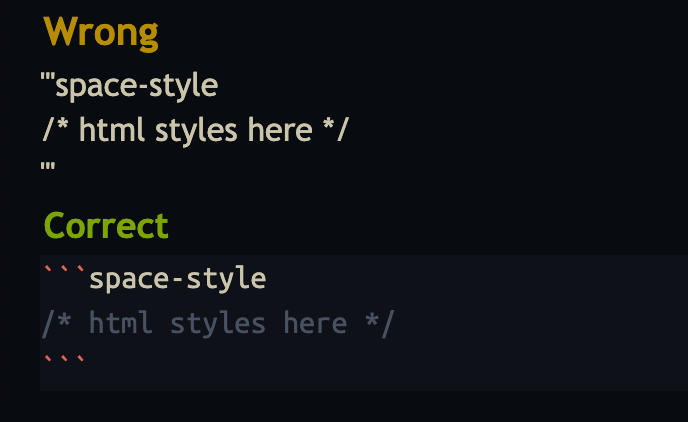
you are using the wrong codeblock syntax:
'''space-style
/* html styles here */
'''
the correct one is:
```space-style
/* html styles here */
```
notice the different backtick: ```should be used and not ‘’’or ''' or ´´´
PS: you don't need to Restart to apply the new style, its enought to do a System: Reload commands
Sorry, typed that message on mobile and couldn’t find the backticks, so subbed in apostrophes instead.
I’ll try the system reload
could you give an exact screenshot with the codeblock, or maybe copy/paste the whole thing, maybe there is an issue with the validity of the css (missing : or missing ; or just a copy/paste mistake)
I’ve just got it sorted with a System: Reload. I’d saved it minus the backticks! Do you mind me asking how do you change the font? I want to use a font called IA Writer Duo S. It’s in my system fonts.
Here is my config:
First you need to put the font files e.g. *.ttf you want to use in a folder in your space and then point the space-style to them. here is an example of what i use, it's a little more complicated because i use custom fonts in different elements:
Set Custom Font
/* Font Styling*/
@font-face {
    font-family: "OpenSansCond";
    src: url('/.fs/fonts/OpenSansCond.ttf') format('truetype');
    font-weight: 400;
    font-style: normal;
    font-display: swap;
}
@font-face {
    font-family: "OpenSans";
    src: url('/.fs/fonts/OpenSans.ttf') format('truetype');
    font-style: normal;
    font-weight: 600;
    font-display: swap;
}
@font-face {
    font-family: "UbuntuMono";
    src: url('/.fs/fonts/UbuntuMonoRegular.ttf') format('truetype');
    font-weight: 400;
    font-style: normal;
    font-display: swap;
}
@font-face {
    font-family: "UbuntuMono";
    src: url('/.fs/fonts/UbuntuMonoBold.ttf') format('truetype');
    font-weight: 700;
    font-style: normal;
}
@font-face {
    font-family: "UbuntuMono";
    src: url('/.fs/fonts/UbuntuMonoItalic.ttf') format('truetype');
    font-style: italic;
}
@font-face {
    font-family: "Inconsolata";
    src: url('/.fs/fonts/Inconsolata.ttf') format('truetype');
}

@font-face {
  font-family: "OrticaAngular";
  src: url("/.fs/fonts/OrticaAngular-Bold.woff2") format("woff2");
  font-weight: 700;
  font-style: normal;
}

@font-face {
  font-family: "OrticaLinear";
  src: url("/.fs/fonts/OrticaLinear-Light.woff2") format("woff2");
  font-weight: 300;
  font-style: normal;
}

@font-face {
  font-family: "OrticaLinear";
  src: url("/.fs/fonts/OrticaLinear-Regular.woff2") format("woff2");
  font-weight: 400;
  font-style: normal;
}

@font-face {
  font-family: "OrticaLinear";
  src: url("/.fs/fonts/OrticaLinear-Bold.woff2") format("woff2");
  font-weight: 700;
  font-style: normal;
}

#sb-root {
    --editor-font: "UbuntuMono", monospace;
    --ui-font: "Trebuchet MS", "OpenSans", sans-serif;
}

span.sb-code {
    font-family: var(--editor-font);
}

#sb-editor .cm-content {
    font-family: var(--ui-font);
}


div .sb-line-fenced-code {
  font-family: var(--editor-font);
}

.sb-hashtag, .hashtag {
  font-family: var(--editor-font);
  font-size: 1rem !important;
  padding: 1px 4px !important;
}

/* Mobile screens — change to Open Sans Condensed */
@media (max-width: 600px) {
  #sb-root{
   --editor-font: "Inconsolata", monospace;
   --ui-font: "OpenSansCond", sans-serif;
  }
}
you don't need to do all this if you want to use a web-safe font which is built in your system(Win/Linux/Mac) but here are the relevant css's you can use for your use case.
if you have something more specific in mind, a certain font you want to use in a certain location, or font-family you want to add, be more specific, so we can guide you to the right direction.
Ok, here are the exact steps to use IA Writer Duo S
Download and Copy the font files (*.ttf) into a fonts folder in the root of your space.
- iAWriterDuoS-Bold.ttf
- iAWriterDuoS-BoldItalic.ttf
- iAWriterDuoS-Italic.ttf
- iAWriterDuoS-Regular.ttf
like so:
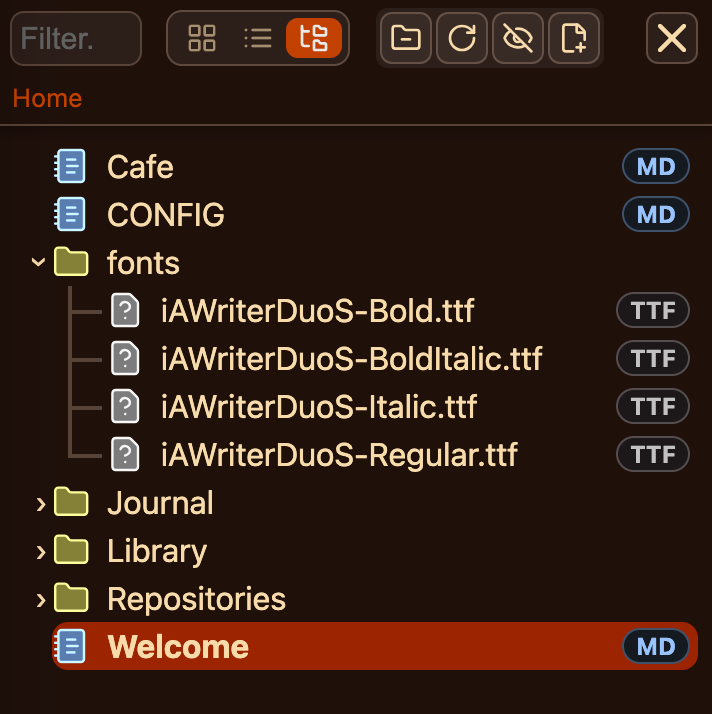
then in a page for example: STYLES.md use following space-style codeblock:
@font-face {
    font-family: "iAWriterDuoS";
    src: url('/.fs/fonts/iAWriterDuoS-Bold.ttf') format('truetype');
    font-weight: 900;
    font-style: normal;
}
@font-face {
    font-family: "iAWriterDuoS";
    src: url('/.fs/fonts/iAWriterDuoS-BoldItalic.ttf') format('truetype');
    font-style: italic;
    font-weight: 900;
}
@font-face {
    font-family: "iAWriterDuoS";
    src: url('/.fs/fonts/iAWriterDuoS-Italic.ttf') format('truetype');
    font-style: italic;
}
@font-face {
    font-family: "iAWriterDuoS";
    src: url('/.fs/fonts/iAWriterDuoS-Regular.ttf') format('truetype');
    font-weight: 400;
    font-style: normal;
}

#sb-root {
    --editor-font: "iAWriterDuoS";
    --ui-font: "iAWriterDuoS";
}
Notice the extra
/.fs/is mandatory to add, if you are pointing to non-.mdfiles in your space.
- After this run the
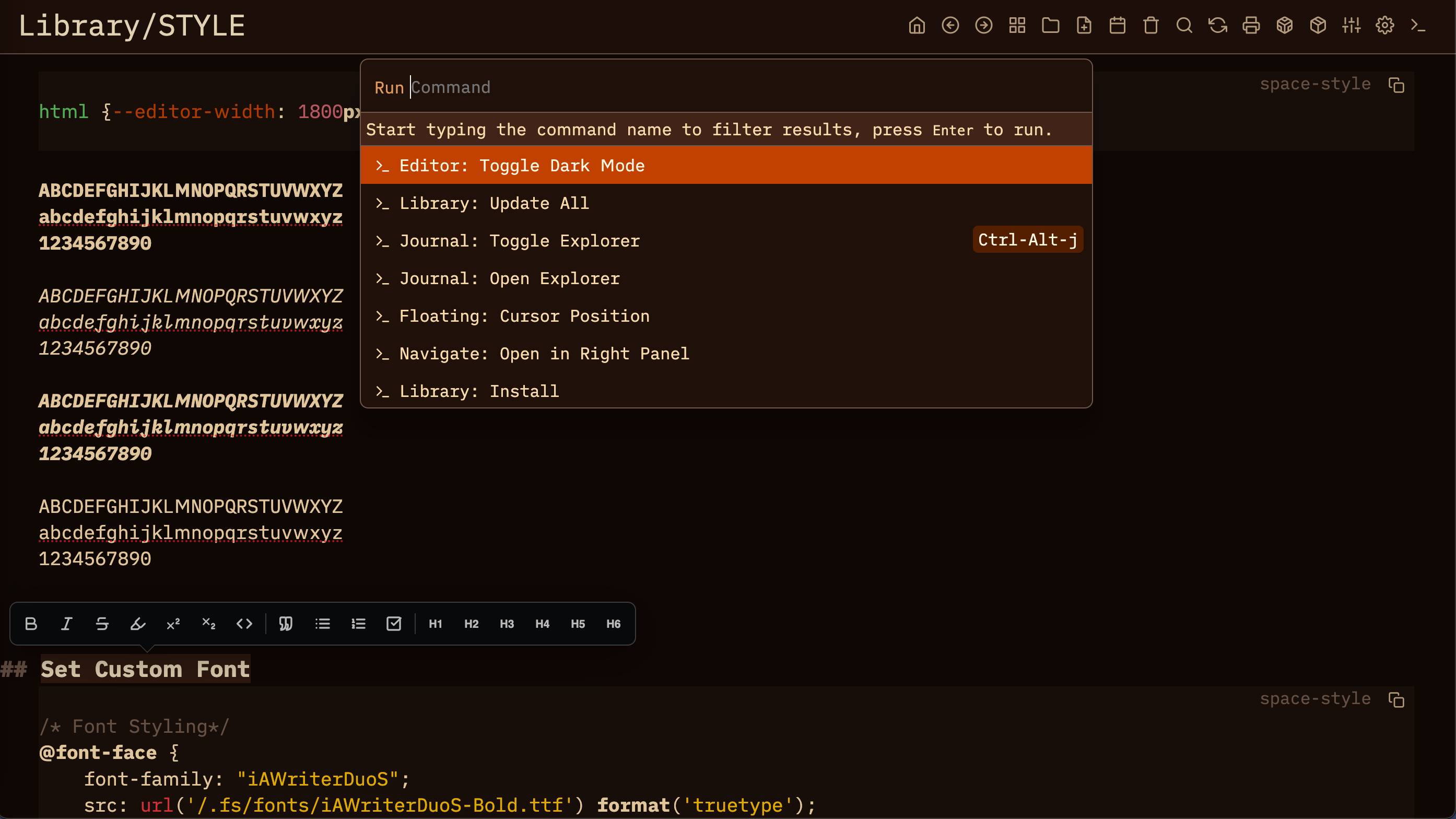
System: Reloadcommand, and voila: DONE
DONE
Now, all your silverbullet fonts are set to iAWriterDuoS
Thanks for your comprehensive response. That’s great.