SpaceLua Debugger - Enhance Your Development Workflow (Alpha version)
Description:
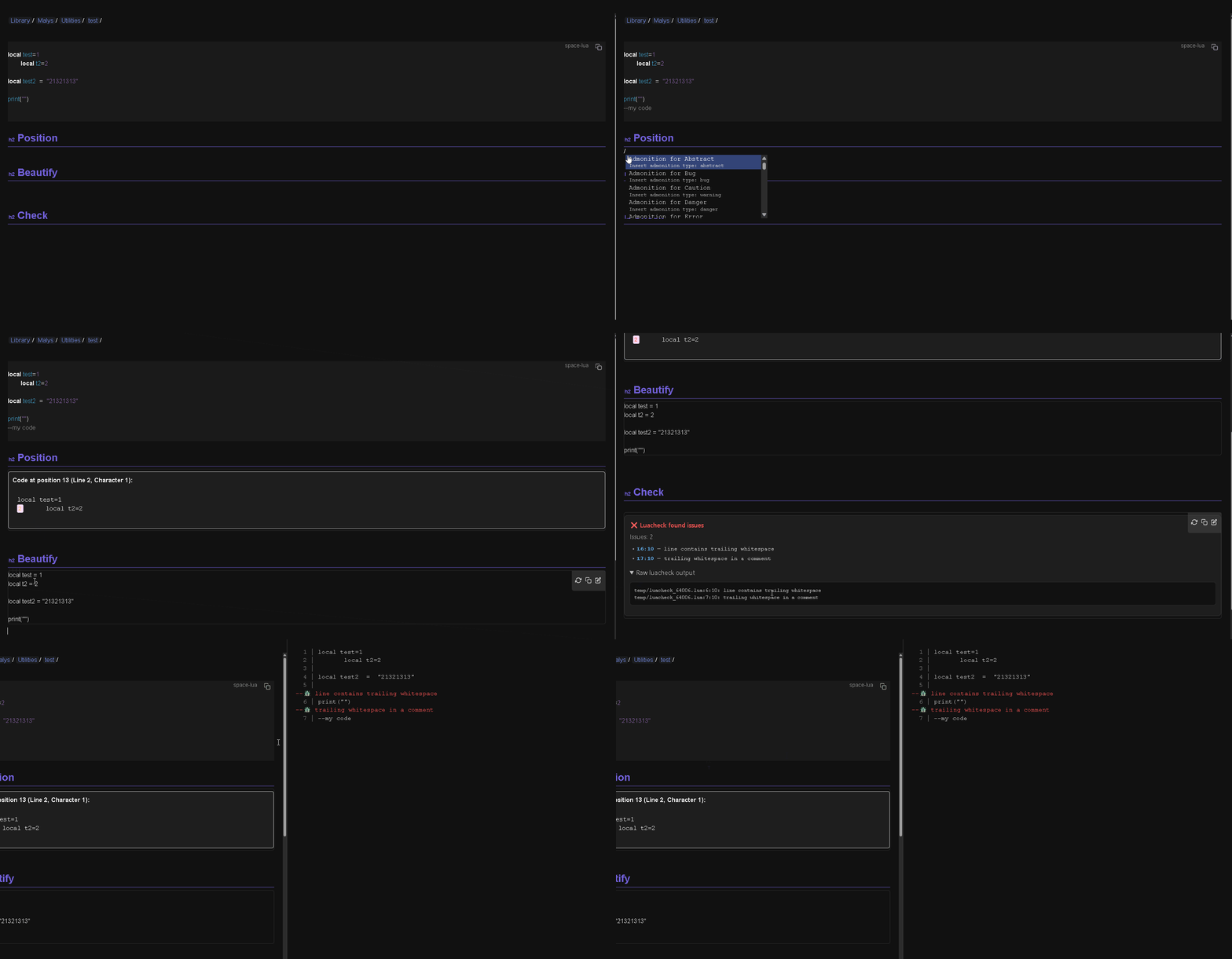
This SpaceLua script provides a set of tools designed to aid in the development and debugging of Lua code directly within the Silverbullet environment. It helps you identify errors, improve code quality, and maintain consistent formatting.
Features
- Lua Linting: Integrates with
luacheckto automatically analyze your code for potential errors, stylistic issues, and adherence to best practices. Issues are clearly displayed within Silverbullet. - Code Formatting (Beautification): Utilizes
lua-formatto automatically format your Lua code, ensuring consistent indentation, spacing, and overall readability. The formatted code is conveniently copied to your clipboard. - Position Highlighting: Allows you to quickly locate and visually inspect code at a specific character position. This is useful when dealing with error messages that point to a particular location within your Lua files.
- Easy Access with Slash Commands: The script offers three slash commands for rapid execution of key features:
/debugger:check- Runs Lua linting on the current code block./debugger:beautify- Formats the current code block and copies it to the clipboard./debugger:position- Prompts you for a character position and highlights the corresponding code in a panel.
- Dedicated Lint Panel: A toggleable panel on the right-hand side of the editor continuously displays linting information, providing real-time feedback as you write code. This panel automatically updates when you save your page.
How to Use:
- Installation: The script automatically attempts to install required dependencies (
Utilities.mdandLuacheck.md) from the Silverbullet library repository. You’ll see a notification if installation is successful or if there are any errors. - Code Block Designation: Place the Lua code you want to debug within a Silverbullet code block specifically labelled with the tag
space-lua. The script will automatically identify and process this code block. - Executing Commands: Type the corresponding slash command into the Silverbullet editor to trigger:
- Linting: Type
/debugger:checkand press Enter. The results will be displayed in the editor. - Formatting: Type
/debugger:beautifyand press Enter. The formatted code will be inserted into the editor and copied to your clipboard. - Position Highlighting: Type
/debugger:positionand press Enter. You will be prompted to enter a character position. Enter the position and press Enter again to see the code highlighted in a panel.
- Linting: Type
- Using the Lint Panel: Run the command
Debugger: Toggle Lint Panelto show a panel with linting errors. The panel automatically reloads when the page is saved.
Installation
- Install silverbullet-libraries/src/Utilities/Debugger.md at main · malys/silverbullet-libraries · GitHub
- Read prerequisites
Undercover
Library/Malys/Luacheck: luacheck wrapper