Fixing Silver Bullet's Chinese Search Gap – A Space Lua Global Search Implementation

I’ve created a Space Lua script for Silver Bullet that enhances the search functionality by properly handling Chinese characters, which the default search struggles with. Here’s how it works:

This implementation adds two new commands to Silver Bullet:

  • “Global Search”: Opens a prompt to enter your search keyword, then displays results in the right-hand panel
  • “Close Global Search”: Hides the search results panel

The key features of this implementation:

  1. Chinese Character Support: The search works seamlessly with Chinese text, addressing a limitation in the default search
  2. Contextual Results: Shows 10 characters before and after each match to provide context
  3. Structured Output: Displays results grouped by page with clickable page links
  4. Special Character Handling: Properly escapes regex special characters in search terms

The script uses space.listPages() and space.readPage() to scan all content, then applies pattern matching with context extraction. Results are formatted as markdown and displayed in the RHS panel using editor.showPanel().

One limitation is that I couldn’t find a way to add a close button directly to the panel itself, hence the separate “Close Global Search” command. There might also be performance improvements possible when dealing with very large vaults.

Hopefully this can be useful to others who need better Chinese language support in Silver Bullet, until official support is added.

-- Escape regular expression special characters in keywords
local function escapeKeyword(keyword)
    -- List of regular expression special characters: . ^ $ * + ? ( ) [ ] { } | \
    local specialChars = {
        ["."] = "%.",
        ["^"] = "%^",
        ["$"] = "%$",
        ["*"] = "%*",
        ["+"] = "%+",
        ["?"] = "%?",
        ["("] = "%(",
        [")"] = "%)",
        ["["] = "%[",
        ["]"] = "%]",
        ["{"] = "%{",
        ["}"] = "%}",
        ["|"] = "%|",
        ["\\"] = "\\\\"
    }
    -- Replace special characters in the keyword with their escaped versions
    return string.gsub(keyword, ".", function(char)
        return specialChars[char] or char
    end)
end

-- Extract 10 characters before and after the keyword (handles cases with fewer than 10 characters)
-- Parameters: content (content to search), keyword (keyword to search for)
-- Returns: Iterator (each iteration returns a match result in the format: prefix + keyword + suffix)
local function extractKeywordContext(content, keyword)
    -- 1. Escape the keyword (handle special characters)
    local escapedKeyword = escapeKeyword(keyword)
    -- 2. Build regular expression pattern (0-10 characters before + keyword + 0-10 characters after)
    local pattern = ".{0,10}" .. escapedKeyword .. ".{0,10}"
    -- 3. Use string.gmatch to iterate through matches and concatenate results
    return string.gmatch(content, pattern)
end

local function searchGlobal(keyword)
    local result = ""
    local pages = space.listPages()
    for i, page in ipairs(pages) do
        local matchs = ""
        local content = space.readPage(page.name)
        for match in extractKeywordContext(content, keyword) do
            matchs = matchs .. "* " .. match .. '\n'
        end
        if #matchs > 0 then
            result = result .. "## [[" .. page.name .. "]]\n" .. matchs
        end
    end
    return result
end

command.define {
  name = "Global Search",
  run = function()
    local keyword = editor.prompt("Keyword","")
    if #keyword then
      local res = searchGlobal(keyword)
      if #res > 0 then
        editor.showPanel('rhs', 1, markdown.markdownToHtml(res))
      else
        editor.flashNotification('not found', 'warn')
      end
    end
  end
}

command.define {
  name = "close Global Search",
  run = function()
    editor.hidePanel('rhs')
  end
}

I’m sharing this in case others need this functionality while waiting for potential official Chinese search support. Feedback on improving performance or adding a proper panel close button would be appreciated!

3 Likes

Very impressive. Nice work!

1 Like

Thank you for your reply.

I have an additional question: When testing Silver Bullet v2 with approximately 1,000 articles (each around 5,000 characters long), I noticed that in a new browser (or browser incognito mode, where there is no existing local storage), the sync and indexing processes take a significant amount of time. I have three follow-up questions regarding this:

  1. Will the sync time be optimized in future updates?
  2. Is this indexing process specifically for the built-in Search Space plugin? If I don’t use this plugin, can I disable indexing to save time?
  3. Currently, sync works from the server to the local computer. However, if the server crashes someday but I still have a complete offline copy of my notes on my local computer, is it possible to reverse the sync direction—i.e., sync notes from the local computer to the remote server?

A bit off topic, but let me answer anyway because I happen to be looking at this topic as part of my indexing rearchitecture: Sync engine rearchitecture by zefhemel · Pull Request #1516 · silverbulletmd/silverbullet · GitHub

There’s two things here:

  1. It will be possible to NOT sync all content (by default all documents and attachments) and to effectively have a “sync ignore” (similar to git ignore) to exclude specific files/areas of your space not to sync locally. This may speed up sync slight, but not necessarily a lot (for pages) because still all content needs to be indexed, which means those files need to always be fetched from the server at least once (more on that later).
  2. I have an idea on how I can parallelize the sync, which should help a little depending on where the sync time bottleneck is.

I haven’t done deep investigation on what the more expensive indexers are, but my guess would indeed be that the bigger one is the full text indexer. There’s some others too that are storing a lot of data in the database. What I plan to do is add configuration options to be able to toggle on and off specific indexers, along the lines of:

-- disable full text indexing
config.set("indexer.fts", false)
-- disable paragraph indexing (another big one)
config.set("indexer.paragraph", false)

I hope to get to this later this week.

Theoretically this is possible, but it would require some thinking about how to enable this safely. Likely, by default the sync engine would conclude that all files on the server were deleted, and sync those deletes back to the client immediatly. So we’d somehow have to find a way to signal to the client that this shouldn’t happen, but that you want to “force push” all content to the server.

This would require a bit of thinking and work, for a bit of a niche scenario. Would making (off site) backups on the server not always be the better option?

I’ve done a little more testing since the last thread about indexing :upside_down_face:. And it seems like the search indexer doesn’t really add to the index time, because it is in another worker. So as long as the search index is quicker than the index from the “index” plug, the difference is negligible, because the “index” worker is the bottle neck.

Theoretically this is possible, but it would require some thinking about how to enable this safely. Likely, by default the sync engine would conclude that all files on the server were deleted, and sync those deletes back to the client immediatly. So we’d somehow have to find a way to signal to the client that this shouldn’t happen, but that you want to “force push” all content to the server.

Wouldn’t it be possible to write a space lua script which just downloads all pages as markdown files (Maybe even zips them using a library?)? I feel like this would be the easier and “safer” option, especially if the server “crashes” I wouldn’t trust it enough to push my data there again. But maybe I’m misunderstanding something about the use case of this.

1 Like

Right. Either way, I’d like to add options to opt in and out of various indexers. Even if it’s not slowing things down, it’s generating a shit to of “garbage” in your data store that you may not use.

Right, yeah that’s another option. That’s a script you should have ready to go then. It would be nice if it could output some sort of archive format then.

2 Likes

来自中文用户的感谢

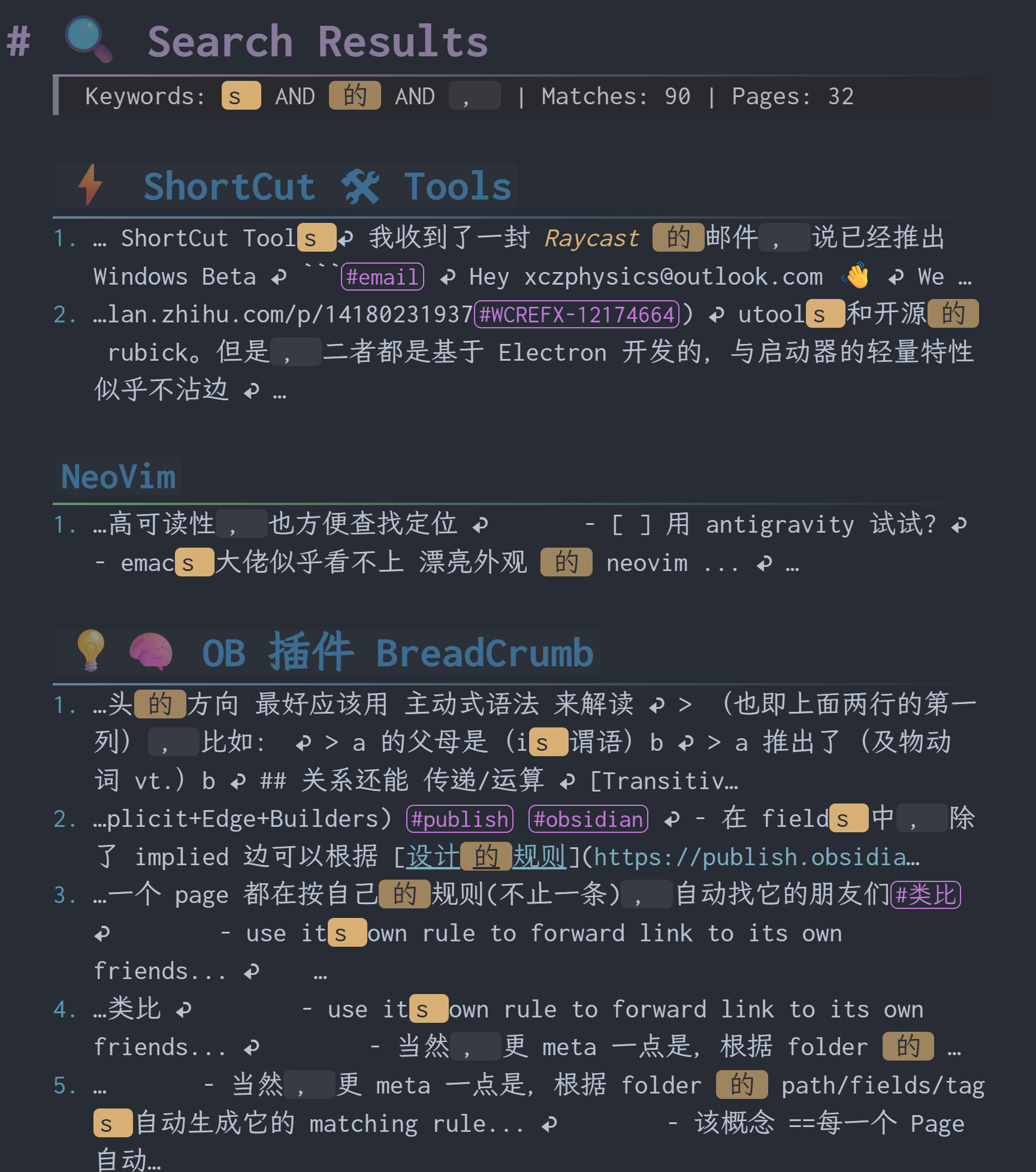
Missing the previous full-text search, so extended this script — now largely transformed.

  1. Multi-keyword/phrase search with distinct highlights.
  2. Header cues showing the folder hierarchy of matched pages (with optional folder tree).
  3. Hit counting with ordered lists.
  4. configurable contextLength for multi-phrases…
```space-lua
-- ============================================
-- Configuration
-- ============================================
local config = {
    showParentHeaders = false,
    contextLength = 50  -- size of context window (for multi-)
}

-- Highlight styles for different keywords (recycling)
local highlightStyles = {
    function(kw) return "==" .. kw .. "==" end,
    function(kw) return "==`" .. kw .. "`==" end,
    function(kw) return "`" .. kw .. "`" end,
    function(kw) return "**==" .. kw .. "==**" end,
    function(kw) return "**`" .. kw .. "`**" end,
    function(kw) return "*==`" .. kw .. "`==*" end,
    function(kw) return "*`" .. kw .. "`*" end,
    function(kw) return "**" .. kw .. "**" end,
    function(kw) return "*" .. kw .. "*" end,
    function(kw) return "*==" .. kw .. "==*" end,
}

-- Clean context string (remove newlines)
local function cleanContext(s)
    if not s then return "" end
    return string.gsub(s, "[\r\n]+", " ↩ ")
end

-- Generate heading prefix based on depth
local function headingPrefix(depth)
    if depth > 6 then depth = 6 end
    return string.rep("#", depth) .. " "
end

-- Build hierarchical headers for a page path
local function buildHierarchicalHeaders(pageName, existingPaths)
    local output = {}
    local parts = {}
    for part in string.gmatch(pageName, "[^/]+") do
        table.insert(parts, part)
    end
    
    local currentPath = ""
    for i, part in ipairs(parts) do
        if i > 1 then
            currentPath = currentPath .. "/"
        end
        currentPath = currentPath .. part
        
        if not existingPaths[currentPath] then
            existingPaths[currentPath] = true
            if i == #parts then
                table.insert(output, headingPrefix(i) .. "[[" .. pageName .. "]]")
            elseif config.showParentHeaders then
                table.insert(output, headingPrefix(i) .. part)
            end
        end
    end
    
    return output
end

-- Parse keywords from input
-- Supports: `phrase with spaces` as single keyword, space separates others
local function parseKeywords(input)
    local keywords = {}
    local i = 1
    local len = #input
    
    while i <= len do
        -- Skip whitespace
        while i <= len and string.sub(input, i, i):match("%s") do
            i = i + 1
        end
        
        if i > len then break end
        
        local char = string.sub(input, i, i)
        
        if char == "`" then
            -- Find closing backtick
            local closePos = string.find(input, "`", i + 1, true)
            if closePos then
                local phrase = string.sub(input, i + 1, closePos - 1)
                if phrase ~= "" then
                    table.insert(keywords, phrase)
                end
                i = closePos + 1
            else
                -- No closing backtick, treat rest as keyword
                local phrase = string.sub(input, i + 1)
                if phrase ~= "" then
                    table.insert(keywords, phrase)
                end
                break
            end
        else
            -- Regular word until whitespace or backtick
            local wordEnd = i
            while wordEnd <= len do
                local c = string.sub(input, wordEnd, wordEnd)
                if c:match("%s") or c == "`" then
                    break
                end
                wordEnd = wordEnd + 1
            end
            local word = string.sub(input, i, wordEnd - 1)
            if word ~= "" then
                table.insert(keywords, word)
            end
            i = wordEnd
        end
    end
    
    return keywords
end

-- Find all positions of a keyword in content (plain text search)
local function findAllPositions(content, keyword)
    local positions = {}
    local start = 1
    while true do
        local pos = string.find(content, keyword, start, true)
        if not pos then break end
        table.insert(positions, {
            pos = pos,
            endPos = pos + #keyword - 1,
            keyword = keyword
        })
        start = pos + 1
    end
    return positions
end

-- For single keyword: find all occurrences with context
local function findSingleKeywordMatches(content, keyword, ctxLen)
    local matches = {}
    local positions = findAllPositions(content, keyword)
    local contentLen = #content
    
    for _, p in ipairs(positions) do
        local prefixStart = math.max(1, p.pos - ctxLen)
        local suffixEnd = math.min(contentLen, p.endPos + ctxLen)
        
        local prefix = cleanContext(string.sub(content, prefixStart, p.pos - 1))
        local suffix = cleanContext(string.sub(content, p.endPos + 1, suffixEnd))
        
        table.insert(matches, {
            prefix = prefix,
            suffix = suffix,
            keyword = keyword
        })
    end
    
    return matches
end

-- For multiple keywords: find contexts where ALL keywords appear within window
local function findMultiKeywordMatches(content, keywords, ctxLen)
    local matches = {}
    local contentLen = #content
    
    -- Get all positions for first keyword
    local firstKeywordPositions = findAllPositions(content, keywords[1])
    
    for _, anchor in ipairs(firstKeywordPositions) do
        -- Define search window around this anchor
        local windowStart = math.max(1, anchor.pos - ctxLen)
        local windowEnd = math.min(contentLen, anchor.endPos + ctxLen)
        local window = string.sub(content, windowStart, windowEnd)
        
        -- Check if all other keywords exist in this window
        local allFound = true
        local keywordPositionsInWindow = {}
        
        -- Add first keyword position (relative to window)
        table.insert(keywordPositionsInWindow, {
            keyword = keywords[1],
            keywordIndex = 1,
            relPos = anchor.pos - windowStart + 1,
            len = #keywords[1]
        })
        
        for i = 2, #keywords do
            local kw = keywords[i]
            local relPos = string.find(window, kw, 1, true)
            if not relPos then
                allFound = false
                break
            end
            table.insert(keywordPositionsInWindow, {
                keyword = kw,
                keywordIndex = i,
                relPos = relPos,
                len = #kw
            })
        end
        
        if allFound then
            -- Build highlighted snippet
            -- Sort by position descending for safe replacement
            table.sort(keywordPositionsInWindow, function(a, b) 
                return a.relPos > b.relPos 
            end)
            
            local snippet = cleanContext(window)
            
            -- Recalculate positions after cleaning (newlines become spaces)
            -- Re-find each keyword in cleaned snippet
            local cleanedPositions = {}
            for _, kp in ipairs(keywordPositionsInWindow) do
                local pos = string.find(snippet, kp.keyword, 1, true)
                if pos then
                    table.insert(cleanedPositions, {
                        keyword = kp.keyword,
                        keywordIndex = kp.keywordIndex,
                        relPos = pos,
                        len = kp.len
                    })
                end
            end
            
            -- Sort descending and apply highlights
            table.sort(cleanedPositions, function(a, b)
                return a.relPos > b.relPos
            end)
            
            for _, p in ipairs(cleanedPositions) do
                local styleIndex = ((p.keywordIndex - 1) % #highlightStyles) + 1
                local highlightFn = highlightStyles[styleIndex]
                local before = string.sub(snippet, 1, p.relPos - 1)
                local after = string.sub(snippet, p.relPos + p.len)
                snippet = before .. highlightFn(p.keyword) .. after
            end
            
            table.insert(matches, { snippet = snippet })
        end
    end
    
    return matches
end

-- Core search function
local function searchGlobalOptimized(keywordInput)
    if not keywordInput or keywordInput == "" then
        return nil, 0, 0, {}
    end
    
    local keywords = parseKeywords(keywordInput)
    if #keywords == 0 then
        return nil, 0, 0, {}
    end
    
    local results = {}
    local matchCount = 0
    local pageCount = 0
    local ctxLen = config.contextLength
    
    local pages = space.listPages()
    local existingPaths = {}
    
    for _, page in ipairs(pages) do
        if not string.find(page.name, "^search:") then
            local content = space.readPage(page.name)
            
            if content then
                local pageMatches = {}
                
                if #keywords == 1 then
                    -- Single keyword search
                    local kw = keywords[1]
                    if string.find(content, kw, 1, true) then
                        local singleMatches = findSingleKeywordMatches(content, kw, ctxLen)
                        for i, m in ipairs(singleMatches) do
                            local styleIndex = 1
                            local highlightFn = highlightStyles[styleIndex]
                            local formatted = string.format(
                                "%d. …%s%s%s…",
                                i,
                                m.prefix,
                                highlightFn(m.keyword),
                                m.suffix
                            )
                            table.insert(pageMatches, formatted)
                        end
                    end
                else
                    -- Multi-keyword AND search within context window
                    local multiMatches = findMultiKeywordMatches(content, keywords, ctxLen)
                    for i, m in ipairs(multiMatches) do
                        local formatted = string.format("%d. …%s…", i, m.snippet)
                        table.insert(pageMatches, formatted)
                    end
                end
                
                if #pageMatches > 0 then
                    pageCount = pageCount + 1
                    local headers = buildHierarchicalHeaders(page.name, existingPaths)
                    for _, header in ipairs(headers) do
                        table.insert(results, header)
                    end
                    for _, match in ipairs(pageMatches) do
                        table.insert(results, match)
                        matchCount = matchCount + 1
                    end
                    table.insert(results, "")
                end
            end
        end
    end
    
    return results, matchCount, pageCount, keywords
end

-- Build keyword legend for header
local function buildKeywordLegend(keywords)
    local parts = {}
    for i, kw in ipairs(keywords) do
        local styleIndex = ((i - 1) % #highlightStyles) + 1
        local highlightFn = highlightStyles[styleIndex]
        table.insert(parts, highlightFn(kw))
    end
    return table.concat(parts, " AND ")
end

-- Virtual Page: search:keyword
virtualPage.define {
    pattern = "search:(.+)",
    run = function(keywordInput)
        keywordInput = keywordInput:trim()
        
        if not keywordInput or keywordInput == "" then
            return [[
# ⚠️ Search Error
Please provide search keywords.

**Usage:**
- `search:keyword` - single keyword
- `search:word1 word2` - AND logic (both must appear within context window)
- `search:`phrase with spaces`` - backticks for exact phrase
]]
        end
        
        local results, matchCount, pageCount, keywords = searchGlobalOptimized(keywordInput)
        local output = {}
        
        table.insert(output, "# 🔍 Search Results")
        
        local legend = buildKeywordLegend(keywords)
        table.insert(output, string.format(
            "> Keywords: %s | Matches: %d | Pages: %d",
            legend, matchCount, pageCount
        ))
        
        if matchCount == 0 then
            table.insert(output, "")
            table.insert(output, "😔 **No results found**")
            table.insert(output, "")
            table.insert(output, "Suggestions:")
            table.insert(output, "1. Check spelling")
            table.insert(output, "2. Try fewer keywords")
            table.insert(output, "3. Keywords are case-sensitive")
            if #keywords > 1 then
                table.insert(output, "4. All keywords must appear within " .. config.contextLength .. " characters of each other")
            end
        else
            table.insert(output, "")
            for _, line in ipairs(results) do
                table.insert(output, line)
            end
        end
        
        return table.concat(output, "\n")
    end
}

-- Command: Global Search
command.define {
    name = "Global Search",
    run = function()
        local keyword = editor.prompt("🔍 Search (space=AND, phrase=`a b`)", "")
        if keyword and keyword:trim() ~= "" then
            editor.navigate("search:" .. keyword:trim())
        end
    end,
    key = "Ctrl-Shift-f",
    mac = "Cmd-Shift-f",
    priority = 1,
}

For multi-keyword search, ugrep offers keyword AND comparing to ripgrep, and potentially faster on AND pattern (not verified).

I previously built a Sublime Search plugin. Ripgrep was initially slow and unfriendly to AND logic; switching to ugrep worked much better.

Just some notes for those seeking faster search performance.

Customize freely!

Amazing, this code is so strong that it does everything I want.
In addition, I also encountered a problem when using silverbullet, that is, when using the link [[ page ]] symbol, the pinyin input (I use 双拼), the first pinyin subtitle will always be left, for example, entering “你好” will appear [[ n你好 ]].
Have you ever encountered this situation? Is there a solution?

Yep, all three of my input methods(IMs) (WeChat, Weasel/Rime, and Xiaohe Yinxing) exhibit similar issues. Some IMs even insert two extra letters before actual Chinese characters can be entered. The problem is not limited to [[ but also affects #, and in certain cases it occurs again when the cursor is positioned before trailing whitespace.

This is likely because SilverBullet’s autocompletion mechanism responds too quickly and gets the focus, winning the priority race against the IM’s inline preedit? However, even after disabling inline preedit in weasel.custom.yaml via

```yaml
patch:
  "style/inline_preedit": false

the issue persists.

Several compromises are possible:

  1. Replace [[ with inserters (page, heading) that rely on a picker window.
  2. Design a tag-picker-style inserter to replace #.
  3. First type at least one English or Chinese character, then:
    • prepend #, move the cursor to the end, and trigger autocompletion;
    • or select the characters, type [[, move the cursor after them, and trigger autocompletion.

I’m trying to use this but I suppose in Windows Silverbullet’s Search Space command is getting invoked whenever I’m pressing Ctrl+Shift+F. This doesn’t happen on a Mac. Any solution to unbind Search Space command?

Nevermind, found the cause: I built the executable from source in Mac which probably had a fix for this which was lacking in the prebuilt binary available through GitHub Releases. I grabbed the binary from Github Releases for Windows.

Btw, there is now Chinese support for Silversearch for anyone stumbling over this post.

3 Likes

Tried the Chinese tokenizer for Silversearch and the OP's script both today; they appear different. When searching for a single character, some cases are missed by Silversearch but still captured by the script; maybe this is because the tokenizer regards the single-character as not a valid token for searching.

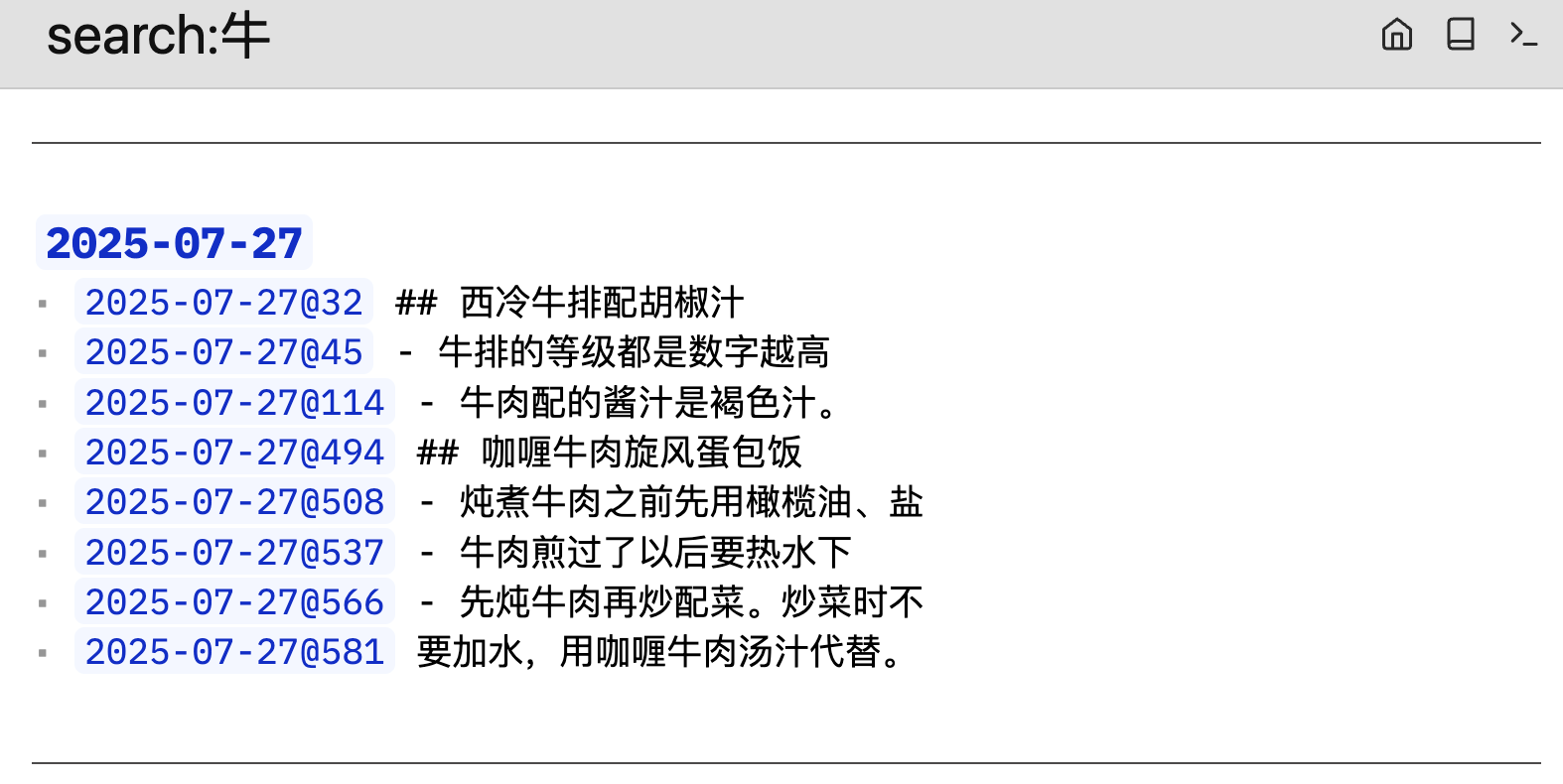
I built a slightly new script that returns a virtual page instead of a sidebar upon searching. It looks like the old default Silverbullet Search:

Each page has its own subsection, and pages are divided by --- dashes. It's not very quick of course, but in my space even a search which returns 28 pages and ~250 matches can complete within ~1/4 of a second.

The script is here:

-- Escape regular expression special characters in keywords
local function escapeKeyword(keyword)
	-- List of regular expression special characters: . ^ $ * + ? ( ) [ ] { } | \
	local specialChars = {
		["."] = "%.",
		["^"] = "%^",
		["$"] = "%$",
		["*"] = "%*",
		["+"] = "%+",
		["?"] = "%?",
		["("] = "%(",
		[")"] = "%)",
		["["] = "%[",
		["]"] = "%]",
		["{"] = "%{",
		["}"] = "%}",
		["|"] = "%|",
		["\\"] = "\\\\",
	}
	-- Replace special characters in the keyword with their escaped versions
	return string.gsub(keyword, ".", function(char)
		return specialChars[char] or char
	end)
end

-- Extract 10 characters before and after the keyword (handles cases with fewer than 10 characters)
-- Parameters: content (content to search), keyword (keyword to search for)
-- Returns: Iterator (each iteration returns a match result in the format: prefix + keyword + suffix)
local function extractKeywordContext(content, keyword)
	local escapedKeyword = escapeKeyword(keyword)
	local pattern = "(.{0,10}" .. escapedKeyword .. ".{0,10})"
	local pos = 1
	return function()
		local matchStart, matchEnd, match = content:find(pattern, pos)
		if matchStart then
			pos = matchEnd + 1
			return match, matchStart
		end
		return nil
	end
end

local function searchGlobal(keyword)
	local result = ""
	local pages = space.listPages()
	for i, page in ipairs(pages) do
		if page.name:match(":") then
			goto continue
		end
		local matchs = ""
		local content = space.readPage(page.name)
		for match, position in extractKeywordContext(content, keyword) do
			matchs = matchs .. "* [[" .. page.name .. "@" .. position .. "]] " .. match .. "\n"
		end
		if #matchs > 0 then
			result = result .. "\n---\n" .. "\n## [[" .. page.name .. "]]\n" .. matchs
		end
		::continue::
	end
	return result
end

command.define({
	name = "Global Search",
	run = function()
		local keyword = editor.prompt("Keyword", "")
		if #keyword then
			local res = searchGlobal(keyword)
			if #res > 0 then
				editor.navigate("search:" .. keyword)
			else
				editor.flashNotification("not found", "warn")
			end
		end
	end,
})

virtualPage.define({
	pattern = "search:(.+)",
	run = function(keyword)
		return searchGlobal(keyword)
	end,
})

I have the similar situation if on Chromium-based browsers on MacOS, but on Firefox for MacOS with the default IM of MacOS or Rime (Squirrel) it works fine. On my iPhone this problem is absent, possibly because Apple requires everyone to use their browser kit. My way to bypass this is either to edit the page in Firefox or just open my text editor since there's a git synced copy of my space locally.

Would be interesting to know which cases fail. I sadly can't test anything here, because I have no idea how the Chinese language(s?) works.

The difference is basically "do you index word-parts (prefixes, word roots, etc) or not". In "atom" there are "a-" (not) and "tome" (divide), but we only index the word "atom" in SilverSearch. In Chinese, words are not divided by spaces; rather, the reader is required to use experience to tell which characters form a word. So "atom" in Chinese is two characters "原子", "原" means "not dividable" and "子" means "some basic stuff". We see here that along the lines of SilverSearch, neither "原" nor "子" should be indexed, as they are just word-parts.

But here comes the question: a character can be a word-part but also a word by itself! Eg., "子" can also be pronoun. Does this mean we want to index every character? Which characters deserve to be indexed stand-alone and which do not?

The most aggressive approach would be to index every character. This seems to be the approach used by the script of the OP. The "tokenizer" for SilverSearch is a judge who decides which characters get indexed stand-alone.


By the way, when I tried to install it, the install of the Chinese tokenizer was corrupted; the big (3.8M) wasm file was not fetched into my SB space... :face_with_spiral_eyes: I had to manually download them into the same path as the PLUG.md.

@zef Perhaps we can consider adding a "checkhealth" command for libraries, e.g. checking whether the files they need are actually there, etc? Maybe provide a template and prompt the library authors to add this command when they share, or write a script to automatically post a warning (or not) after installing a library?

Silversearch should probably be clearer on what indexer is in use. The hard part tho is that different indexers can be used for different files and it can't know what indexers was used to index a specific file (You'll also have to do a full reindex, after installing the chinese tokenizer). The underlying part of the Chinese indexer is jieba-rs, which makes the decisions on how to split the text.

Thanks for pointing me to jiaba-rs; I've implemented the "aggressive" approach at https://github.com/Al3cLee/silversearch-chinese-tokenizer. This is just changing the last function call of the current tokenizer from cut_for_search to cut_all.

2 Likes