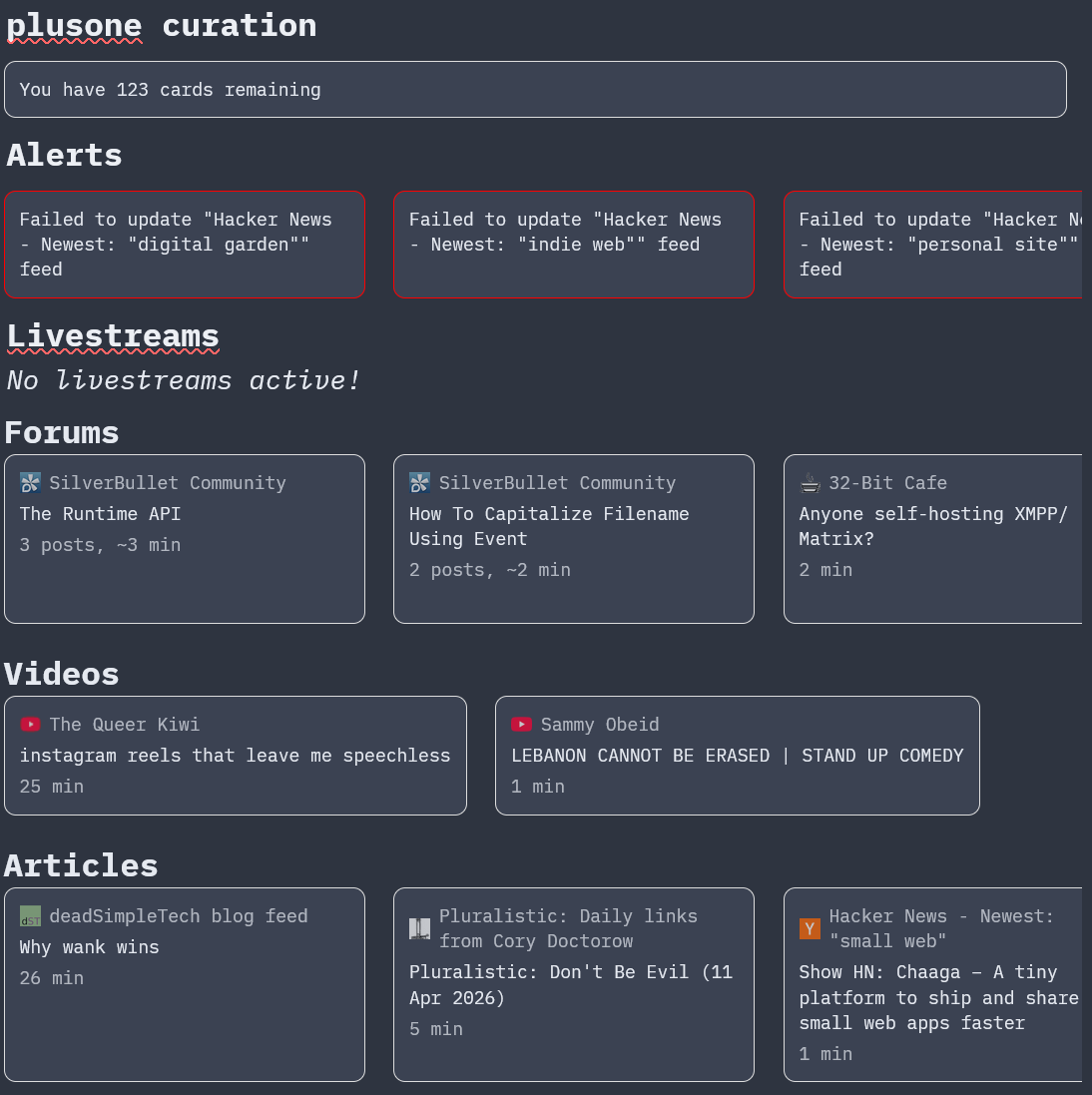
I'll make a post/library about it once it's a bit more polished and generalized, but right now I have a couple utils for making the button and the rows and shuffling items and stuff.
The button code is currently this:
function campfire.create_button(href, onclick, children, style)
  return dom.a {
    href = href,
    target = "_blank",
    onclick = onclick,
    style = table.concat({
      "display: flex",
      "flex-direction: column",
      "gap: 4px",
      "padding: 10px !important",
      "margin-right: 10px",
      "min-width: 220px",
      "text-decoration: none",
      "color: inherit",
      "border: 1px solid #ddd",
      "border-radius: 8px",
      "background: var(--subtle-background-color)",
      table.unpack(style or {})
    }, ";"),
    table.unpack(children)
  }
end
The alert buttons pass in the red border via the style parameter.
The code for each source of data is currently a bit different, but for the livestreams it looks like this:
function campfire.get_livestreams()
  local streamsRes = twitch.get_streams({
    -- (ommitted)
  })
  if streamsRes.data == nil then
    -- We need to get a new oauth token
    local children = {
      dom.div {
        style = table.concat({
          "font-size: 12px",
          "font-weight: 500"
        }, ";"),
        "Get new oauth token for twitch"
      }
    }
    local href = twitch.get_oauth_url()
    local button = campfire.create_button(href, nil, children, {
      "border-color: red"
    })
    return widget.html(dom.div {
      style = "margin: -1em 0",
      button
    })
  end
  local items = streamsRes.data
  if #items == 0 then
    return widget.html(dom.i {
      "No livestreams active!"
    })
  end
  local row = {}
  local streams = { }
  for k, v in pairs(items) do streams[k] = v end
  streams = shuffle(streams)
  for _, stream in ipairs(streams) do
    local children = {}
    local href = "https://www.twitch.tv/" .. stream.user_login

    local icon = stream.thumbnail_url
    icon = icon:gsub("{width}", "14")
    icon = icon:gsub("{height}", "14")
    local topRow = {
      dom.img {
        src = icon,
        style = "width: 14px; height: 14px;"
      },
      stream.user_name
    }
    table.insert(children, dom.div {
      style = table.concat({
        "display: flex",
        "align-items: center",
        "gap: 6px",
        "font-size: 12px",
        "opacity: 0.7"
      }, ";"),
      table.unpack(topRow)
    })

    table.insert(children, dom.div {
      style = table.concat({
        "font-size: 12px",
        "font-weight: 500"
      }, ";"),
      stream.title
    })

    table.insert(children, dom.div {
      style = table.concat({
        "font-size: 12px",
        "opacity: 0.7;"
      }, ";"),
      stream.game_name
    })

    local button = campfire.create_button(href, nil, children)
    table.insert(row, button)
  end
  return widget.html(dom.div {
    style = table.concat({
      "display: flex",
      "gap: .5em",
      "margin-top: -1em",
      "margin-bottom: -1em",
      "overflow-x: auto"
    }, ";"),
    table.unpack(row)
  })
end
RSS is a bit more complicated because I merge items from the same forum thread together and have it open the thread directly instead of miniflux (and use the onclick function to mark each post in miniflux as read).
For actually talking to twitch, miniflux, etc. I write files like Library/Infrastructure/Miniflux that look something like this (with the vars defined in a separate file):
function filter(arr, func)
    local result = {}
    for i, v in ipairs(arr) do
        if func(v, i) then
            table.insert(result, v)
        end
    end
    return result
end

function miniflux.get_unread()
  local feeds = miniflux.fetch("/v1/feeds/counters").body.unreads
  local unread = 0
  for i, v in pairs(feeds) do
    unread = unread + v
  end
  return unread
end

function miniflux.mark_read(ids)
  miniflux.fetch("/v1/entries", {
    entry_ids = ids,
    status = "read"
  }, "PUT")
end

function miniflux.get_recent_entries(days)
  local timestamp = os.time()
  timestamp = timestamp - days * 24 * 60 * 60
  return miniflux.fetch("/v1/entries?status=unread&after=" .. timestamp).body.entries
end

function miniflux.get_icon(id)
  return miniflux.fetch("/v1/icons/" .. id).body.data
end

function miniflux.get_failing_feeds()
  local feeds =  miniflux.fetch("/v1/feeds").body
  return filter(feeds, function(e)
    return e.parsing_error_count > 0
  end)
end

function miniflux.fetch(url, body, method)
  local baseUrl = config.get("miniflux.baseUrl")
  if not baseUrl then
    error("miniflux.baseUrl config not set")
  end
  local token = config.get("miniflux.token")
  if not token then
    error("miniflux.token config not set")
  end
  return net.proxyFetch(baseUrl .. url, {
    method = method or "GET",
    headers = {
      ["X-Auth-Token"] = token
    },
    body = body
  })
end