When I have checklist items, the second row is not aligned with the first. Is this a bug or a problem with my setup? How can I make them aligned?
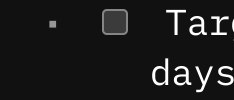
this is a known bug due to using a mix of non-monospaced(proportional) and monospaced fonts.
text-ident in the markdown rendering for Quotes, Tasks, Admonitions, Lists etc. is calculated based on the the character width for example: text-indent: calc(-1 * (0.8ch + 5ch));
Because different fonts have different widths for the “character” measurement, this creates these kind of visual inconsistencies, where the rendered indentation drifts or misaligns.
There are some workarounds but it’s like a Whac-A-Mole game. Fix the indent in one misbehaving element, and two more explodes somewhere completely unexpected.
As @Mr.Red said, it’s a game of Whac-A-Mole and I still haven’t found a true fix.
However, if you’re interested, these are my WIP Space Styles that address part of the problem (at least for me).
Fix task’s text indentation when soft-wrapping:
/* top level tasks */
#sb-main .cm-editor .sb-line-ul.sb-line-li-1.sb-line-task {
  text-indent: -5.8ch;
}
#sb-main .cm-editor .sb-line-ul.sb-line-li-1.sb-line-task .cm-list-bullet::after {
  left: 6.4ch;
}

/* first nested level */
#sb-main .cm-editor .sb-line-ul.sb-line-li-1.sb-line-li-2.sb-line-task {
  text-indent: -7.8ch;
}
#sb-main .cm-editor .sb-line-ul.sb-line-li-1.sb-line-li-2.sb-line-task .cm-list-bullet::after {
  left: 7.8ch;
}

/* second nesting level */
#sb-main .cm-editor .sb-line-ul.sb-line-li-1.sb-line-li-2.sb-line-li-3.sb-line-task {
  text-indent: -9.8ch;
}
#sb-main .cm-editor .sb-line-ul.sb-line-li-1.sb-line-li-2.sb-line-li-3.sb-line-task .cm-list-bullet::after {
  left: 9.8ch;
}
Fix task’s text indentation when soft-wrapping inside templates.taskItem:
#sb-main .cm-editor .sb-lua-directive-block:not(.sb-lua-top-widget) ul li {
  padding-left: 3ch;
  text-indent: -3.5ch;
}

#sb-main .cm-editor .sb-lua-directive-block:not(.sb-lua-top-widget) ul li:before {
  text-indent: 0;
}
@laurybueno this fixed worked perfectly! Thank you. It fall apart if you indent your bullet list or have an indented title, but that’s not how I use it 99% of the time.