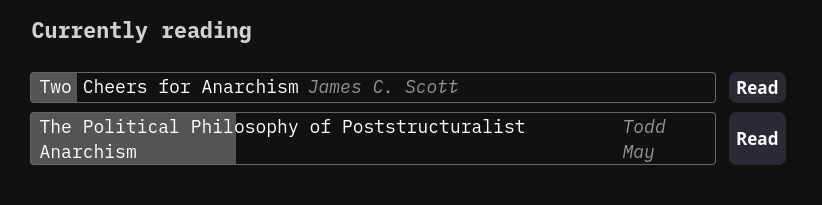
I ended up deciding to setup kravita, because it syncs reading progress and has an API I can use to show progress and potentially even pull my annotations with. For now it looks like this:
And here’s how I implemented it:
local function createPageFromTemplate(templatePage, pageName)
  -- Won't override an existing page
  if space.pageExists(pageName) then
    editor.flashNotification("Page " .. pageName .. " already exists", "error")
    return
  end
  local tpl, fm = template.fromPage(templatePage)
  local initialText = ""
  if fm.frontmatter then
    initialText = "---\n"
      .. string.trim(template.new(fm.frontmatter)())
      .. "\n---\n"
  end
  -- Write an empty page to start
  space.writePage(pageName, initialText)
  editor.navigate(pageName)
  -- Insert there, supporting |^| cursor placeholder
  editor.insertAtPos(tpl(), #initialText, true)
end

function kavita.get_currently_reading()
  local activities = kavita.fetch("/api/Series/currently-reading?PageNumber=0&PageSize=5&userId=1").body
  local rows = {}
  local baseUrl = config.get("kavita.baseUrl")

  for _, activity in ipairs(activities) do
    -- The docs don't have a good way of getting % progress
    -- https://www.kavitareader.com/docs/api
    -- We can get the overall wordCount, but can't get current progress in wordCount
    -- We can get current page, but progress on that page is just a string that doesn't map to a word count nor % of the page/chapter
    -- (the string is "bookScrollId" from `/api/Reader/get-progress`)
    -- Instead, we'll use `/api/Reader/continue-point` to get the volume we're on to construct a link to the reader
    local continuePoint = kavita.fetch('/api/Reader/continue-point?seriesId=' .. activity.id).body
    local link = baseUrl .. '/library/' .. activity.libraryId .. '/series/' .. activity.id .. '/book/' .. continuePoint.volumeId
    local progress = activity.pagesRead / activity.pages
    local seriesMetadata = kavita.fetch('/api/Series/metadata?seriesId=' .. activity.id).body

    table.insert(rows, dom.div {
      style = "display: flex; gap: .5em",
      -- title w/ progress display
      dom.div {
        style = "position: relative; border: solid 1px var(--button-border-color); flex-grow: 1; padding: 0 .5em; border-radius: 4px; display: flex; gap: .5em; cursor: pointer;",
        onclick = function()
          if space.pageExists(activity.name) then
            editor.navigate(activity.name)
            return
          end
          createPageFromTemplate("Library/Templates/Books", activity.name)
          local updated = index.patchFrontmatter(editor.getText(),
          {
            { op="set-key", path="libraryId", value=activity.libraryId },
            { op="set-key", path="seriesId", value=activity.id },
            { op="set-key", path="volumeId", value=continuePoint.volumeId },
          })
          editor.setText(updated)
          editor.rebuildEditorState()
        end,
        dom.div {
          style = "position: absolute; top: 0; bottom: 0; left: 0; width:" .. (progress * 100) .. "%; z-index: -1; background: var(--button-background-color)"
        },
        activity.name,
        dom.span {
          style = "font-style: italic; color: var(--subtle-color);",
          seriesMetadata.writers[1].name
        }
      },
      -- button to open reader
      dom.button {
        style = 'white-space: nowrap;',
        onclick = function()
          editor.openUrl(link)
        end,
        "Read"
      }
    })
  end

  return widget.html(dom.div {
    style = "display: flex; flex-flow: column; gap: .5em",
    table.unpack(rows)
  })
end

function kavita.fetch(url, body, method)
  local baseUrl = config.get("kavita.baseUrl")
  if not baseUrl then
    error("kavita.baseUrl config not set")
  end
  local token = config.get("kavita.token")
  if not token then
    error("kavita.token config not set")
  end
  return net.proxyFetch(baseUrl .. url, {
    method = method or "GET",
    headers = {
      ["x-api-key"] = token,
      ["Content-Type"] = "application/json"
    },
    body = body
  })
end