Hey there. I newly discovered a weird problem that I cannot really understand.
I am running the following Lua snippet: ${os.time({year=2025, month=9, day=30})}
I know that os.time returns the timestamp in seconds. So I would expect the timestamp for 2025-09-30 at 00:00, aka. 1759183200. I am in UTC+2, hence I would also be fine with an offset of up to 2 hours, aka. 7200 seconds here.
What I actually get is 1761822000. Parsing that back into a date gives me 2025-10-30. This is odd.
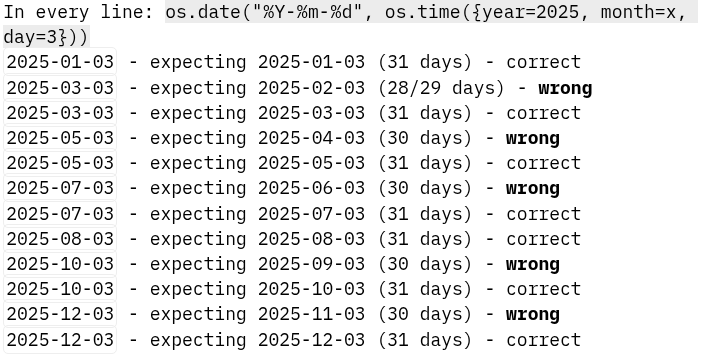
Running throughout the year, this problem is a bit larger: The months 2,3 return the same timestamp, same for 4,5 and 6,7 and 9,10 and 11,12. From this observation, I assume that the problem occurs with months that have less than 31 days?
Throughout the year 2025, this problem reoccurs in every month that has less than 31 days:
Should be fixed tomorrow when it’s the first of the month again …
Yeah, that should be fixed that’s really bad. It happens because the api internally uses the js date api and first creates a date, which then has the current date, and sets the provided day, month, year, using the apis. This one is for the month. And this is the relevant paragraph.
For example, if the current value is 31st January 2016, calling setMonth with a value of 1 will return 2nd March 2016. This is because in 2016 February had 29 days.
After the month, the day is set, that’s why it’s the 30th again.
Could you create an issue on github? Doesn’t have to be long, you can link to this thread.