I'm querying tasks. I want the query results (each row is a task) to be rendered just like the source line of the task is rendered from markdown. Is this possible?
As far as I understand you question correctly, the short answer: No.
The long answer:
The query itself is a lua widget block. So you technically have a html wrapper around it and is seen as a rendered HTML.
Btw the “markdown” you see on your page isn’t the raw markdown either, it is a rendered html too, the only thing is it is editable, and rendered in real time from the raw markdown source.
So a query can be transformed/converted to markdown using the “copy” button on the top-right corner and pasting it into the page. This will be copied into the markdown, and not linked to the original tasks.
On the other hand you can style the wrapper to looks exactly like a normal markdown Task, but of course it won’t be it, it will only look like it.
This can be achieved with a little css/spacestyle magic. But the query will still be wrapped inside the widget wrapper but it won’t be visible 
Correct, that rendered markdown is what I'm wanting.
Unfortunately, this doesn't work: the pasted markdown looks like the rendering of the query, not the rendering of the source:
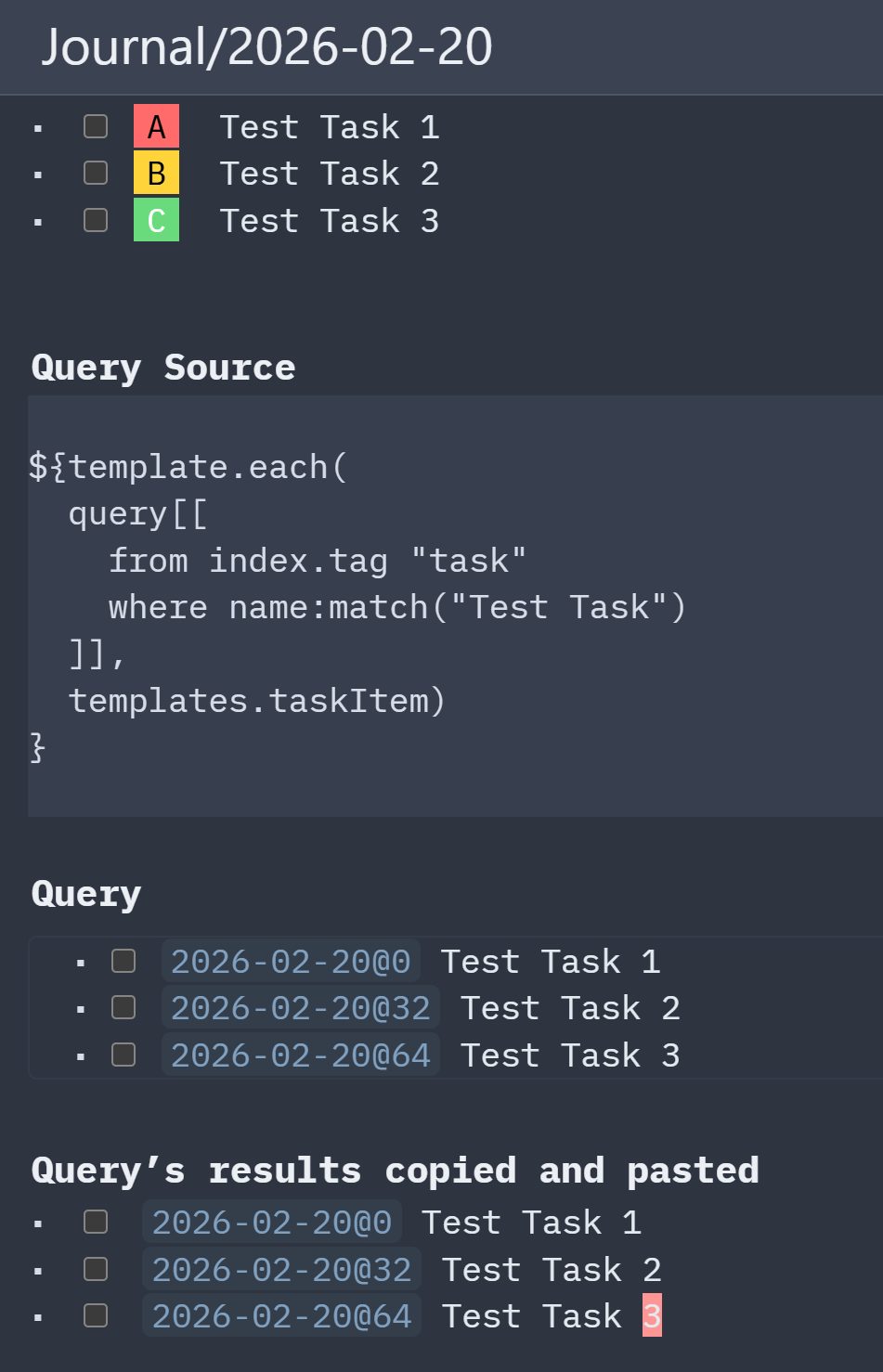
Styling the wrapper seems against DRY and therefore a pain to maintain. I'm wondering if it's possible to somehow use the existing formatting, so the query renders just as the actual tasks do at the very top of the screen?
Not possible with simple CSS.
like i said before, the only way to do this to work with the query, is to creat a custom template for your custom task rule, and using the template + query + JS to change the DOM structure so that the CSS in the space-style can be applied accordingly.
it's not impossible. but it's not as simple as pointing a css styles to some selectors inside a wrapper. You can's simply does this in CSS only because the query generates a completely other DOM hierarchy.
Here is the same example task as "markdown" and as "query":
This is the DOM of the "raw markdown" task:
<div class="cm-line sb-line-ul sb-line-li sb-line-li-1 sb-line-task">
  <img class="cm-widgetBuffer" aria-hidden="true">
  <span class="cm-list-bullet" contenteditable="false">-</span>
  <img class="cm-widgetBuffer" aria-hidden="true">
  <span class="sb-list"></span>
  <img class="cm-widgetBuffer" aria-hidden="true">

  <span class="sb-checkbox" contenteditable="false"> <input type="checkbox"></span>

  <img class="cm-widgetBuffer" aria-hidden="true">

  <span class="sb-list sb-task">Feed the cats</span>

  <span class="sb-attribute" data-priority="A">
    <span class="sb-list sb-frontmatter sb-meta">[</span>
    <span class="sb-list sb-frontmatter sb-attribute-name">priority</span>
    <span class="sb-list sb-frontmatter sb-meta">:</span>
    <span class="sb-list sb-frontmatter sb-attribute-value">A</span>
    <span class="sb-list sb-frontmatter sb-meta">]</span>
  </span>
</div>
This is the DOM generated by the query for the same task:
<div class="sb-lua-directive-block">
    <div class="content">
      <span class="wrapper">
        <ul>
          <li>
            <span data-external-task-ref="CSS_PRIORITY_TASK@2">
              <input type="checkbox" data-state=" ">
              <a  href="CSS_PRIORITY_TASK%402" class="wiki-link" data-ref="CSS_PRIORITY_TASK@2">Feed the cats</a>
              <span class="attribute">[priority: "A"]</span>
            </span>
          </li>
        </ul>
      </span>
    </div>
  </div>
</div>
As you can see, it's a completely different hierarchy, classes, and dom elements.
and CSS is not "smart" enough to style the rendered query where the priority is a simpl text, without any specific class or data-field. it's not possible to display the colored rectangles based on the generated DOM elements in the query, without any serious JS dom manipulation.
CSS has no way to select elements based on their text content. There's no standard selector like :contains("A") that works for this purpose.
Your options remain:
- Add data-priority="A" as an actual HTML attribute on the span (fix at the source/template level)
- Use a small JS snippet to read the text and set the attribute, then let your existing CSS work
There's no pure-CSS workaround when the only distinguishing information is inside the text content of the element.
That makes sense.
I was wondering if there'd be a way to do it using the space and/or markdown API, but it looks like there isn't. There is a space.readRef to get the original text for the task, but the problem is, the rendering is not done. I wonder why. Note that copy/pasting these results works well, and the markdown is rendered.
function widgets.mytasks()
  local tasks =  query[[
    from index.tag "task"
    where done == false
      and name:match("Testing:")
    order by state, (priority or "Z"), name:lower()
  ]]
  text = "### Tasks:\n"
  for t in tasks do
    content = space.readRef(t.ref)
    text = text .. content .. "\n"
  end

  return text
end
${widgets.mytasks()}