[Library] Silverware-database

I've been working on a new plugin in the Silverware collection, and it's ready for people to try. It's heavily inspired by Notion's databases, and I'm not going to pretend otherwise. The difference is that nothing here lives in a hidden store. Every item is a normal SilverBullet page, and its properties are that page's frontmatter.
How it works

A database is a folder of pages next to the page you created it on:

Projects.md                       the page that shows the database
Projects/db-tasks.md              the database itself: its name and properties
Projects/db-tasks/Fix login.md    an item: properties in frontmatter, notes in the body

Because items are just pages, everything you already do keeps working. You can link to them, write notes and tasks in them, and query them:

query[[from index.tag "db" where status == "Doing"]]

To show a database somewhere, type /database and pick one, or pick New database… at the top of the list. That inserts a small block:

```silverware-database
id: tasks
```

You can put the same database on as many pages as you like. Each block remembers its own view, filter, sort and grouping.

Views

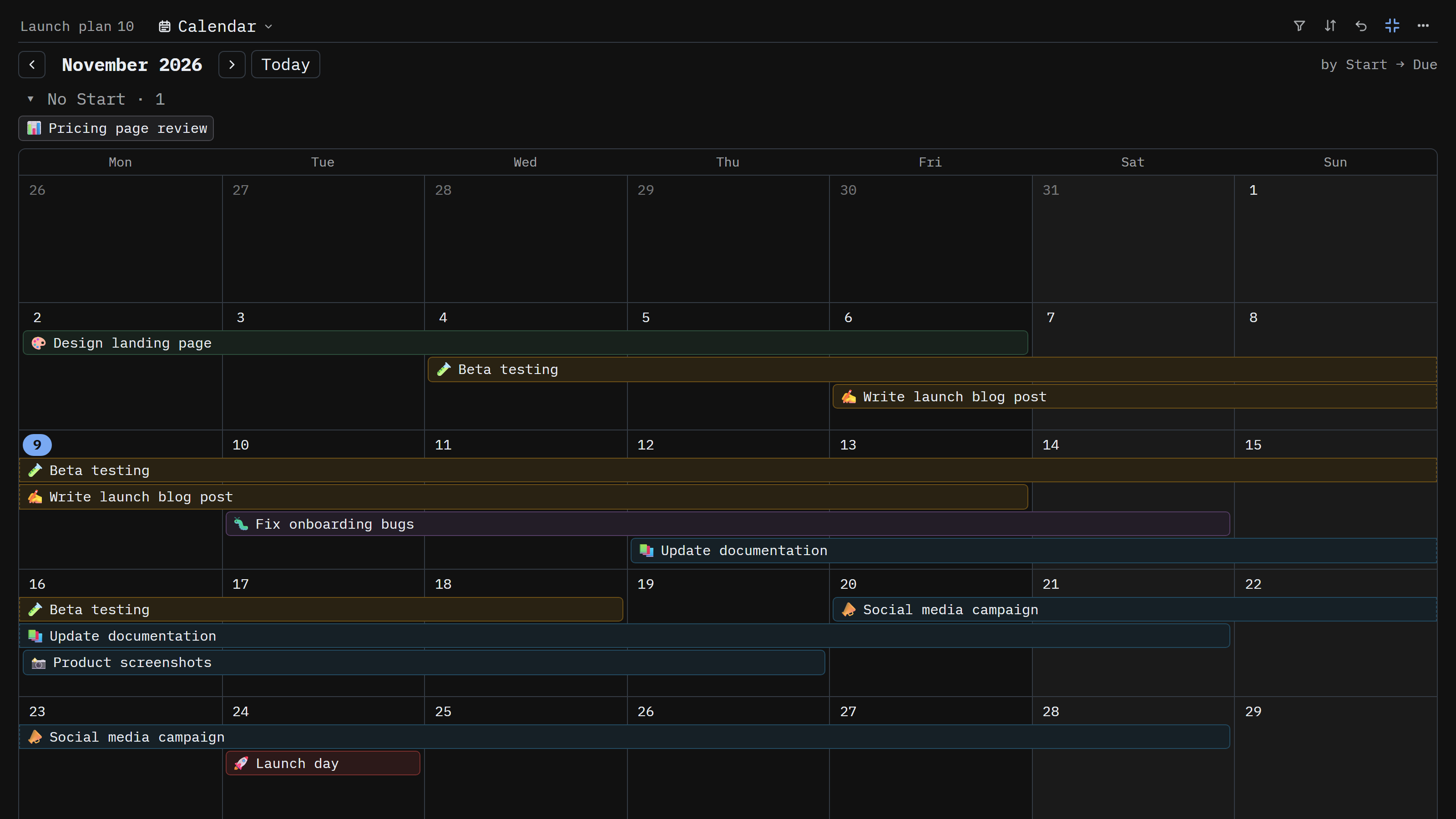
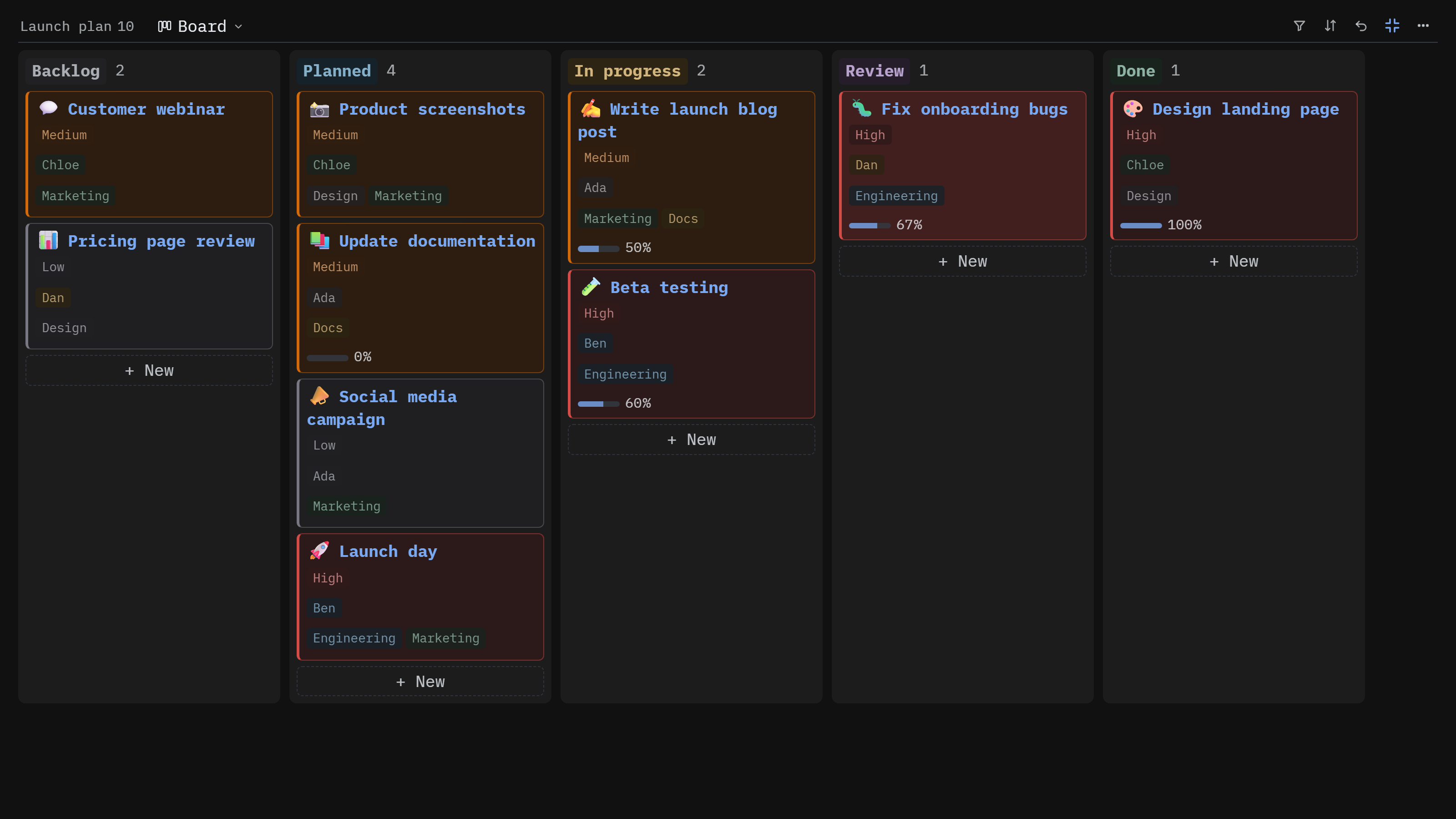
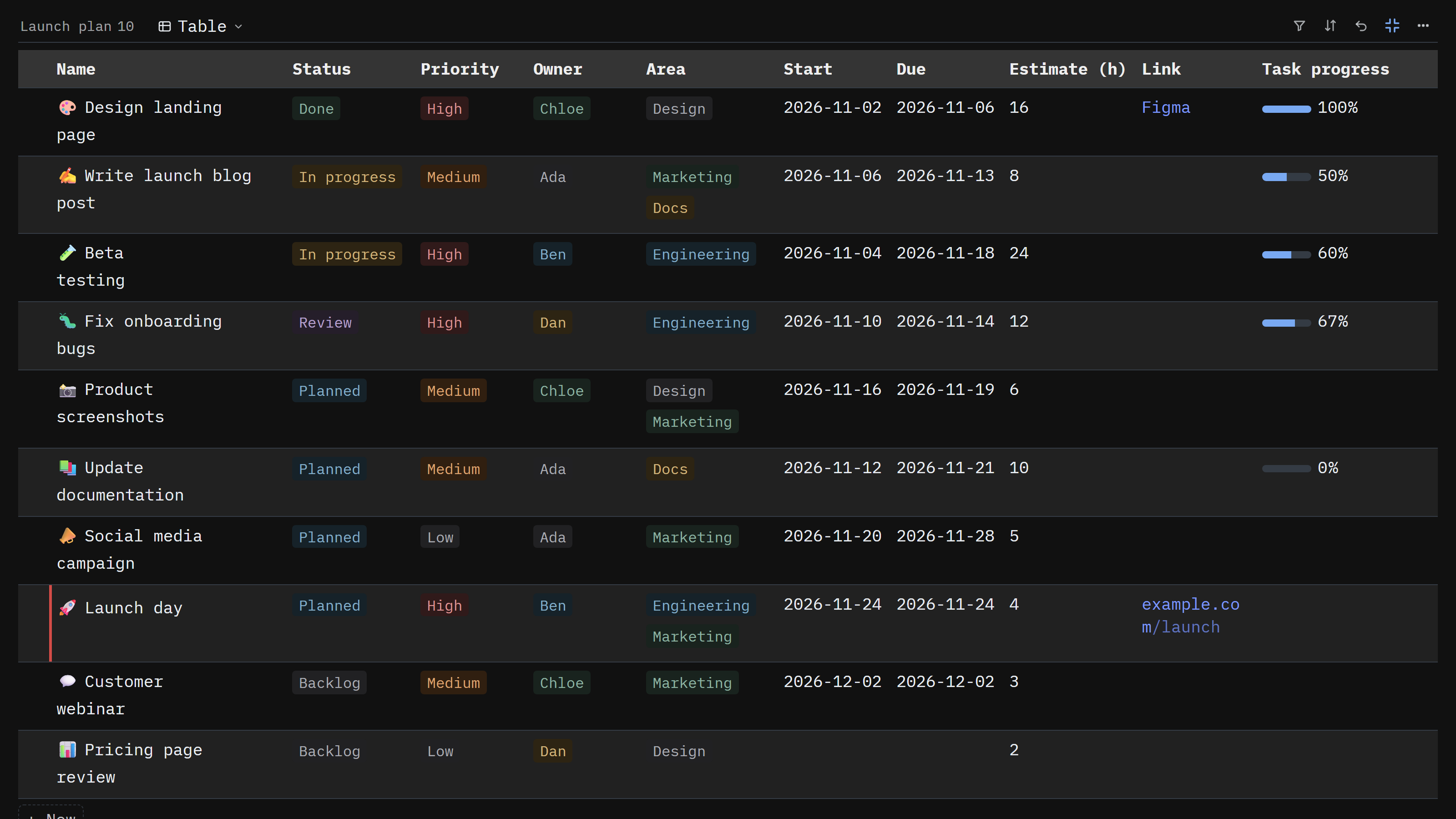
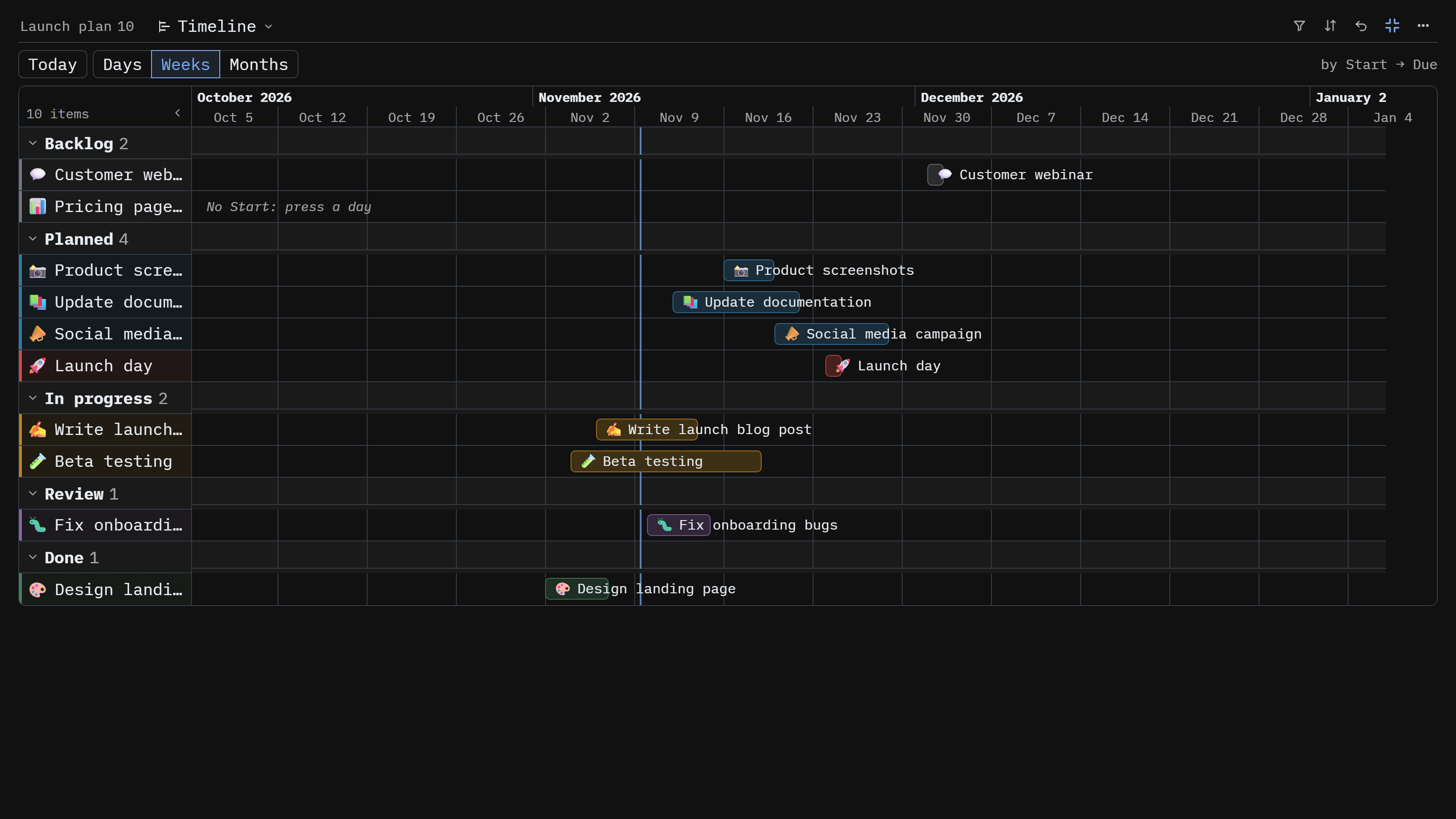
There are five built-in views: Table, List, Board, Calendar and Timeline. Every view can be filtered, sorted, grouped by any property and colored by a select. You edit values in place. Cards, rows and timeline bars can be dragged around, and dragging changes the underlying value. Drop a card in another column and its status changes. Move a bar on the timeline and its dates change.
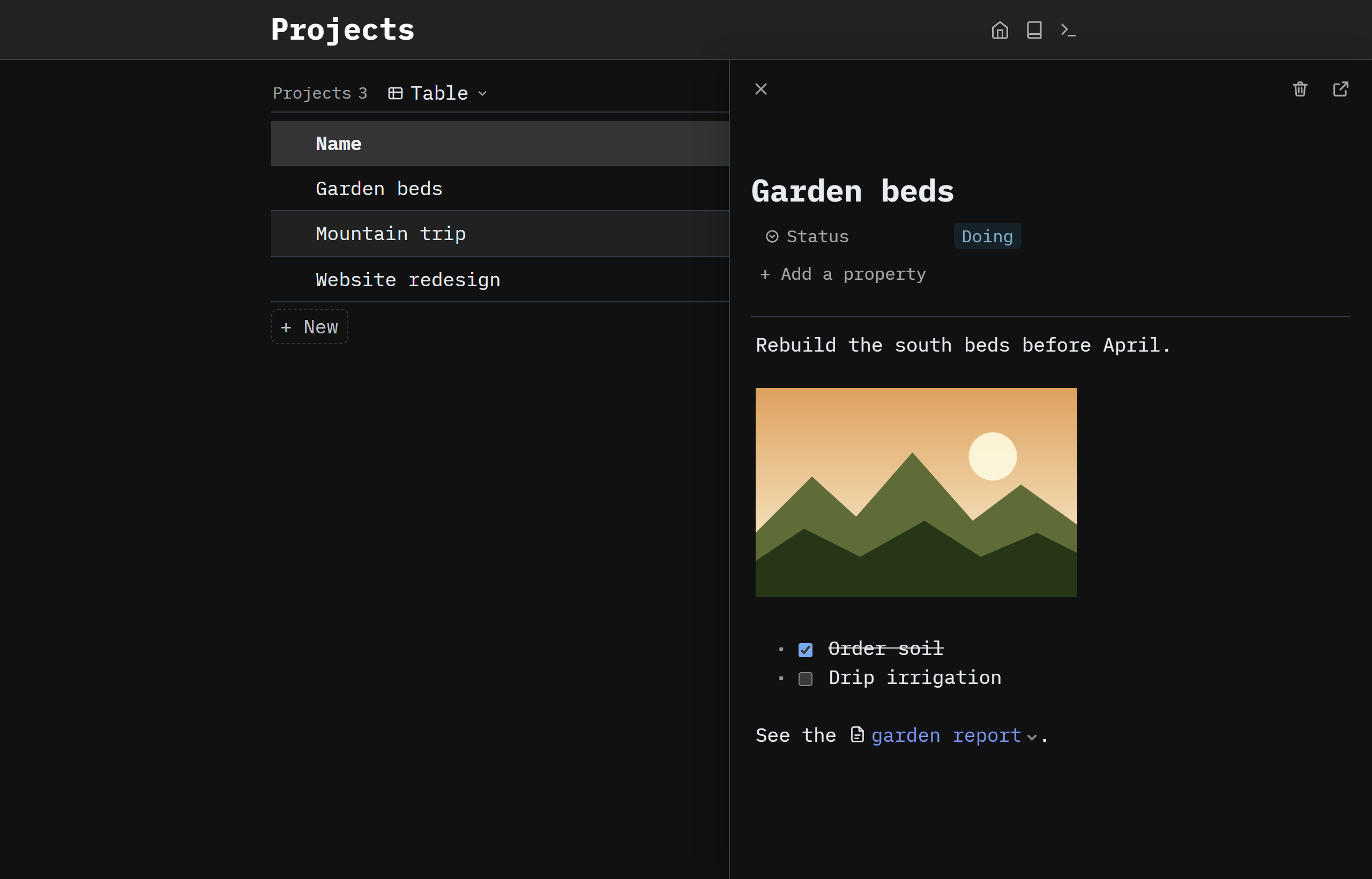
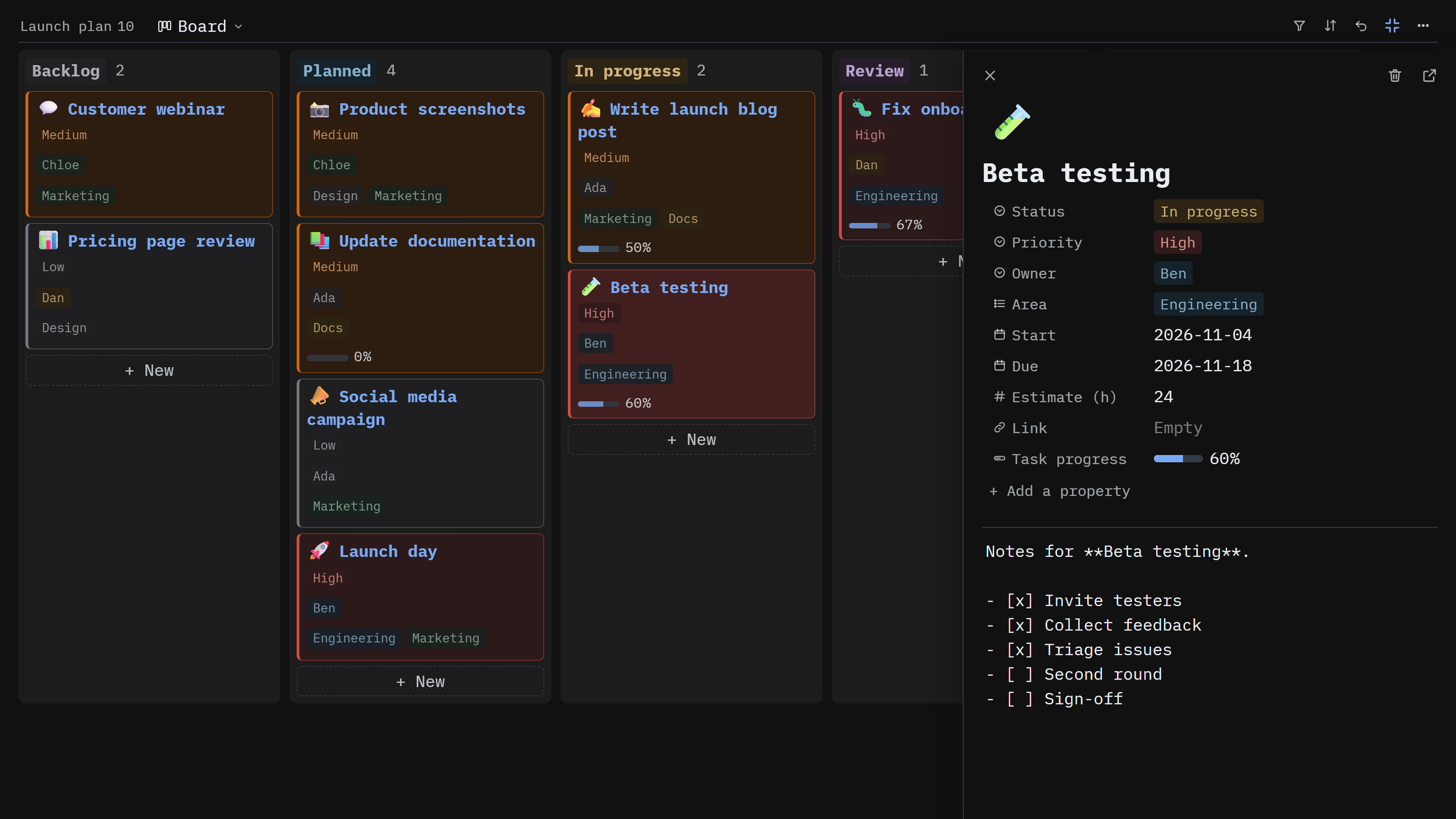
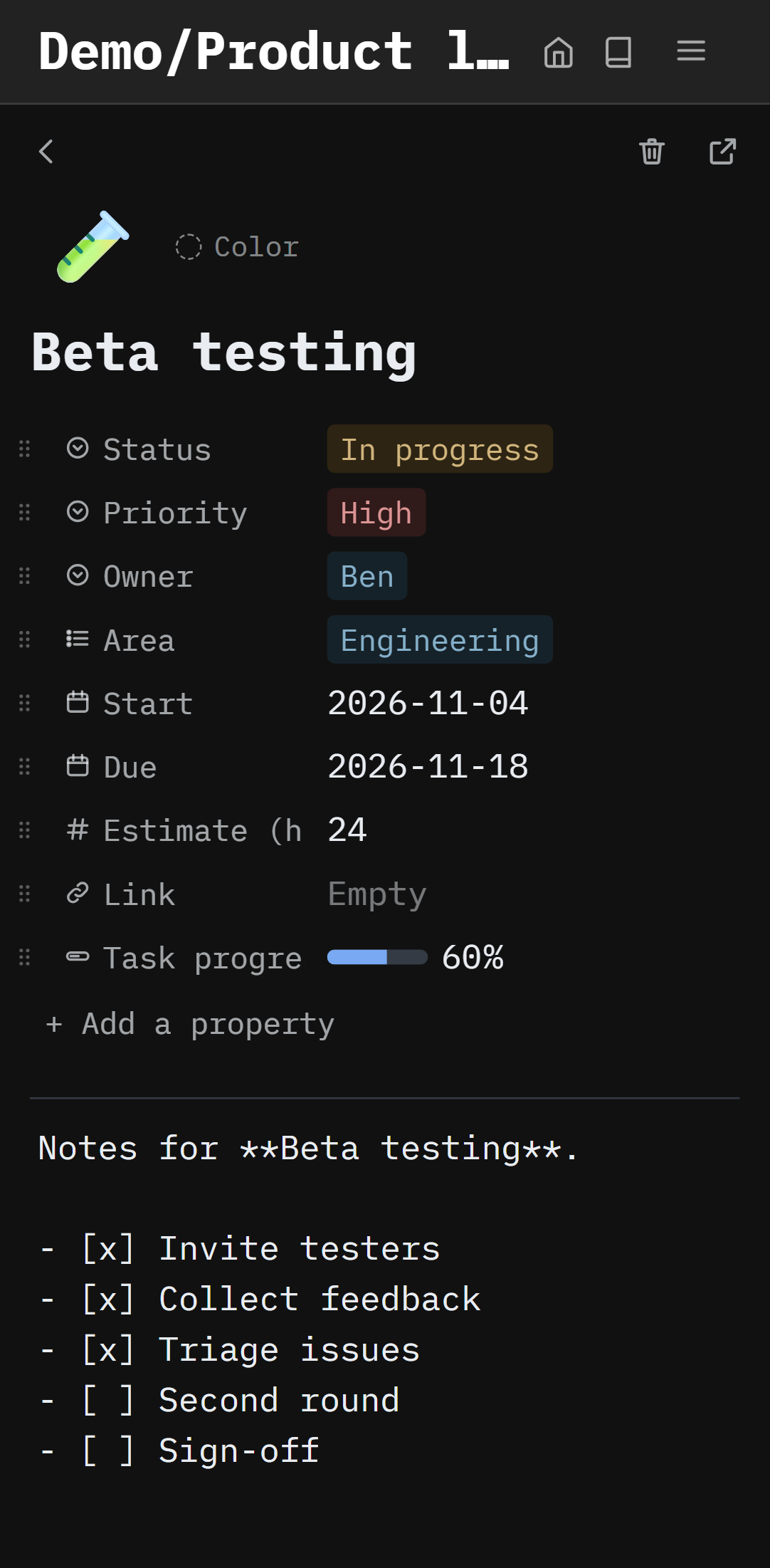
Click an item's name and it opens in a side panel (the "peek"). From there you can edit its properties, read and write its notes, give it an icon or a color, or open the full page.
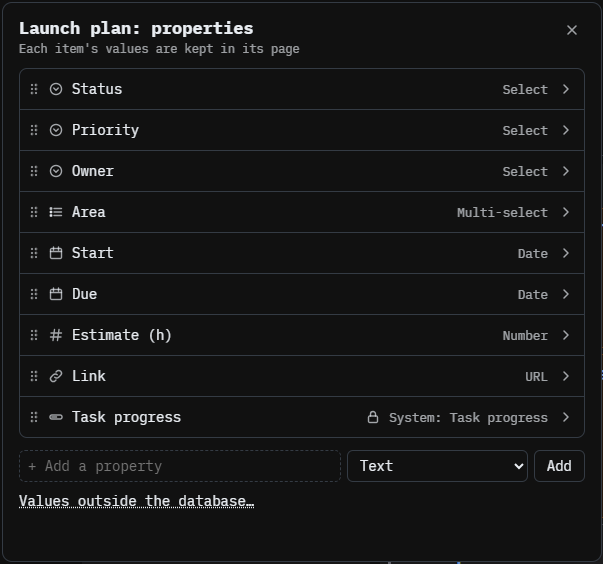
Properties

The property types are text, number, select, multi-select, checkbox, date, time, date & time, URL and reference (links to other pages). There are also a few system properties the database fills in for you: created, modified, order, page, tags, and a task progress bar based on the - [ ] tasks inside the item's page.

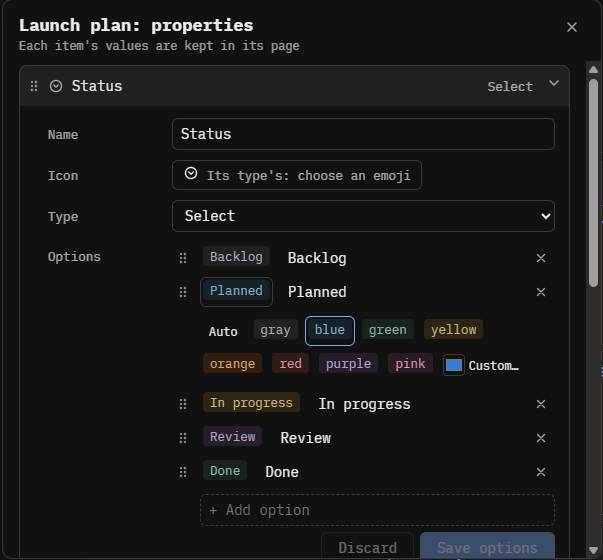
Anything that touches a lot of pages shows you what it will change before it does it. That covers renaming an option, changing a property's type, removing a property and deleting a database. Every change can be undone.
When a page changes under you

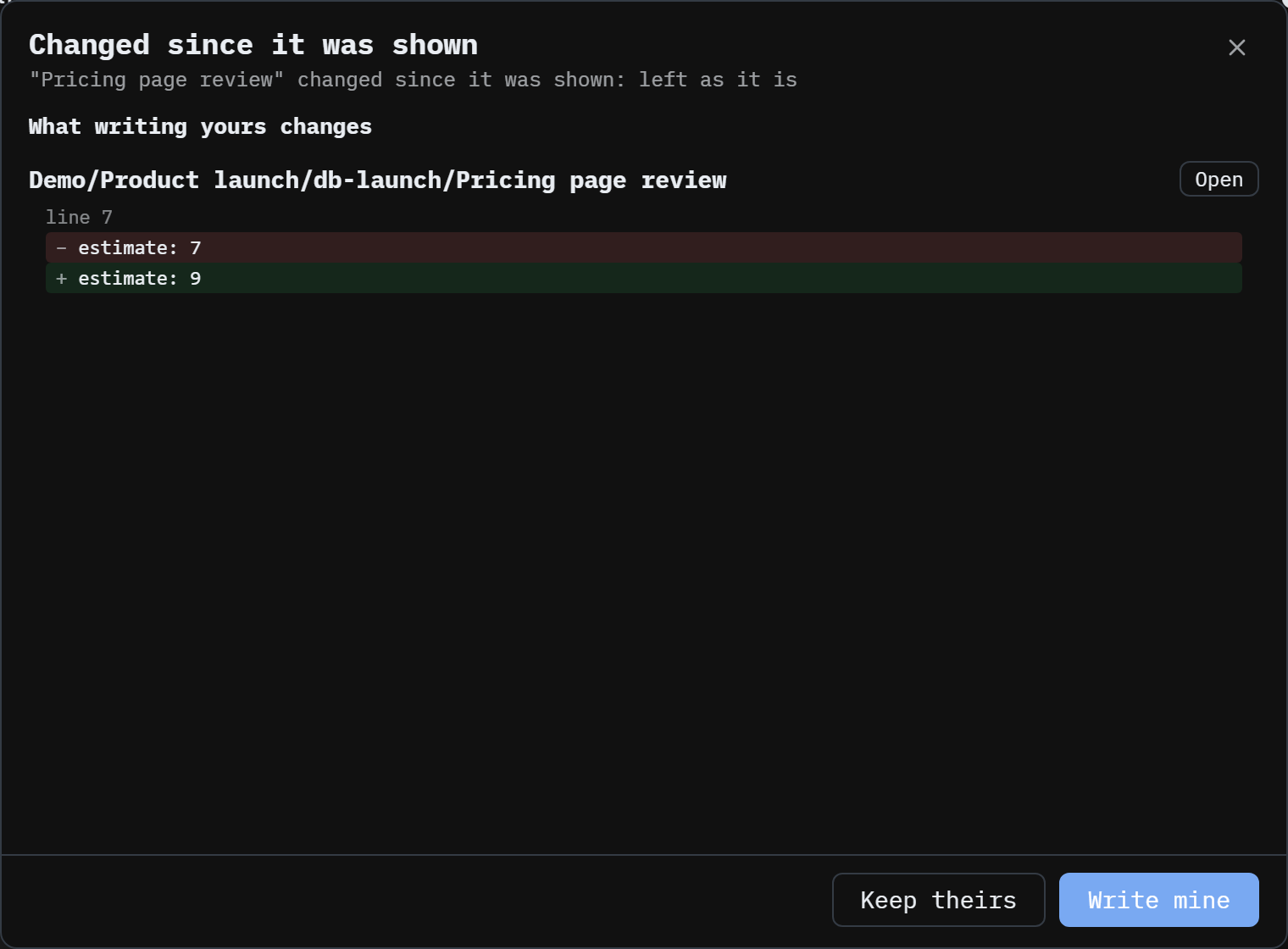
Your database is just pages, so they can change while you're looking at them: on another device, in another tab, or when you edit the frontmatter by hand. When you edit a value that changed after the view drew it, Silverware Database doesn't silently overwrite it. It leaves that value as it is and shows a notification that stays until you close it.

Click Show conflict to see the page's markdown as it is now and as your change would make it. Then pick Keep theirs or Write mine. Write mine can be undone like any other change. If the page changed yet again in the meantime, you get the new conflict instead of a blind overwrite.

It only kicks in when the exact thing you're changing has changed. If someone edited a different field of the same item, your change just goes through and theirs stays.
On a phone

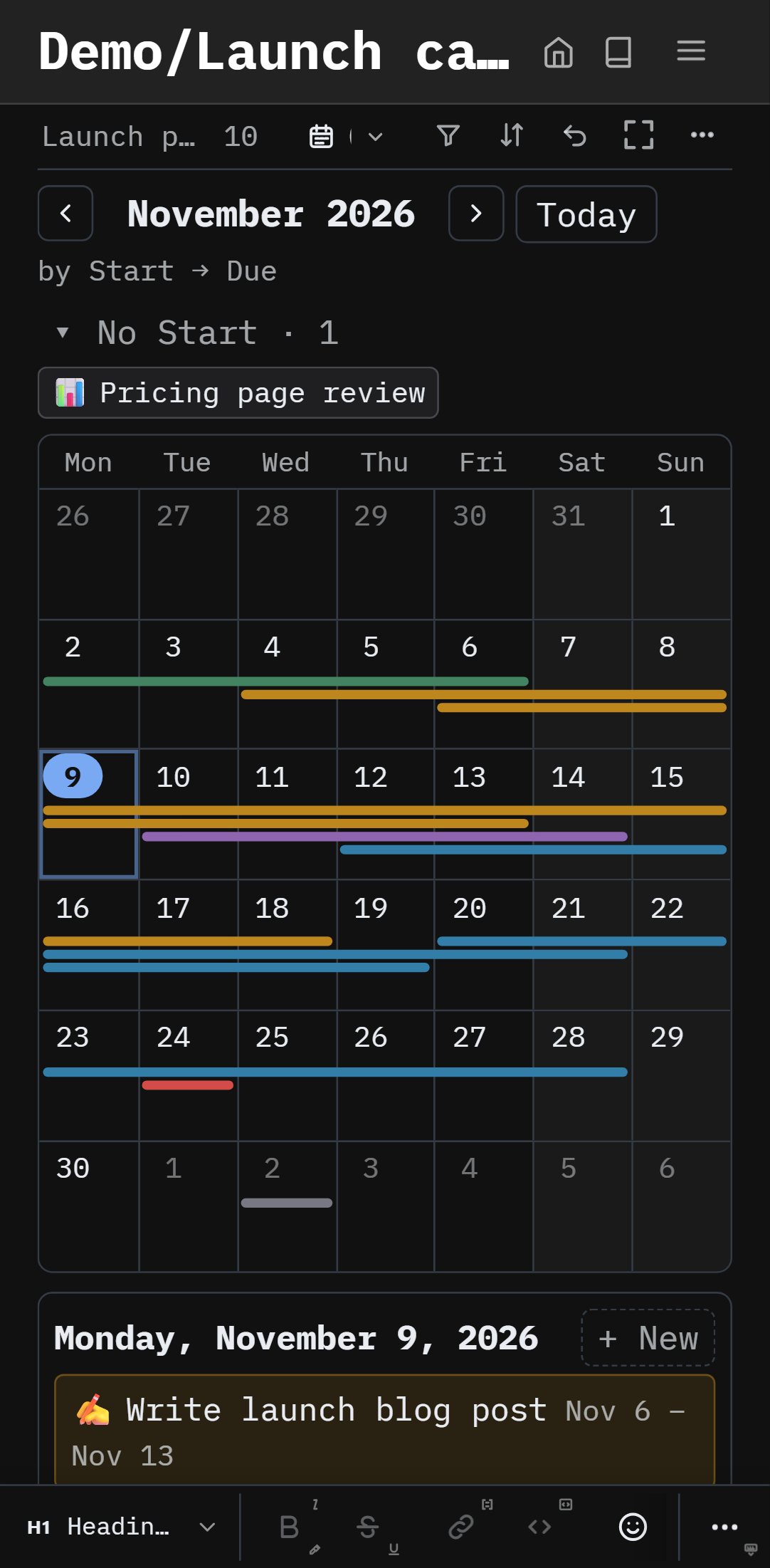
I use SilverBullet on my phone, so this was a requirement from the beginning. The peek takes the whole screen, cards and bars can be dragged with a finger, and the calendar switches to a compact layout with the selected day's items listed underneath.
Your own views and types

If the built-in ones don't fit, you can define your own views and property types in JavaScript and register them from Space Lua (silverware.database.defineViews, defineTypes). The library page has the details and a working example.

Install

Add the repository with Library: Add Repository:

https://github.com/damesene/silverware-libraries/blob/main/REPO.md

Then run Library: Install and pick Silverware Database.

It's new. I've tested it a lot, but you'll probably find rough edges. Please report them.

What's next

I'm far from done with this plugin. There's a lot more I want to build, and some of it I'm really looking forward to. If you're missing something, let me know.

I have to say, you are crazy man! You are single-handedly creating Notion in SilverBullet, what an incredible featureset is silverware becoming! Especially this one, with the elaborate github-projects/notion like kanban boards / bases, this will skyrocket what can be done with SilverBullet as a (small-medium) team project tracker!

Full disclosure: this project probably wouldn’t exist without AI. And no, it’s not a matter of typing “rebuild Notion in SilverBullet” and waiting for the result. I handle the architecture, how it fits into the platform, and where it’s heading, but AI writes most of the actual code.

I also want to be upfront about the downsides of how my SilverBullet plugin works. The idea was to get Notion-style databases on top of plain Markdown files, using SilverBullet’s index. The catch is that keeping a pile of plain text files in sync like a real database isn’t free.

Some bulk operations (they’re rare) have to touch every page in the database. For example, if you delete a property along with its data (optional), the plugin has to open every page and remove that field from each one. It warns you before it starts, shows progress while it runs, and lets you undo the whole thing. Still, editing text files one by one is never going to be fast at scale.

Speed isn’t the only cost, though. Since the data lives in ordinary Markdown files, the plugin simply can’t guarantee consistency the way a real database would. Anyone can edit a page by hand, in another editor, or through a sync tool, and nothing stops the data from drifting away from the database’s structure. The plugin is built with that in mind, so it doesn’t assume everything is always in order and handles inconsistent data instead of breaking on it.

Whether these trade-offs work for you depends on what you need. I just don’t want to give the impression that this is a perfect fit for everything.

Yeah, I kind-of assumed so, given the velocity at which you're doing this. But I can't blame you, everybody has their own vibecoded projects nowadays, and also the results are great!

I think this tradeoff fits very well in the SB way of doing things. Keep the truth in the markdown, and adopt app-specific formats as sparingly as possible. If you actually want notion, use notion :sweat_smile:

I think nobody uses notion as an actual database anyways, just like you wouldn't use excel as a database. I think a more accurate term would be something along the lines of "structured frontmatter"

Turn a task list into a database

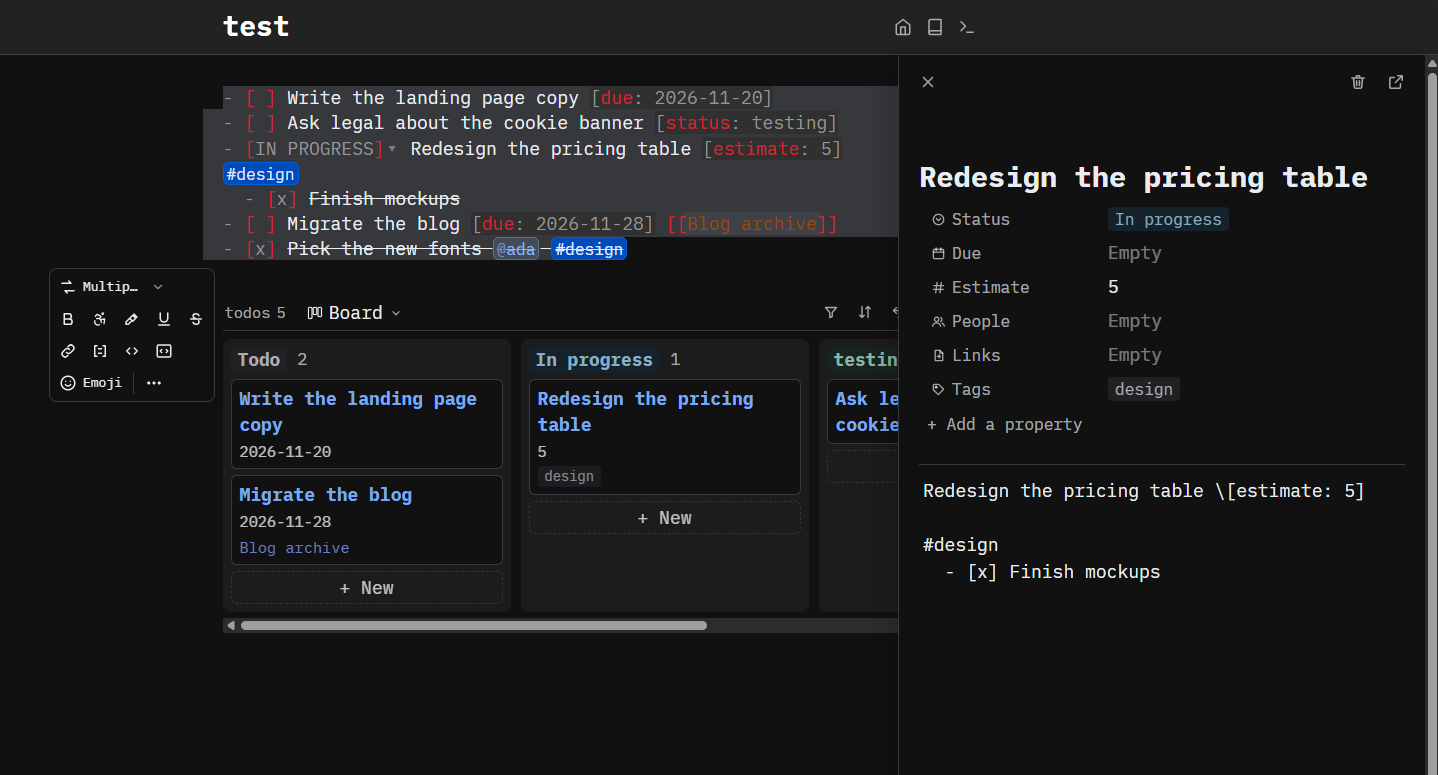
Select a list of tasks and run Silverware Database: Convert selection to database. Each task becomes an item (a page of its own), and the new database shows up right under your list, as a board by status.

What it reads

  • Status: [ ] is Todo, [x] is Done, [IN PROGRESS] or any state of your own is kept, and [status: …] / [state: …] attributes win over the checkbox. Matching ignores case. Todo, In progress and Done are always there; add or rename statuses later in Properties.
  • Attributes become properties, typed from their values: [due: 2026-11-20] a date, [estimate: 5] a number, [owner: "@ada"] a person, [project: [[Web]]] a reference, a list (or the same key twice) a multi-select.
  • Mentions go to People, wiki links to Links, hashtags to the item page's tags.
  • Subtasks and anything indented under a task go into the item's page.
  • Names stay readable: Ask @jana about #budget becomes "Ask jana about budget". Marks at the end of the line are left out of the name, and the original line is kept at the top of the item's page, so nothing is lost.

The converted lines stay selected, so press Delete if you don't need them anymore. The whole conversion is one change: Silverware Database: Undo removes the database again.

And back again: Copy as tasks in a view's ⋯ menu copies the items the view shows (filtered and sorted) to the clipboard as a plain task list: Todo [ ], Done [x], any other status as [state: …], so it is a valid task list in any markdown and converts back to the same statuses.

Your own converters: silverware.database.defineConverters(...) takes converters from a JS module of your space: read(text) gives the properties and items, and an optional write(items, properties) adds a "Copy as …" entry. The library page has an example.

Coming from Notion, and I've just started looking at SilverBullet -- really thrilled to see this! You're adding an incredible amount of value to the ecosystem with Silverware libs.

You asked to know if we were missing something: calculated fields would be very useful!

Thanks! I’m glad that the plugins I build for my own needs turn out to be useful for other people too.

Calculated fields are pretty high on my TODO list. It’s a fairly complex thing though, because I want to build them on top of the table formulas, and for that I first need to make a few changes under the hood (which I’ve already started on). If it all works out, databases will get the full power of table formulas. I’d also like to add the option to query a database from a table, and the other way around, to reference a table from a database.

I’m also planning to bring conditional formatting over to databases as another coloring option. So an item could get colored, for example, when there are only 7 days left until the due date, or when revenue - costs is below zero, and so on.

Silverware Database update

The item side panel (peek) has improved:

  • With Silverware Editor installed, the item's content is edited in a markdown editor instead of a plain text box.
  • Images and files in the content are drawn as in the page. With Silverware Assets this includes previews, cards and file links with their menu. Without it, images only.
  • Links in the content can be clicked to open the page or file. Ctrl+click opens a new tab.
  • With Silverware Toolbar, selecting text in the panel shows the toolbar.
  • SilverBullet's global shortcuts don't work inside the panel. Pressing one now shows a short notice instead of doing nothing silently.

Files in databases

I've added a new property type: Files & media based on @joshbenner's request on GitHub.

You can now attach images, PDFs, documents or any other file to a database item, or just a link to something on the web.

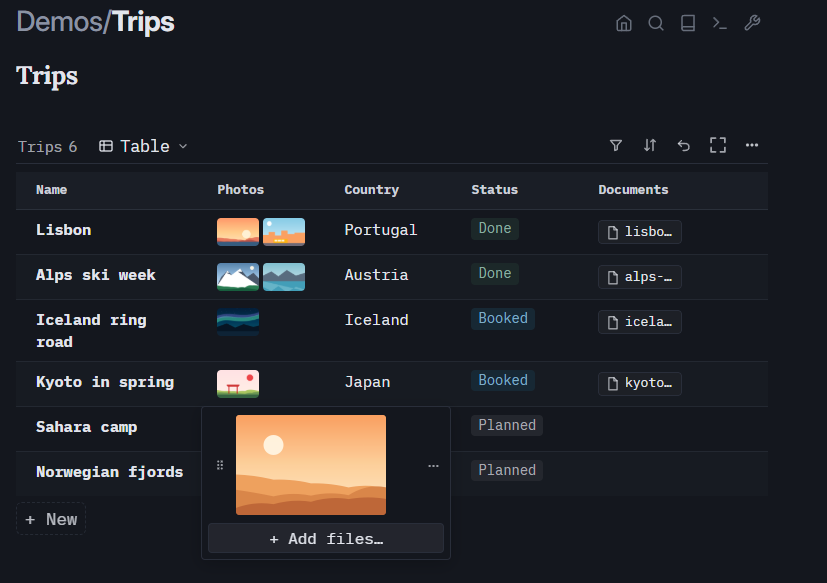
  • Tables, lists and cards show the files as small thumbnails. An image shows as itself. A PDF, Word or Excel file shows its first page if you have Silverware Assets and the matching viewer installed. Anything else gets an icon and its name.
  • Clicking a file opens it in Silverware Assets' side panel (or in a new tab without it).
  • Drop files onto a cell, a card or the item panel, or paste them, and they get added to the value.
  • Clicking beside the files opens a small editor where you can reorder them, remove them from the value or add more.
  • When you delete an item, you're offered to delete the files only that item used. When you delete a whole database, there's a checkbox to delete its uploaded files too.

Uploading needs Silverware Assets. Without it you can still link files that are already in your space, or web addresses.

1.4.0: formula properties and Load more

Silverware Database 1.4.0 is out, with two things I've wanted for a while: properties calculated by a formula, and databases that stay usable with lots of items.

Formula properties

There's a new property type: Formula. It's calculated from the item's own values or from the whole database, using the same formula language as Silverware Table:

=[@qty] * [@price]
=[@hours] / SUM([hours])
=IF([@due] < TODAY(), "late", "")

You create it in Properties. While you type you get the property names and functions offered, and a preview of the result for one of your items. The values are never written into your pages, they're calculated when the database is shown. You can sort, filter and group by them like any other property.

Formulas can also give a select's (or a person's) options, so a list of choices can come from your data.

For now a formula can only read its own database. Referencing another database or a table on one of your pages isn't supported yet, but that's planned for one of the next updates.

Load more

Big databases used to draw every single item, which got slow once you had thousands of them. Now each view shows its first 50 items (per group when grouped) with a Load more button under them, and reading the database is done once instead of over and over after each change. Large databases open, sort and update noticeably faster. Filtering, sorting and counts still use all items. You can change the 50 in Settings, General, Items shown at first.

Smaller things

  • silverware.database.items(id) gives you a database's items in Space Lua, formula values included
  • An item you add with + New opens straight in the side panel with its name ready to type over
  • Fixed: renaming an item in the side panel closed the panel
  • Fixed: on a phone, closing the panel jumped the page to the top
  • Fixed: the database blinked when you changed the sort, the filter or the view