I modified the UX little with adding a copy button when hovered the text:
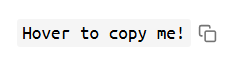
and confirming that the text was copied with a 

I needed to change it because I use copyable mostly for URL, and by clicking the URL will navigate to the page instead of copying so i needed a solution where i can click the URL to navigate and also a button to copy the link. Here is my version i use:
If you like it and want you can integrate it also in your library, I didn't wanted to create a PR for this.
---
name: "Library/thepaperpilot/Copyable"
tags: meta/library
---
This library registers a syntax to make text copy itself on click. This is useful for “preset messages”, codes, or other pieces of text that are expected to be copied frequently.

It makes text like this:

```
[copy]Click to copy me![/copy]
```

Renders as this:

[copy]Hover to copy me![/copy] And here continues the text

## Implementation

```space-lua
local function renderCopyOnClick(body)
  local content = dom.span {
    class = "copy-on-click-text",
    body
  }
  local icon = dom.span {
    class = "copy-on-click-icon",
    title = "Copy to clipboard",
    onclick = function(event)
      js.window.navigator.clipboard.writeText(body)
  --    editor.flashNotification("Copied to clipboard.")
      local el = event.target
      el.classList.add("copied")
      js.window.setTimeout(function()
        el.classList.remove("copied")
      end, 1200)
    end
  }
  return dom.span {
    class = "copy-on-click-wrapper",
    content,
    icon
  }
end

syntax.define {
  name = "Copy on click",
  startMarker = '\\[copy\\]',
  endMarker = '\\[/copy\\]',
  mode = "inline",
  renderWidget = function(body, pageName)
    return widget.html(renderCopyOnClick(body))
  end,
  renderHtml = function(body, pageName)
    return renderCopyOnClick(body)
  end
}


local function get_string_length(text)
  if utf8 and utf8.len then
    local ok, len = pcall(utf8.len, text)
    if ok and len then return len end
  end
  return #text
end

command.define {
  name = "Text: Wrap in Copy Tags",
  key = "Ctrl-Alt-C",
  run = function()
    local ok_sel, raw_sel = pcall(editor.getSelection)
    if not ok_sel or not raw_sel then return end

    -- Normalize selection so 'from' is always the lower index
    local from = math.min(raw_sel.from, raw_sel.to)
    local to = math.max(raw_sel.from, raw_sel.to)

    if from ~= to then
      local ok_txt, fullText = pcall(editor.getText)
      if not ok_txt then return end

      -- Extract the exact selection using Lua's 1-based indexing
      local selectedText = fullText:sub(from + 1, to)
      local wrappedText = "[copy]" .. selectedText .. "[/copy]"

      -- Replace the text in the editor
      editor.replaceRange(from, to, wrappedText)

      -- Set the selection to cover the newly wrapped string cleanly
      local wrapped_len = get_string_length(wrappedText)
      editor.setSelection(from, from + wrapped_len)
    else
      -- If nothing is selected, insert empty tags and place cursor in the middle
      local pos = editor.getCursor()
      editor.insertAtCursor("[copy][/copy]")
      editor.moveCursor(pos + 6)
    end
  end
}
```

```space-style
.copy-on-click-wrapper {
  display: inline-flex;
  align-items: center;
}

.copy-on-click-text {
  background-color: rgba(127, 127, 127, 0.08);
  border-radius: 3px;
  padding: 0.05em 0.3em;
}
.copy-on-click-icon {
  display: inline-block;
  width: 0;
  height: 1em;
  margin-left: 0;
  cursor: pointer;
  opacity: 0;
  flex: none;
  overflow: hidden;
  background-color: currentColor;
  transition: width 0.15s ease, margin-left 0.15s ease, opacity 0.15s ease, background-color 0.15s ease;
  -webkit-mask-repeat: no-repeat;
  mask-repeat: no-repeat;
  -webkit-mask-size: contain;
  mask-size: contain;
  -webkit-mask-position: center;
  mask-position: center;
  -webkit-mask-image: url("data:image/svg+xml;utf8,<svg xmlns='http://www.w3.org/2000/svg' viewBox='0 0 24 24' fill='none' stroke='black' stroke-width='2' stroke-linecap='round' stroke-linejoin='round'><rect x='9' y='9' width='13' height='13' rx='2' ry='2'></rect><path d='M5 15H4a2 2 0 0 1-2-2V4a2 2 0 0 1 2-2h9a2 2 0 0 1 2 2v1'></path></svg>");
  mask-image: url("data:image/svg+xml;utf8,<svg xmlns='http://www.w3.org/2000/svg' viewBox='0 0 24 24' fill='none' stroke='black' stroke-width='2' stroke-linecap='round' stroke-linejoin='round'><rect x='9' y='9' width='13' height='13' rx='2' ry='2'></rect><path d='M5 15H4a2 2 0 0 1-2-2V4a2 2 0 0 1 2-2h9a2 2 0 0 1 2 2v1'></path></svg>");
}

.copy-on-click-wrapper:hover .copy-on-click-icon {
  width: 1em;
  margin-left: 0.35em;
  opacity: 0.55;
}

.copy-on-click-icon:hover {
  opacity: 1;
}

/* Confirmation state: color change */
.copy-on-click-icon.copied {
  background-color: #2ea043; /* pick any "success" color you like */
  opacity: 1 !important;
  width: 1em !important;
  margin-left: 0.35em !important;
}

/* Optional: swap to a checkmark glyph while copied, instead of just color */
.copy-on-click-icon.copied {
  -webkit-mask-image: url("data:image/svg+xml;utf8,<svg xmlns='http://www.w3.org/2000/svg' viewBox='0 0 24 24' fill='none' stroke='black' stroke-width='2' stroke-linecap='round' stroke-linejoin='round'><polyline points='20 6 9 17 4 12'></polyline></svg>");
  mask-image: url("data:image/svg+xml;utf8,<svg xmlns='http://www.w3.org/2000/svg' viewBox='0 0 24 24' fill='none' stroke='black' stroke-width='2' stroke-linecap='round' stroke-linejoin='round'><polyline points='20 6 9 17 4 12'></polyline></svg>");
}
```


## Discussions
- [Silverbullet Community](https://community.silverbullet.md/t/make-text-copy-on-click/4267)
 !
!