Because @malys asked this question in the general chat, and I though I make a quick post for future references if someone else also wants to use this too:
The Synthax
- use
<br>or\nwhenever you want a line break - i recommend
<br>because it's more widely accepted in md tables.
| Column A | Column B |
|----------|----------|
| Some text\nSecond line | Other cell |
| Some text<br>Second line | Other cell |
| Some text\nSecond line<br>third line | Other cell |
The Result
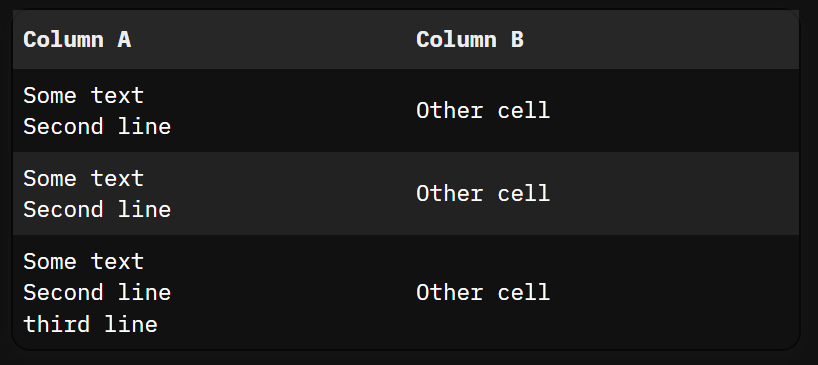
The Space-Lua
-- priority: 1
function enableMultilineTables()
local scriptId = "sb-multiline-tables-runtime"
local existing = js.window.document.getElementById(scriptId)
if existing then
return
end
local scriptEl = js.window.document.createElement("script")
scriptEl.id = scriptId
scriptEl.innerHTML = [[
(function() {
function processTable(table) {
if (table.dataset.multilineProcessed) return;
const cells = table.querySelectorAll('td, th');
cells.forEach(cell => {
const raw = cell.innerHTML;
if (raw.includes('<br>') ||
raw.includes('<br/>') ||
raw.includes('<br>') ||
raw.includes('\\n')) {
let content = raw;
// Replace escaped or literal <br> tags
content = content.replace(/<br\s*\/?>/gi, '<br>');
// Replace literal \n strings
content = content.replace(/\\n/g, '<br>');
cell.innerHTML = content;
}
});
table.dataset.multilineProcessed = "true";
}
document.querySelectorAll("table").forEach(processTable);
const observer = new MutationObserver((mutations) => {
mutations.forEach(mutation => {
if (mutation.addedNodes.length) {
document.querySelectorAll("table").forEach(processTable);
}
});
});
observer.observe(document.body, { childList: true, subtree: true });
window.addEventListener("sb-multiline-cleanup", function cleanup() {
observer.disconnect();
document.querySelectorAll("table").forEach(t => delete t.dataset.multilineProcessed);
window.removeEventListener("sb-multiline-cleanup", cleanup);
});
})();
]]
js.window.document.body.appendChild(scriptEl)
end
function disableMultilineTables()
local event = js.window.document.createEvent("Event")
event.initEvent("sb-multiline-cleanup", true, true)
js.window.dispatchEvent(event)
local scriptId = "sb-multiline-tables-runtime"
local existing = js.window.document.getElementById(scriptId)
if existing then
existing.remove()
end
end
-- Execute immediately
enableMultilineTables()
command.define { name = "Table: Enable Multiline", run = function() enableMultilineTables() end }
command.define { name = "Table: Disable Multiline", run = function() disableMultilineTables() end }

