Hi,
I’m quite taken by the many features of SilverBullet and I’m certain I’d enjoy this for a personal notes system.
I’m wondering if/how I could use SilverBullet with several users where each could have their own workspace with private notes and also shared workspaces where teams can work together?
If this is possible today, then how would I set this up?
Or is this somewhere down the pipeline or - hopefully not - a pipedream?
I am reading two use cases.
- Host multiple individual spaces
- One or more shared spaces
I assume you will be hosting on a vm or container.
How many users? The solution for use case 1 coming to my mind does not scale well. I do not believe use case 2 is supported at this time. SilverBullet is a PWA. The user edits a local copy which is synchronized. Someone correct me if I am wrong.
What access controls are you looking to implement? Would basic auth suffice?
Scenario 1
If I wanted six to a dozen instances setup for use on my LAN (and accessible by VPN), I would write startup scripts for one SilverBullet process per user using their user account, user home, and a unique port. Frontend the the vm/container using Caddy as a reverse proxy and basic auth.
Doesn’t scale well but would do the job. SilverBullet does permit setting a password as an arg when starting SilverBullet. I couldn’t figure out how to launch SilverBullet using a password with special characters with my init, openrc, but yours may work.
Basic Auth is, well, basic. There are better authentication mechanisms but depends on what you are trying to protect.
Thanks for your answer.
Initially, my aim would be quite limited, basically the replacement of a couple of personal and shared OneNote notebooks
- two users with private workspaces
- one shared workspace (would this be a third user?)
- basic auth
Where would I read up on the setup of the suggested multiple SB instances with basic auth?
I use Linux. If you using Windows or MacOS, well, conceptionally, it is the same but the the details will differ.
If you execute silverbullet --help, it results with:
$ silverbullet --help
Run the Silverbullet server

Usage:
  silverbullet [flags]
  silverbullet [command]

Available Commands:
  completion   Generate the autocompletion script for the specified shell
  help         Help about any command
  upgrade
  upgrade-edge
  version

Flags:
  -h, --help              help for silverbullet
  -L, --hostname string   Host or address to listen to
  -p, --port int          Port to listen to (default 3000)

Use "silverbullet [command] --help" for more information about a command.
So to run a process for john,
silverbullet -L0.0.0.0 -p3001 /home/john
and for jane,
silverbullet -L0.0.0.0 -p3002 /home/jane
I use Alpine Linux and its init, openrc. Here is an example of an init for john.
cat /etc/init.d/silverbullet-john
results
#!/sbin/openrc-run

description="Silverbullet.md note taking app"
pidfile="/run/silverbullet-john.pid"
command_background=true
command="/usr/local/bin/silverbullet"
command_args="-L0.0.0.0 -p3001 /home/john"
command_user="john:john"

depend() {
        need net
}
Note: verify silverbullet command location using which silverbullet. Yours may differ.
On using a certificate, I would recommend reading https://silverbullet.md/TLS, first. I just read it for the first time. Well done, @zef! I use a stand alone reverse proxy but I use it for a lot of different services. Simpler to use it on the same box. You can always explore alternatives later. Caddy’s document site.
On authentication, I would recommend exploring SilverBullet’s authentication, first. If it meets your needs, much simpler. Though the use of an environment variable could prove interesting. Experiment! Otherwise, read the Caddy basic_auth link I posted in prior reply and google for example Caddyfile configurations.
The above is not a complete solution, but should get your started.
SilverBullet does not currently have “native” support for hosting multiple spaces from one server instance, nor supporting multiple users.
The best approach to support multiple spaces is to simply spin up one server per space, which is as of to 2.1 or should be quite cheap (memory use went about 10x when we switched from Deno to natively compiled Go binaries). This way you can also run them as separate (Linux) users, so you can inherit all permission issues from Linux.
SB’s authentication doesn’t support multiple users, although you can of course share credentials or use another authentication systems that does support this (like authelia). Generally I’d be a bit careful with a shared use case because SilverBullet is not really built for it. It syncs files individually or in batches and doesn’t do the fancy “google docs” style CRDT stuff where multiple users can edit documents simultaneously. As a result, when you have two people editing a single page, you’re likely to get sync conflicts. For individual users this is less of an issue because you don’t tend to be typing on two devices at the same time.
Fun result preview of the ongoing survey results:
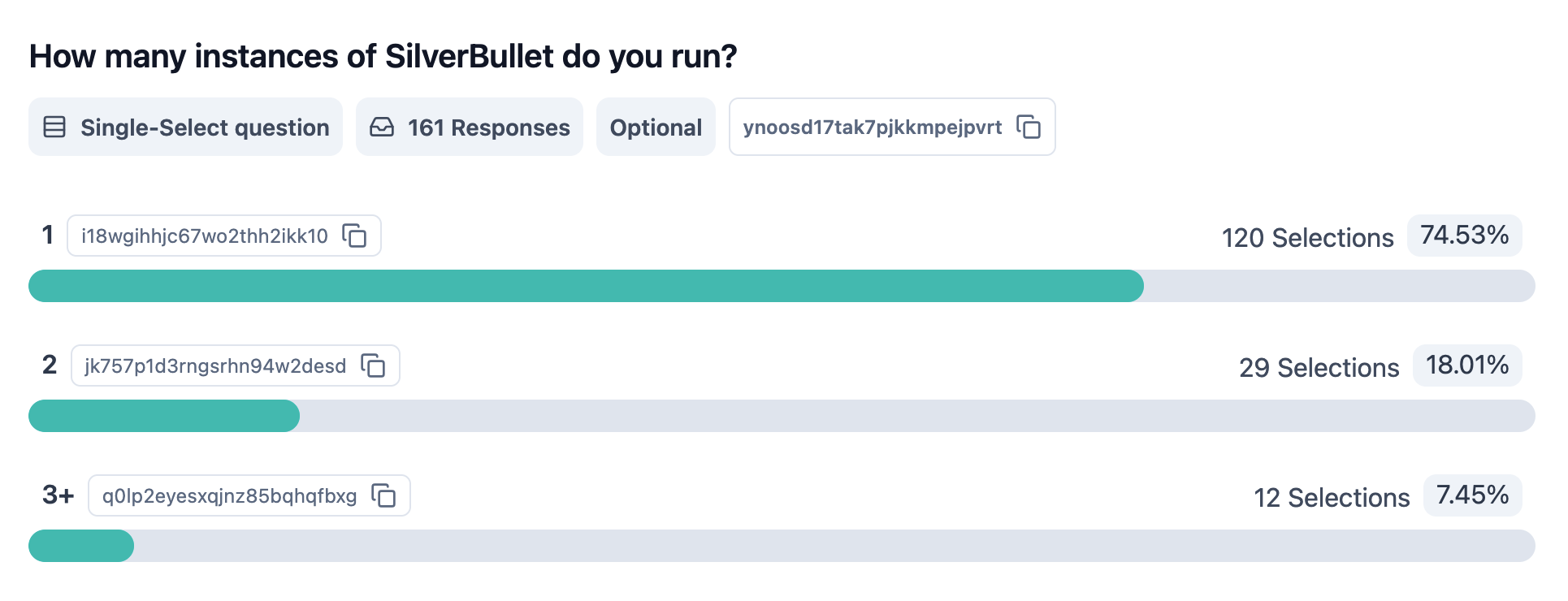
It seems it is quite common that people run multiple spaces. My guess would be that if they run 2, one is for personal use and a second for work. For the 3+ case we’re probably talking about hosting it for friends & family.
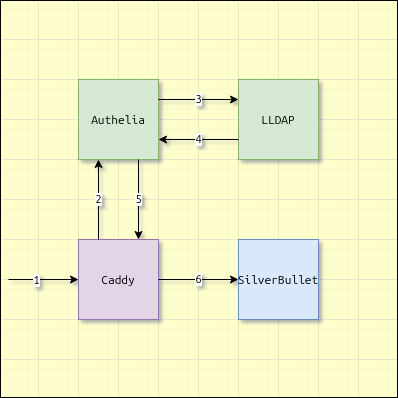
@Stephan-P, I finally got around updating from caddy + basic_auth to something more capable.
It took a couple hours but I got the following working:
- Caddy
- Authelia
- Light LDAP
- SilverBullet
Adds complexity, but the authentication and authorization with Authelia and identity management with lldap can be reused for other self-hosted services.

Thanks very much.
There’s a lot of new words in the solution you give.
Lots to learn and experiment with 
The above solution comes with its own problems. I believe that I am running into this issue which results with me having to ctrl+shift+R to login. A page refresh does not work.