I'm testing silverbullet.md as an alternative to access my vimwiki markdown files remotely. So far it works mostly well, however, it appears that markdown paragraphs containing multiple lines are not rendered appropriately as a single paragraph.
Here's an example (pre-formatted). Every line ends with an end-of-line delimiter:
Lorem ipsum dolor sit amet, consectetur adipiscing elit, sed do
eiusmod tempor incididunt ut labore et dolore magna aliqua.
Ut enim ad minim veniam, quis nostrud exercitation ullamco
laboris nisi ut aliquip ex ea commodo consequat.
Duis aute irure dolor in reprehenderit in voluptate velit esse cillum
dolore eu fugiat nulla pariatur. Excepteur sint occaecat
cupidatat non proident, sunt in culpa qui officia deserunt
mollit anim id est laborum.
In all markdown rendering implementations I've seen, this is considered as a single paragraph, even though the paragraph is multiple lines.
In silverbullet.md, it "breaks" this paragraph as if it was multiple lines. The only way to make it render the paragraph correctly is to make all those lines a single, very long line.
Is there a way to render multi-line paragraphs properly?
In a way this is a divergence from markdown rendering that nobody thus far has been bothered by and don't really know what to do about.
Markdown is a format that reads text in and produces a HTML version of it. What wasn't considered is what would happen if you would "edit in the rendering". SilverBullet doesn't have a "markdown preview" feature, it is, in a sense WYSiWYG (we call this live preview). Now technically, this would mean that if you hit enter (insert a newline) in the editor (=renderer), nothing should happen, because according to markdown rendering lines, only 2 newlines have significance (or some empty spaces followed by a newline), but this would be extremely confusing. I mean, you hit enter, and... technically it's there, but you don't see it, until you do something else?
That's why SilverBullet gives you a newline when you enter a newline. It also does this in its own markdown rendererer (used in various places) to remain consistent with that behavior, which technically isn't correct, but...
In reality this is never really a problem in my own use. It only fails when using some sort of markdown reformatting tool that adds newlines to make things "look nice" in the source markdown (max 60 character line lenghts for instance).
In a way you have hit upon a possible solution. Because Markdown was meant to be rendered as HTML it accepts HTML within it. Whether SilverBullet can handle this is something to test. You can surround your multi-line text with the HTML <pre> and </pre> tags.
For example:
This is a
multi-line test.
Ha!
Changing the CSS formatting to render pre using a non-fixed space typeface would be necessary.
Thanks for the explanation Zef. Indeed, the editor angle makes all the sense, and now I can appreciate how tricky it is to provide a somewhat WYSIWYG editor for a markup language
My problem is that vimwiki (vim) is my main way to edit these files and most of my lines have been formatted to something like 80 characters.
I'll see what I can do to fix this on the vim side.
Thanks for the explanation, but my problem is not with pre-formatted text, but rather, regular paragraphs. I just used pre-formatted text to provide the example.
Anyway, good to know that I can use HTML constructs. This always helps!
I understand that. I only provided the <pre> option as a potential work-around. To Markdown, though, a regular paragraph is denoted by two newlines. Significant whitespace is one of its failings.
Here's another potential workaround that, again, I'm not sure will work but it just might. Instead of pressing "Enter" for a newline try "Ctrl+Enter".
Ah, I just found something interesting: If the line width of my text is smaller than the line width silverbullet uses to render the image, things go well. I imagine I could influence the CSS but that could get a bit tricky when viewing on the cellphone, for example...
Any pointers on how to easily change the line width? Feel free to tell me to RTFM if needed.
I don't quite understand what you are trying to do? can you make some screenshots of what you are trying to achieve? i don't know how the width actually would affect the paragraph rendering
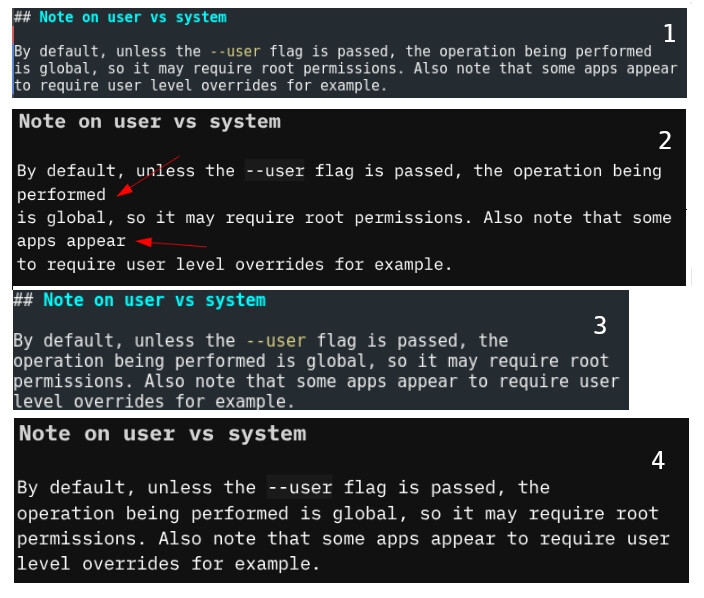
Note: Unfortunately, the forum system won't let me post more than one image (since I'm a new user). Bummer! I had to redo the whole message and it's not as clear as before, but here it goes:
Vim, formatted as 78 columns results in...
Improper rendering in SilverBullet (notice the line breaks).
Reducing the number of columns in vim to 60...
Makes things render correctly in SilverBullet, as now the "source" breaks the line before SilverBullet needs to break it.
So one idea would be to increase SB's width rendering to something like 100 characters, which would always be above what I use for vim/vimwiki markdown files. However, this is just a workaround, since we can't guarantee that devices will smaller screens (mobile) will be able to render it.
Ohh nice! We're getting there! This did the trick for the desktop, but as I expected, not for the mobile device since there's no screen space for 100ch. I'm trying to reduce the font size a bit to see if it will do it.
Yes, it's a terrible workaround, but if it works...
For different size for mobile you can use the @media (max-width: 600px) CSS selector :
html {--editor-width: 100ch; }
@media (max-width: 600px) { html {--editor-width: 90vw;}}
This will if you open it from your mobile the width will be 90 view-width (90% of your screen size).
and also you can use any CSS dimension units: ch, px, %, vw etc.