Hello SB Community,
I want to make bullet folding persistent across devices.
For me, folded bullets represent lower importance, so this is intentional, semantic state, and not just transient UI state. I want the fold state to live in the document and sync with the notes. I find this has worked very well for me as a Logseq user.
My current idea to implement this is:
Persist fold state as an inline attribute on the bullet, e.g.
- Some item [folded: true]
On fold, add the attribute if missing (I’m hoping folding will be exposed as an event
On unfold, remove it
On page load, automatically fold any bullets with [folded: true]
To keep the editor clean, I plan to hide the inline [folded: true] attribute visually using space-style CSS so it doesn’t clutter the text while still remaining in the Markdown source. Feel free to let me know if this is not a good way to implement it.
My question: what would be space-style CSS look like to hide the [folded: true] attribute?
A few thoughts. First of all: I really like your intuition to encoded the desired folding state as an attribute instead of assuming some external magic place where such folding states would persist.
Yes this sounds right, but indeed you’d need the event.
Yesm I think you should be able to rely on editor.* APIs (editor see the editor.toggleFold, but there are some undocumented ones as well such as editor.fold() to restore the state once a page is loaded. The unfortunate thing is that those APIs assume your cursor is currently placed in whatever area you want to fold/unfold. You can use this by programmatically moving your cursor to the desired place, then call editor.fold() and then move on to the next, but this may not look great. As a first pass it should work, though. I think it also makes sense to add an argument to editor.fold with a cursor position so you don’t have to do the jumping around part.
In theory yes, in practice I don’t think there’s a CSS selector you can use right now to do this. It should technically be possible though to somehow attach an addition data- attribute to the [fold ...] thing with fold in there so you can add it as a selector. Just created this issue: Add `data` attribute to inline attributes · Issue #1740 · silverbulletmd/silverbullet · GitHub
Thanks much for the feedback, the walkthrough, and filing the github issue! Noted what to expect with the folding.
I’m currently working through an import script to import a ton of notes from Logseq. This gives me enough confidence to convert folding attribute (from Logseq’s collapse property) in the script. Once the even and the CSS selector are ready, it should be easy to do the remaining. I’ll share it here of course.
Maybe a clue:
I just discovered that all inline attributes (page, task and item) are associated with the .sb-frontmatter class. It is therefore possible to hide/show all the attributes of a page (as well as the frontmatter) with a single command. See this, for example (no need to add a specific item in the frontmatter - the code does the job with Ctrl+Alt+f )
I think the ask is to be able to apply custom styles to specific attributes of tasks, both in their source location and in queries. If I’m not mistaken, that’s different from this?
yes. The trick is indiscriminate.
But, you also asked:
To keep the editor clean, I plan to hide the inline [folded: true] attribute visually using space-style CSS so it doesn’t clutter the text while still remaining in the Markdown source. Feel free to let me know if this is not a good way to implement it.
Making the .sb-frontmatter class invisible does the job.
Who can do more, can do less !
I will soon offer you a fairly complete solution which could allow you to wait until the solutions recommended by Zef Hemel are integrated.
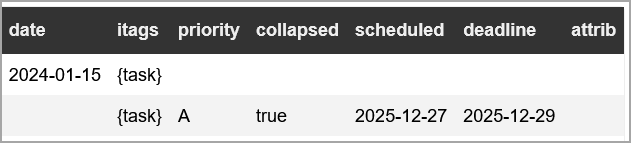
And I’d like the collapsed to be hidden, the priority to display with a special A/B/C, and the scheduled and deadline to display just the date in green and red respectively.
So I tried this to fold on page loads. Works well, except editor.getCursor() returns nil. So after the page loads, the cursor is not set by SB to its correct position, but remains at the last line that was folded. I don’t understand when and how SB sets the cursor position (to what it was when this page was last visited). Help appreciated.
event.listen{
  name = "editor:pageLoaded",
  run = function()
    local text = editor.getText()
    if not text then
      return
    end

    -- Save cursor position
    local originalCursor = editor.getCursor()

    local lineNum = 0
    for line in (text .. "\n"):gmatch("(.-)\n") do
      lineNum = lineNum + 1

      -- Simple substring match
      if line:find("[folded: true]", 1, true) then
        -- Move cursor to the line so the folding can be done
        editor.moveCursorToLine(lineNum, 1, false)

        -- Fold the block at cursor
        editor.fold()
      end
    end

    -- Restore cursor
    if originalCursor then
      editor.setCursor(originalCursor)
    end
  end
}
The following space-style code removes all task attribute marks (across your entire sb space) to keep only the item value:
.sb-line-task .sb-frontmatter.sb-meta,
.sb-line-task .sb-frontmatter.sb-atom {
    display: none;
}

.sb-line-task .sb-frontmatter:not(.sb-meta):not(.sb-atom) {
    display: inline;
    color: blue; /* example of personalization*/
}
This is still not discriminatory between attribute keys (but only task attributes are impacted and frontmatter is not targeted). I’m still trying to find a solution to color the values differently depending on the key. So far, no positive results…
Nb: it is possible to reduce or modulate the scope of these rules for certain pages by adding a css subclass in their frontmatter then incorporating it into the space-style (example: values could be displayed in blue on some pages and in red on others).
I also tried two very different approaches with space-lua code, without success. I will document my research later, in case it is of use to anyone.
/* Hide all attribute structure elements in task lines */
.sb-line-task .sb-frontmatter.sb-meta,
.sb-line-task .sb-frontmatter.sb-atom {
    display: none;
}

/* Keep only values visible (= spans .sb-frontmatter whitout additional class)*/
.sb-line-task .sb-frontmatter:not(.sb-meta):not(.sb-atom) {
    display: inline;
    background: none;  /* we remove the background */
}

/* Value of the 1er attribute : red */
.sb-line-task span.sb-frontmatter:nth-of-type(8) {
    color: red;
}

/* Value of the 2ème attribute : blue */
.sb-line-task span.sb-frontmatter:nth-of-type(14) {
    color: blue;
}

/* Value of the 3ème attribute : orange */
.sb-line-task span.sb-frontmatter:nth-of-type(20) {
    color: orange;
}

/* Value of the 4ème attribute : green*/
.sb-line-task span.sb-frontmatter:nth-of-type(26) {
    color: green;
}

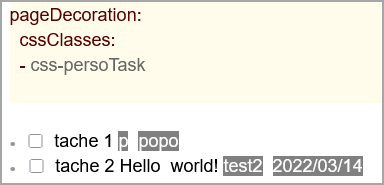
/* Personalization per page possible. In the example,
the classe .css-persoTask is created in the frontmatter
of the page - cf https://silverbullet.md/Page%20Decorations*/
.css-persoTask .sb-line-task .sb-frontmatter:not(.sb-meta):not(.sb-atom){
    color: white;
    background: grey;
    /* possible variation depending on the position of the attribute on the line
    according to the same variations as above*/
}
an attribute enumeration structure must be respected: task_1°[attrib1: xx]°[attrib2: yy]°[attrib3: zz]°[attrib4: aa]
(where ° is equal to 1 or more spaces)
the style applies to all tasks in the SB space (but you can customize per page)
CSS code can’t reach the value itself because it doesn’t have a specific class. So it’s DIY, while waiting for @Zef Hemel’s PR to go into production.
One thing I realize using it: the remaining text (the [attribute: part) should also be shown, perhaps very grayed out, so that it doesn’t break the contract that editing a line always brings it into plain text mode.
What about the opposite? That is, leaving attributes alone but hiding frontmatter? Do you think that’s possible with a Lua script that is essentially the inverse of what you did?
Of course, and sorry! I wasn’t sure if this was a bug, and was wondering if there was a different hook I should be using. Let me look, and file a bug if needed.
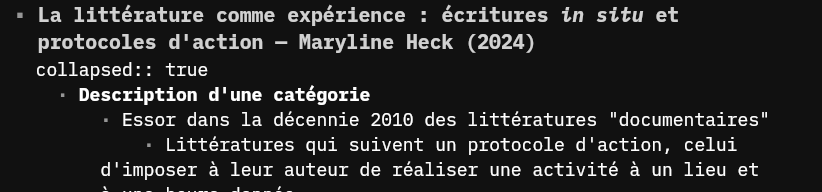
Logseq works with the property "collapsed:: true" for persistent folding. This form could improve the interoperability between the two platforms and escape the creation of a new standard.
For instance (it is a logseq page imported to Silverbullet) :