Hi All, can anyone let me know what I would need to change to point the git plug to a local gitea instance?
I have had a look around but I cant quite get it working unfortunately so any help would be super appreciated.
Many thanks
Hi All, can anyone let me know what I would need to change to point the git plug to a local gitea instance?
I have had a look around but I cant quite get it working unfortunately so any help would be super appreciated.
Many thanks
The git plug (or Git space lua implementation that will likely succeed it) simply runs git commit, git pull and git push commands. If you configure git properly so that running these commands push to gitea (or anywhere else) it should all work.
Are you running SB in a docker container? Then you have to figure out how to configure it to do authentication without ssh keys etc. so this works inside the container. Github allows you to use private api keys + https URLs. Not sure how this works in Gitea.
If you run SB as a binary, the git commands will just run as whatever the server process runs in.
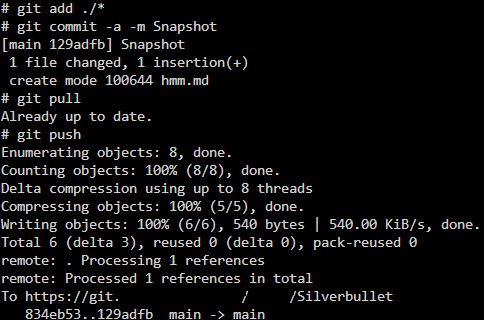
Thanks for getting back to me, this is in docker and when inside the container I am able to push while providing credentials or a url which includes credentials so I can see it is working. I will keep doing some tinkering to see if I can get it working with the plug/space lua 
I think the issue I am having is that the git commands that are being called from the git.md page (I cloned from your gist) are not able run correctly. When running the git sync the container logs show the below:

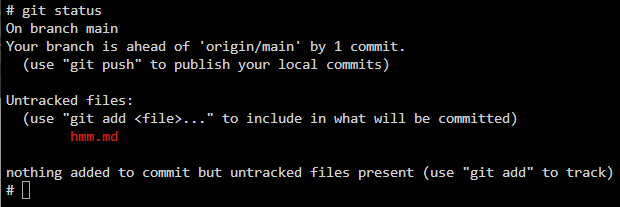
Running a git status from the container shows that files are still pending to be added
I ended up working round this, set up application access token in gitea with access to the repo and git remote add origin https://user:[email protected]/repo. I then made a script on the docker host and ran this every 5 mins via crontab. Still confused why the space-lua does not do what I am after but hopefully it helps someone.
#!/bin/bash
CONTAINER="silverbullet"
REPO_PATH="/space"

# Check if container is running
if docker ps --filter "name=^/${CONTAINER}$" --filter "status=running" | grep $CONTAINER > /dev/null; then
    docker exec $CONTAINER sh -c "cd $REPO_PATH && git commit -a -m 'Auto Snapshot $(date)' && git pull && git push"
fi
What does the shell.run return when you try to run a add & commit?
Sorry how do I check this?
Sorted in the end!
Permissions issue