Remote Sync/Sharing

Some context:

SilverBullet it is aimed for single-user, private use. I know some of you have public instances (and of course silverbullet.md is one), and some apparently even share access with multiple people, but this is not the primary, intended use case.

Nevertheless, I have a need, and I think many people do, to share content kept in SilverBullet with the outside world. Not all of it, but pieces. At least individual pages.

Some examples:

  • Blog posts: I do all my blog and article writing in SilverBullet, I publish my blogs to Ghost.
  • Social network posts: mastodon, BlueSky, …
  • Random quick notes to show to people (Github gists)
  • SilverBullet libraries
  • Google Docs (spoiler alert: this will be harder to support)

Without any ā€œinfrastructuralā€ support from SilverBullet itself, what you can do is simply start in SilverBullet, copy and paste that content into another tool and forget about it. The rich text export helps for tools like Confluence and Google Docs. For some use cases, this may be ok.

But I don’t like this because I’d like to keep the content in SilverBullet as my source of truth. Some of this content I’d like to be able to keep updating over time (and publishing updates to). If I start in SB, then export and edit externally, those changes never make it back.


In v1 I had this concept of Sharing that was based on a ā€œmagicā€ frontmatter key $share, that based on a URI scheme would figure out what type of sharing you’d want to do. This sharing was one way: you update your page, add a $share key, hit Share (Cmd-s at the time) and it would push your content out to whatever targets you had configured (could be multiple).

I scrapped this concept in v2, and replaced it with Export and Import. This design was less restrictive on having to use a $share key in frontmatter, in fact it doesn’t standardize much other than the extension mechanism. It did add the ā€œinwardā€ direction with Import.

Still, I’ve never been truly happy with this design, so now I’m rethinking it again. This is partially triggered in the context of Library management - #7 by zef because also there there’s a need to pull content in from an external place, and (for library developers) to push content out (to that same place) and to keep these things in sync.

Effectively what’s called for is a way of syncing pieces of content with an external place.

Sadly sync is an overloaded term in SilverBullet, because we already have sync going on between the client and server.

The working title for this feature I’ll go with for now is ā€œRemote Sync.ā€ If anybody has a better name for it, I’m all ears. There are only two hard problems in computer science as we know.

What this would be

Essentially what I’m looking to introduce is a way to say:

ā€œThis particular SilverBullet page is available out there somewhere (can be a Ghost blog, Mastodon post, Github repo file, Gist, you name it). I’d like to keep the page in SilverBullet as the source of truth, but then be able to easily publish my local updates there and also (potentially) use that remote place as a type of ā€œsync pointā€: if there are new versions published there (either by me, or somebody else) I want to have the ability to pull them in.ā€

When I trigger this ā€œremote syncā€ action, if I made no local changes since the last sync, but changes were made remotely, it would just update my local copy based on what it fetched from the remote location. If local changes were made locally but not remotely, just push them out. If both sides were changes, ask me what to do. This is exactly how regular SB sync works, except it’s with a remote endpoint.

How this could work

Let’s say we go back to the standardized frontmatter approach, I’d suggest reserving the remote key for this:

---
# Publish this to a Ghost blog
remote.uri: ghost:alt.management:my-post
# Or: publish this to a Github repo
remote.uri: github:zefhemel/silverbullet-libraries/Git.md
# Automatically injected and kept up by the sync mechanism
remote.localHash: 1232321321321
remote.remoteHash: 1232321321321
---

There’s a separate topic of introducing a generic URI reading/writing infrastructure in SilverBullet (which I also have in development) so that libraries can implement these github: style ā€œprotocolsā€ to do the right thing (they’d have a read and write and getMeta style operations). But let’s just assume that is already in place.

Then, there would be a ā€œRemote: Syncā€ command that would do the following:

  • If there’s already a remote key configured, perform a remote sync as described earlier
  • If not, it would ask for a provider (Ghost, Github, …) to use, which could start a provider specific flow, put the resulting URI in frontmatter, perform an initial sync and update the local and remote hashes). If the remote place already exists, it would push the local version to the remote place.

I could also imagine there could be a ā€œRemote: Sync Allā€ command that would find all pages with a remote attribute configured, and perform a sync step on each individually.

Infrastructure

As with many SilverBullet features, this would be built in an extensible way. I’d likely only distribute a Github and Gist integrations out of the box. The community can then implement more in Space Lua and distribute them as libraries.

Thoughts?

2 Likes

Some alternative naming ideas:

  • Remote Mirror
  • Mirroring
  • Propagate changes
  • Remote propagate

There should be a ā€œforceā€ direction option, when for example i changed something on the remote side, and silverbullet wants to update it own page(truth source) from the remote place, but I know the remote place has some errors/or unwanted changes i dont want to integrate in my SB version. Or I want to republish the SB-version back to the remote location forcing it to overwrite the changes.

1 Like

Again, Forester notes has solid approach.

Do you have more specific pointers, not sure what I’m looking at here?

Oh no, it’s math people trying to explain something to humans …

1 Like

I personally publish markdown pages where a Nuxt server then, well, serves them. I have a long script processing stuff in the middle - converting widgets into what will eventually be rendered by Vue components, rewriting wiki style links with paths that’ll work on the actual site, removing a special type of admonition labeled ā€œprivateā€, and so on. The export of all this work still is markdown and is still in the space, so it gets indexed (and has invalid links!) which causes some inconveniences at times. It would be nice if this remote sync system supports this kind of ā€œmiddlewareā€ without needing to write the output to somewhere that gets indexed.

1 Like

Sounds great! I’m definitely looking forward to seeing more blogs. I share the sentiment that losing the single source of truth is holding back publication.

I also hope this could introduce more users to regular, independent static pages. Even if realistically I expect a lot of them to end with github.io, this becomes something that can be migrated much more easily. You get a domain name, maybe a server, and SilverBullet becomes another entry drug to the independent Web :smiling_face_with_sunglasses:


Among the names proposed in this thread I like ā€œmirroringā€ and ā€œremote mirrorā€ from @Mr.Red the most. This avoids the overloaded ā€œsyncā€ term, and doesn’t imply directionality like ā€œpublishā€ or ā€œshareā€ does.

It seems to me that also git forges (Forgejo, Gitea, GitLab) also use this term to differentiate a more remote synchronisation. Normally it’s ā€œpushā€ and ā€œpullā€, but to a different server it’s ā€œmirrorā€.

I am also curious for more explanation from @mjf, coincidentally the term ā€œmirroringā€ also appears there: Towards Forester 5.0 II: a design for canonical URLs › What about replication and mirroring?

And in a true SilverBullet fashion, let’s wikilink some other pages I think have some relevance:

Alternative idea: what if it was just push-style syncing? Maybe ā€œPublish?ā€

At the top of your document, you say where you want to publish to:

---
publish:
  - silverbullet-libraries
  - alt-management
  - github-gist
# ... any other note metadata
---

In your CONFIG.md, you define what the publish destinations mean:

-- space-lua:
config.set {
    publish = {
        ["silverbullet-libraries"] = {
            remote = sb.publish.remotes.github, -- this is the implementation of the remote
            config { repo = "zefhemel/silverbullet-libraries" },
        }
        ["alt-management"] = {
            remote = sb.publish.remotes.ghost,
            config = { site = "alt.management" },
        }
        ["github-gist"] = {
            remote = sb.publish.remotes.github_gist,
            config = { user = "zefhemel" },
        },
    }
}

The sb.publish.remotes.* objects I wrote here would have a push method that accepts a note (the note to publish) and config (the config block from the configuration section). Any customizations you want to make to how it looks on the other end, like setting a path to publish blogs at, can be done by modifying this.

Having this work bidirectionally seems like it could get really complicated and opinionated when dealing with things that aren’t in markdown. Doing it like this with only publishing keeps the filesystem as the source of truth for notes. Going outside of that (eg. pulling from gist) seems like it’s inverting that. Personally, I don’t think I would use something that syncs in from the outside unless it was supposed to be a one-time archive (like web clipping). In my mind, the ā€œsecond brainā€ notes repository on disk is the source of truth. Adding external dependencies kind of ruins this.


Some other thoughts and questions:

  • This almost seems like an event system, where event handlers (remotes) are called with the updated articles each time they’re modified. I might suggest this be built around an existing event system if possible, since there will probably be other uses for an event system in the future.
  • What level of the stack are these going to run at? Is it the go/server level or the deno/plug level or the browser level? Some might be better than other for writing extensions, especially if API keys might be needed. I don’t know if I would want to store these in my notes repo as plaintext.
  • How would this behave if I modify a file on disk that’s synced/published to some other destinations? I do this a lot, and I’d want it to still be able to make it to the other destinations. This would really cool to have working.

Thank you for the discussion on remote sync. I have limited programming knowledge and may not fully understand Silverbullet’s architecture, so please bear with any inaccuracies.

Terminology: I think ā€œShareā€ would be a good name. Why?

  • ā€œRemoteā€ focuses only on the remote side, not the local instance.
  • ā€œMirrorā€ implies an exact copy, which doesn’t fit since both sides can change.
  • ā€œShareā€ describes sharing information between a SB instance and other services, programs, or locations.

Concept: Share System

A share requires three pieces of information:

  1. What is shared (content/format)
  2. What it is shared with (target/protocol)
  3. How it is shared (push/pull/sync)

1. What is shared (content/format)

  • Content: entire page, chapter, table, etc.
  • Format: SB-Markdown as-is, Markdown rendered (queries, space-lua), Rich-Text, PDF, etc.

2. What it is shared with (target/protocol)

A target with an associated protocol, for example:

  • Git/GitHub
  • Gist
  • Another SB instance
  • Other targets as needed

3. How it is shared (push/pull/sync)

Depending on target and protocol:

  • Push: local changes are sent
  • Pull: remote changes are retrieved
  • Sync: bidirectional exchange

Conflict Resolution

With pull and sync, remote information may differ. Four strategies:

  1. Force: always take the remote state
  2. Diff: show differences and allow selecting versions
  3. Latest: take the state of the most recently modified version
  4. Automerge: merge versions using CRDT (see automerge-repo)

Configuration

A share is defined in the config with:

  • Identifier (name of the share target)
  • Remote URI
  • Protocol
  • Defaults for push/pull/sync
  • Defaults for conflict resolution (force, diff, latest, automerge)
  • Defaults for format

Tag-based Syntax

To specify what (how, where) should be shared on a page, a special tag could be used:

#share@target::option::option::...

target refers to a target (remote) defined in the config. Options can override the config.

Example:

#share@myOtherSB::sync::automerge::sb-markdown

Application Levels

The tag can be applied at different levels:

  • At the beginning of a page: entire page is shared
  • After a heading: associated chapter/subchapter is shared
  • At a table: that table is shared
  • etc.

How should internal links be handled? Recursive sharing could be offered optionally (with corresponding risks).

1 Like

There’s a risk I try to solve too many problems with one ā€œsilver bullet solutionā€ (ha!), but I have three immediate problems to solve, and one potentially cool one for the future:

  1. The publish case as mentioned. I have content locally in my space and want to publish to somewhere.
  2. Library (and plug) updates. If I put in some mirror/remote frontmatter on a library page, I can use that to auto update it from an external source. In most scenarios this is pull only (give me the new version of the ā€œGitā€ library, for instance). But if I’m a developer a library (like the Git one) I’d like to be able to reverse that direction to a push.
  3. Future: collaboration: I have a page locally and want to collaborate on it with another SilverBullet user without having to give each other access to each other’s spaces. We could use an intermediate server somewhere that we can use as a sync point. The most basic version would do this in a manual sync style: I make a change, sync, then my collaborator does the same to pull in my change. Obviously this is not real-time collaboration (yet) but that could be a future iteration (some may remember we had exactly this feature in SB at some point in the past).

In my currently working version (locally) I use the term ā€œmirrorā€, but based on @inos-github 's terminology suggestion of using ā€œshareā€ I may change naming again.

Here’s how it works:

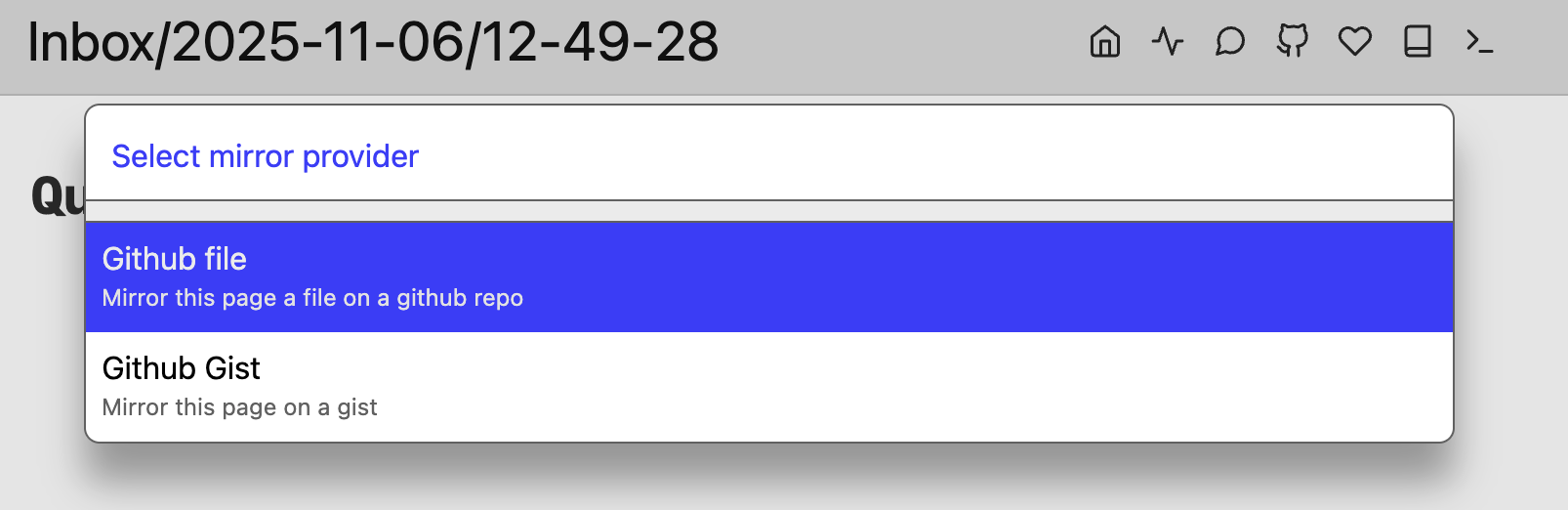
I’m on a page that I’d like to mirror. I hit Cmd-p, and a dialog appears:

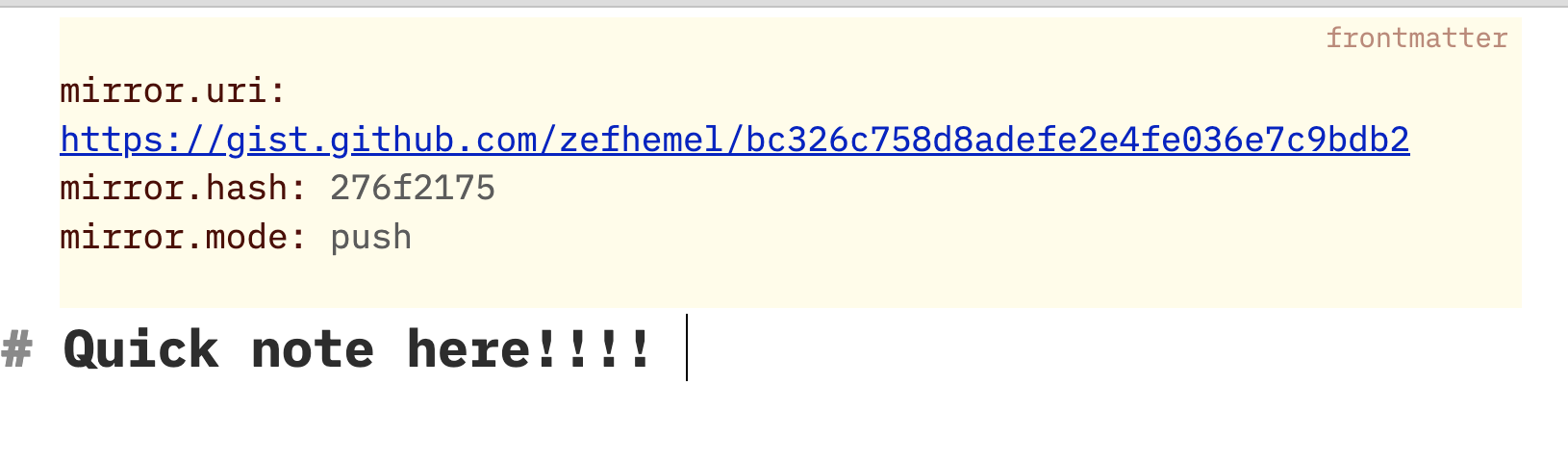
I select the Gist option (I already have a github token configured). Then, it creates new Github gist and updates my frontmatter:

I make a change, hit Cmd-p again and it pushes that new version to the existing gist.

If I select the Github repo one, it will ask me for a repo, branch and file name and do something similar.

For instance, to publish a new library to my libraries repo I have this frontmatter:

---
mirror.uri: "https://github.com/zefhemel/silverbullet-libraries/blob/main/test.md"
mirror.hash: f4fd734c
mirror.mode: push
---

Note: the hashes are used to check if local changes have been made since the last push.

At the same time I’m working on Library management - #7 by zef what I intend to do next is that whenever you install a library from a repostory, it will populate the mirror.* frontmatter for those downloaded libraries in pull mode. Upgrading these libraries would then be as simple as a ā€œmirrorā€ operation (conceptually hitting Cmd-p on those files) to pull in the latest version.

Upgrading all libraries would be implemented by querying all pages with a mirror key in pull mode and updating them all.

What I’ve built now is a service registry on top of the event bus that was already there. When you run the ā€œMirrorā€ command and no mirror is configured, it will run service discovery on a mirror:onboard selector. Many services may match this selector (currently Github and Github gists).

Similarly, when a mirror key is configured, the readURI and writeURI services are called on the configured URI (which may have many implementations like a Gist, Github, Ghost one — all extensible).

Nothing happens on the server, really. 90% of the server code is CRUD operations on files (list, read, write, delete), plush an endpoint to run shell commands and proxy http request (to avoid CORS issues). So the answer is: this is operated fully from the browser.

As for handling credentials: I don’t have a great solution for this. My current practice is that I have a page named SECRET(.md) that has a space-lua block with all keys. This file is in my .gitignore so it doesn’t end up in my repo (which I use for versioning and backup). There are probably fancy encryption things we can do with locking and unlocking things, but haven’t gotten to think about that much.

I agree, I like this term, and I’m not sure why I didn’t consider it before given that there was a feature named exactly this before :thinking:

I hadn’t considered doing anything more granular than simply entire pages. This could indeed be an option, but indeed we need to have an encoding mechanism that allows marking/encoding enough information. You suggest using hash tags, which could work but would get… elaborate.

An honestly I personally only see cases where I’m interested in sharing entire pages not just parts of it, not sure we really need that?

1 Like

Worth sharing here, since it’s related: https://hedgedoc.org/

It’s a self-hosted real-time collaborative markdown editor. Here’s an instance you can use to try it out if you’d like: https://scratch.flake.sh/. Clicking ā€œnew guest noteā€ in the upper right will create a note.

I think zef is already on the same page as I am about this, but since I saw someone else suggest that this feature would listen to file modified events I want to mention why that would not be a good idea, and I would always want to manually choose when a given page or the entire space updates it’s shares.

Simply put, sometimes your changes are not ready! Imagine a sync happened after every character, and suddenly my gist jus-

2 Likes

Ok, I just pushed the next iteration onto main (part of the edge builds). Details and documentation are linked from the CHANGELOG, let me know what you think and if it makes sense: CHANGELOG

Oh wow, that does seem powerful. Will take a bit to chew over it, but I like that I might be able to implement my export as a custom uri that handles the post processing bit. I also create a manifest of the exported pages and links between them, which might be harder in a export flow that operates on a per-page basis. I’ll also still have to find a way to get the exported pages to the file server through means other than a folder that docker mounts on both containers, because I really want to stop having my exported pages from getting indexed.

Yes, I was also thinking of putting any page-processing parts in the writeURI service. Creating a manifest of exported page is an interesting case, I’d be interested to hear what your flow looks like. There’s now ā€œShare allā€ command yet, but once that would be added I can imagine adding another event or service call to hook up a manifest generator of some sort.

Right now, the manifest serves two main purposes.

The first is to have a list of actually public assets and pages. Since SB is the source of truth, I wanted to avoid having my export process delete any files, since that felt like a needlessly dangerous thing to do, in case things go wrong. Plus if the files get deleted prior to being re-written, the website wouldn’t be able to serve those pages temporarily. So instead I only write to the export folder, and use the manifest to handle any pages that get renamed or have the ā€œpublicā€ tag removed from their frontmatter.

The second is to have a list of links between each page, which gets rendered in a graph on the website. The website is sort of like a wiki, where it doesn’t make sense to just have a list of all pages, so I expect users to use search or links between pages to find the pages relevant to them.

You can see what the manifest looks like here: https://paperpilot.dev/api/manifest

While writing this I realized I could just have a function to update the manifest, and run it whenever any page gets synced via the uri handler. Then all I have to figure out is how to send the files to the web server without writing them to a folder that gets indexed by SB. I think I might just make an endpoint on the server, guarded with a x-api-key header. I’ll have to be careful including a secret somewhere SB can access it though.

1 Like