Ripgrep Search with View API

I tried the new View API on the Edge release.

I implemented a search with ripgrep. You select a text and run Navigate: RG Search.
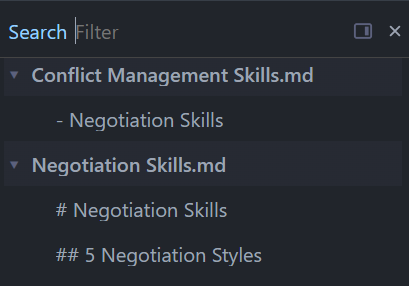
It works fine, and I see it needs improvements,

  1. Ability to update the search when filter text is updated
  2. Ability to highlight the selected text
  3. Ability to add custom buttons like Match Case, Regex

Suggestions on how to improve is welcomed. @zef, Are these use-cases overkill / possible?

rgsearch = rgsearch or {}
function rgsearch.parseRgOutput(rgJsonOutput)

  local results = {}

  for line in rgJsonOutput:gmatch("[^\r\n]+") do
      parsed = js.tolua(js.window.JSON.parse(line))
      print(parsed.type)

      if parsed.type == "match" and parsed.data then
        print(parsed, 'parsed')
        local data = parsed.data
        local fullPath = data.path and data.path.text or ""
        local rawLine = data.lines and data.lines.text or ""

        -- Clean trailing newline/carriage returns and path separators
        local cleanLine = string.gsub(rawLine, "[\r\n]", "")
        local cleanLine = string.gsub(cleanLine, "/", "\\")

        -- Extract just the filename from path (e.g., "docs/Journal/Week/2026-08-03.md" -> "2026-08-03.md")
        local fileName = string.match(fullPath, "[^/]+$") or fullPath

        -- Build submatches table
        local submatches = {}
        if data.submatches then
          for _, sub in ipairs(data.submatches) do
            table.insert(submatches, {
              text = sub.match and sub.match.text or "",
              startCol = sub.start,
              endCol = sub["end"]
            })
          end
        end

        -- Construct name: <filename>/<line content preview>
        local namePath = fileName .. "/" .. cleanLine

        table.insert(results, {
          name = namePath,
          path = fullPath,
          lineNumber = data.line_number,
          offset = data.absolute_offset,
          line = cleanLine,
          submatches = submatches
        })
    end
  end
  return results
end

view.define {
  name = "RG Search",
  title = "Search",
  command = "Navigate: RG Search",
  dock = "modal",
  supportedDocks = { "page-top", "page-bottom", "lhs", "rhs", "modal" },
  defaultOpen = true,
  key = "Ctrl-Shift-f",
  mac = "Cmd-Shift-f",
  source = function(ctx)
    local term = editor.getSelection().text
    local result = shell.run("rg", {"-nbiu", "--json", "--column", "--type", "markdown", term})
    local searchdata = rgsearch.parseRgOutput(result.stdout)
    return searchdata;
  end,
  presentation = {
    mode = "tree",
    row = {
      primary = "name",
      description = "page"
    },
    expandAll = true,
  },
  onSelect = function(item)
    editor.navigate(item.path .. '@' .. item.offset)
  end,
  onCreate = function(item)
    print(item)
  end,
}

If interested, I have another library implementing the search with RG - silverbullet-libraries/RG Search.md at main · LogeshG5/silverbullet-libraries · GitHub
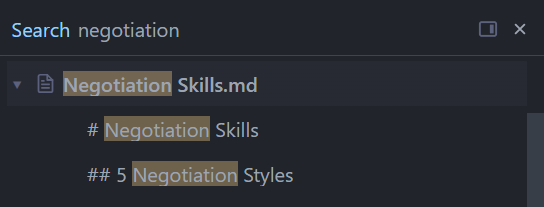
Nice! I think this is a great use, and one of the goals of SB is to provide infrastructure that people can then do surprising things with. I didn't anticipate this one, but I like it.

Looking at this example, specifically your source function, this is passed ctx which should have a phrase field containing the current search phrase, which you may want to use instead of the editor selection. Then, if you switch the search field to source, it will basically re-run the source function on every keystroke (debounced), fetching results from ripgrep based on the search phrase.

You'll have to experiment and see if this all works as it's supposed to (this part is not very well tested).

Docs (which I hope you found): view

Thanks Zef. It worked.

Wishes,

  1. Ability to add custom buttons like Match Case, Regex for extra control, I see an ability to have dropdowns, so custom widgets might be possible one day
rgsearch = rgsearch or {}
function rgsearch.parseRgOutput(rgJsonOutput)

  local results = {}

  for line in rgJsonOutput:gmatch("[^\r\n]+") do
      parsed = js.tolua(js.window.JSON.parse(line))

      if parsed.type == "match" and parsed.data then
        local data = parsed.data
        local fullPath = data.path and data.path.text or ""
        local rawLine = data.lines and data.lines.text or ""

        -- Clean trailing newline/carriage returns
        local cleanLine = string.gsub(rawLine, "[\r\n]", "")

        -- Extract just the filename from path (e.g., "docs/Journal/Week/2026-08-03.md" -> "2026-08-03.md")
        local fileName = string.match(fullPath, "[^/]+$") or fullPath

        -- Build submatches table
        local submatches = {}
        if data.submatches then
          for _, sub in ipairs(data.submatches) do
            table.insert(submatches, {  
              text = sub.match and sub.match.text or "",
              startCol = sub.start,
              endCol = sub["end"]
            })
          end
        end

        -- Construct name: <filename>/<line content preview>
        local namePath = fileName .. "\31" .. cleanLine

        table.insert(results, {
          name = namePath,
          path = fullPath,
          lineNumber = data.line_number,
          offset = data.absolute_offset,
          line = cleanLine,
          submatches = submatches
        })
    end
  end
  return results
end

view.define {
  name = "RG Search",
  title = "Search",
  command = "Navigate: Search",
  dock = "modal",
  supportedDocks = { "page-top", "page-bottom", "lhs", "rhs", "modal" },
  defaultOpen = true,
  key = "Ctrl-Shift-f",
  mac = "Cmd-Shift-f",
  source = function(ctx)
    local term = ctx.phrase
    if #term == 0 then 
      term = editor.getSelection().text 
    end
    if #term < 3 then return end
    local result = shell.run("rg", {"-nbiu", "--json", "--column", "--type", "markdown", term})
    local searchdata = rgsearch.parseRgOutput(result.stdout)
    return searchdata;
  end,
  search = "source",
  presentation = {
    mode = "tree",
    hierarchy = { field = "name", separator = "\31"},
    row = {
      primary = "name",
      description = "page",
      icon = function(obj) if obj.isFolder then return 'file-text' end end,
    },
    expandAll = true,
  },
  onSelect = function(item)
    editor.navigate(item.path .. '@' .. item.offset)
  end,
}