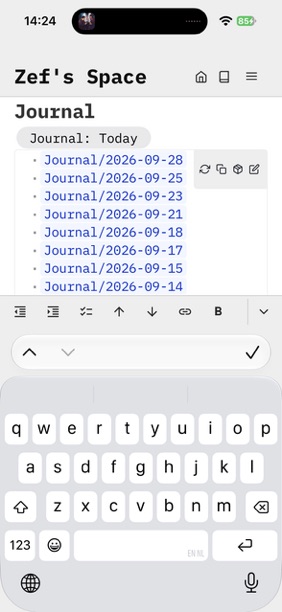
When launching SilverBullet+ I also made plans to expand it into the mobile "native" app space. Now, after a few months of daily driving SB+ for almost everything, I'm less convinced this is worth the effort.
For a desktop version having a desktop app is great. Not only does it feel nice to just have all your files synced into a "normal" folder locally instead of a browser-based database, it's also great to be able to use SilverBullet as your markdown editor very everything, also see docs as code.
However, on mobile, to me the only setup in which SB makes sense is in a synced setup. Having a space that is purely local to my phone is perhaps conceptually "sure, why not" but in practice never something I want: I want to be able to access my notes from anywhere — my desktop and my mobile phone too, occasionally. In practice this means: sync. Specifically: sync with silverbullet.md server. And if you do that anyway, why not just use the PWA version? It's offline capable, you can add it to your home screen.
It's not a perfect experience, but a lot of that non-perfect experience largely from the state of the mobile web. You just have less control about certain things in web apps on phones, and not all phone vendors (cough Apple) care about this platform that much. Sadly, this problem doesn't magically go away with a "native" app, because "native" would still mean — wrapper around the web app. There's no way I can reimplement all SilverBullet functionality in native code (Swift UI or something), so even with a wrapper what I'd be able to fix is going to be extremely limited.
While I thought multi-space support would be a useful native app feature, I'm not so sure it is now. What I do now is simply add each space as a separate app on my phone and switch that way — works fine.
Therefore my question to you, as potential users: what functionality would you hope to get from a "native" mobile app that you're not getting right now from the PWA?
Most things I write are "outliner-esque", so bullets and tasks. I know that native iOS apps can decorate the keyboard with custom buttons above the top row - that, for me, would be great because I could have indent/outdent/toggle task type buttons to save me typing.
I haven't looked yet to see if such a thing is possible for PWAs, and I suspect I could build something that floats above my keyboard anyway with a custom list of shortcuts, but that really is the main benefit for me.
Edit: Incidentally, is PWA more reliable these days? I remember back earlier this year/last year it would be quite unreliable syncing or loading new config. That could've been a problem with my particular setup though.
For me I'm (almost) completely satisfied with the PWA on mobile.
The only (small) advantage of an native app could be to have the raw md-files available on mobile, too. However, that could pretty easyly achieved with other tools as well (git / foldersync / ...)
The only possible improvement might be to make "file: upload" more useful/reliable, or enable a "share to silverbullet" as a "service" accessible from other apps (I simply mean the array of options that pop up after one hits the "share" button in apps like the photo gallery). But I doubt this will be a real improvement when compared against copy-and-paste.
My 2 cents: My main concern is performance of the mobile UI. My smartphone is not very powerful but also not very old yet (Fairphone 4), and Silverbullet PWA tends to be sluggish on mobile, especially:
at first start, to render the index page, before I can click on a toolbar button,
at subsequent starts after Android killed it despite giving the PWA the permission to run in the background,
When navigating between query-heavy pages,
when populating the wikilink autocomplete list.
These are the main items that give it a feel of browser app rather than native, and it significantly impact the use case of "quickly jotting down a note while I'm in a meeting" (same issue I had with Logseq on mobile, despite that app being branded as native). Not sure whether there is any way to improve this if my device's CPU is the bottleneck to compute the rendering.
I have already planned to mitigate by either making my index page less heavy or pointing it directly at today's journal page - maybe it could even be configured differently depending on the device I use?
To me, the mobile app makes far more sense than the desktop. When I need to check something on the go, there is a high chance that I am in a place with poor connectivity and the only device I have is my phone. Using PWA in that situation can be less than ideal.
Native app for mobile phones is desirable for permanent offline access. With PWAs on iPhone, it seems a crapshoot when the browser engine decides to reload the page or drop stored data for no reason. In fact, ironically the only time I don't need a native offline app is when I am on my desktop.
Right now, I am making do with a combination of self-hosted SilverBullet, iA Writer (markdown editor), Working Copy (Git client) and some Shortcuts (for automation on iOS). But it's all quite janky and doesn't support the dynamic features of SilverBullet; a native mobile app would be quite useful.
In fact, I actually tried out Trilium to see if it would be good enough for me to switch simply because it had a iOS app (it wasn't good enough).
Indeed, almost 100% of functionality is available offline when the PWA is installed. All content is synced locally, all indexing is there. Having a "native" app would add nothing compared the the current PWA functionality.
Im a new user here and generally agree with the sentiments above, so far the only friction has been uploading files easily on mobile and with a very large page typing on my phone is extremely laggy. Im going to remedy by splitting up the file for now!