Silversearch not working, Command not found

Hey there,
I’m still new to the Lua stuff, so I’m still a bit lost where to find what.

My issue at hand is, I installed Silversearch via the Library Manager. Put something like:

config.set {
  mobileMenuStyle = 'bottom-bar', --'bottom-bar' or 'hamburger'
  actionButtons = {
    {
      icon = 'md-link',
      description = 'Link',
      mobile =  true,
      run = function()
        local pos = editor.getCursor()
        editor.insertAtCursor('[[]]', true)
        editor.moveCursor(pos + 2,false)
      end
    },
    {
      icon = 'home',
      description = 'Go to the index page',
      run = function()
        editor.invokeCommand('Navigate: Home')
      end
    },
    {
      icon = 'book',
      description = 'Open Page',
      run = function()
        editor.invokeCommand('Navigate: Page Picker')
      end
    },
    {
      icon = 'search',
      description = 'Search for words in space',
      run = function()
        editor.invokeCommand('Silversearch: Search')
      end
    },
    {
      icon = 'terminal',
      description = 'Run command',
      run = function()
        editor.invokeCommand('Open Command Palette')
      end
    }
  }
}

in my CONFIG and now I’m getting:
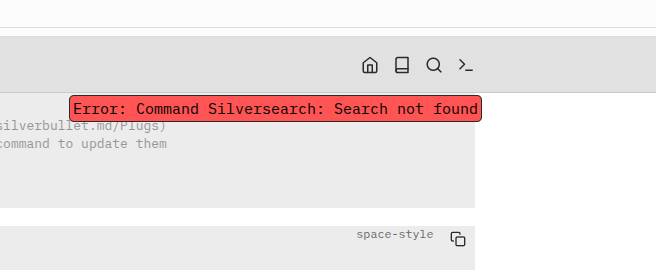
every time I’m trying to do the Silversearch. Anyway, can’t find the Silversearch search command in the Run: Command dialogue neither. Tried to define it but to no help.

Also I get an error when I’m trying to uninstall the library now:
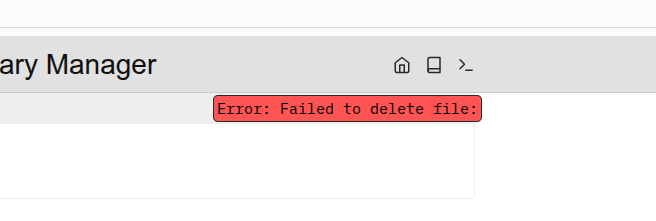
Which suggest the library didn’t install. However the Library/mrmugame/Silversearch file exists.

And than the Update doesn’t do nothing. Just says “Update complete”.

The silverbullet-math library I installed just fine, no issues there.

I’d appreciate any help, I’m fairly new to coding with browsers, so wouldn’t know how to debug using the console. :smiley:

It’s always good to open up your browser’s JavaScript console to see if you see any more specific errors there.

After you installed Silversearch, did you reload your client (refresh) or do a Plugs: Reload? Because you need to that for it to load (I should somehow automate this, but haven’t).

1 Like

I face the same error on a brand new install (running locally on Windows 11): start silverbullet, install Silversearch library from Library Manager, run a Plugs: Reload. At the end, no Silversearch command is available. While testing, one try seems successfull but all other failed.

Anything of interest in the console?/Could you share your console output? If you say one try seems successful, does the silversearch.plug.js file actually exist in your space folder?

My last two attempts succeeded when starting from a new folder. On the previous failing one, there is a silverbullet_tmp/Library/mrmugame/Silversearch.md but no silverbullet_tmp/Library/mrmugame/silversearch.plug.js.

I will check why some attempts fail and not others.

So here comes my console output when trying to execute the non-existent command.

client.js?v=cache-1763977884535:29 [Client] Error during : Error: Command Silversearch: Search not found
at Pd.runCommandByName (client.js?v=cache-1763977884535:348:244)
at editor.invokeCommand [as callback] (client.js?v=cache-1763977884535:110:9855)
at Eo.syscall (client.js?v=cache-1763977884535:62:4148)
at Eo.localSyscall (client.js?v=cache-1763977884535:62:3749)
at nn.l [as fn] (client.js?v=cache-1763977884535:71:1397)
at nn.call (client.js?v=cache-1763977884535:62:36872)
at c1 (client.js?v=cache-1763977884535:62:41888)
at h (client.js?v=cache-1763977884535:62:22327)
at o (client.js?v=cache-1763977884535:62:22738)
at Gh (client.js?v=cache-1763977884535:62:22768)
```

There is a Library/mrmugame/Silversearch.md but no .js, neither a Silversearch folder as like for the Silverbullet-math plug.

And this is what it gives me when I try to remove the Silversearch plug:

client.js?v=cache-1763977884535:170 
 GET https://XXX/.fs/Library/mrmugame/silversearch.plug.js 404 (Not Found)
service_worker.js:2 [Service Worker] Error deleting Library/mrmugame/silversearch.plug.js Not found
client.js?v=cache-1763977884535:170 
 DELETE https://XXX/.fs/Library/mrmugame/silversearch.plug.js 404 (Not Found)
client.js?v=cache-1763977884535:29 [Client] Error during : Error: Failed to delete file: 
    at z3.deleteFile (client.js?v=cache-17…977884535:170:13967)
    at async f3.deleteFile (client.js?v=cache-17…977884535:170:10362)
client.js?v=cache-1763977884535:170 Uncaught (in promise) Error: Failed to delete file: 
    at z3.deleteFile (client.js?v=cache-17…977884535:170:13967)
    at async f3.deleteFile (client.js?v=cache-17…977884535:170:10362)

Which basically confirms that there is no Silversearch instance.

So it‘s not downloading it then. Do you have logs from the installing step?

Sorry, no, I don’t have, at least not that I know of. Couldnt access the container logs anymore.

Is there any way of manually deleting silversearch so I can at least try to reinstall it?

I tried, reloading the container from scratch but am stuck with this not working silversearch instance.

Alright, here we go.

  1. I deleted the Silversearch.md in Library/mrmugame.
  2. I reloaded everything.
  3. Silversearch is not anymore under the installed Plugs in the Library Manager.
  4. And than installing Silversearch via Library Manager and this time it worked.

Cheers, have nice night.

1 Like

You can also open the document picker (which lists all non markdown files including .plug.js) and find silversearch.plug.js there, it should give you a few options, one of them is Delete. After that reload the page again.