CSS question: so in my rudimentary understanding of CSS, your solution worked was able to override the built-in CSS where mine didn’t because yours had a higher specificity.
Question: is it possible to override the in-built CSS without relying on specificity?
Technically you don’t always need to add all the selectors.
Some CSS selectors work some might not, because their hierarchy or how these selectors are constructed and styled.
.wrapper.element1: This is a compound selector. Because there is no space between the two classes, CSS is looking for a single HTML element that has both classes at the same time (e.g., <div class="wrapper element1">).
The Result: Since the HTML has wrapper on the parent and element1 on the child, the first rule fails to match anything.
The Fallback: The browser moves to the second rule, .element1, which matches your HTML perfectly and turns the text green.
If you had put a space (.wrapper .element1), the first rule would have won because it would be more “specific.”
The Concept of Specificity (The “Weight” of Selectors)
Browsers use a scoring system to decide which CSS rule “wins” when multiple rules target the same element.
Simple Class:.element1 has a score of 10.
Combined Class:.wrapper .element1 has a score of 20.
ID Selector:#my-id has a score of 100.
If you want to override a style without using !important, you “add more selectors” to increase the weight of your rule.
.a.b (No space): Target an element that has both class A AND class B.
.a .b (With space): Target an element with class B that is inside an element with class A.
No, you don’t always need all selectors because of Inheritance. If you set font-family on the .wrapper, you don’t need to define it again for .element1 and .element2. They “inherit” the style from their parent automatically.
Yes, you should avoid being too specific.
Bad:body div.wrapper section.content div.element1 (Too long, hard to read, and slow for the browser to parse).
Good:.element1 or .content-element (Clean, reusable, and fast).
Summary
Selector
Meaning
.element1
Any element with class element1
.wrapper .element1
element1 inside a wrapper
.wrapper.element1
One element with both classes
div > .element1
element1 that is a direct child of a div
… and many more
Start with the most basic selector first. If it fails to override existing styles, gradually add parent selectors or IDs to give the rule more weight.
The short answer is: No, you cannot override that specific code without changing the selectors.
The reason it “doesn’t work” isn’t just because of your selector; it is because the built-in code is using the !important flag.
When the browser decides which style to show, it follows a strict hierarchy:
The !important Flag: This is the of CSS. If a style has !important, it will almost always beat a style that doesn’t, regardless of how many classes or IDs you add.
Specificity: If both rules have !important (or neither do), the one with the more complex selector (e.g., .parent .child) wins.
The Cascade (Order): If the specificity is a tie, the rule written last in the code wins.
In your example, the built-in code has two massive advantages:
The Flag: It uses !important. Your code does not.
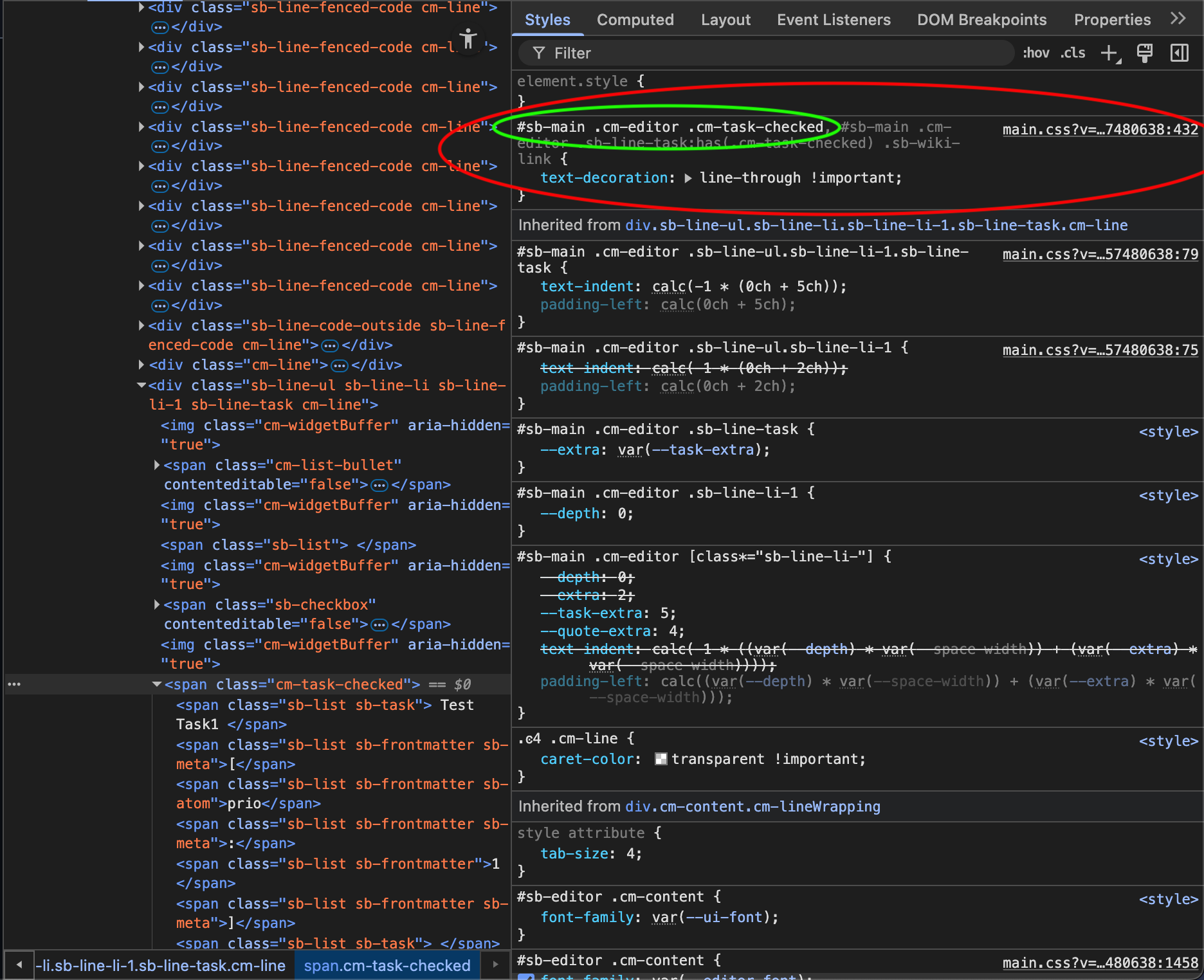
The Complexity: The selector .sb-line-task:has(.cm-task-checked) .sb-wiki-link is much “heavier” (more specific) than your simple .cm-task-checked.
Since the built-in code uses !important, you must also use !important just to get onto a level playing field. However, even then, a simple class might lose if the built-in one is more specific.
To override it while keeping your code as simple as possible, you have two options:
Option A: Match the Force (Same selector + !important)
Copy the built in selector exactly. This creates a “tie” in specificity, allowing your code to win as long as it is loaded after the built-in CSS.
/* You must use the exact same selector to match their weight */
.cm-task-checked,
.sb-line-task:has(.cm-task-checked) .sb-wiki-link {
    text-decoration: none !important; /* This overrides their line-through */
}
Option B: The example I said in my first post, with the whole hierarchy selector path + `!important`
Option A actually doesn’t work. And I still don’t know why. I imagine my css is loaded before the built in, but I don’t see documentation clarifying this.
The one from the main.css in the screenshot above gets a higher priority score than your simple .cm-task-checked selector, that’s why your selector cant override the style.
And to answer your other question:
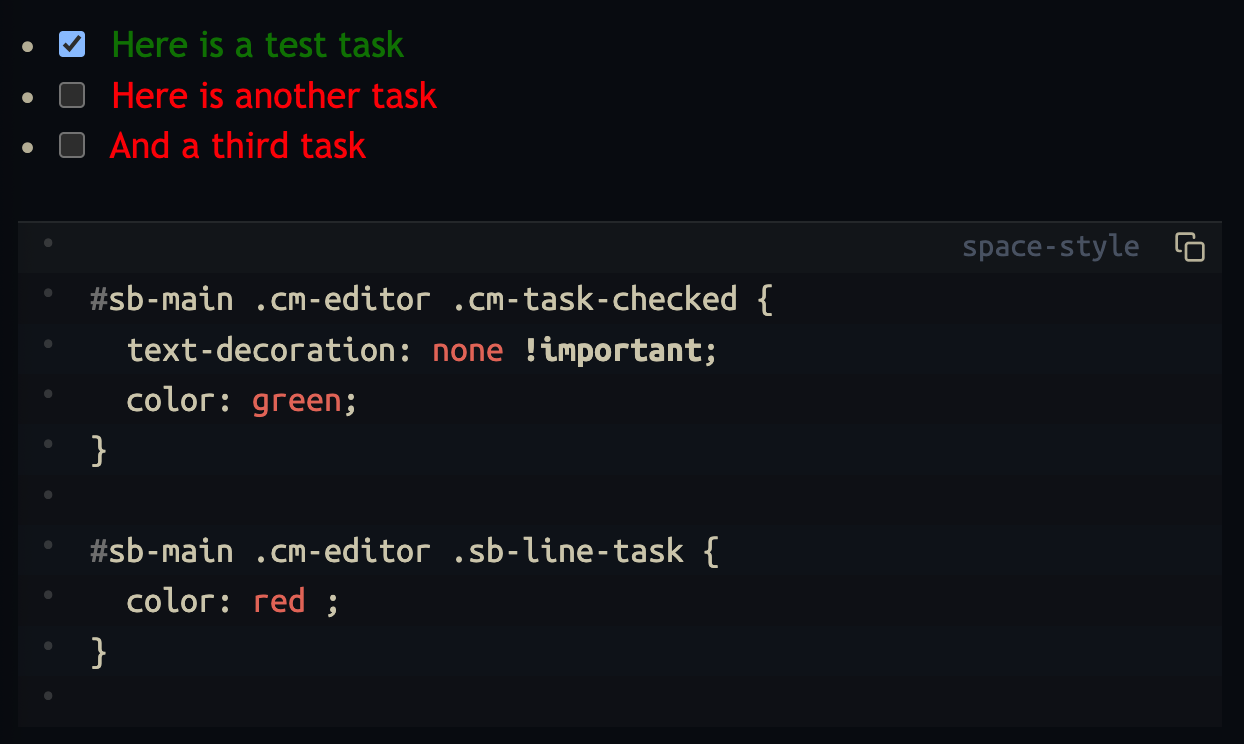
the custom space-styles are loaded always after the build in css, so if you chose a stronger or even the same selector , it’s always possible to override the built-in one.
I always use the browsers Dev-Tools (Inspect Element) to get the correct CSS selector the DOM hierarchy etc. This way i can also quickly modify & test out the expected behaviour.
also check out this brief “conversation” with deepwiki.
I asked about your exact problem, and this is what it told me: deepwiki

 of CSS. If a style has