If your workflow is relying strong on Table of Contents & Headings Navigation & Folding/Unfolding them, I might have a treat for you!
Here is a proof of concept(for now) I've been tinkering with in my spare time:
It's not finished yet, but here are some of the features so far:
What it does:
Renders the Table of Contents from your current page's headings, pinned as a right-hand sidebar panel
Clicking any heading navigates you directly to that position in the document
Mirrors fold state one-directionally with the editor, collapsing or expanding a Heading in the TOC folds or unfolds the corresponding section in the document.
Ancestor headings and their connecting spine lines highlight on hover, keeping the hierarchy visually clear
Reloads automatically whenever you switch to a new page, always in sync without manual refresh
It's still a work in progress, there's polish left to do and a few edge cases to iron out.
I'll be cleaning up the code and posting the full plug once it's a bit more stable.
Feedback and ideas very welcome, drop a comment below!
I noticed that when Im on mobile, most of the time I dislike the TOC and frontmatter, because they always are at top. I disabled the entire TOC and created a special function to "force" the TOC on specific pages where is usefull for me.
Not quite sure how much space left for the editor/page when having TOC as side panel. Pretty sure that on laptop or big screens will be ok (and nice).
Very nice! Feels to me like a side panel is a logical place for a TOC, so you can easily jump on the page.
One question - is it possible to follow the default Silverbullet theming 'out of the box'? I'm using the Nord theme with very minimal changes compared to 'out of the box' Silverbullet and the TOC side panel does not fit with the theme at all.
I'll admin that I'm not super comfortable with CSS theming (aka it confuses the hell out of me).
Absolutely, I’ll be adding that later, but first I wanted to iron out the functionality and features and as last to bind the color variables to existing ones from the main.css/theme space-styles.
They are not two overlapping panels. It’s the same issue like with other panel Addons/Libraries/Plugs with toggle feature. When refreshing or reloading. The state of the toggle button somehow isn’t persistent when it’s reloaded. So it’s just the toggle command acting weird when persistent after reload. This happens with all toggleble plugs in sidepanel. A workaround would be to assume that the panel is toggle’d on even after reload. But that’s like saying that the panel is toggled on without knowing its actual state.
its technically possible, but the library will override the system/std.widget.toc, so the widget wont be system toc wont be controlled by the system, but by the library. so if the toc is disabled on a page using disableTOC:true in the forntmatter, and the TOC in sidepanel is closed, the toc will appear. until you reload the page.
This is awesome! I was wondering if it would be possible to dynamically scroll to and highlight which section/subsection the cursor is currently in as you peruse the file?
(also, is this thread the correct way for bug reports and FRs? Issues isn't open in that centralized repo)
 If your workflow is relying strong on Table of Contents & Headings Navigation & Folding/Unfolding them, I might have a treat for you!
 Library Release: TOC in SidePanel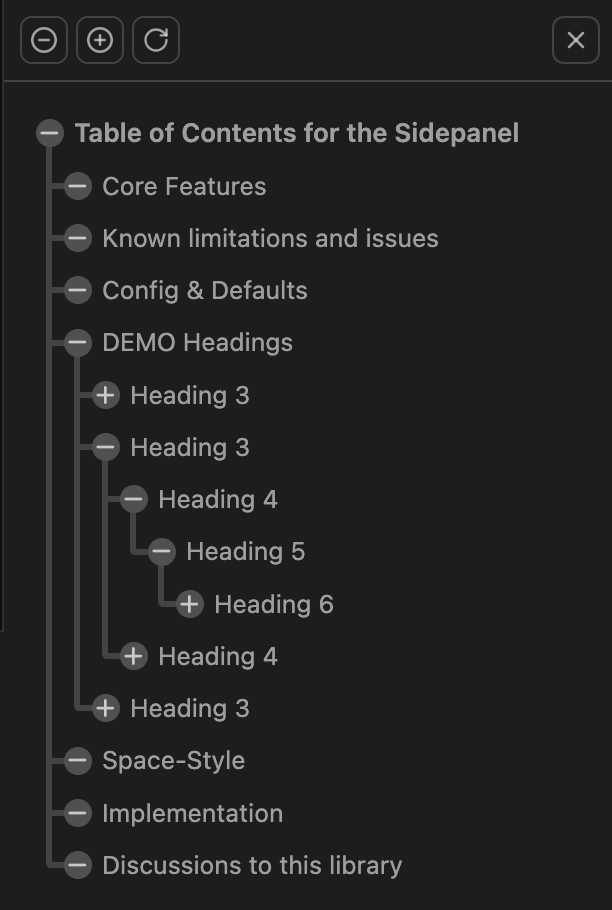
 My Repository
 TOCInSidePanel.md