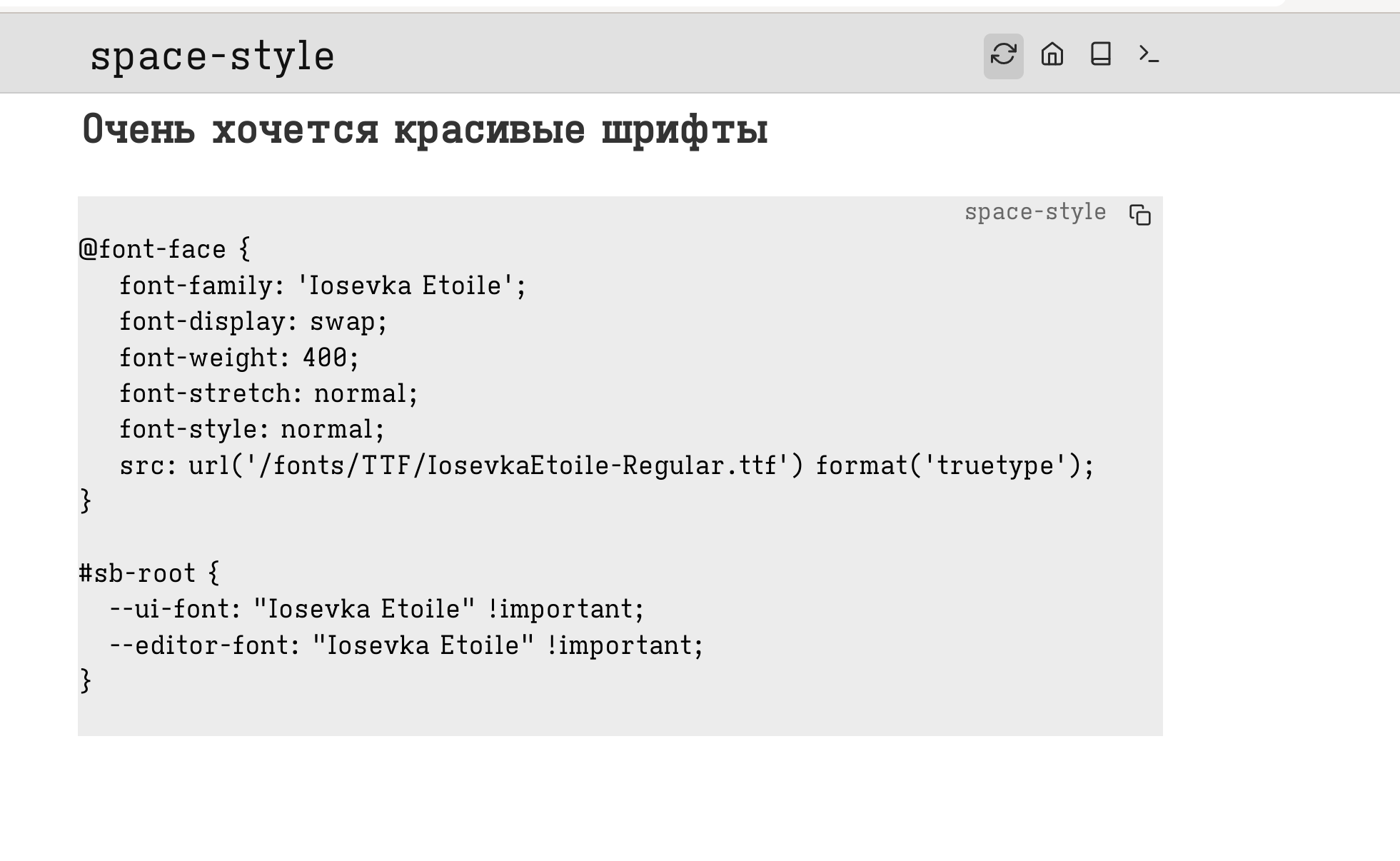
I’m trying to change default font to Iosevka Etoile and facing weird issues.
I thought I’m being very clever putting folder fonts/TTF/ containing Iosevka TTF files in it right inside space directory. Now I can access font files like this: https://${host}/fonts/TTF/IosevkaEtoile-Regular.ttf
When you open your browser tools, e.g. your JavaScript inspector, do you see any errors there? Or in your Networks tab, do you see (an attempt) at the font being fetched?
I’ve not tried this with font files served from the space directly, I do know others use externally hosted fonts (so they put in the full URL to an external site instead of a local one), does this work for you?
Hi, thanks for this solution and I made it works on my instance as well.
Out of curiosity, I want to ask @zef if this work when the SB enters offline sync mode? I don’t have much knowledge on web, but it seems to me that SB will try to fetch the font in offline mode per Link and likely to fail, is that the case?
Update: I made a test on my mobile phone and it worked fine. But I’m still curious on the underlying reason.
Thanks for the detailed explaination! Another thing I find relevant yet a separate problem is to make a secondary font (mainly for the CJK character overwrites), it is currently not working with the following config I adapt from the example.
This thread was really helpful. In case this helps anyone else, I observed that it is not possible to serve static assets from a hidden directory, like /.fonts. Can someone comment on whether this is a deliberate design choice?
(I had originally hoped to serve the fonts from /.client, to be consistent with the application’s behavior for the built-in iA Writer font.)
This is a deliberate design choice. Files and folders starting with a . are reserved for internal use. If you just put files on your disk, SB considers them documents and those documents follow the same rules as page names.
The docs aren’t super clear on all that stuff right now, but I’m currently working on a PR, which is going to include a much more extensive page on those rules and why specific page name rules exist.
Unfortunately, it looks like there was a regression that broke this approach somewhere between an earlier beta release of v2 and the new stable release.
From what I can tell, Silverbullet is still serving the static font files, but the browser seems to receive them with the text/html MIME type rather than font/woff2 (I think). I have filed a report on the GitHub issue tracker; please see there for details.
@MrMugame points out that this was a change introduced in #1507. To reference static files in your space, add .fs/ to the start of the URL path (in other words, src: url('/.fs/fonts/...');). Do not create a .fs/ directory on disk in the SilverBullet space itself.
Learn more in the “File system” section of the HTTP API docs.
I was trying to use a specific TTF file (ChicagoFLF)
but when addig thes few lines in my CONFIG in a style-lua block
It changes my default font for a times new roman ??
Very frustrating
And I also would like to use a monospace font for the code blocks, and didn’t find the key
Thankyou, I thought the .fs part was only needed when the file was out of the
space directory.
I confirm: it changes the main page editor with my font…
I still have to find how to keep a monospace font in the code blocks and
it will be perfect !
here is my space-style where I define each element where to use which font.
of course this can differ from where and which element you want to use which font:
/* Set the font as root variables*/
#sb-root {
    --editor-font: "UbuntuMono", monospace;
    --ui-font: "Trebuchet MS", "OpenSans", sans-serif;
}

/* set Monospace font for codeblocks*/
span.sb-code{
    font-family: var(--editor-font);
    background-color: rgba(128, 128, 128, 0.2);
}

div .sb-line-fenced-code {
  font-family: var(--editor-font);
  font-weight: 300;
}

/* set monospace font / bold / extra padding  for hashtags*/
.sb-hashtag, .hashtag {
  font-family: var(--editor-font);
  font-size: 1rem !important;
  font-weight: 300;
  padding: 1px 4px !important;
}


/* set Serif/ UI-Font font for CodeMirror content*/

#sb-editor .cm-content {
    font-family: var(--ui-font);
}


/* set a condensed Fonts for mobile devices*/

/* Mobile screens — change to Open Sans Condensed */
@media (max-width: 600px) {
  #sb-root{
   --editor-font: "Inconsolata", monospace !important;
   --ui-font: "OpenSansCond", sans-serif !important;
  }
}
if you want here are some of my Space-Styles what I use, maybe you’ll find some helpful ones.
some of them are only me fooling around, some others might be helpful.

 The way it works: