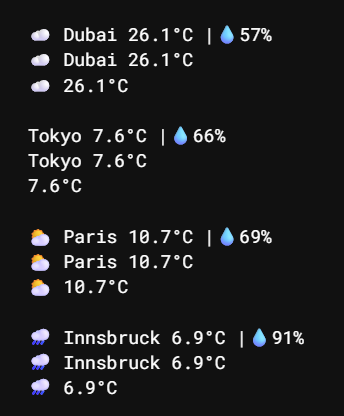
I wanted to spruce up my dashboard, so I made a quick weather widget!
It fetches current weather data using the Open-Meteo API.
It requires no API key but relies on net.proxyFetch, so your silverbullet instance must allow outbound requests.
-- Weather icon mapping (WMO Weather interpretation codes)
local weatherIcons = {
  [0] = "☀️", [1] = "🌤️", [2] = "⛅", [3] = "☁️",
  [45] = "🌫️", [48] = "🌫️", [51] = "🌦️", [53] = "🌦️", [55] = "🌧️",
  [56] = "🌧️", [57] = "🌧️", [61] = "🌧️", [63] = "🌧️", [65] = "🌧️",
  [66] = "🌧️", [67] = "🌧️", [71] = "🌨️", [73] = "🌨️", [75] = "❄️",
  [77] = "🌨️", [80] = "🌦️", [81] = "🌧️", [82] = "🌧️",
  [85] = "🌨️", [86] = "❄️", [95] = "⛈️", [96] = "⛈️", [99] = "⛈️"
}

-- Helper to get coordinates for a city
local function getCoords(city)
  local geoUrl = "https://geocoding-api.open-meteo.com/v1/search?count=1&name=" .. city
  local geoResp = net.proxyFetch(geoUrl)
  if not geoResp.ok then return nil, "Geo Error" end
  local geoData = geoResp.body
  if not geoData.results or #geoData.results == 0 then return nil, "City not found" end
  local loc = geoData.results[1]
  return loc.latitude, loc.longitude
end

-- Simple weather: icon + city + temp (inline friendly)
function weather(city) --City as a string, e.g. "Dubai"
  local lat, lon = getCoords(city)
  if not lat then return "⚠️ " .. lon end
  local url = "https://api.open-meteo.com/v1/forecast?current=temperature_2m,weather_code&latitude=" .. lat .. "&longitude=" .. lon
  local resp = net.proxyFetch(url)
  if not resp.ok then return "⚠️" end

  local c = resp.body.current
  local icon = weatherIcons[c.weather_code] or ""
  return icon .. " " .. city .. " " .. c.temperature_2m .. "°C"
end

-- Extended weather: icon + city + temp + humidity
function weatherExtended(city)
  local lat, lon = getCoords(city)
  if not lat then return "⚠️ " .. lon end

  local url = "https://api.open-meteo.com/v1/forecast?current=temperature_2m,relative_humidity_2m,weather_code&latitude=" .. lat .. "&longitude=" .. lon
  local resp = net.proxyFetch(url)
  if not resp.ok then return "⚠️" end

  local c = resp.body.current
  local icon = weatherIcons[c.weather_code] or ""
  return icon .. " " .. city .. " " .. c.temperature_2m .. "°C |💧" .. c.relative_humidity_2m .. "%"
end

-- Compact weather: just icon + temp
function weatherCompact(city)
  local lat, lon = getCoords(city)
  if not lat then return "⚠️" end

  local url = "https://api.open-meteo.com/v1/forecast?current=temperature_2m,weather_code&latitude=" .. lat .. "&longitude=" .. lon
  local resp = net.proxyFetch(url)
  if not resp.ok then return "⚠️" end

  local c = resp.body.current
  local icon = weatherIcons[c.weather_code] or ""
  return icon .. " " .. c.temperature_2m .. "°C"
end
 ).
).