AdvancedPanelControl – Installation & UX Feedback
Hi Mr. Red,
I am a newcomer to the SilverBullet community, but an experienced Obsidian user, and I am currently trying to migrate to this new environment. Panel-based layouts are a critical UX aspect for me in note-taking applications, so I decided to test your AdvancedPanelControl plugin and document the installation and usage steps, along with some feedback.
Installation
silverbullet version
2.4.1-0-g3e1f03b
With Library: Install Repository command I installed your repository
Library Manager Confusion
From the Library Manager, I installed DocumentExplorer.
I noticed that AdvancedPanelControl was also installed automatically.
- Library/Mr-xRed/AdvancedPanelControl
- Library/Mr-xRed/DocumentExplorer (Update / Remove)
However, this resulted in some confusion, as there appears to be another similarly named entry:
- Advanced Panel Control and Window Management (Mr-xRed)
It is not immediately clear how these entries relate to each other or which one should be configured directly.
Configuration
In my CONFIG, I added the following:
"AdvancedPanelControl", {
  mode = "auto",       -- "auto" | "overlay" | "dock"
  gestures = true,     -- true (enabled), false (disabled)
  minWidth = "300",    -- Minimum width for LHS and RHS
  maxWidth = "1000",   -- Maximum width for LHS and RHS
  minHeight = "100",   -- Minimum height for BHS
  maxHeight = "500",   -- Maximum height for BHS
}
Reload Commands
I ran the following reload commands:
- CLIENT RELOAD
- PLUG RELOAD
- SYSTEM RELOAD
I am not entirely sure when each of these should be used or what their exact scope is. A brief explanation would be very helpful.
Panel Visibility & Population
Panel Visibility & Population
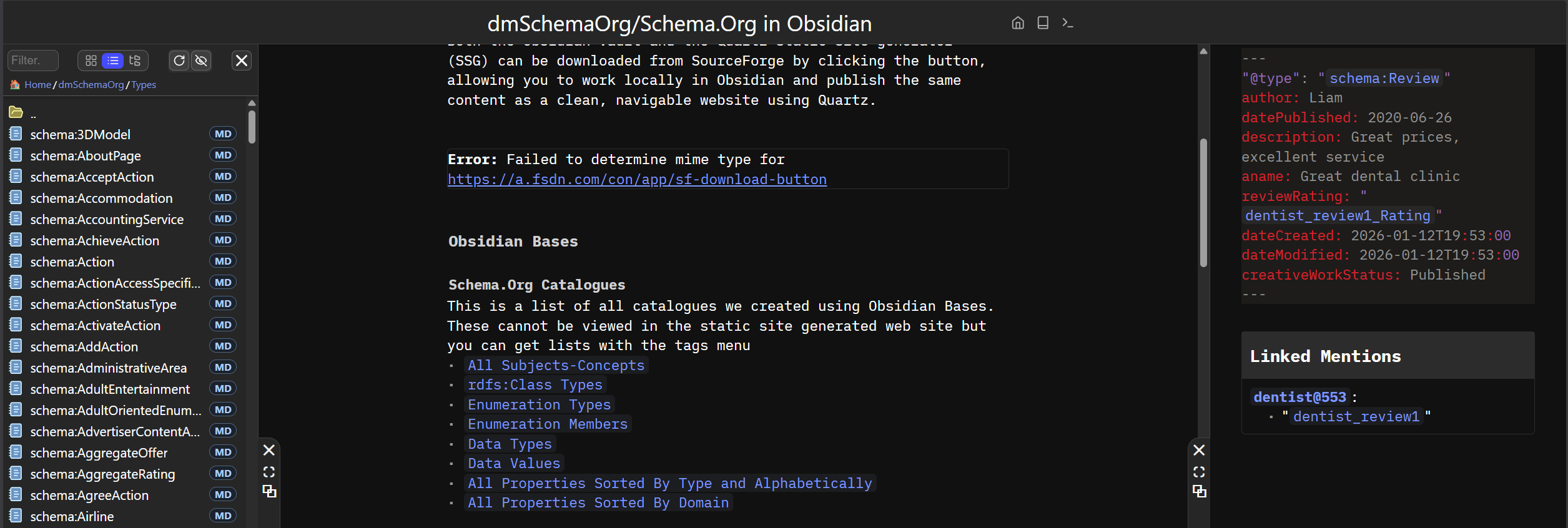
I realized that LHS, RHS, and BHS panels are not visible unless populated with a widget, so I tried the following:
LHS (Left-Hand Side)
- Ran the command Navigate: Toggle Document Explorer
- The documented shortcut (Ctrl + Alt + E) does not seem to work
RHS (Right-Hand Side)
- Right-clicked on a file
- Selected Pop out
- In the pop-up window, clicked Dock Right to fill the RHS pane
From a UX perspective, it would be very helpful to have a direct option such as “Open to Right Panel” when right-clicking a file. This mirrors Obsidian’s Open to the right / Split right behavior and reduces the interaction to a single click, which is likely what most users want.
Similarly, when the cursor focus is inside a note that is already open in the RHS panel, clicking a file in the Document Explorer should open that file in the RHS by default, rather than always opening it in the LHS, which is the current behavior.
BHS (Bottom-Hand Side)
- I could not find a way to populate the BHS panel
Ideally, this area could host widgets such as:
- Document outline
- Backlinks (Linked Mentions — apologies, but that term is awkward !)
- Network graph visualization
- Calendar
Main Content Panel
Is there any quick way to handle the width of the main content, the central area between RHS and LHS panels, or perhaps fill the available space of the Browser window by default ?
General Feedback
Overall, this is an impressive and valuable contribution, and I am very grateful that you have shared it openly with the community.
One idea inspired by Obsidian is to keep the left and right panels always occupied by default, with the ability to collapse them when needed. Combined with simple actions like Split Right or Open to Right, this creates a very fluid and powerful workflow.
I fully appreciate that managing flexible panel layouts programmatically is extremely complex, so keeping things simple for now makes sense.
Thank you very much for your time and your work on this.