Amazing. My feedbacks are:
Side panel view
Full mode
perfect
Muti modal view
- no way to rollback to side panel mode
- size modal window to contains
what do you mean? no way to go back to panel mode? and what is modal mode?
i don’t understand.
this is only a 80% prototype to see development stage, not everything is implemented yet.
what does it contain where and when?
from modal move, no way to come back to panel view
When the modal view is opened, the window does not adjust to contain its content properly.
I KNOW!!!
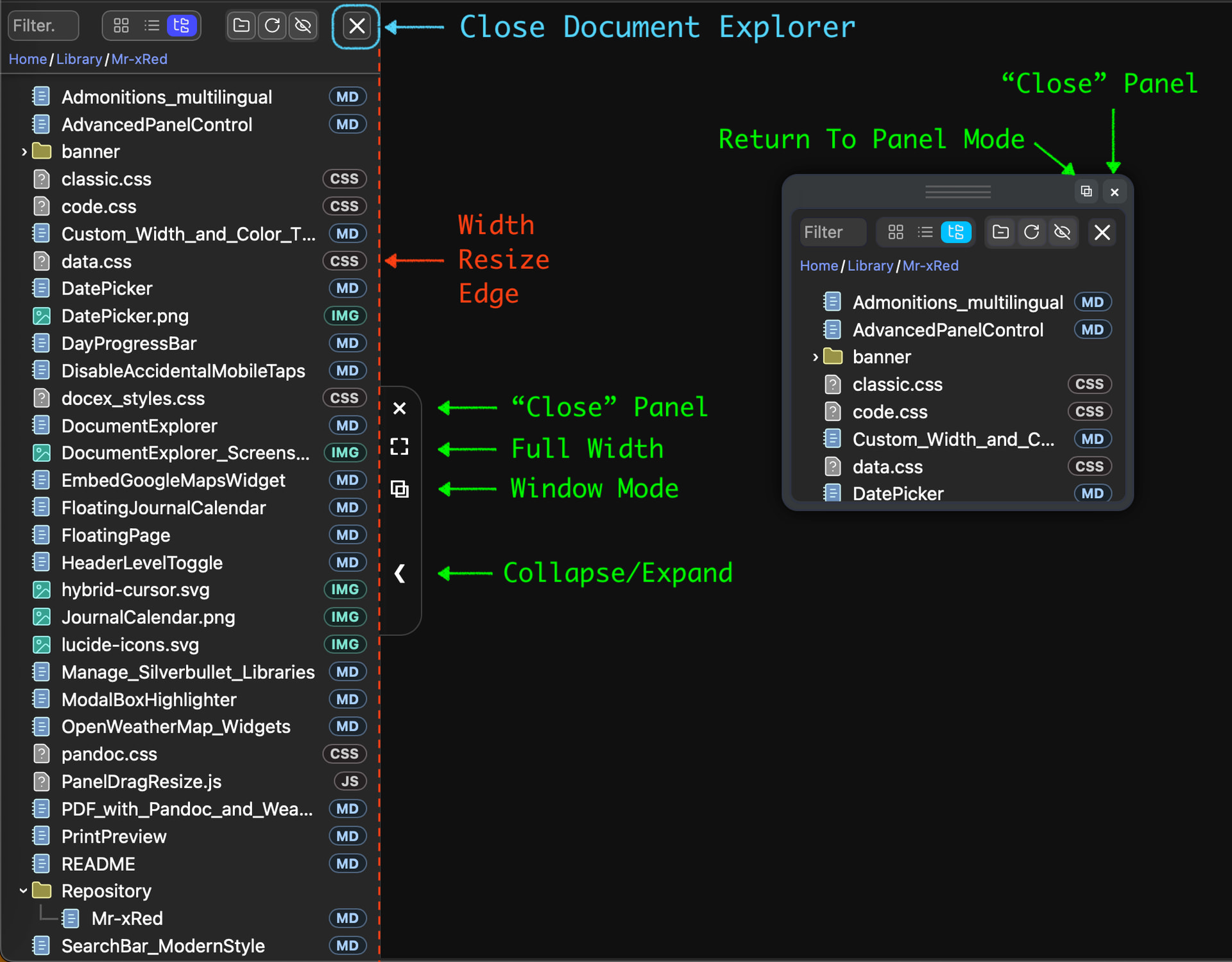
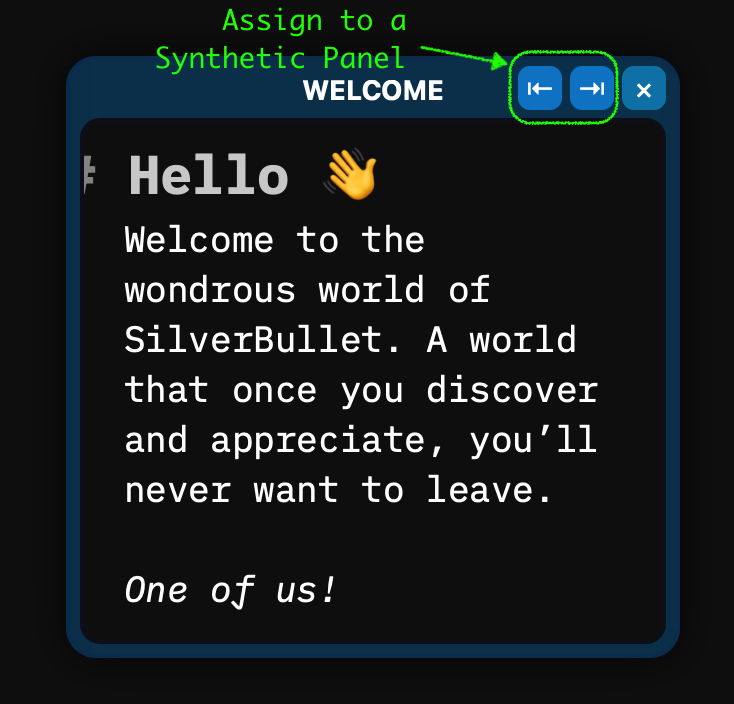
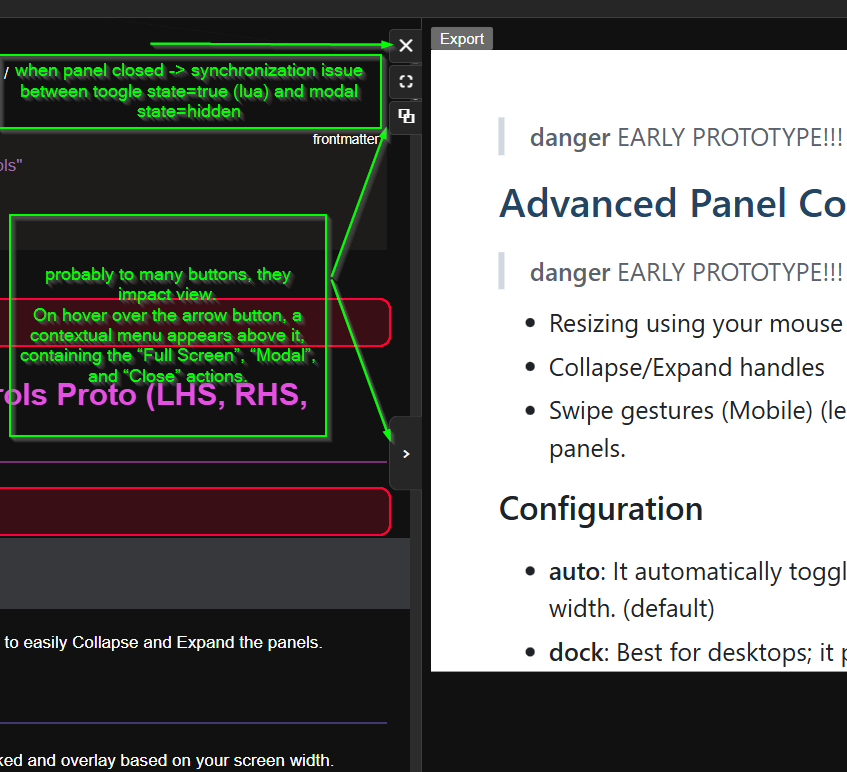
window/modal mode is not yet fully implemented because currently they use two different code bases, andd they are not syncronizes yet. it’s just work status prototype to get a sneak peak, i will later put everything in one master js. currently is modular so i can try out different things. i will also remove the close&window buttons, from the explorer(top right), because the closing and control of the Panel will be moved to the edge buttons, and the one for the window, it will be in the header. And on the window i will add the Close button and a “attach to panel” button, so one can switch between: (Collapsed<->Panel<->Full Width<->Collapsed)<->Window(modal) mode easily in whichever state you currently are.
CAUTION before update
Remove any old versions of following libraries (if you had it installed):
- Document Explorer
- Advanced Panel Control
- Treeview Extension
- FloatingPage
Don’t forget to also update the
Mr-xRed Repo
Unified the Advanced Panel Controls (UAPC) with the Floating Window JavaScript.
Control Buttons on panels for close, expand/collapse, and mode switch.
Gesture/Swipe Control for Mobile users.
Switch between Window Mode and Docked Panel Mode seamlessly.
Added Synthetic Panels concept, to temporarily (until closed) assign a virtual panel side to a floating window.
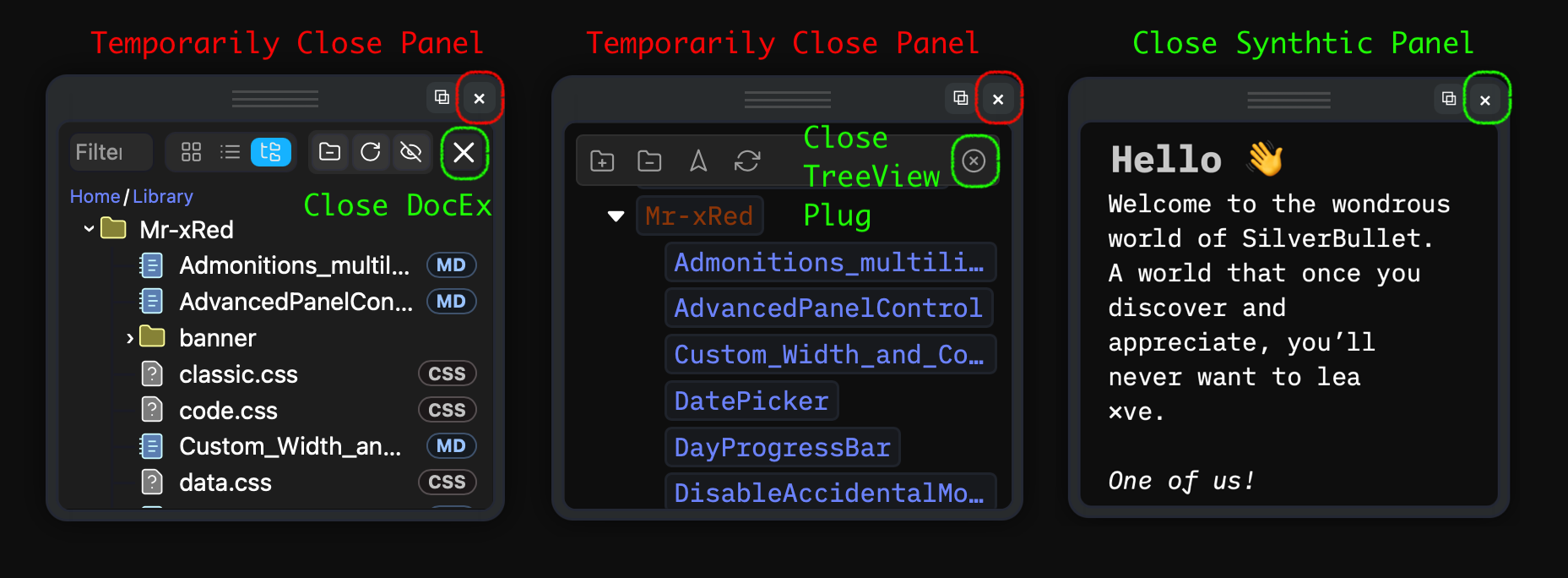
Consistent panel controls across all Panels and Synthetic Panels
Panel sizing is persisted via clientStore (LHS, RHS, BHS).
Panel constraints configurable (min/max width and height).
Button-Size and Style configurable through Space-Style (Documentation → Soon)
recoverAfterRefresh = true) will return to the Panel even after you closed it from the “Close” button) → To effectively close that panel use the dedicated Close Button provided by the developer of the Plug/library. This doesnt affect Synthetic PanelsHi Mr. Red,
I am a newcomer to the SilverBullet community, but an experienced Obsidian user, and I am currently trying to migrate to this new environment. Panel-based layouts are a critical UX aspect for me in note-taking applications, so I decided to test your AdvancedPanelControl plugin and document the installation and usage steps, along with some feedback.
silverbullet version
2.4.1-0-g3e1f03b
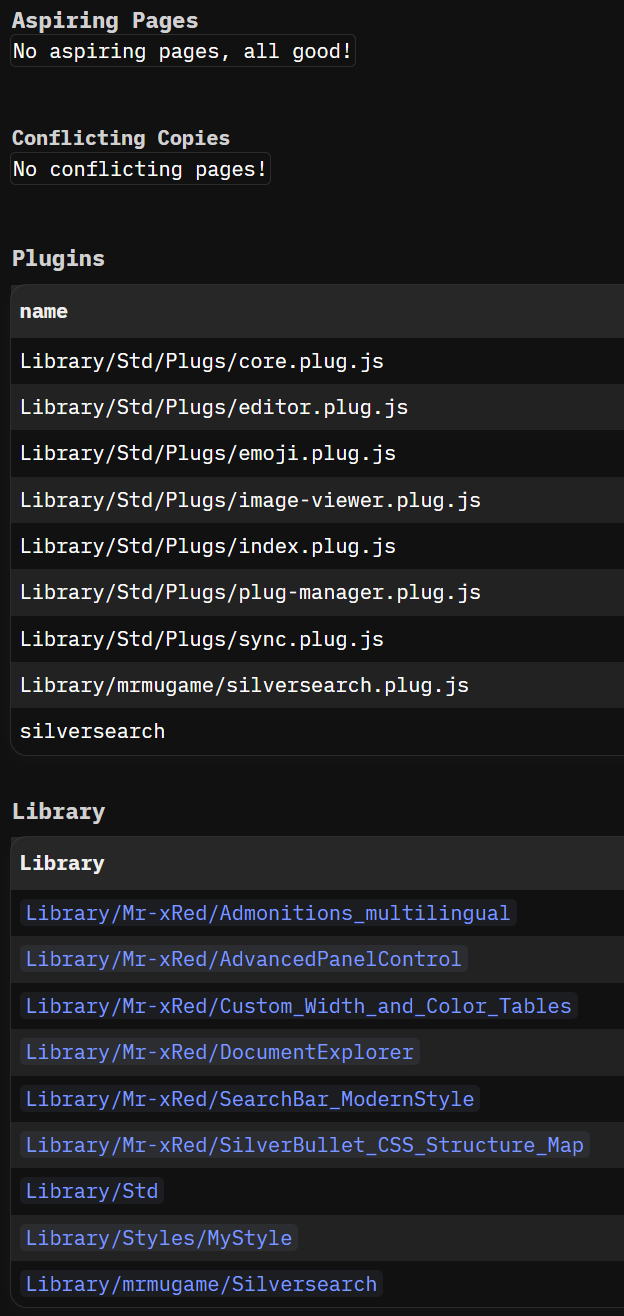
With Library: Install Repository command I installed your repository
From the Library Manager, I installed DocumentExplorer.
I noticed that AdvancedPanelControl was also installed automatically.
However, this resulted in some confusion, as there appears to be another similarly named entry:
It is not immediately clear how these entries relate to each other or which one should be configured directly.
In my CONFIG, I added the following:
"AdvancedPanelControl", {
  mode = "auto",       -- "auto" | "overlay" | "dock"
  gestures = true,     -- true (enabled), false (disabled)
  minWidth = "300",    -- Minimum width for LHS and RHS
  maxWidth = "1000",   -- Maximum width for LHS and RHS
  minHeight = "100",   -- Minimum height for BHS
  maxHeight = "500",   -- Maximum height for BHS
}
I ran the following reload commands:
I am not entirely sure when each of these should be used or what their exact scope is. A brief explanation would be very helpful.
Panel Visibility & Population
I realized that LHS, RHS, and BHS panels are not visible unless populated with a widget, so I tried the following:
From a UX perspective, it would be very helpful to have a direct option such as “Open to Right Panel” when right-clicking a file. This mirrors Obsidian’s Open to the right / Split right behavior and reduces the interaction to a single click, which is likely what most users want.
Similarly, when the cursor focus is inside a note that is already open in the RHS panel, clicking a file in the Document Explorer should open that file in the RHS by default, rather than always opening it in the LHS, which is the current behavior.
Ideally, this area could host widgets such as:
Is there any quick way to handle the width of the main content, the central area between RHS and LHS panels, or perhaps fill the available space of the Browser window by default ?
Overall, this is an impressive and valuable contribution, and I am very grateful that you have shared it openly with the community.
One idea inspired by Obsidian is to keep the left and right panels always occupied by default, with the ability to collapse them when needed. Combined with simple actions like Split Right or Open to Right, this creates a very fluid and powerful workflow.
I fully appreciate that managing flexible panel layouts programmatically is extremely complex, so keeping things simple for now makes sense.
Thank you very much for your time and your work on this.
As you mentioned above, “AdvancedPanelControl” is the short name of the library that gets installed automatically as a dependency of Document Explorer.
The full name in my repository is, as you also noticed, “Advanced Panel Control and Window Management” (yes, it’s a mouthful). Apologies for the confusing naming.
Functionally, they are the same thing: same .md file, same .js file. The separation exists purely so users can install Advanced Panel Control on its own, without also having to install Document Explorer, if that’s all they need.
Regarding the configuration: you are correct.
These parameters control the behaviour of the panels (LHS, RHS, and BHS), such as sizing, docking mode, and gesture support.
Those three reload options are all core SilverBullet system commands and are not related to AdvancedPanelControl or Document Explorer specifically.
For clarity, here is when each one is typically used and what it affects in MY understanding:
CONFIG, Space Lua scripts, or when a broader refresh is neededconfig.set changes.js file, it is recommended to additionally run CLIENT: RELOAD UI so the updated JavaScript is applied on the client side as well.I understand where you’re coming from, and the comparison with Obsidian makes sense from a UX perspective. The key difference is that in Obsidian, side panels are a first-class feature deeply integrated into the core application.
In SilverBullet, side panels were never designed to render pages directly. There isn’t even a native command to render a markdown page independently of the main editor view. The only workaround I found was to simulate this behaviour by running a second SilverBullet instance inside an iframe, then stripping away the title bar and other UI elements to approximate a clean panel view.
This approach comes with significant limitations. For example, once a page is opened inside that iframe, any further navigation remains confined to that panel. There is no clean way to choose whether a page opens in the main window or the panel, as the iframe runs SilverBullet in a sandboxed, isolated state.
Additionally, panels can only host one element at a time. If the Document Explorer is assigned to the LHS, it occupies that panel entirely, even when running in window mode. Nothing else can be docked there unless the Document Explorer is closed first.
The BHS was never a major focus for me, largely because there are very few (if any) existing plugins or libraries that make use of it. For that reason, it also received less attention in the Advanced Panel Control library.
Thank you for the kind words and the thoughtful feedback. A lot of effort went into getting this to its current state, so it genuinely means something to receive both appreciation and constructive criticism.
That said, side panels in SilverBullet are a fairly rigid system. The fact that they can be resized, undocked, and used as floating windows at all is already pushing the boundaries of what they were originally intended to do. Especially considering that I don’t have a formal programming or software development background, and that a large portion of this work involved iterative experimentation, heavy debugging, and extensive use of LLMs.
Reaching the level of seamless UX you describe would require changes beyond what an extension library can realistically provide. I’ve tried to simplify the experience as much as possible within those constraints, but at this point the limitations are more structural than cosmetic.
In the official space-style documentation there is 
html {
  /* Uncomment the next line to set the editor width to 1400px */
  /* --editor-width: 1400px !important; */
}
You can also use “%” or any CSS unit , so basically setting the --editor-width variable to 100% will give the editor the maximum space it can fill.
Hmm, thanks for your quick and thoughtful explanation:
running a second SilverBullet instance inside an iframe…
… the iframe runs SilverBullet in a sandboxed, isolated state.
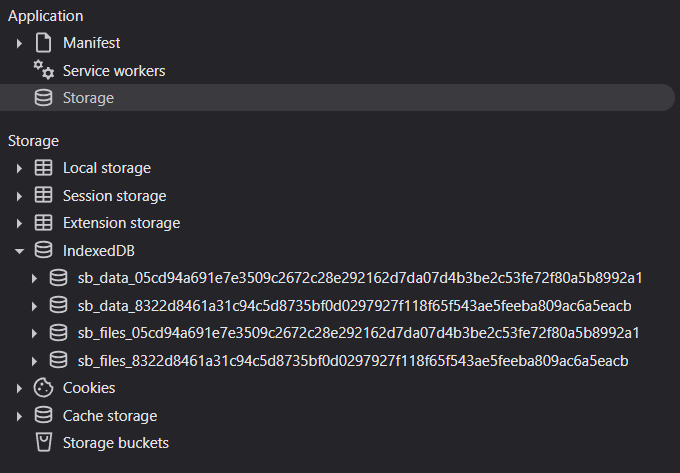
that probably explains why I can see duplicate object stores with the same name-key but different content. Total entries are different !
So I am not sure how that affects synchronization and/or indexing performance. When you say it runs in a sandboxed, isolated state, do you mean that it only renders the content of the note in the panel and syncing changes on the disk ? Should I expect the same behavior when you modify/edit a note in the main window ?
actually that’s not the case. When i said sandboxed, i meant it’s isolated from the main view, that if you open a new page inside the window using Ctrl-k, it will be opened inside the same iframe, and you cannot “send it” to the main window.
It still uses the same client store, same index, same database and everything the main window/tab uses. Basically best comparison is, like running silverbullet inside a separate tab inside the same browser. It will still syncronize without any issue, and don’t create a second database.
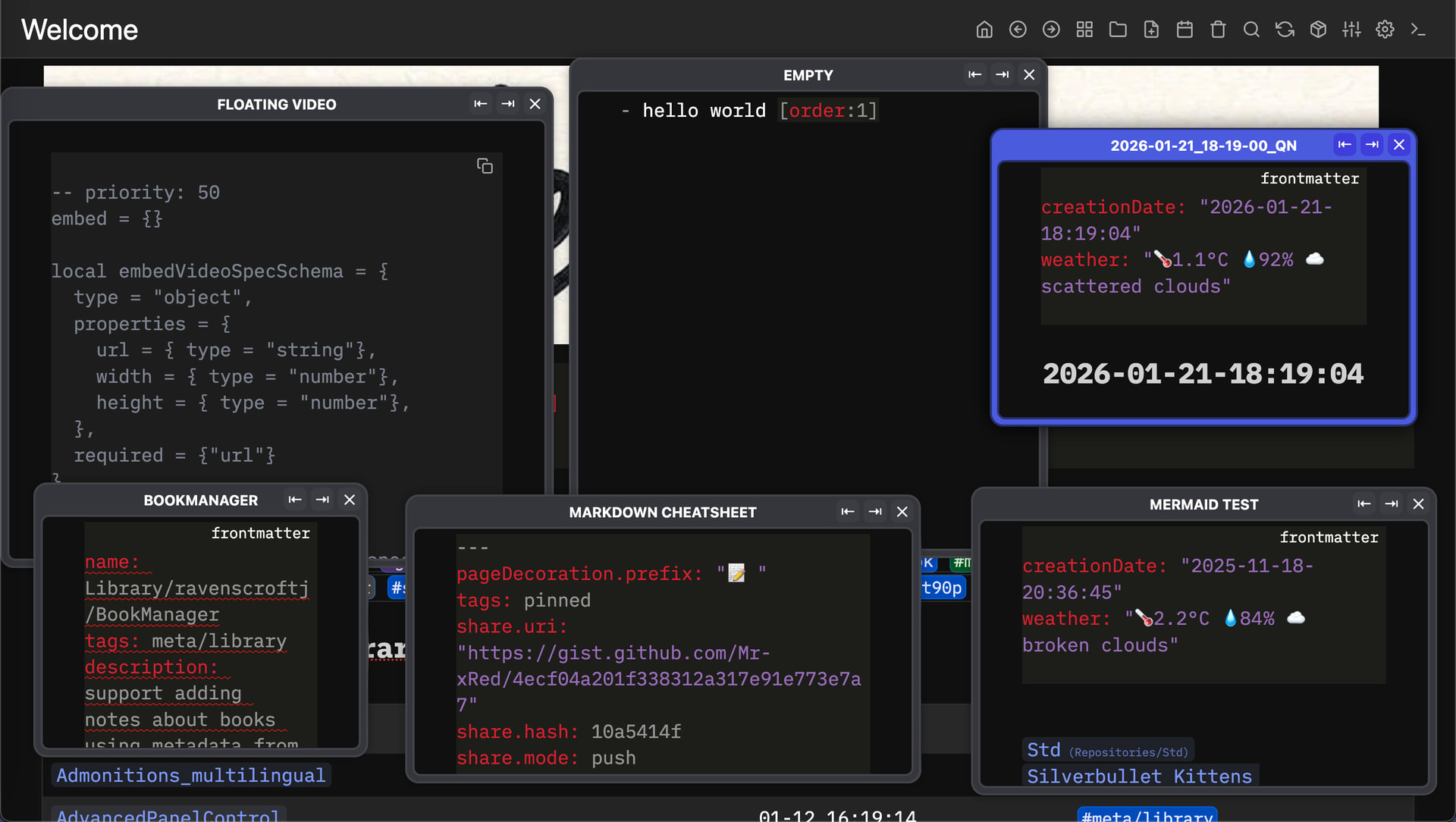
Here is an example:
i opened up 6x Floating windows with different pages inside them, and i still have only one indexDB. so that duplication is not from the AdvancePanelControl and nor from “DocumentExplorer”
So I am not sure how that affects synchronization and/or indexing performance. When you say it runs in a sandboxed, isolated state, do you mean that it only renders the content of the note in the panel and syncing changes on the disk ? Should I expect the same behavior when you modify/edit a note in the main window ?
it only affects syncrhonization if you open the same page in different floating windows, and try to modify each one at the same time (good luck). otherwise i don’t see how it could affect the sync negatively.
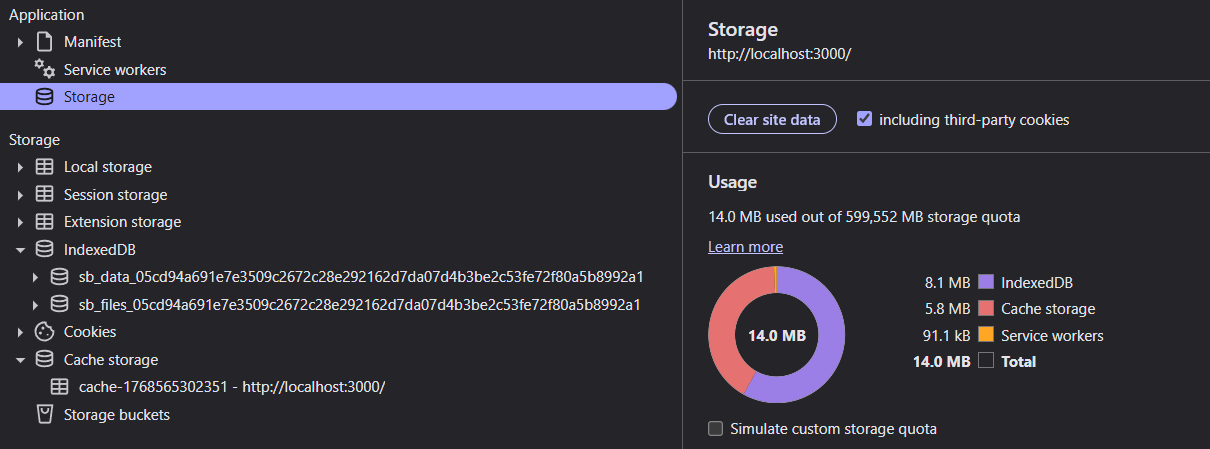
OK thanks for the clarification, it is crystal clear now. Here is some more feedback on the problem I faced with the duplicate indexing on which the reason is unknown to me.
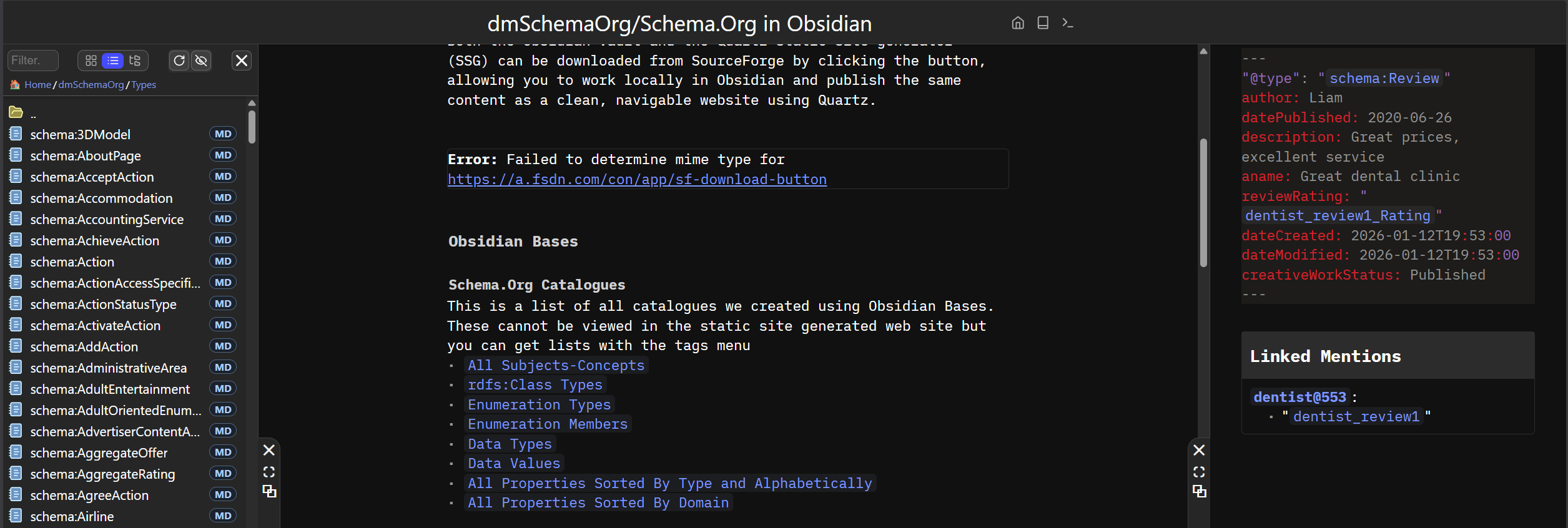
I am trying to port my SchemaOrg in YAML project in SilverBullet. There are thousands of markdown notes that are interlinked so that makes reindexing on the specific dataset a bit challenging and interesting in terms of performance.
Total pages: 3066
Total documents: 37

* 1st method
  Space Reindex: time 120sec

* 2nd method
  Clear site data (application storage)
  Close WebBrowser Tab
  Shutdown silverbullet
  Start silverbullet - Reindex: 75sec
  Duplicate storage problem fixed
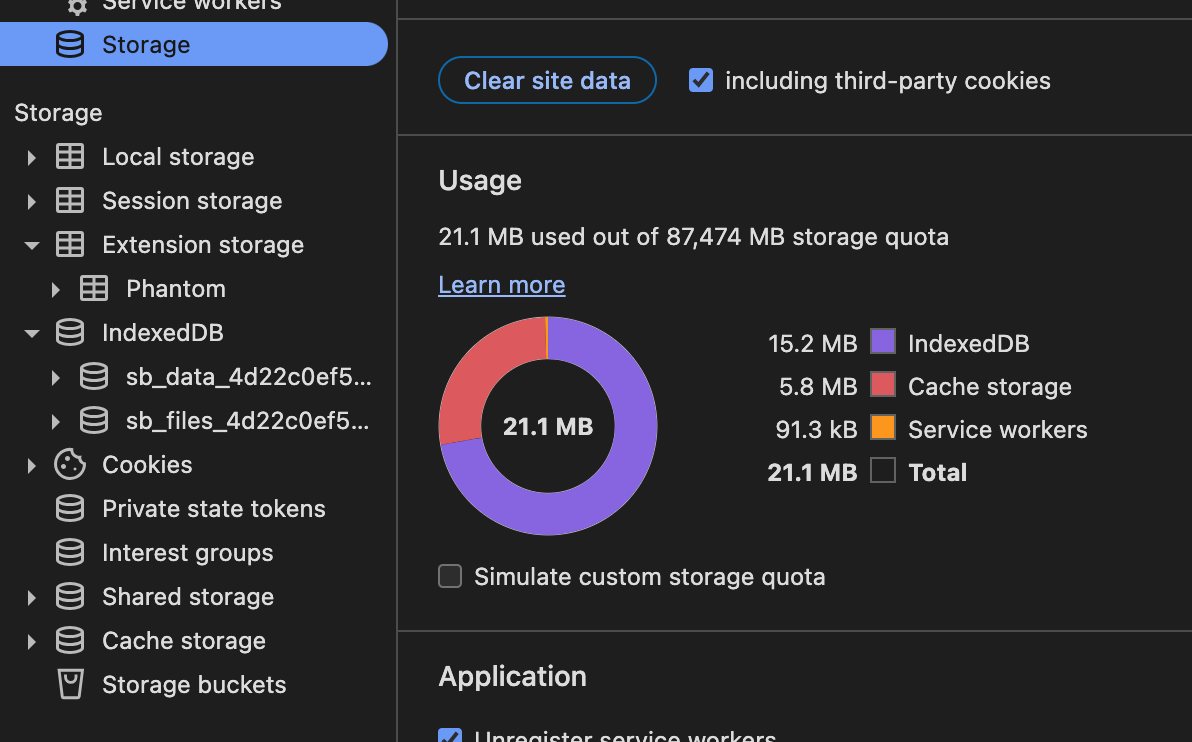
  Storage - Site data - 14 MB

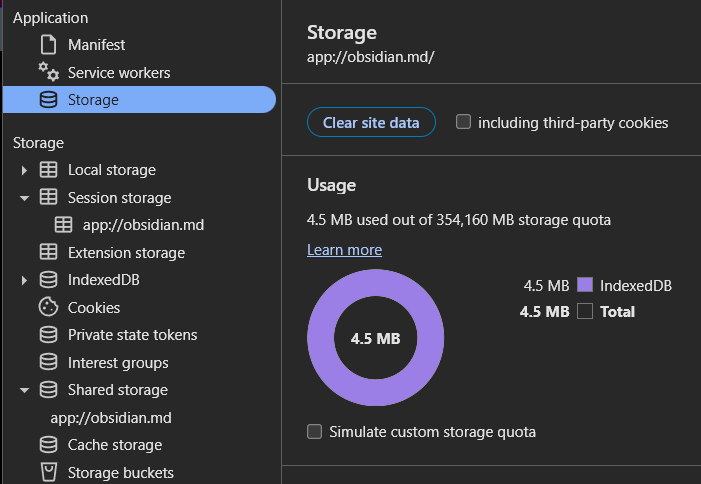
* Obsidian Vault Comparison
   Rebuilding Vault Cache: 55sec
   Storage - Site data - 4.5 MB
Trying just reindexing the space running the relevant command and/or closing the window, restarting the server did not fix the problem. But when I tried a “hard reset” using the second method, the problem vanished.
Obsidian is faster and occupies less space in IndexedDB, but in terms of time complexity SilverBullet is not far away.
Here is also a bug I discovered in Document Explorer and here is how to reproduce it.
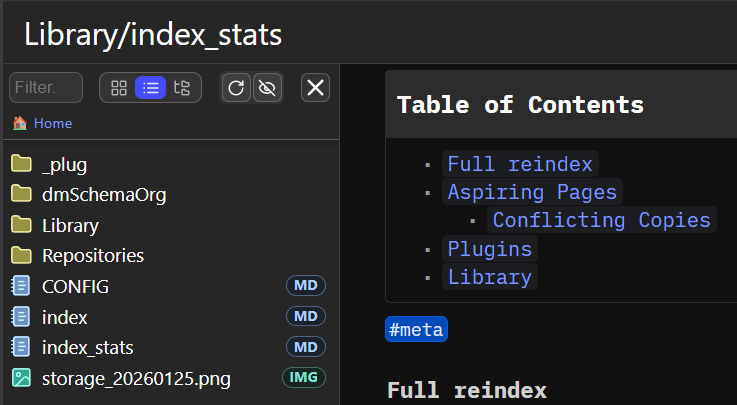
Rename a note that is open inside the sb-editor by clicking on its name at sb-top. For example rename index_stats to Library/index_stats. At the time you do the renaming, make sure Document Explorer occupies the space on the sb-panel lhs.
The problem as you can see in the screen capture is that Document Explorer has not updated its content and index_stats is still displayed in the root of my space. The user has to reload the page or perhaps do Client: Reload UI to update the Document Explorer.
BTW1: Renaming the file from the Document Explorer works fine
BTW2: It would be nice to implement movement of a batch of files to another folder
This is not a bug, but there isn’t any “file renamed” or “file deleted” event in silverbullet i can hook a reload to it, that’s why it is recommeneded you rename/delete the files directly in DocumentExplorer. You don’t need to reload the Page, or Reload the UI, you can always click the “Refresh View” - button, which will force to update the file list and Explorer View

Did you know you can also use “Rename” to move files too, even complete folders?
I know it’ would be nice to have “select&move”, or “select&rename” or “select&delete” as feature, but currently I have no time to add further features, and also it is quiet hard for me to implement further features, but anyone has thee time and knowledge to do it, feel free to make a PR with the implementation for it, and i’ll be sure to merge it.
Revisited the Advanced Panel Control and added the option/function to open a page directly in a certain Synthetic Panel (RHS or LHS), sorry still no BHS yet.
Here Two Examples how to use it.
local jsModule = js.import("/.fs/Library/Mr-xRed/UnifiedAdvancedPanelControl.js")
-- dock to the RHS
jsModule.showDocked(page.name, "rhs")
-- dock to the LHS
jsModule.showDocked(page.name, "lhs")

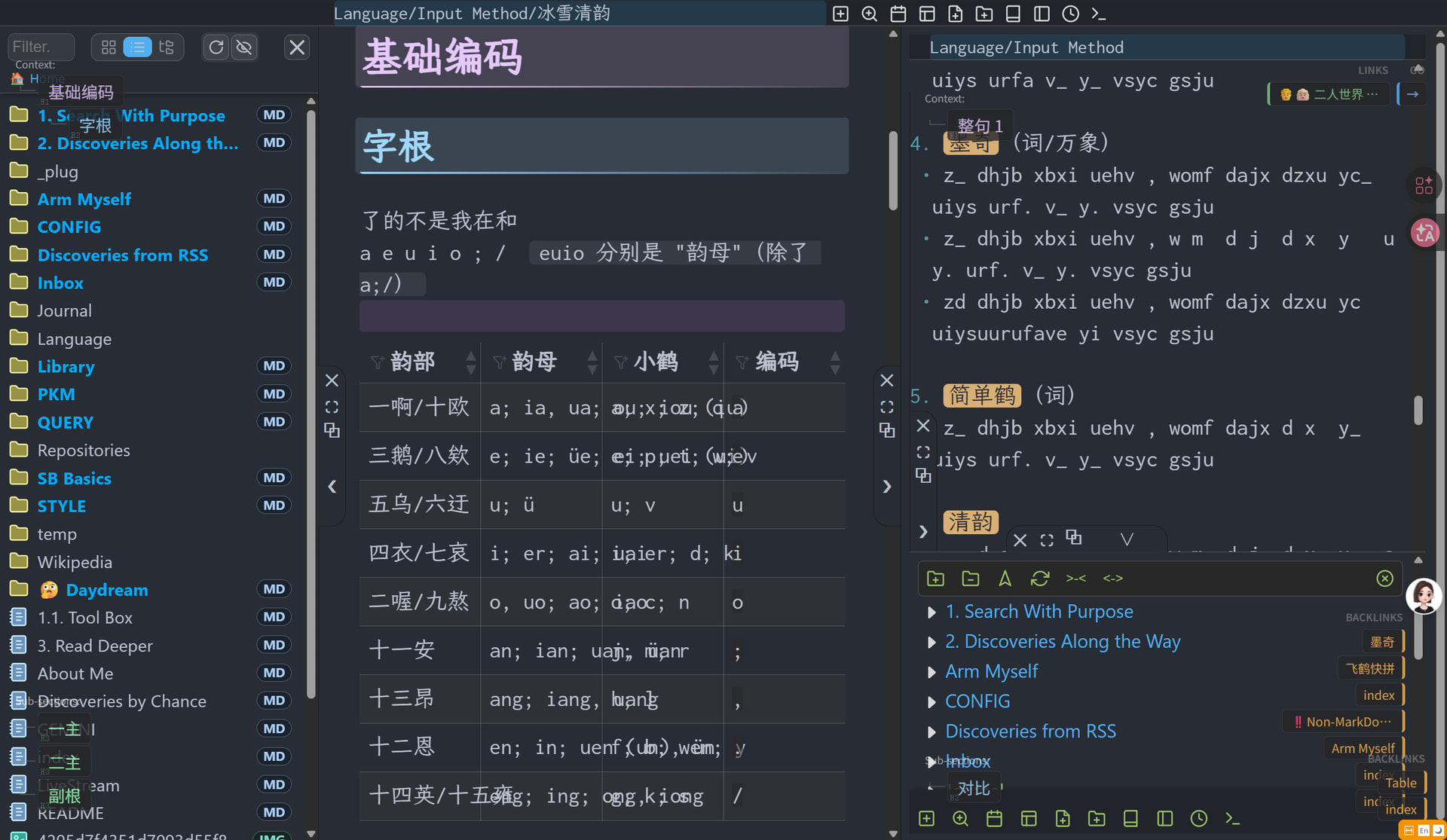
Just looking at your screenshot, I got dizzy 
But as long as you can see order in that chaos and if it works for you, i'm glad 
I wanted to test the Shadow DOM element mode introduced in February by @onespaceman and i'm having a problem with UnifiedAdvancedPanelControl.js.
The code creates a variable --sb-panel-width which persists when opening the panel with a Shadow DOM element. So, the mode parameter of editor.showPanel has no effect. Example: editor.showPanel("lhs", 0.5, element, "").
Shadow DOM without UnifiedAdvancedPanelControl.js:
<div class="sb-panel" style="flex: 1 1 0%;"></div>
#shadow-root (closed)
<div id="panel-root">
<div id="test-panel">
<p>
Shadow DOM with UnifiedAdvancedPanelControl.js:
<div class="sb-panel lhs is-expanded" style="flex: 0 0 auto; --sb-panel-width: 384px; --sb-panel-height: 200px; position: relative; z-index: 90; width: var(--sb-panel-width); max-width: 100vw;">

#shadow-root (closed)
<div id="panel-root">
<div id="test-panel">
<p>
Is there a workaround to fix this problem?
Thanks.
What's a shadow DOM element mode?
Changelog:
The context used by editor.showPanel() depends on the type of html parameter that is passed to editor.showPanel:
// To use an iframe (old method)
editor.showPanel("rhs", 1, "<h1>Contenu HTML</h1>", "")

// To use Shadow DOM (new method)
const element = document.createElement("div")
element.innerHTML = "<h1>Contenu DOM</h1>"
editor.showPanel("rhs", 1, element, "")
Backwards compatibility is maintained because the system dynamically checks the HTML content type panel.tsx:13-20 . Existing plugins that pass strings will continue to work with iframes, while new plugins can pass DOM elements to benefit from Shadow DOM.
Conversation with Claude AI (Opus 4.6):
Question :
Recently, the SilverBullet Changelog announced:
Panels now use Shadow DOM elements instead of iframes.
What does that mean? What are the differences between the two techniques? What impact for existing plugins (knowing that no malfunction has been observed for two months)?
Response:
Shadow DOM vs iframes in SilverBulletWhat it means
SilverBullet previously used iframes to display its panels — interface areas that can contain dynamic content, widgets, query results, etc. Now, these panels are rendered via Shadow DOM, a web-native technology that allows content to be encapsulated within the same document.The differences between the two approaches
The iframe is essentially one web page embedded within another. It is a complete HTML document, with its own JavaScript context, its own CSS space, and its own memory management. Communication between the iframe and the parent page goes through postMessage, which is secure but relatively cumbersome and asynchronous. Each iframe has a significant cost in memory and rendering time.
The Shadow DOM creates an encapsulated DOM subtree inside the main document. The styles are isolated (the Shadow DOM CSS doesn't leak outward and vice versa), but the content lives in the same JavaScript context and rendering process as the rest of the page. Communication is direct — no need to serialize messages.
In summary, the concrete benefits of switching to Shadow DOM for SilverBullet are: better performance (fewer separate rendering contexts), simpler and synchronous communication between panels and the main application, a unified DOM (which facilitates accessibility, keyboard focus, events), and a reduced memory footprint when multiple panels are open.The trade-off is that the isolation is less strict than with an iframe — the JavaScript in the panel shares the same global context as the application — but for a tool like SilverBullet where the panels are an integral part of the application, this strong isolation was not necessary.
Impact on existing plugins
If no malfunction has been observed in two months of use, that is a good sign and quite logical. The cases which could have posed a problem would be plugins which directly manipulated the DOM of the iframe (access tocontentDocument,contentWindow), or which relied on the specific life cycle of an iframe (load events,resizing). If a plugin usedpostMessageto communicate with the panel, it's likely that the SilverBullet team maintained a compatibility layer or the plugin API was already abstracting this communication.
In practice, most SilverBullet plugins interact via high-level APIs (system of plugs, functions, declarative widgets) rather than by directly manipulating the DOM of the panels. This is why the transition was seamless. If your plugins have been working well for two months, there's no reason to worry — you just benefit from lighter, more responsive panels.
@Mr.Red In general, any call to editor.showPanel(...) gives Advanced Panel Controls, so I can adjust the width, dock and so on... this is nice!
When Shadow DOM is rendered by editor.showPanel(...) the drag handle and the control buttons are missing because it was written during iframe times. Wish 1: If panel controls show up that would be great.
Wish 2: Panels shall have name / id attribute which also needs a PR in silverbullet. Then width (or positions) can be per panel. Document Explorer panel can have its width and graph can its width independently persisted.