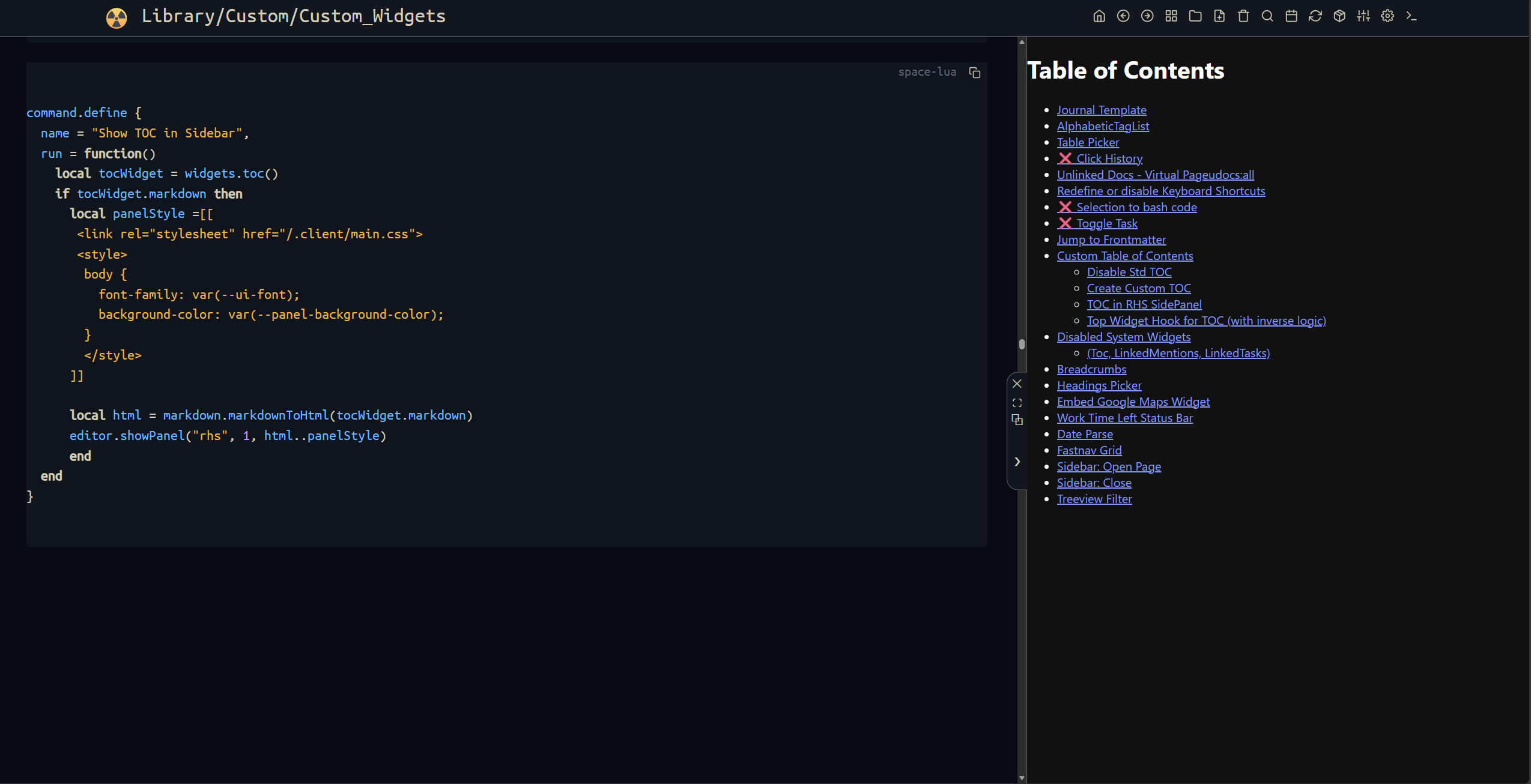
command.define {
  name = "Show TOC in Sidebar",
  run = function()
    local tocWidget = widgets.toc()
    if tocWidget.markdown then
      local panelStyle =[[
       <link rel="stylesheet" href="/.client/main.css">
       <style>
        body {
          font-family: var(--ui-font);
          background-color: var(--panel-background-color);
        }
        </style>
      ]]

      local html = markdown.markdownToHtml(tocWidget.markdown)
      editor.showPanel("rhs", 1, html..panelStyle)
      end
  end
}
the problem I'm having with this is that whenever I click something in the TOC, the whole page is Reloaded, instead of just simply jumping to the desired heading.
I checked the DEV-Tools for the iframe inside the panel:
<li><span class="p">
<a href="/Library/Custom/Custom_Widgets%4030849" class="wiki-link"
data-ref="Library/Custom/Custom_Widgets@30849">TOC in RHS SidePanel</a>
</span></li>
The anchor-links have the correct href and data-ref attribute even the class="wiki-link" , so why doesn't the sb-main jumps directly to the desired position without reloading the whole webpage?
and how do you add the onclick event to the already rendered TOC?
are you using JS injection or simple text replace?
do you have the complete working example?
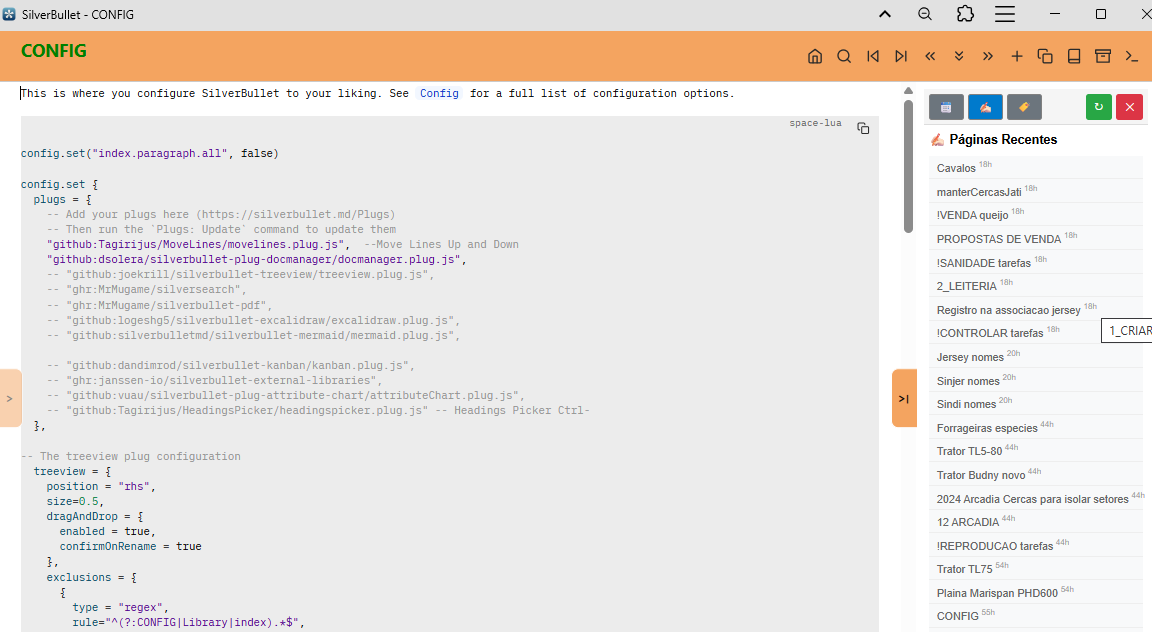
-- Função para gerar páginas recentes (versão DOM vertical)
function miniPaginasRecentesV(nPaginas)
  nPanPaginas = nPaginas or 12
  -- Buscar últimas 10 páginas modificadas
  local recentPages = query[[
    from index.tag "page"
    order by lastModified desc
    limit nPaginas
  ]]

  -- Array para as páginas
  local pagesContainer = {}

  -- Gerar cada página como item vertical
  for i, page in ipairs(recentPages) do
    local pageName = page.name or ""
    local displayName = string.match(pageName or "", "([^/]+)$") or pageName or ""

    -- Calcular horas desde última modificação
    local hoursAgo = ""
    if page.lastModified then
      local now = os.time()

      -- Converter string ISO "yyyy-mm-ddThh:mm:ss.mmm" para timestamp
      local year, month, day, hour, min, sec, msec = string.match(
        page.lastModified,
        "(%d+)%-(%d+)%-(%d+)T(%d+):(%d+):(%d+).(%d+)"
      )

      if year then
        local modifiedTime = os.time({
          year = tonumber(year),
          month = tonumber(month),
          day = tonumber(day),
          hour = tonumber(hour),
          min = tonumber(min),
          sec = tonumber(sec)
        })

        local hoursDiff = math.floor(os.difftime(now, modifiedTime) / 3600)
        if hoursDiff >= 0 then
          hoursAgo = tostring(hoursDiff)
        end
      end
    end

    -- Criar item da página
    local pageItem = dom.div {
      style = [[
        padding: 5px 9px;
        background-color: #f8f9fa;
        color: #666;
        cursor: pointer;
        font-size: 12px;
        border-bottom: 1px solid #eee;
        white-space: nowrap;
      ]],
      ["data-page"] = pageName,
      onclick = function()
        editor.navigate(pageName)
      end,
      ["xonclick"] = string.format("syscall('editor.navigate','%s')", pageName),
      title = pageName,

      -- Nome da página com expoente de horas
      displayName,
      dom.sup {
        style = "font-size: 0.7em; vertical-align: super; margin-left: 3px; color: #999;",
        hoursAgo..'h'
      }
    }

    table.insert(pagesContainer, pageItem)
  end

  -- Container principal
  local html = dom.div {
    style = "padding: 5px; font-family: sans-serif;",
    dom.h3 {
      style = "margin: 0 0 10px 0; font-size: 14px;",
      "✍🏻 Páginas Recentes"
    },
    unpack(pagesContainer)
  }

html = js.tojs(html).outerHTML
  html = html:gsub('xonclick=', 'onclick=')
  editor.showPanel("rhs", 0.1, html, script)
  my.print('showRHSPanelDinamico carregado')
end
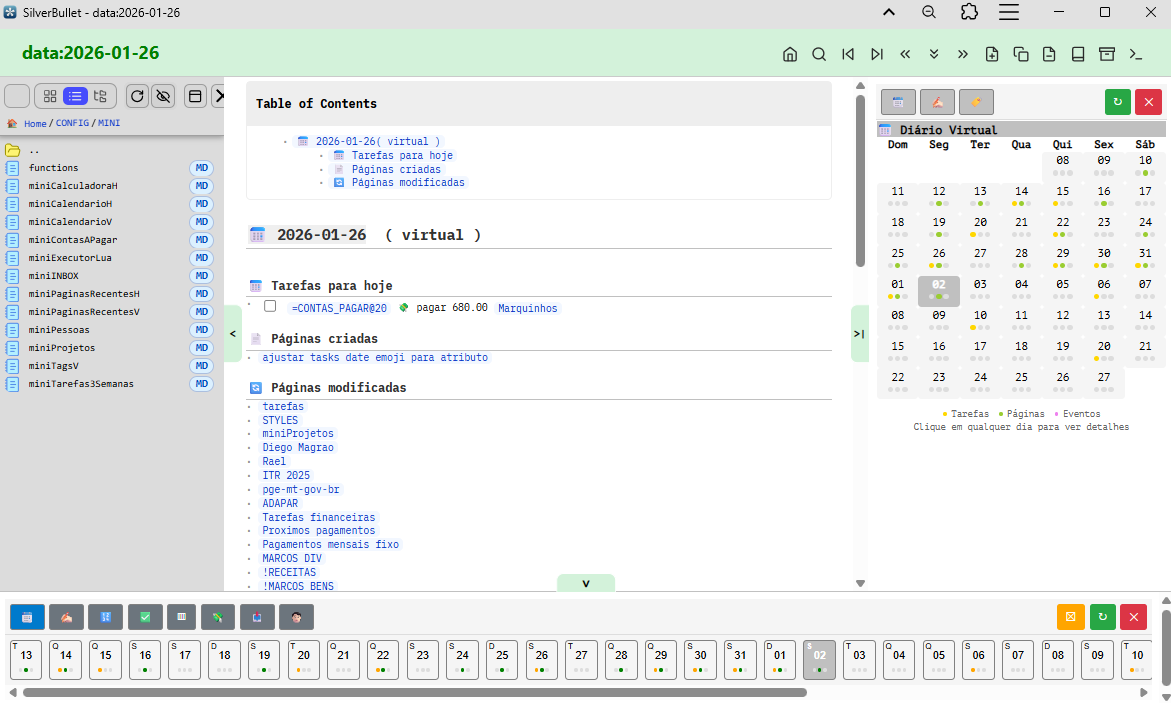
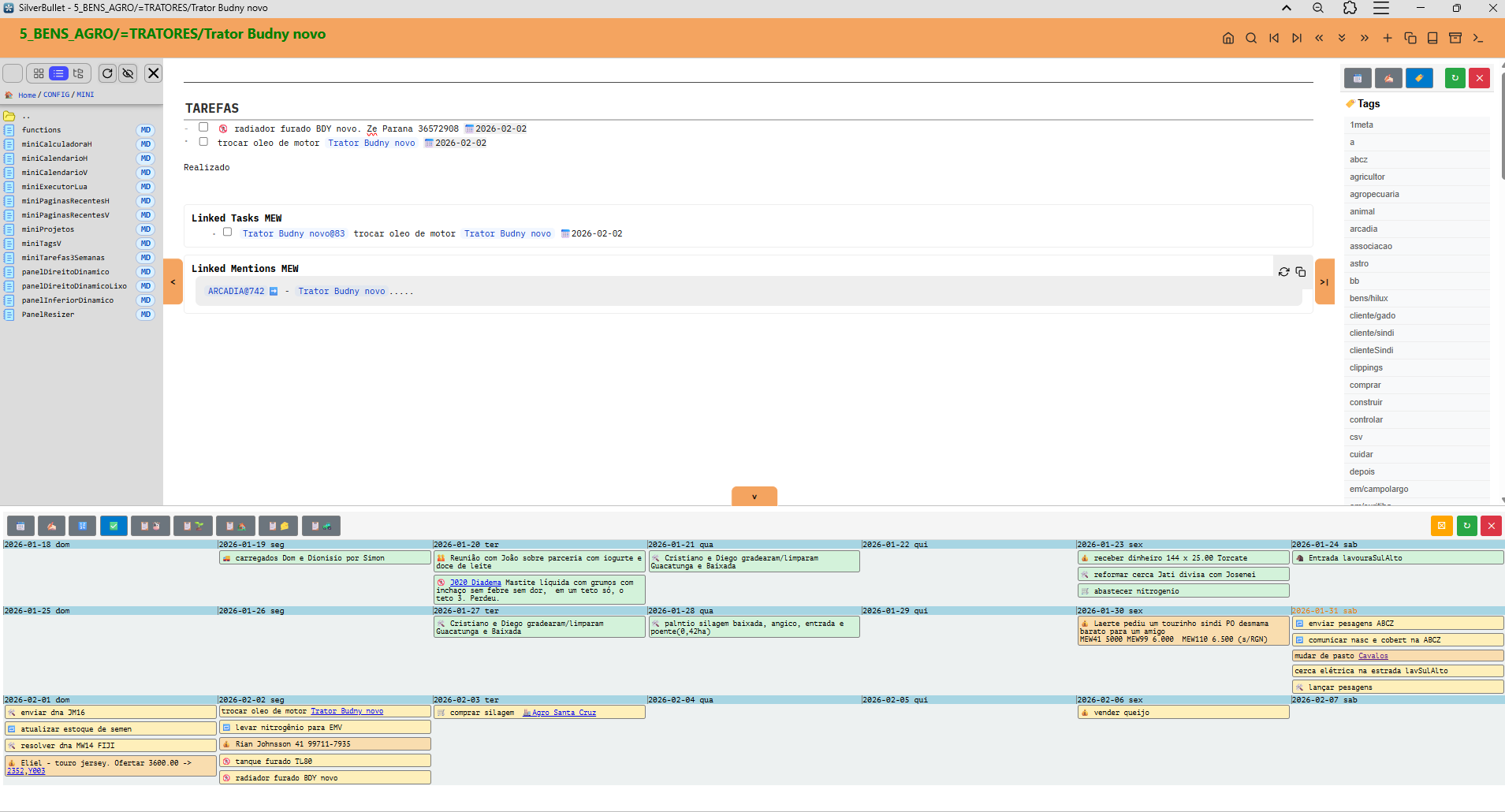
I made miniApps (calendar, timeline, taskboard, etc.), which are dynamically plotted anywhere: in the editor or in the panels.
I can even put whatever I want in the panels and the buttons work as if they were tabs.
This way I have everything at hand, leaving the editor area with viewer/editor.
It really turned out very good and practical.
But your implementations helped a lot!! Thanks.
To illustrate more features....
I don't use diary/journal. I write everything inside a page that is the container/context.
But I want to see everything I did that day. So I have a "virtual diary" (virtual page), where I see the main changes. I still want to improve, but a prototype.
And the calendar can be horizontal or on the side panel.
And the dots tell me if there were tasks, pages and events on the day.
This way I can review and look at what lies ahead.
The modified pages section is interesting, and I'd love to have that on my own journal pages. How do you keep a list of all days a page was modified on? Since the singular last-modified date would naturally get overwritten
I only use the created and lastModified fields.
To have a log of all the days you edited, you would need a log or a field where you would concatenate the dates (or an array/list of days).
And automate it with some event.
It's possible, but you would have to work on it.
It's a test to do.
Have you experienced any difficulties with RHS, like me ?
Once the panel is open (docked or not), if I modify the page displayed in the editor, the panel disappears.It happens just as well with Task Explorer and with Document Explorer.
I queried DeepWiki which identified a potential bug for which I opened an issue:
I don't have any problems!
I think you're referring to clicking on a link that's in a panel.
If that's the case, the problem is that it can't have hrefs. If you click on href, it's like opening or going to a new page.
You have to use the syscall, as I explained above.
Okay... I just saw your question.
Indeed, before, the right and left panels were confusing.
The problem ended when I used Library/Mr-xRed/PanelWidthResizer
Never happened to me. The panel only “disappears” if I reload the page, but that’s the correct behavior. Disappearing just by typing or editing the main page, I hear this the first time. What are the steps to reproduce this behavior ?
PS: I wouldn’t give too much thought of what DeepWiki says. I had the experience that it hallucinate pretty much if more complex issues. I wouldn’t trust it too much.
The scenario is extremely simple:
1- I open the right panel (with Document Explorer or Task Explorer, docked or in Windows mode). I can use the panel without any worries, call pages in the editor, etc...
2- if I add or modify a character in the editor, the right panel disappears!
I have experienced this at least 100 times ...
and this since the beginning of the development of Task Explorer (I had not yet had the opportunity to test Document Explorer on the HRS).
I confirm that DeepWiki is seriously hallucinating. However, the analysis attached to the issue appears credible. The comparison of management processes between LHS and RHS really suggests a bug.
If I am the only one who knows this situation, it would rather refer to my installation. However, I have nothing extraordinary. I pretty much took everything out. The last test to be carried out would consist of starting from a blank document space. Why not ?
Just tested it. And nothing disappears. I do recommend you create a Brand new test space. And try that out, maybe you have a broken code somewhere in your space. It’s easy just create an empty folder and point another instance with a different ports number to that space folder and off you go, a brand new space you can experiment with
Just tested it. And nothing disappears. I do recommend you create a Brand new test space. And try that out, maybe you have a broken code somewhere in your space. It’s easy just create an empty folder and point another instance with a different ports number to that space folder and off you go, a brand new space you can experiment with.
Are you using advanced panel control installed with the document explorer? Because that’s the only way I use panels. And maybe by manipulating the panel dom through the UAPC.js is solving this issue you are talking about. But I do recommend to setup a brand new dummy Space where you can play around without breaking anything in your main SB instance.
The culprit is the @malys's plugin MarkmapMindmap which somehow takes over the rhs upon installation and does not "let go":
by default, the variable "is_panel_visible" = false
the code listens to "editor:pageSaved" (in the previous version, until 01/16, which was still installed in my home, it listened to "editor:pageModified", which triggers more quickly)
it calls render(false) which, combined with "is_panel_visible, closes rhs when MarkmapMindmap is not open!
It was quite difficult to find and DeepWiki had put me on the wrong track!
The lesson of history is that multi-windowing is not easy to manage if it is not federated (or centralized) by a dedicated tool.
 I see what you did there...

 for your setup