Inspired by @bau’s Task Explorer and after exchanging some ideas with him yesterday. I pulled an all-nighter to make a small streamlined, interactive Task Manager. The breakthrough here is a custom JavaScript engine that enables AlphaNumeric Sorting and Filtering for EVERY table in SilverBullet, not just this dashboard,
I’m confident this will be a game-changer for those of you managing ToDo Task & datasets or sprawling project lists.
Description
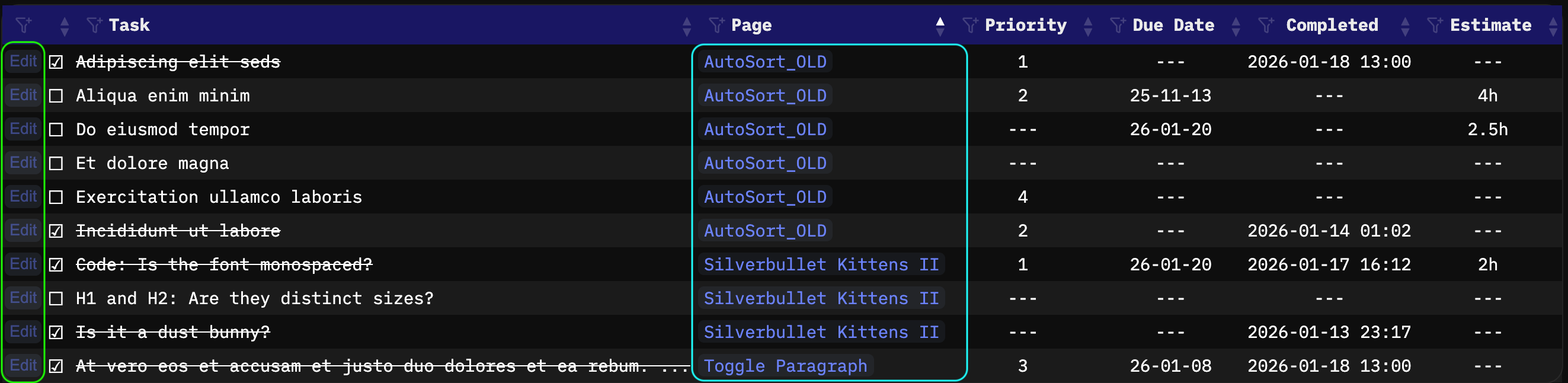
Unified Task Dashboard: Aggregates every task from across your entire space into a single interactive table.
Remote Execution: Toggle completion status or “undo” tasks directly from the dashboard. The script surgically updates the source page and appends the completion timestamp automatically.
Use the “Anchor” action to jump directly to the exact line and character position of a task in its original page.
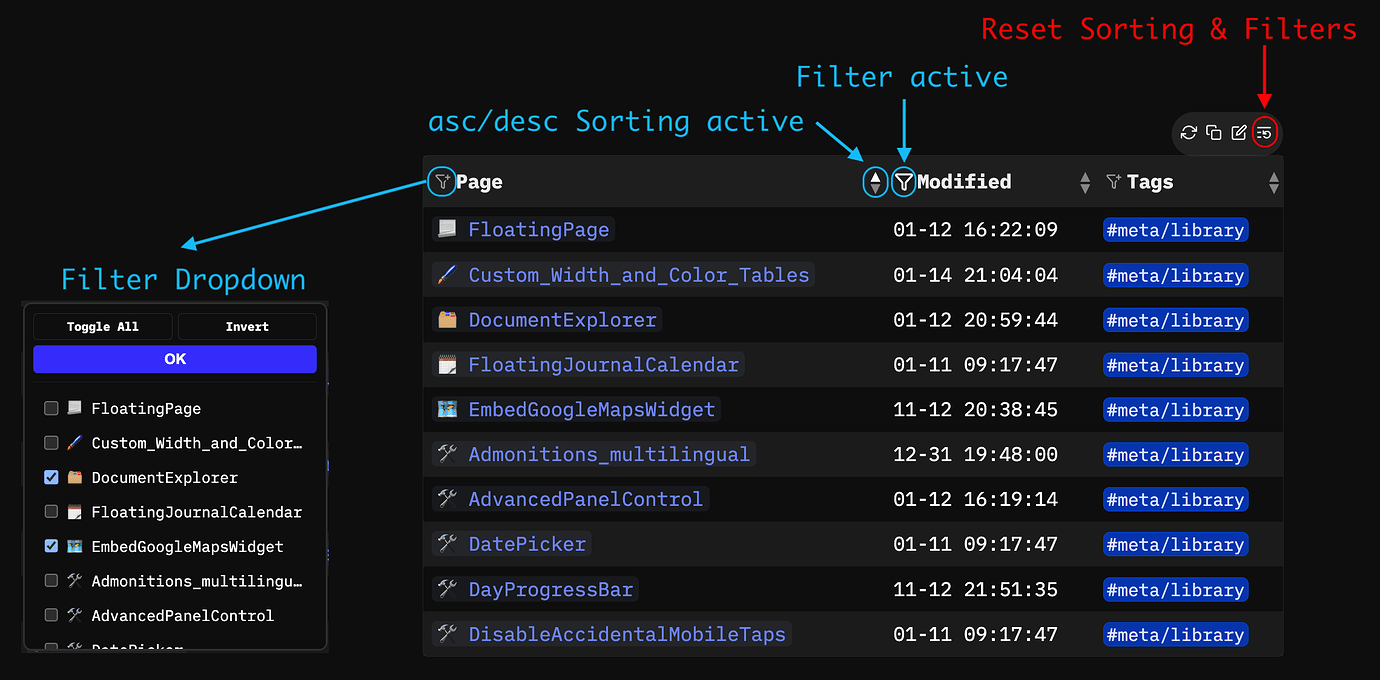
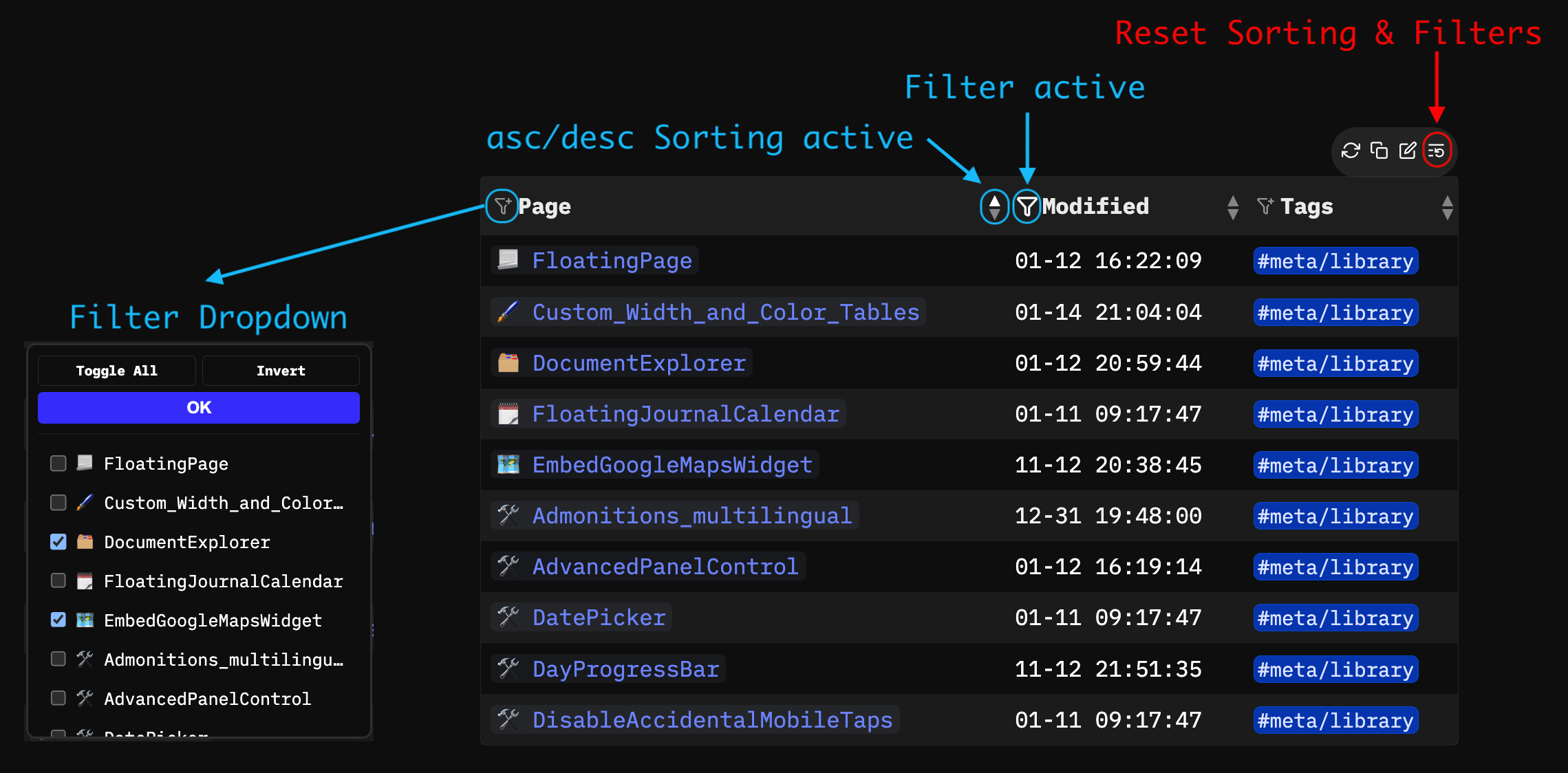
Global Table Sorting&Filtering: Injects a JS engine that adds column sorting and unique value filters to all tables in your system.
Session Persistence: Your specific sort orders and active filters are cached in session storage, maintaining your view even as long as you stay on the page.
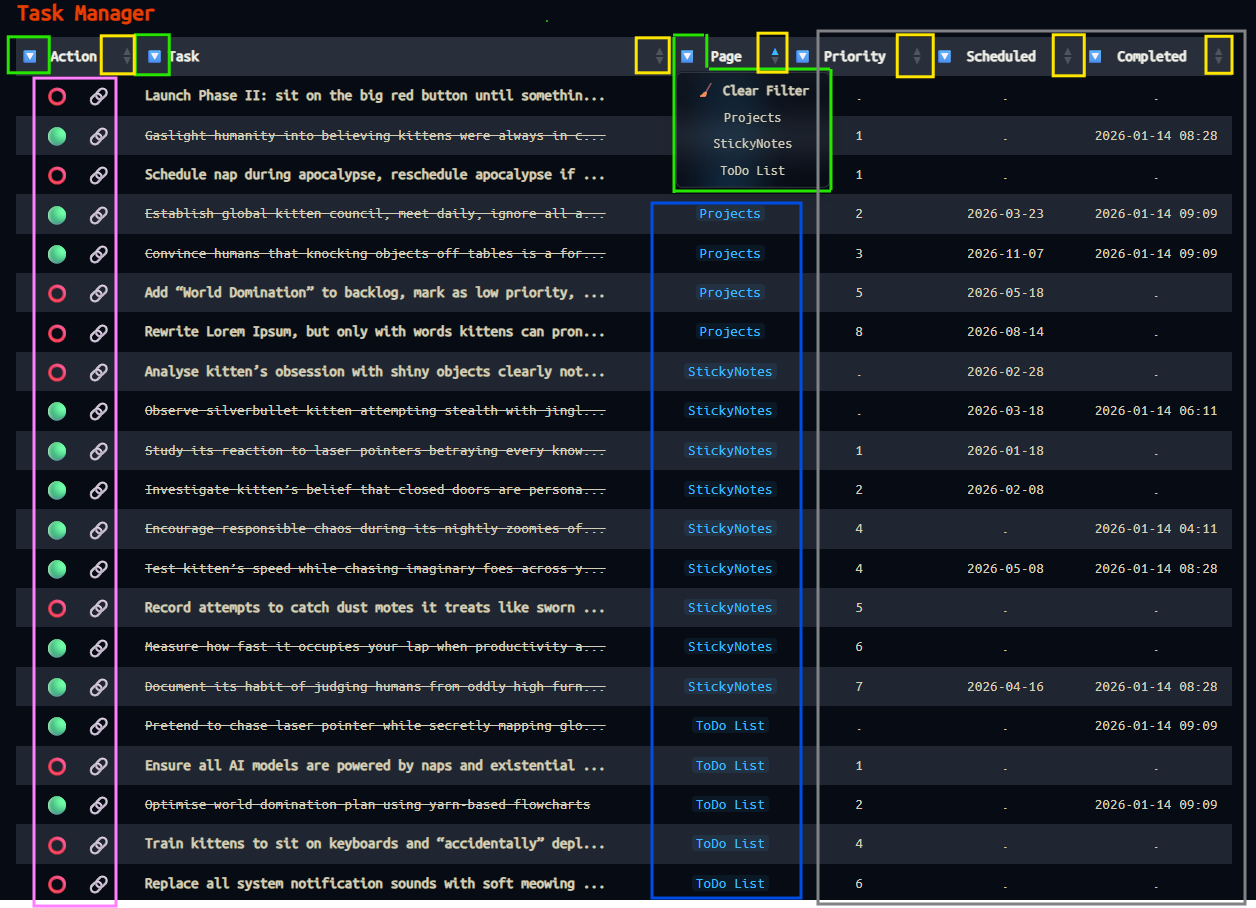
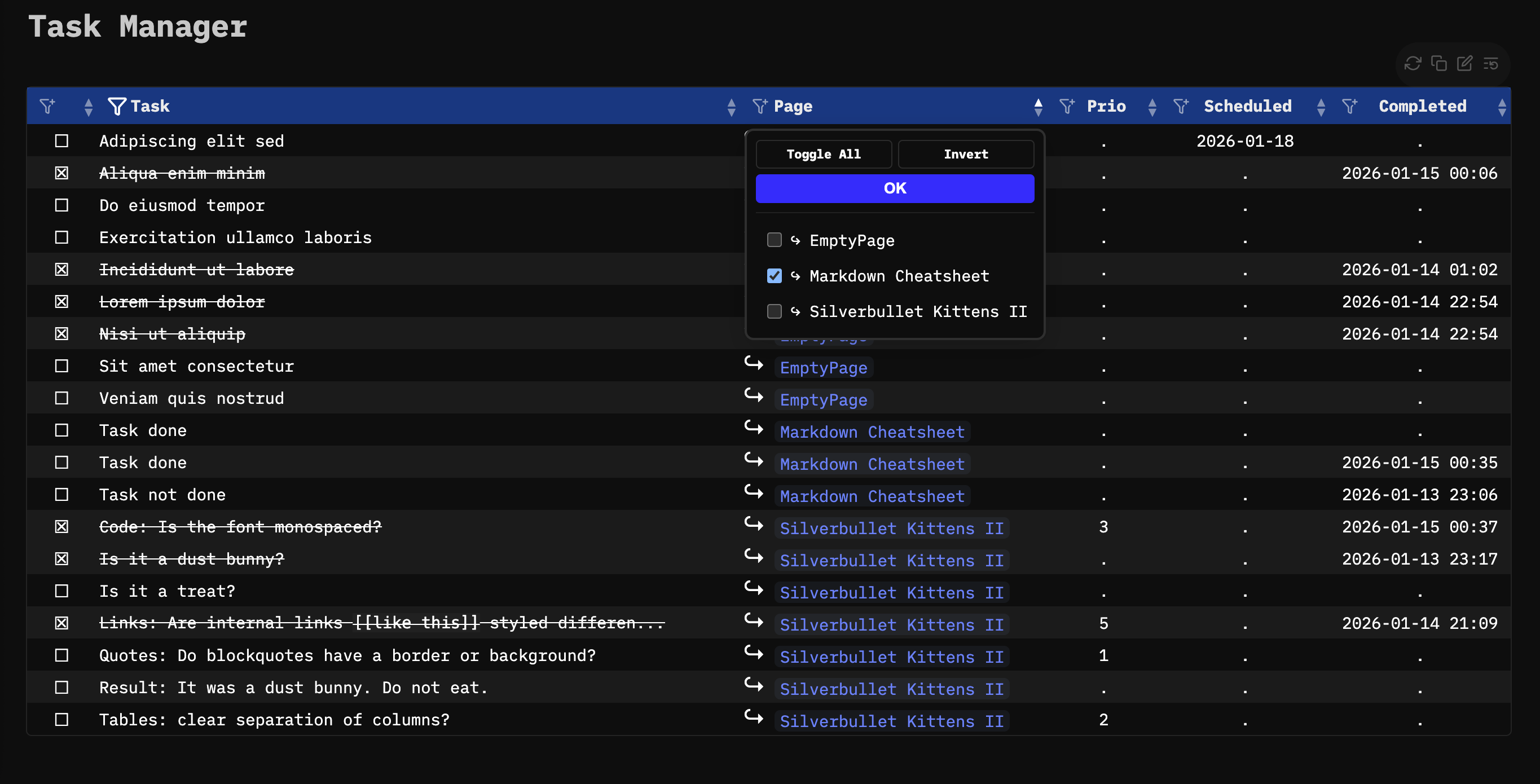
The (current) Interface
Each column is built with specific interactive zones:
Green: Filter: A dropdown Filter to isolate specific values within that column.
Yellow: Sort Marker: Toggle between A–Z / Z–A or Numeric (0–9) ordering.
Pink Action&Anchor:
- Remote Toggle: Complete or revert tasks without leaving the dashboard.
- Anchor: Immediate navigation to the task’s physical location.
Blue: Direct access to the page containing the task.
Gray: Custom Attributes: Displays your unique task metadata (Priority, Tags, etc.) in a clean, readable format.
Currently i don’t receive suggestions, it’s still a prototype but in my testing is working well…
the table is indeed geenerated by the query like this:
${TaskTable(query[[from index.tag "task" order by name]])}
the order by name is only the initial ordering, the default one. otherwise you can order, and filter anything you want in the list. no need any config…just simply by the header markers, and buttons. i will release a prototype this evening…until then i still need to fix couple of styling and filtering logic issues. but i`m really happy how it came out… also the emojis are placeholders for icons, i didn’t bothered too much with styling until i get the main features built in.
I decided to release as two separate libraries so if you only want to use the FIlter&Sorting without the Task Manager you can choose what to install. For the Task manager I strongly recommend installing also the Filer&Sorting Library although it’s not mandatory, but you’ll lose the fIlter and sorting capabalities of the Task Manager.
As with much of your stuff I’m simultaneously impressed and somewhat horrified by what you’re able to achieve @Mr.Red
At the one hand I’m impressed because it’s just cool and useful stuff. On the other hand the how involves escaping to JavaScript land quite quickly and attaching to very specific implementation details. This works, until I wake up one morning and decide to tweak a few things in the HTML DOM or CSS and it breaks everything for people of your libraries. I’m not really sure what’s the solution to this problem though. It may just be inherent in the escape hatches that SilverBullet offers.
I completely understand what you mean, and I’m very aware that injecting JavaScript into the main code path can also be abused by malicious actors.
Flexibility and customisability are arguably SilverBullet’s strongest features. If that flexibility is heavily restricted, you also tie people’s hands when it comes to building tools that are genuinely useful to themselves or to the wider community. There will always be some surface area to circumvent security, and people will find ways to do so, whether they are acting in good or bad faith. Adding hard limitations may reduce risk, but it will also significantly clip the wings of people who are pushing the platform forward.
We already touched earlier on the idea that the library manager itself could help here, for example by introducing warnings and trust levels. This could be applied to developer repository or per individual library. A simple “Low Risk / Medium Risk / High Risk” badge based on static analysis or heuristics might already go a long way. I don’t know how feasible this would be to implement, but perhaps something like @malys’s Risk Audit library could be used as a building block or automation layer.
From my perspective, there are a few broad approaches:
Maximum security. Strictly limit what code can execute. This reduces risk, but also drastically reduces user flexibility. Given that flexibility is one of SilverBullet’s core strengths, this could easily turn people away.
Maximum freedom. Let people do whatever they want. This is risky, but it keeps flexibility essentially unlimited, and allows features to exist far beyond what the core code alone can realistically support.
Move advanced features into the core. Build commonly requested functionality directly into SilverBullet so people don’t need to rely on “escape hatches”. The Filter & Sorting library is a good example: if this were part of the core, people wouldn’t spend time implementing it themselves. That said, this approach is extremely resource-intensive, and it’s impossible to satisfy everyone. There will always be someone who needs a slightly different feature.
A hybrid model. Keep the escape hatches, but make their risk explicit. Combine documentation, tooling, and trust signals so users can make informed decisions about what they install and run, rather than trying to eliminate risk entirely.
In the end, I don’t think there’s a perfect solution. It’s a trade-off between safety, flexibility, and maintainability, and SilverBullet’s current design clearly leans toward empowering users who know what they’re doing.
I meant more fragility rather than security, but security is another issue.
Indeed, regarding security I think we could go the full on secure route, which will likely mean a very limited and tied down feature set, not allowing end-user code at all. This may be fine for some, but I’d estimate not the core SB user base. Any step offering more will increasingly harder to tie down.
I’ve seen the risk audit scripts and I think it’s a good attempt and may find some stuff, but won’t block truly malicious users and may give a false sense of security. Not really sure what the real solution is.
Addressing the fragility: I am using the edge release, so if there is a breaking change in the HTML DOM or CSS classes and handling, i’ll be there to patch my libraries. before the changes get into the main branch.
Adressing the security. If I get a code which i don’t understand and if i’m a little paranoic i use LLM, to determine if that code could harm my computer/data or not. This is one of the reasons I prefer to make libraries where you can see the whole code in raw text instead of plugs.
i simply ask: Could following code be malicious or do harm to my data? and then paste the code in the LLM and i get a short overview of the code:
Here are two examples regarding the two libraries from this topic:
TASK MANAGER
Short answer: No, this code is not malicious.
It is a fairly standard task list widget + checkbox toggle for some custom/personal wiki/note system.
Potential concerns (but not really dangerous):
space.writePage() – can overwrite page content
Runs in browser/widget context (limited sandbox)
No external network calls
No eval(), no dynamic code execution
No obvious data exfiltration
Realistic worst case:
Someone tricks you into toggling tasks on an important page → accidental content change + timestamp added.
That’s basically it.
Verdict: not malicious, just regular application logic.
You can use it without security paranoia.
TABLE FILTERING AND SORTING
Short answer: No, not malicious.
This is a client-side table sorter + multi-select filter script (very common UI enhancement).
Potential issues (none dangerous):
Injects into page DOM
Uses sessionStorage (per-tab, cleared on close)
Adds click/scroll/resize listeners
Modifies table DOM heavily (classes, ids, elements)
Creates global-ish event “sb-table-sorter-unload”
Real security footprint: ≈ 0
No network, no eval/new Function, no cookie/localStorage abuse, no data exfiltration.
Verdict: Safe utility code, typical for personal wiki/custom frontend enhancement.
Just pushed a new update to the task manager.
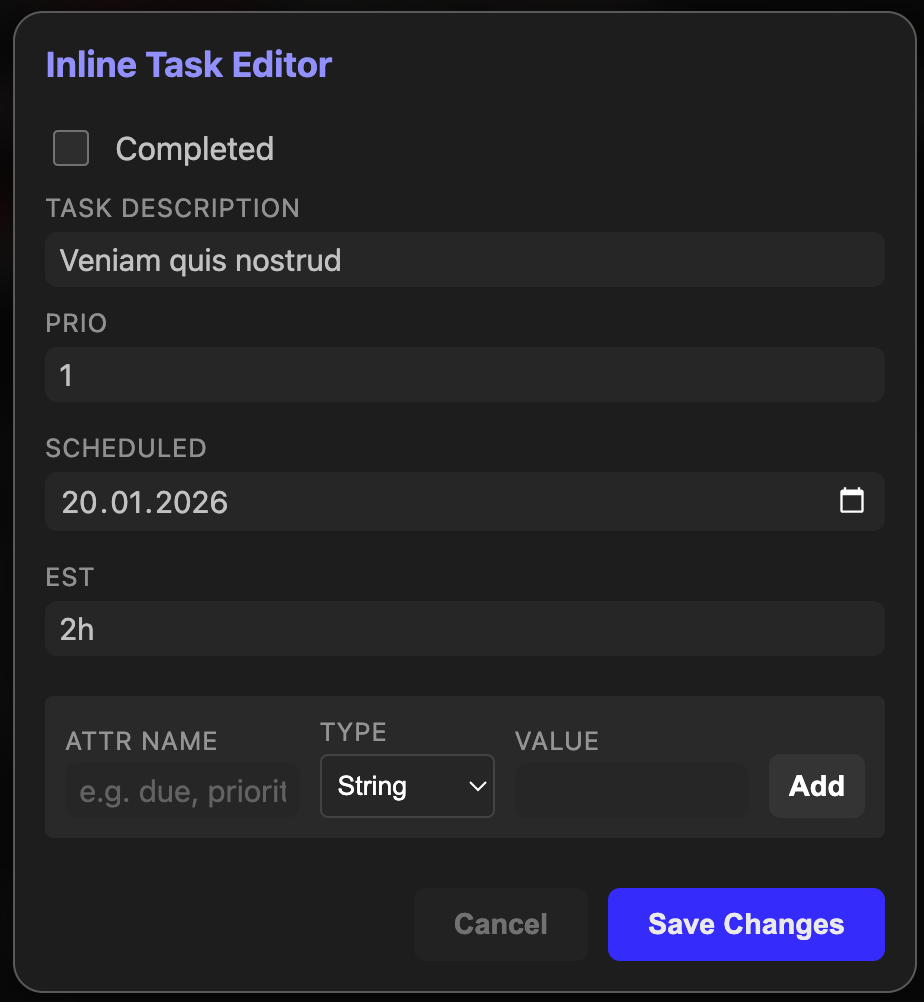
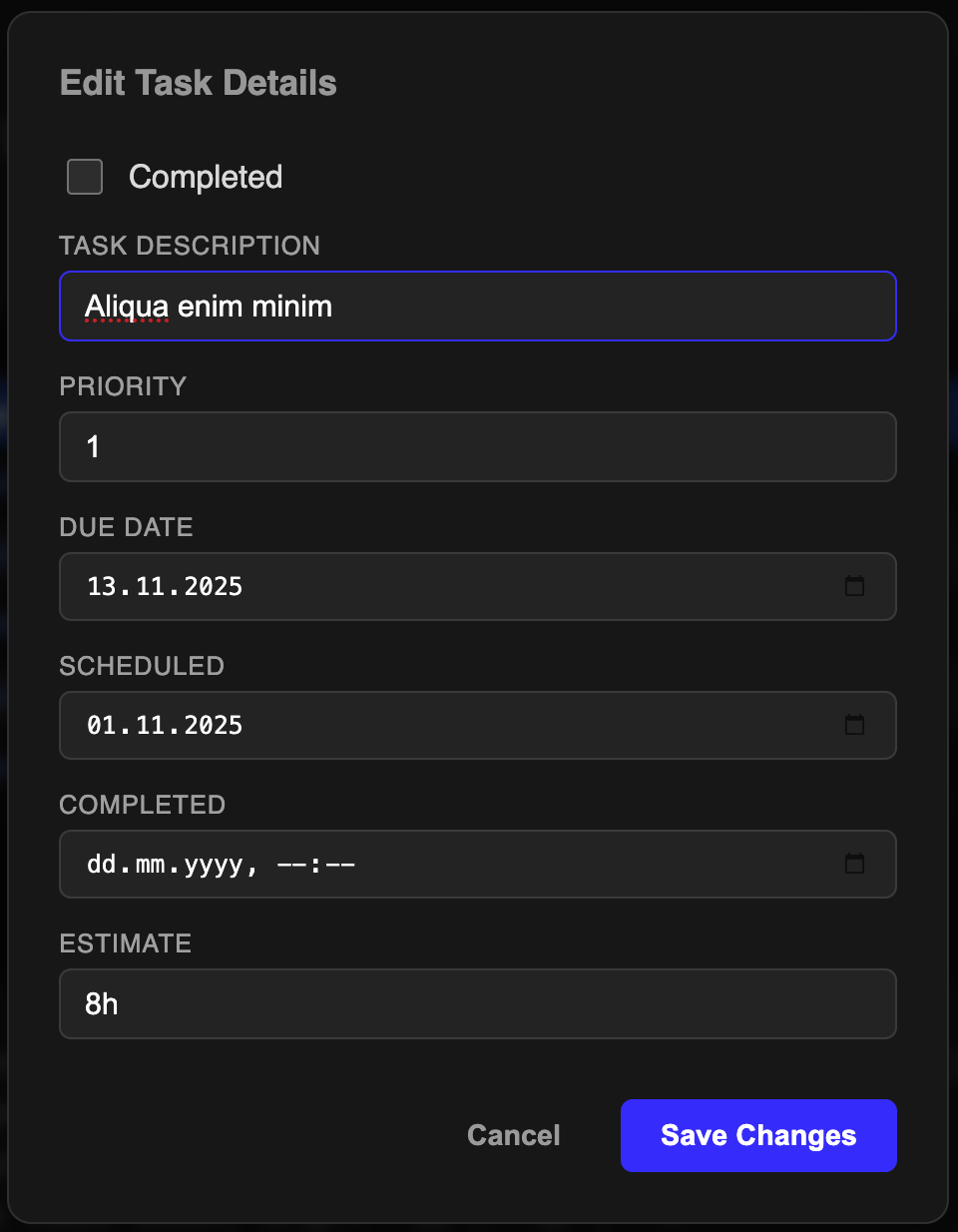
This time I added a simple Task Editor to easily and remotely edit your tasks without leaving the Task Manager’s page.
I’ve just deployed another update to the Task Manager, introducing a focused Inline Editor designed to handle your attributes easier.
What it is: A sleek, UI - driven modal interface that lets you edit task descriptions and attributes (due dates, priority, estimated times etc.) directly in the current page without touching the raw markdown.
How to use: Simply place your cursor on any task line or even an empty line and hit Ctrl-Shift-e to summon the editor; once you’re done, Ctrl+Enter or (click “Save Changes”) saves your changes in your page markdown.
Checking a task as “Completed” within the modal now automatically injects a precise [completed: YYYY-MM-DD HH:mm] timestamp into your task line for perfect record-keeping.
Try now after you updated my library, Reload & Refresh.
[EDIT]
Oh wait, now I understood what you are saying. you mean, there is no button in normal tables which are not generated by a query. Let me check what i can do.
[ UPDATE]
The fix is harder than expected, because the markdown tables doesnt have any button bar to begin with, and there is no way i can inject the button in an unexisting container. so i must create the wrapper for the markdown table alltogether and add the button there... I'll be back with updates soon.


 to … Tana

 Release it as beta preview A.S.A.P, so I can start using it NOW. It doesn’t matter if it has bugs. LFG!!!
 Release it only if the majority of the bugs are solved. I want a working product.
 I don’t care I wont install it anyway.
 Before installing make sure to update my Repo first.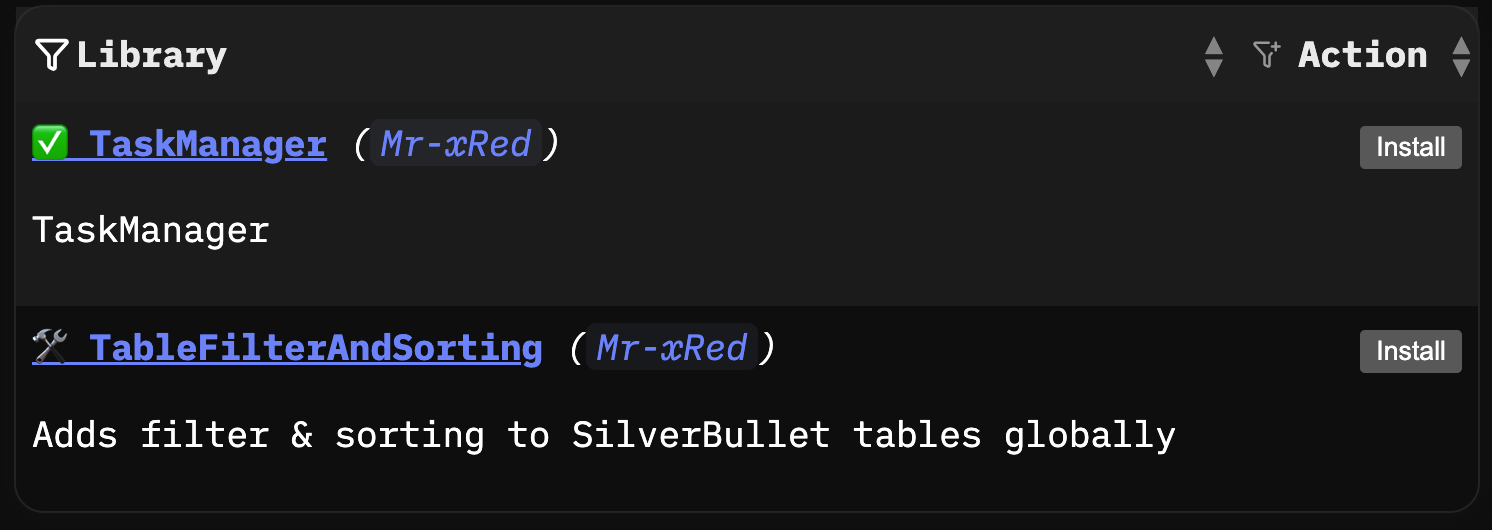

 This is how i feel this morning