what do you mean it’s not intuitive. It’s a hybrid element. A folder which acts also as a page,
if you hover over the Badge the [MD] expands sou it’s easier to click it
If a page share it’s name with a folder, both should be listed. There is a folder foo/ and there is a page foo.md. I would list them one by one, in this case perhaps the page first, then the folder, seems more “natural” to me, but it depends on personal feeling, so I will make the ordering in this particular case configurable.
Yeah, or the combined icon. That’s definitely more intuitive. The issue is that the UX will be dependant on the design rather than on the facts. I still would prefare textual interface. What if I hide the icons? Why not to take the same approach as normal tree command would do, except that we may have another ordering in special cases like this one? I mean, normally folders are listednfirst, then files. In our case I would list the objects in page-folder order.
Another thing I thought of is just leaving the folder with a different appearance and the page with the same name being placed above the children.
Between .. and the daughter pages/folders.
Thus, the folder is opened, I can click on the folder page (parent) and on the child pages and folders.
I like this
Then hat’s on you do you usually hide your icons in your OS too?
I don’t like this Pages then Folders what kind of sorting is that?
What about a hover effect? Normal state = Folder, hover over = Page. Although this is more complicated. To achieve.
That was exactly the way it was before two separate elements one Folder & one Page with same name.(except the sorting) That’s where the issue started in the first place.
Physically (in the operating system object tree), there are 2 things: a folder and a .md page. It doesn’t matter how they were created (via silverbullet or via the filesystem). So the treeview should represent both.
At the “physical” level, the folder created by silverbullet is in fact indistinguishable from other folders in the file system. For example, i can copy/paste an image (or anything else) into this folder.
For sorting, the simplest seems to be to sort folders and files separately.
Displaying the Folder/Page combo as a hybrid folder with the [MD]-badge (not final design but let’s roll with this for a moment).
If you click the folder or icon it behaves like a folder
if you click the [MD]-badge it’s opens the corresponding page. @zeus-web & @marcoswur if you further want to distinguish the hybrid folder with another color you can use following space-style
Sorry @mjf I ran with this option temporarily. if it’s really that counterintuitive, we will hear from the user complaints :P, and I can still change it later.
Hi @zef Check out the latest update: I think you should now take another look at this.
I fixed the initial bottlenecks and performance issues. I also did a stress-test with a 10.000+ (140MB+) of Markdown Pages and it works remarkably well.
Also added lots of new features and visual improvements over last couple of days.
My Favourite Features are:
Drag&Drop from the explorer to the currently opened page.
Auto Highlighting&Focusing on currently opened Page/Document
Quick Live Filtering
Easy colour customization
I welcome any positive or negative feedback to make this even better.
markdown/folder combo item could expand the fold and open the markdown with a click anywhere on the line, not just on the md icon - a click on the fold icon could only affect the fold state
items under folder could be sorted to show all markdown pages on top and below them other types - this way the page hierarchy is more visible
no i don’t like that logic. For multiple reasons: in my opinion that’s 70% a folder and 30% a markdown file. The folde-handle is too small for a clickable area, it only present as a marker to show the collapse-state of the folder , it’s surface area is too small to limit the fold region to it. As a tradeoff, I can add a bigger hover-grow of the badhe and this custom cursor when you hover over the badge to signal that clicking there will open the page. and when hover over folder the normal pointer.
That’s already the sorting logic in Grid and List View. I Kept the absolute alpahbetical ordering for TreeView to mainatain the more Hierarchical / Alphabetical order of standard folder trees.
Added a navigable TreeView. You can now set any folder as the Current Directory.
When inside a folder the TreeView will display only the children of that directory.
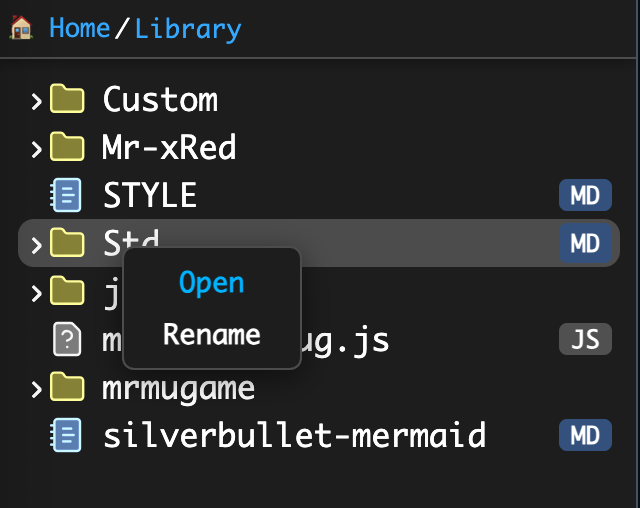
Use the new context menu option “Open” to open a folder in the TreeView and limit the view to its children.
ATTENTION
TreeView will now starts in the current Directory, if you want to go back to the root, simply click “ Home” in the Breadcrumbs.
added a new Custom Cursor for HybridFolder [MD]-badge which will show a pointer with a Note when you hover over it signaling the Page Actions instead of Folder actions.
@Mr.Red, nice update. Tested and you did good. The directory and file name resolution/conflict was something that I was either going to call out or rename files.
@bau, thank you for calling out the folder/file challenge.
excellent ! Setting any folder as the Current Directory is a great feature.
Problem (treeview with folder.md, again):
Scénario :
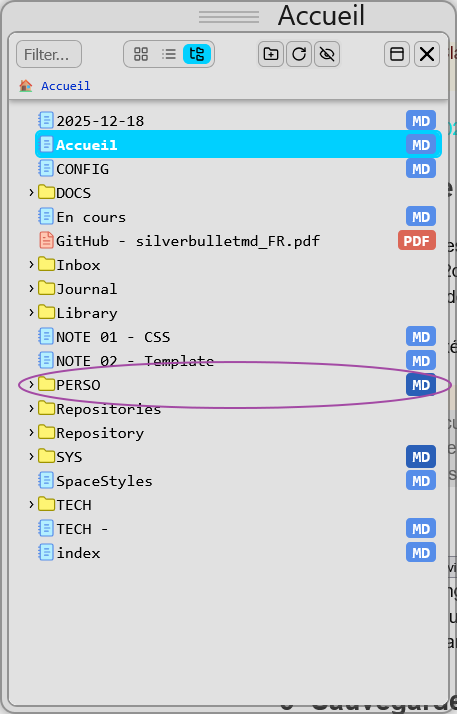
in my (physical) tree, I have a “/PERSO” folder (see image below)
in SB, I create a “PERSO” page. Physically, a “PERSO.md” file is created at the root of the space
PB HERE → in the treeview: the page does not appear and the “/PERSO” folder is not identified as a virtual folder. I close the treeview and reopen it : idem.
I unload the tab (in Firefox) and reload it. I open Document Explorer. The “/PERSO” folder is identified as a virtual folder (“MD” marker). The PERSO.md file is accessible by clicking on the “MD” marker.
when switching from side panel to window (or vice versa), the tree structure is reset to the position of the current page
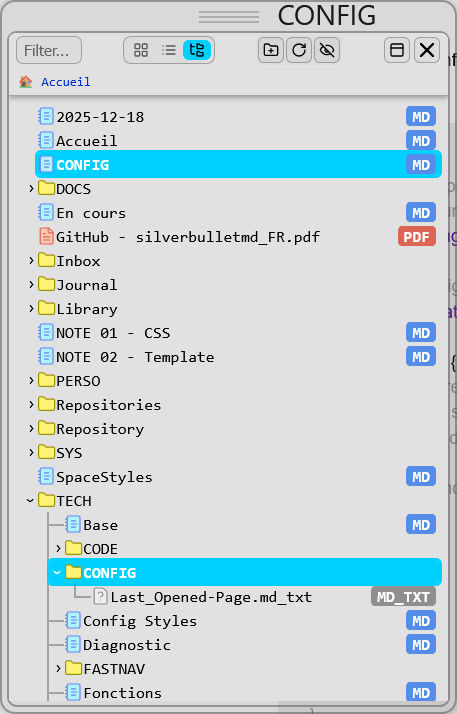
when a document and a (real) folder have the same name, when the treeview is opened, the two positions are located and the view is centered on the two objects (example below)
be able to reposition yourself on the current page with a button (currently, you have to close the treeview then reopen it).
when you switch from listview to treeview, your position is transferred to the treeview. This is not the case in the opposite direction (from the treeview to the listview). Doing the same thing would be more consistent.
double-click on a folder → select Current Directory
This is a design choice to improve performance, the list currently only refreshes on UI events when:
file/folder rename (from the Context Menu)
file delete (from the Context Menu)
manually using the Refresh Button
Currently the file list is cached to not trigger space.listFiles() on every navigation step, or even when nothing is changed in the filesystem (not even when closing the Explorer, to benefit quick reopen (on HUGE spaces ( with 10.000+ pages)). As a solution use the Refresh button after manually creating a page to Refresh the file list.
I have also tried to add a refresh on page creation to refresh the cached file list, but the only closest event is: editor.pageCreating which fires when a new page is being created but AFAIK there is no separate editor:pageCreated event that fires after a page exists. So listening to pageCreating is useless.
@zef@MrMugame please correct me if I’m wrong about the event listener.
this is known bug and i’ll try to solve it in the future [EDITED] - UPDATE FIXED
i will consider this, but not as a button, but as a Context Menu Item - maybe
I can’t reproduce this. The current directory is synced across all the views in the latest version, no matter from which view to which you switch.
Currently there is the “Open” context menu option in treeview and i am not considering adding double click actions, especially not in treeview where double click would fold/unfold the folder.
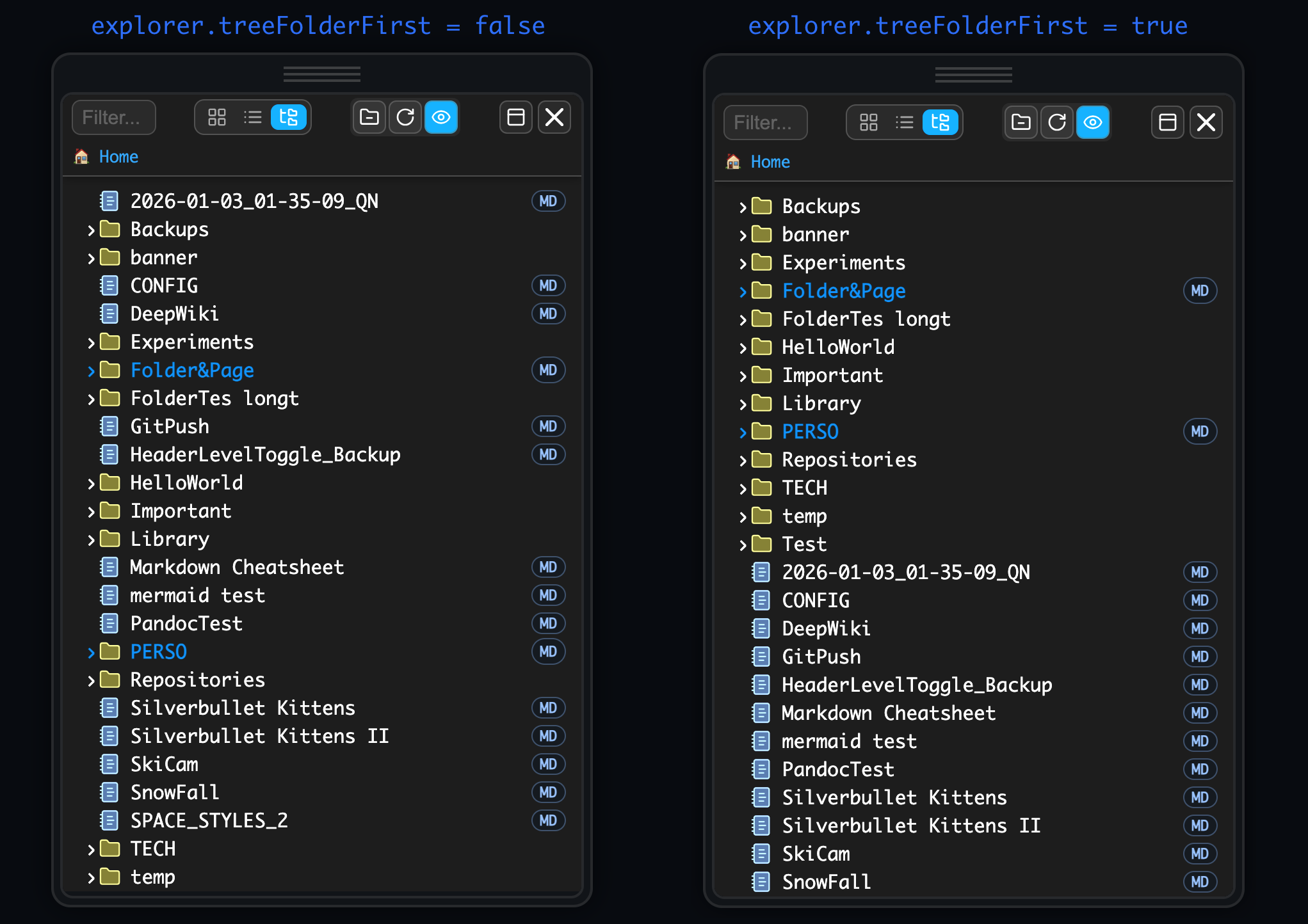
new TreeView sorting option: added treeFolderFirst = true/false config so you can choose between pure alphabetical sorting or Folders first, then Files:
Wonderful (I’m trying to renew my vocabulary !).
A real pleasure to use at the functional, aesthetic and fluidity level.
For our previous exchange:
an event editor:pageCreated would actually be necessary. Github issue?
switching from side panel to window: ok. Thanks !
reposition on the current page. In the meantime (provided that the current root contains the current page - see 4.), just switch from the treeview to the listview. Result: the tree remains deployed as previously but, in addition, the branch where the current document is located is open and the doc highlighted.
switch from listview to treeview.I confirm the observation but analyze it differently.
Selecting a subfolder in the listview redefines the root. So, when we switch to the tree-view, we focus on the new root (whether the current doc is there or not).
To achieve something similar in reverse, you must define the targeted level as the new root (right button) BEFORE switching to the listview. This actually answers my remark !
I’m really pleased to hear the aesthetic and the general ‘flow’ are working well for you!
Regarding the directory switching: the logic I’ve settled on is that the Breadcrumbs are always the absolute ‘Source of Truth’ for your location. I wanted to avoid a scenario where the view jumps around automatically just because you opened a file.
If the explorer constantly redefined the root directory to match whatever file you were currently editing, switching back to List or Grid view would become quite chaotic and counterproductive.
That’s why the blue highlight is strictly a visual guide, it shows you where you are in the open document(if the path where the active file is currently visible), but it doesn’t ‘move’ the explorer’s home base.
If you want to actually shift the root of the explorer to a new spot while in Tree View, using that ‘Open’ command in the context menu is the way to go. It keeps the navigation intentional.
I am, however, thinking about adding a specific command/button to ‘Sync Explorer to Active File’ for those moments when you do want to jump the root to your current location in one click. That way, we get the best of both worlds without the UI acting on its own.
@Mr.Red: If the explorer constantly redefined the root directory to match whatever file you were currently editing, switching back to List or Grid view would become quite chaotic and counterproductive.
I agree (that’s not what I was looking for).
I use the treeview to browse the tree (for example, search for a file), without worrying about the current document and without selecting a new document.
What i was looking for is that the last subfolder opened in the tree-view could become the drop-off point of the listview but … WITHOUT becoming the new root.
But, as the navigation via the listview necessarily defines a new root, my perspective changes … I didn’t understand this last point initially. Thank you for your explanations !
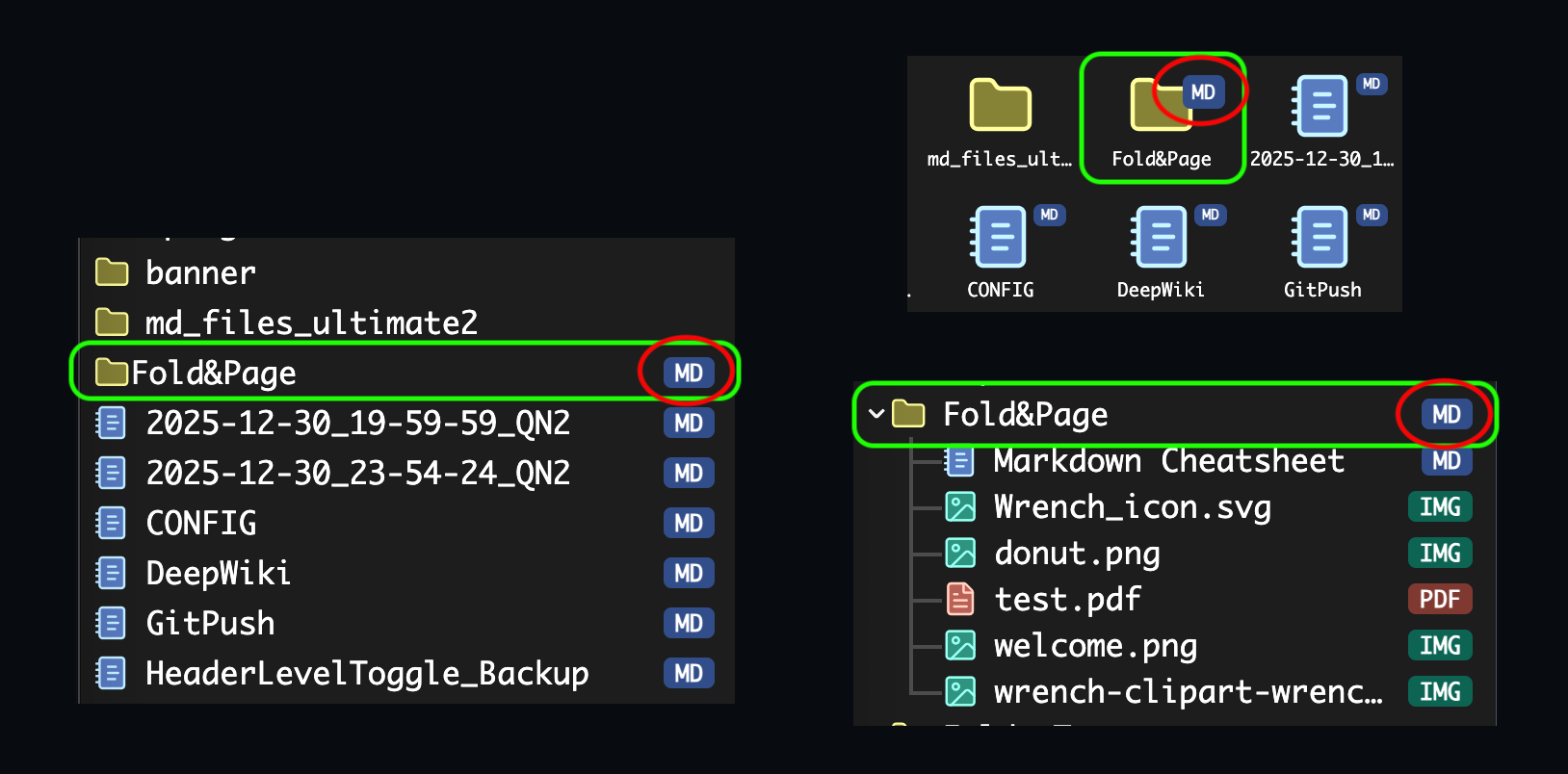



 intuitive enough?
 .. and the daughter pages/folders.
 do you usually hide your icons in your OS too?


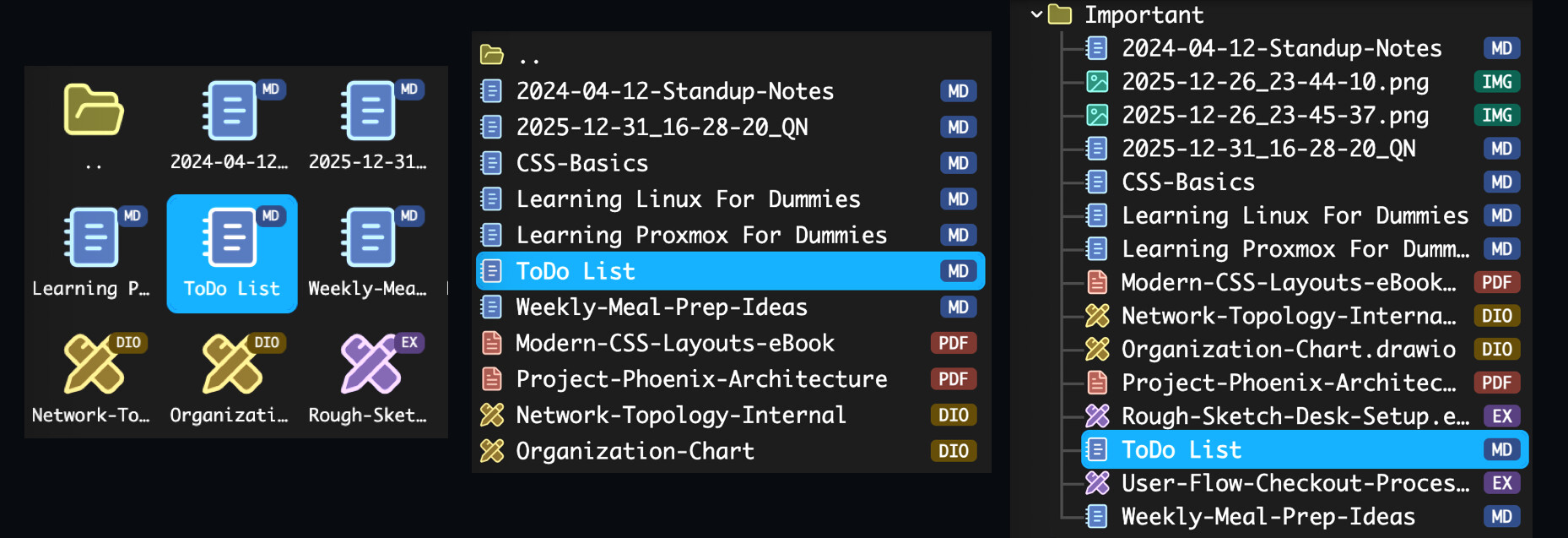

 Check out the latest update: I think you should now take another look at this.

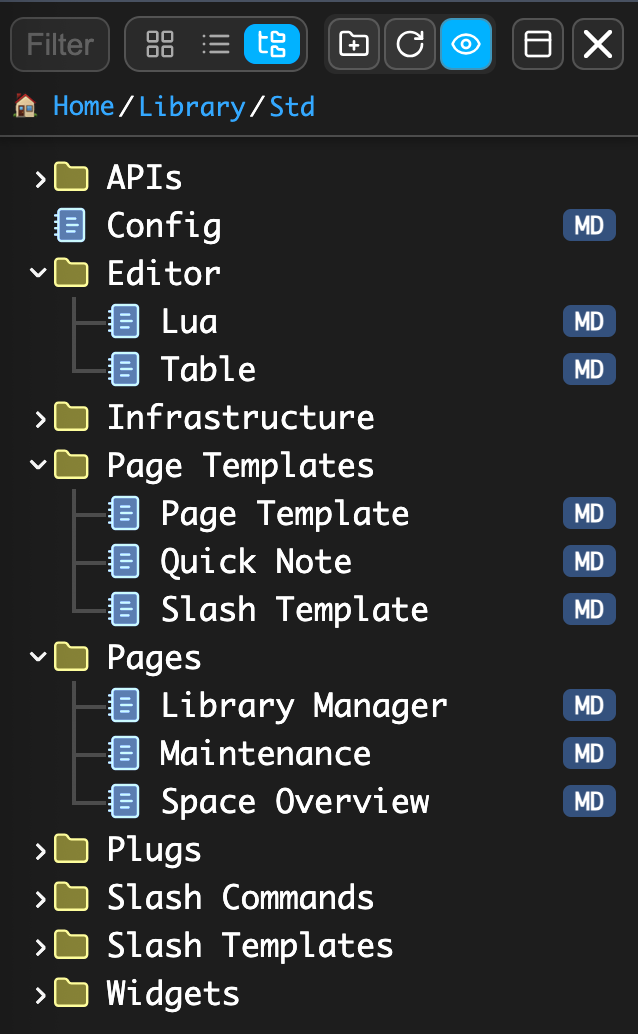
 Home” in the Breadcrumbs.
 !).
!).