Just tried this again and loving it! Great job @Mr.Red !
I still need to theme it but loving it as well. Thank you for spending the time authoring it.
For theme-ing check out this post. It’s done in 2min 
This is amazing, and solves some of the shortcomings I had for Silverbullet that I was planning to fix for me with regards to breadcrumb navigation and other things.
One thing that I am unable to figure out is how to make the document explorer work well on mobile.
On my desktop/tablet, I have enough width to have it docked to the left side at all times to make navigation easy. If I navigate to a new page, I want it kept open.
On mobile, my width is not enough to keep it expanded all times. When I navigate to a new page, the document explorar is above the document, and thus hiding the content. I have to manually close or hide the explorer.
I tired setting recoverAfterRefresh = false, but this then hides the explorer after navigation for both desktop and mobile (obviusly). Would there be an option, that if viewport width is mobile, the after navigation the explorer automatically hides (as in collapes, not close)?
The Document explorer uses my other library as dependency to make the Sidebar resizable & dockable and floating and many more.
Here is the config section of my AdvancedPanelControl Library:
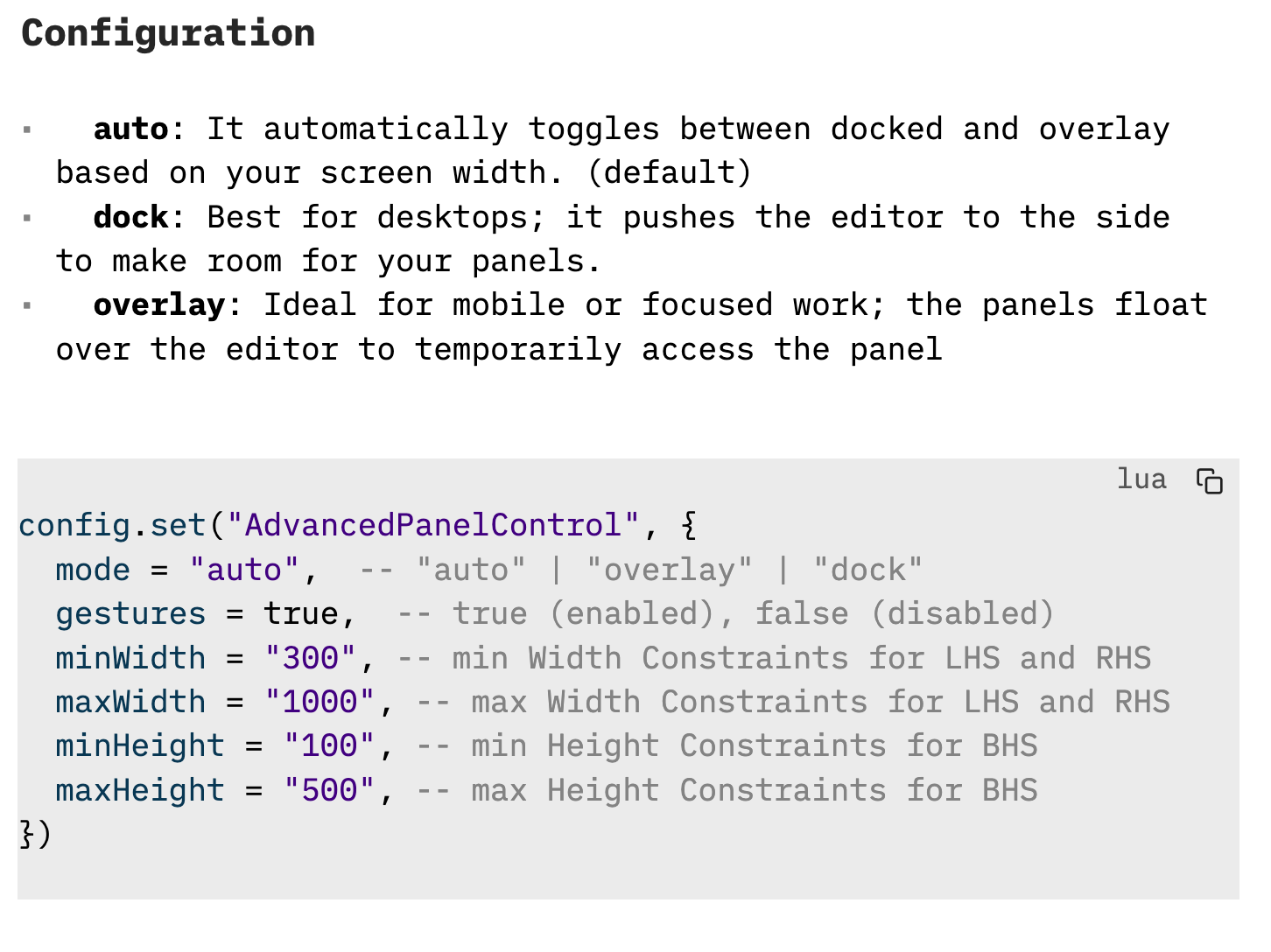
I think what you are looking for is the “mode = dock” option
config.set("AdvancedPanelControl", {
  mode = "auto",  -- "auto" | "overlay" | "dock"
  gestures = true,  -- true (enabled), false (disabled)
  minWidth = "300", -- min Width Constraints for LHS and RHS
  maxWidth = "1000", -- max Width Constraints for LHS and RHS
  minHeight = "100", -- min Height Constraints for BHS
  maxHeight = "500", -- max Height Constraints for BHS
})
If you want you can dettach the sidepanel, and use the Document explorer as a floating window, this is also a good way to use it on mobile. like This:
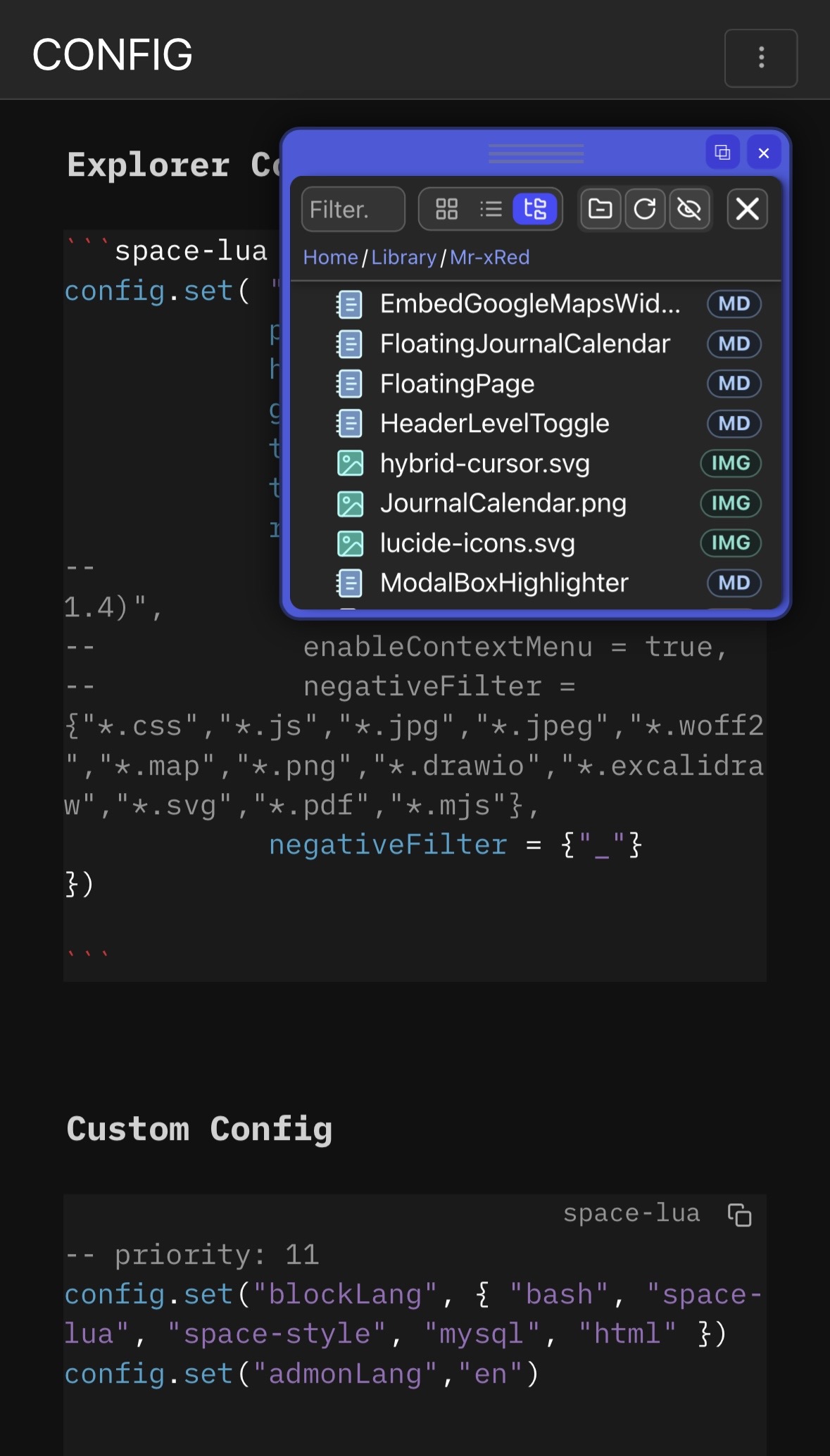
This way 65% of your page is still visible. And also document explorer is still usable.
Feel free to checkout my Advanced Panel Controls - e.g. Resizing Side Panels (LHS, RHS, BHS) using your mouse library for more options and features.
I finally got the Dock/Overlay working, but it doesn’t address the mobile use case. It’s however a minor annoyance that I can live with.
I was travelling the other day, and mid-flight discovered that the CSS file is not cached, hence the plug in stops working when not online.
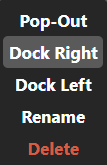
When I open Document Explorer, I see an flash of color before the panel is finally displayed. In the future panel rectangle, i see:
1- background of the color of the window strip (blue, for me)
2- background of the opposite color (green)
3- then, the final content
Is there a way to eliminate this unpleasant flashing (increased since the latest versions), by changing the positioning of the panel or by delaying its visibility?
Does it happen in Document Explorer, or for Pop-Out Floating Windows? Does it happen when you open Document Explorer in Panel or in Window mode?
I’m afraid not, or i’m not aware of how to do it. It supposedly comes from slower PC’s loading the page/content slower.
I can only recreate this for opening Pages in SidePanel or in Window mode, and that’s due to page loading and iframe background color being white.
But I never experienced this in when launching Document Explorer itself.
and I also cannot recollect changing anything on that part of the code lately, so i have no clue where it could come from as i cannot reproduce this.
UPDATE : see below (explanation)
This append when i open Document Explorer in Panel or in Window mode.
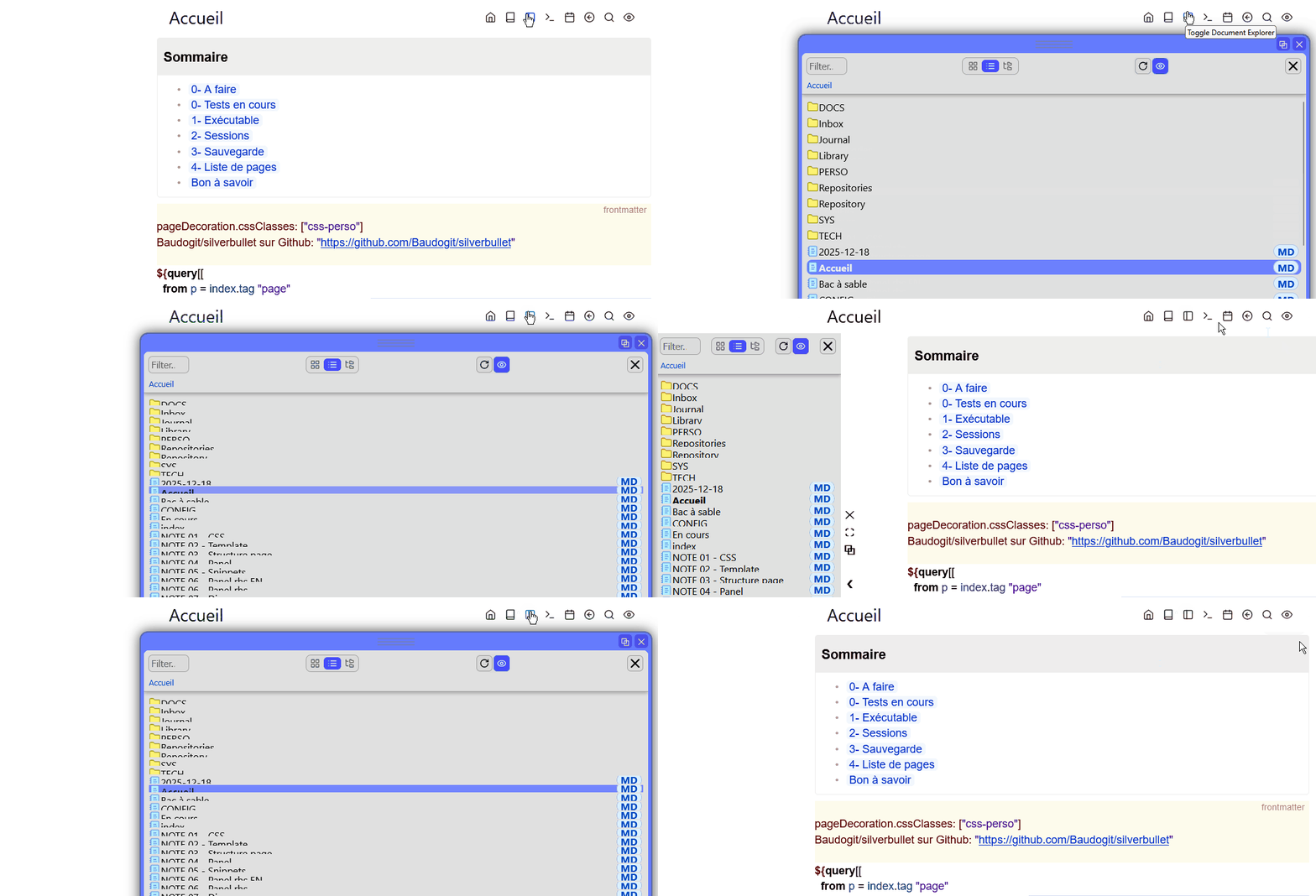
To further test, i:
- disabled Task Explorer and config styles for Task Explorer
- restarted Firefox several times
- restored 2.4.1 (before: edge)
- rebooted my computer
No improvement.
(note1: its the same with Task Explorer
note2: the last position of the panel is not memorized when closing)
For the green background: it’s a leftover test in a config style.
Only one color now appears (blue) but the phenomenon (slow display) remains.
You scared me for a moment b. Didn’t know what to do with that green flicker. 
Sorry !
However, it seems that the update of Document Explorer has an impact. Probably, via docex_styles.css. Before (version of 01/14), I had to force the variable --top-background-color to white in my config style and I had found that reloading main.css before docex_styles.css was a determining factor.
With today’s release I was able to remove --top-background-color from my style config (and then … a slag fixing him green resurfaced).
FYI, I solved my display problems (with Task Explorer on a Document Explorer basis) by acting on two levels:
- with a time delay on showpanel. A progress gauge is displayed as the processing progresses (editing the html).
time delay
    -- ----------------- DISPLAY -----------------
    editor.showProgress(90, "PANEL ...")
      js.window.setTimeout(function()
        editor.showPanel(PANEL_ID, currentWidth, finalHtml, script)
    end, 100)
    editor.showProgress()
- with a Promise which checks that the css rules are loaded before revealing the interface by removing the hide placed on the document when starting the js script.
hidden
    const panel = parent.document.querySelector('.sb-panel.]] .. PANEL_ID .. [[');
    if (panel) panel.style.visibility = 'hidden';
reveal
...
    const mainCss  = ensureElement("silverbullet-main-css", "link", { rel: "stylesheet", href: "/.client/main.css"});
    const explorerCss = ensureElement("explorer-style-css",    "link", { rel: "stylesheet", href: "/.fs/Library/Mr-xRed/docex_styles.css" });

    if (!document.getElementById("explorer-custom-styles-once")) {
        const parentStyles = parent.document.getElementById("custom-styles")?.innerHTML || "";
        const cleanStyles = parentStyles.replace(/<\/?style>/g, "");
        const styleEl = document.createElement("style");
        styleEl.id = "explorer-custom-styles-once";
        styleEl.innerHTML = cleanStyles;
        document.head.appendChild(styleEl);
    }

    // Attendre le chargement des CSS externes avant de révéler
    function onStyleLoaded(el) {
        return new Promise(resolve => {
            if (el.sheet) { resolve(); return; }
            el.addEventListener('load',  resolve, { once: true });
            el.addEventListener('error', resolve, { once: true });
        });
    }

    Promise.all([onStyleLoaded(mainCss), onStyleLoaded(explorerCss)]).then(() => {
      // Promise.all([onStyleLoaded(explorerCss)]).then(() => {
        document.documentElement.style.visibility = '';
        // Révéler aussi le panneau parent
        const panel = parent.document.querySelector('.sb-panel.]] .. PANEL_ID .. [[');
        if (panel) panel.style.visibility = '';
    });

    // Sécurité : reveal forcé après 3s quoi qu'il arrive
    setTimeout(() => {
      document.documentElement.style.visibility = '';
      const panel = parent.document.querySelector('.sb-panel.]] .. PANEL_ID .. [[');
      if (panel) panel.style.visibility = '';
    }, 3000);
 })();
Something else (multi-windowing):
The multi-window system does not memorize the position (dock or window) nor the size of the panel (lhs or rhs) both with Document Explorer and with Task Explorer. With Task Explorer, the panel always opens docked at a previous width (but not the last one used). Weird !
Note: to be sure, I did a client clear. Idem.
I have no clue what you are talking about 
And it's not you, it's definitely me.
so is this a fix, or a workaround? can you open a PR to solve this, or this only works on your computer. Sorry but i don't understand what you wrote about. Also tried to ask LLM to "translate" it to me, but i'm still clueless... what i understand is you are delaying the apperance of the document explorer, which doesn't seem a proper fix to me only like the worst workaround. currently i am experimenting with what you said, but as i cannot reproduce your intial flicker issue, i cannot even test it in any way. sorry.
So, it was just to inform you of the solutions put in place in Task Explorer to delay the visibility of the panel. I should have been more explicit.
The problem remains in Document Explorer but I can live with it !
Please, can you consider my question ?
1- Before (several weeks ago), the position of Document Explorer (dock/window) was memorized. Since UAPC this is no longer the case (on my installation). It constantly opens docked.
In Document Explorer , the key explorer.currentDisplayMode is read in two places:
- in the command
Navigate: Toggle Document Explorer: - in the function
restoreExplorerOpenStateOnPageLoad().
If the key does not exists, lastMode = "panel"
Before, the command DocumentExplorer: Toggle Window Mode could modify the key:
clientStore.set("explorer.currentDisplayMode", "window")
Actually, this command does not exists and nothing can save the last display mode.
I quickly examined UnifiedAdvancedPanelControl.js and I haven't found anything similar (superficial reading).
2- When i click on the X close panel (docked or windowed), it is necessary to run the toggle command twice to open the panel again.
Can you tell me if the behavior observed is intended or give me a line of investigation?
Thank you for the detailed analysis and for digging into the code.
The behaviour you observed is intentional. The feature that remembered whether the panel was docked or in window mode was removed several weeks ago during the refactoring of the Unified Advanced Panel Control (UAPC). While implementing the unified system, I encountered a large number of inconsistencies related to persisting panel and window states. Managing all possible combinations of states across different panels led to behaviour that felt unpredictable and unreliable.
To stabilise the system and simplify the logic, I decided to standardise the default behaviour so that panels always reopen in docked mode. Instead of remembering the display mode itself, the system now only stores window geometry (position and size). This allows users to restore their last floating window layout quickly via the detach button while keeping the internal logic manageable.
Another important factor is that UAPC is designed as a universal framework for all panels, plugins, and libraries, not just the Document Explorer. Supporting a consistent, general-purpose solution significantly increases complexity. Revisiting the old behaviour would require reworking large parts of the underlying logic, which unfortunately exceeds my current capacity given the complexity and scope of the system.
I completely understand that the previous behaviour was convenient, and I appreciate your feedback. I am also glad that the current implementation remains usable despite these limitations.
This behaviour is related to how toggling and panel persistence are currently implemented.
The close button (X) in the panel or window only hides the panel and clears its DOM content. It does not fully toggle the Document Explorer itself because UAPC is intentionally unaware of the internal content of panels. From the perspective of the panel controller, the content is simply an embedded element, and the actual plugin state is managed independently.
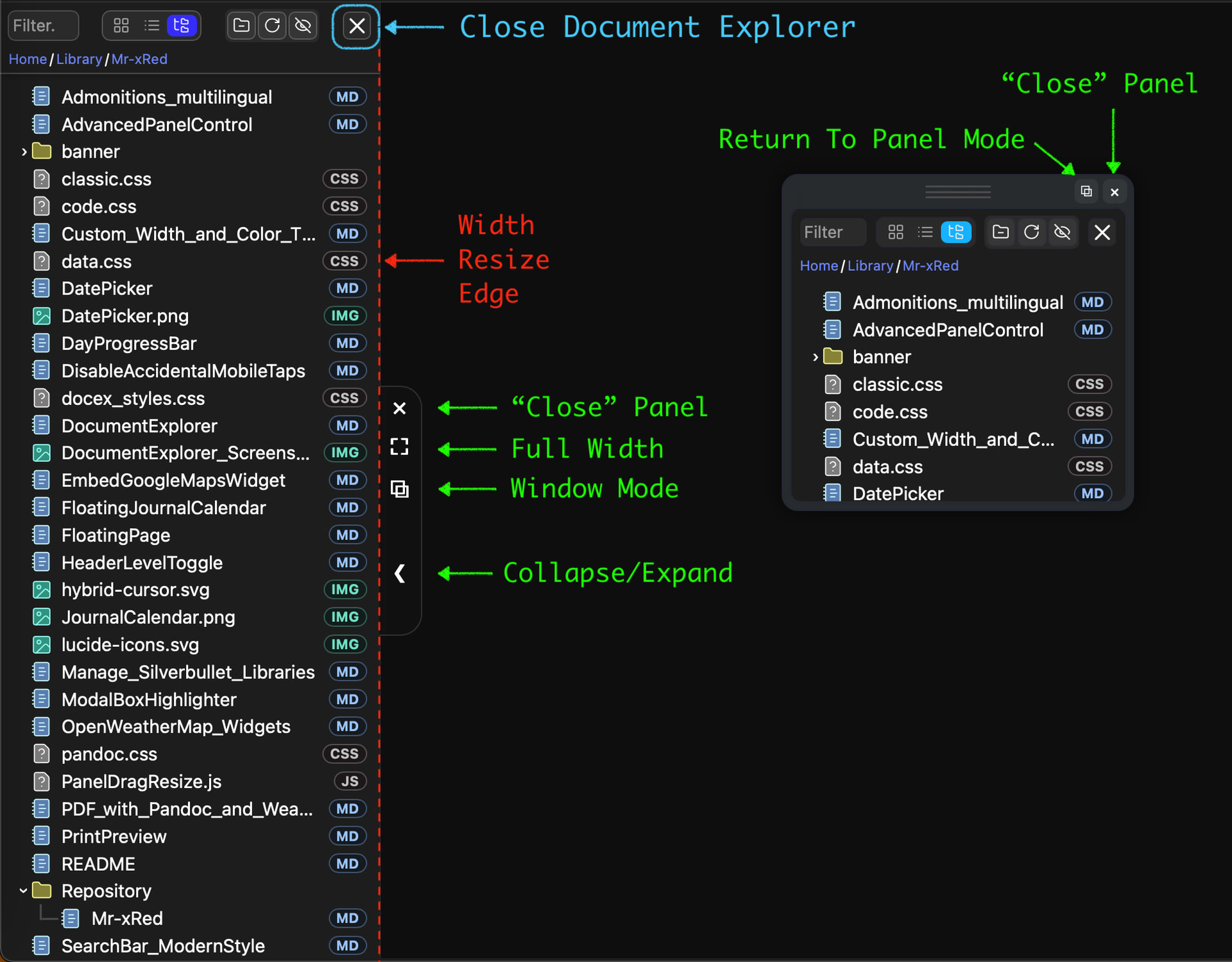
For a proper shutdown of the Document Explorer, its own dedicated close button should be used (the blue-marked button shown in the screenshot). When the panel close button is used instead, the toggle command effectively needs to run twice:
- The first toggle switches off the internally hidden Document Explorer.
- The second toggle turns it on again and makes it visible.
I have investigated potential alternatives, but due to the separation between panel management and the toggle logic, I have not found a clean or reliable solution. Given the architectural complexity and the need to maintain a universal panel system, this behaviour is currently expected. Despite this limitation, I am pleased that the workflow remains functional overall.
As usual, your answers are clear, educational and well documented. Thanks !
Suggestion: some of these details could be added to your documentation.
For closing via X, perhaps it would be clearer to completely delete it when the plugin manages the closure.
Well done and hats off for this immense work! You transform the lives of all SilverBullet users.

I have read these texts more than 10 times without being able to understand what you mean. The wording is probably too technical. You could perhaps specify that if you do not close with the green cross, you will have to call the panel twice consecutively to make it reappear, which is not an intuitive method, you will admit!